
How Ad Monitoring Tools Track Competitor Ads
How monitoring tools capture public ad creatives, landing pages, and run-lengths to infer competitor strategies without spend data.
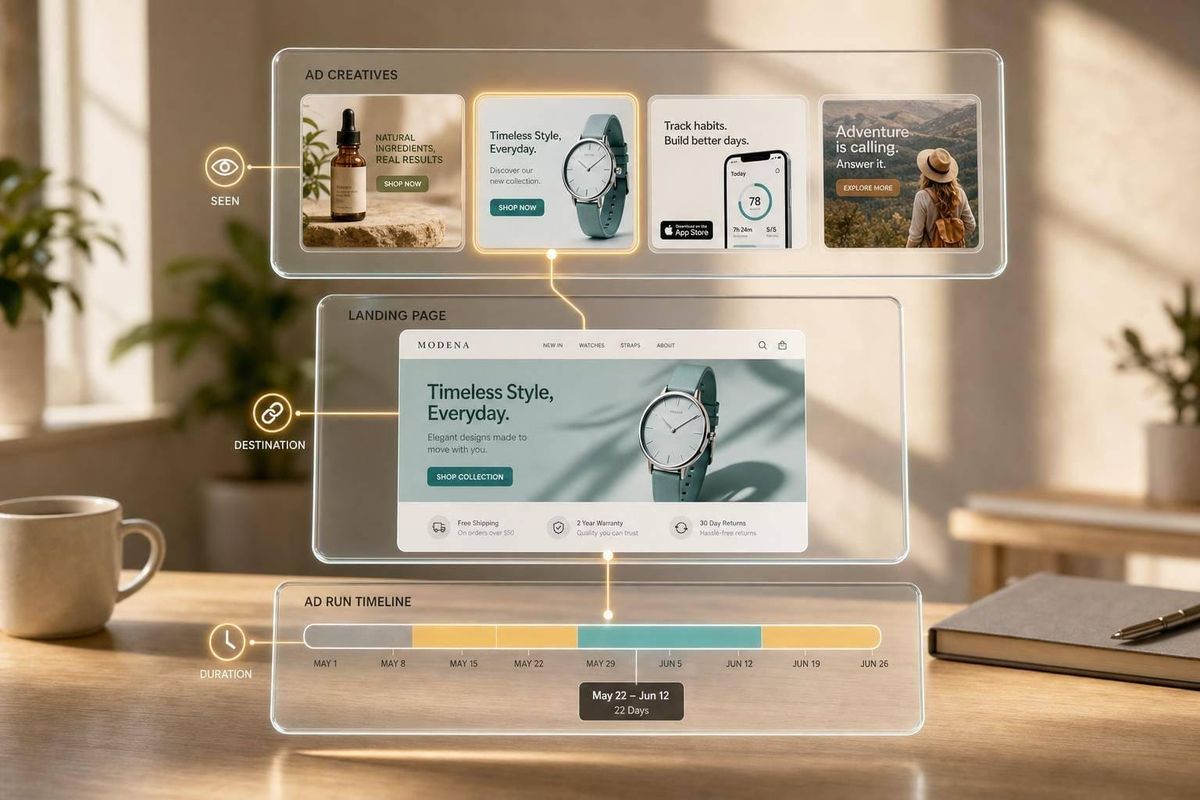
You can’t see a competitor’s ad account, but you can see enough to learn from it. Ad monitoring tools pull public ad data, check landing pages, save daily snapshots, and group similar ads so I can spot what competitors keep testing, what they keep running for 30, 60, or 90+ days, and where clicks go.
Here’s the short version:
- I can use these tools to track ads on Google, Meta, TikTok, LinkedIn, and the Shopify App Store
- They usually collect ad copy, images or video, CTA text, landing-page URLs, first-seen dates, and last-seen dates
- They do not show exact ad spend, CTR, ROAS, or audience settings
- Long-running ads often hint that a message is working, especially when the same angle stays live for 30 to 60+ days
- Multiple versions of one ad idea can point to active testing
- The best use case is tying ad changes to keyword rankings, listing edits, installs, trials, and revenue
In other words: these tools don’t give me a competitor’s full playbook. But they do give me enough public signals to see what they say, where they send traffic, and which ideas stay in market the longest.
A simple way to think about it:
| What I can usually see | What I usually can’t see |
|---|---|
| Ad copy, image/video, CTA, URL, platform, dates | Spend, CTR, ROAS, exact targeting |
| Landing-page path | Profit margins |
| Ad variants and run length | Private account data |
| Listing and keyword changes when paired with app intel tools | Internal results by campaign |
If I’m a Shopify app team, the goal is simple: watch a small set of competitors, review changes every week, and connect those changes to my own App Store and growth data by comparing optimization tools.
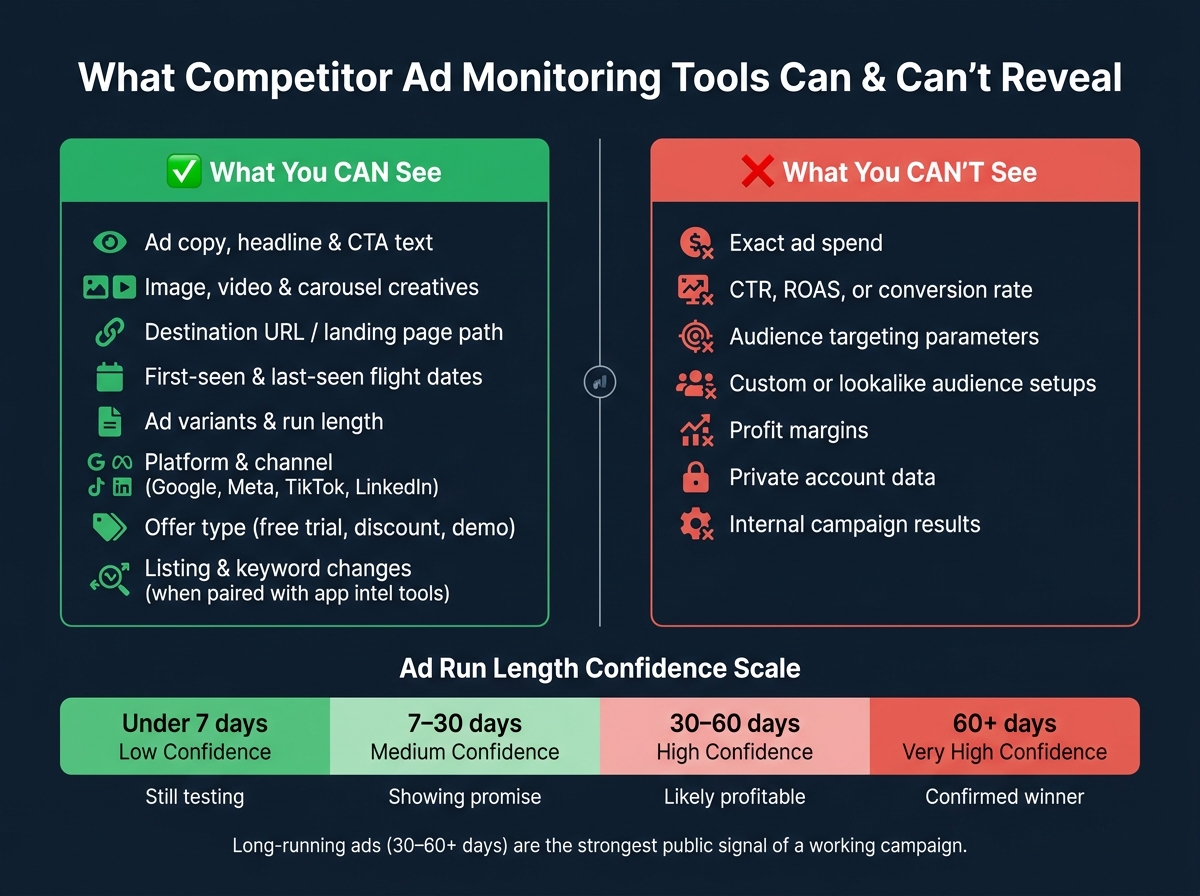
What Competitor Ad Monitoring Tools Can (and Can't) Reveal
How ad monitoring tools collect competitor ad data
Public ad libraries, transparency centers, and structured feeds
Public ad libraries and transparency centers are the starting point for most competitor ad data. In practice, that usually means the ad libraries from Meta, Google, TikTok, and LinkedIn. Tools pull data from these sources through platform APIs or compliant crawlers.
These libraries show a lot without special access. You can usually see advertiser names, creatives, copy, headlines, calls to action (CTAs), ad formats, and landing-page URLs. Google now also shows the billing entity name, which makes it easier to connect ads to parent companies.
One simple move matters here: search by domain, not just brand name. A lot of companies run ads under legal entity names that don't match the brand people know. Domain search helps catch ads that a brand-name search can miss. Those records then become the starting point for landing-page review and tracking analysis.
Web crawling, landing page detection, and tracking parameter analysis
From there, web crawlers follow the landing-page URLs tied to ads. They capture the page, look for tracking pixels, and inspect UTM parameters. That gives teams clues about live campaigns and traffic sources through analytics, including which campaigns may be sending merchant traffic to a competitor's app listing.
There are limits, though. Tools can't access private account data or see exact spend, CTR, or ROAS. What they can do is gather the page-level signals that later get turned into campaign records.
How raw ad data is cleaned and organized across channels
Raw ad data is messy. Each platform structures records in its own way, so tools have to normalize that data into one shared format.
That cleanup usually includes:
- Deduplication
- Visual matching
- Content matching
The goal is simple: group ads by creative concept without counting the same ad twice.
After cleanup, each ad record gets extra metadata, such as first-seen and last-seen dates, geographic distribution, device targeting, ad format, and the number of variants. If one concept has a lot of variants, that's often a sign of heavier investment.
| Ad Running Time | Confidence Level | What It Suggests |
|---|---|---|
| Under 7 days | Low | Still testing; unproven angle |
| 7–30 days | Medium | Showing promise; passed initial filters |
| 30–60 days | High | Likely profitable; worth reverse-engineering |
| 60+ days | Very High | Confirmed winner; core of competitor strategy |
Tools also track changes over time by comparing today's snapshot with a saved baseline. That way, teams can focus on what actually changed instead of reviewing the full ad set every time they log in. Once the data is normalized, the same ad can be compared across channels, time periods, and creative variants. That makes side-by-side review much easier.
sbb-itb-ce93587
What ad monitoring tools track in competitor campaigns
Creatives, copy, offers, and calls to action
The creative is the clearest signal in any ad. Monitoring tools record the full asset and the visible text: primary copy, headline, and the CTA button label. Those are the easiest parts to line up side by side when you're comparing competitors.
They also show how a brand wants to be seen. A free trial message leans on access. Social proof leans on trust. A visible price point shows how the brand frames value.
Offer language is especially worth watching. Free-trial length, money-back guarantees, and limited-time discounts usually sit right in the copy. And when a competitor changes from "Try free" to "Book a demo", you're not just seeing new wording. You're seeing a strategy shift happen in plain sight.
Channels, flight dates, audience clues, and spend signals
These tools also log first-seen and last-seen dates. First-seen is confirmed. Last-seen is the most recent observed date, not a locked end date. Channel choice can hint at plan and intent too. LinkedIn, for example, often supports longer ad flights, which can point to more deliberate messaging.
That makes flight length and channel mix useful stand-ins for campaign intent.
What you can't see is just as important. Exact targeting settings - interests, custom audiences, and lookalike setups - don't appear in public ad libraries. So tools work backward instead. They infer audience intent from the ad creative, the language on the landing page, and sometimes geography or language patterns. If an ad speaks straight to Shopify app developers, that's a pretty strong clue about the buyer it's meant to reach.
When you see five or more versions of the same core creative idea, that usually points to heavy testing around that angle.
Landing pages, App Store listings, and historical changes
Destination URLs matter because they show where the click goes. A set of distinct landing pages can tell you whether a competitor is sending traffic to an App Store listing, a feature page, or a signup flow. In many cases, those landing-page paths show the shape of the strategy better than raw ad count.
History adds another layer. Native ad libraries like Google's often keep only the last 30 days of commercial ad data, so older changes vanish unless a monitoring tool keeps its own archive. With that archive, you can spot when a competitor drops a pricing angle, introduces a new hook, or switches formats.
The next step is tying those signals to rankings, listing updates, and revenue results so you can judge impact. AppJubilee connects ad monitoring with ranking snapshots and listing change tracking. That gives you a clearer read on what changed, when it changed, and what may have happened after.
| Data Point | Directly Observable? | Notes |
|---|---|---|
| Ad creative (image, video, carousel) | Yes | Full asset captured |
| Ad copy, headline, CTA | Yes | Exact text visible |
| Offer type (free trial, discount) | Yes | Visible in copy |
| Destination URL / landing page | Yes | Final URL logged |
| First-seen date | Yes | Confirmed start date |
| Last-seen date | Mostly | Observed floor, not confirmed end |
| Exact ad spend | No | Estimates only |
| Audience targeting parameters | No | Inferred from copy, geography, and landing page |
| ROAS / CTR / conversion rate | No | Not disclosed by platforms |
How ad monitoring data turns into decisions for Shopify app teams
Benchmarking competitors and spotting repeat patterns in their ads
Once your ad data is cleaned up and lined up, the next job is figuring out which signals matter first.
A simple place to start is ad flight length. Treat it as a stand-in for confidence. If an ad stays live for 30 to 60 days or longer, it’s usually worth breaking down first. Variant count matters too. When you see three or more versions of the same basic idea, that often points to an angle that’s working.
The point isn’t to copy the ad word for word. It’s to figure out what message sits underneath it, then build your own version from that idea.
This kind of review can also show you where competitors are bunching up. If most of them lean on the same promise, like saving time, you may have room to stand out with a different message, such as cost reduction or faster onboarding. And don’t stop at the headline. Tie variant count to the app features and merchant pain points they keep pushing. That’s where the strongest positioning signal usually shows up.
Connecting ad themes to keyword strategy and App Store visibility
Repeated ad themes can point you toward keywords worth testing in your App Store listing. If those themes show up again and again in competitor ads, but you don’t rank for the related terms, that’s a keyword gap.
AppJubilee’s Keyword Universe tracks daily keyword rankings and shows the keywords competitors rank for that your listing is missing. When you pair that with ad theme analysis, you get a clearer picture of which terms have both paid demand signals and organic ranking upside. The Competitor Universe feature maps which apps are competing for the same search real estate, so you can spot those gaps more easily.
Using alerts and integrations to link ad changes with business outcomes
Alerts help you catch listing updates, new creative pushes, and offer changes while there’s still time to react. AppJubilee sends competitor alerts within 24 hours of a listing change, so you’re not finding out about a new keyword play several days after a competitor has already started moving up the rankings.
It also helps to track where the click goes. Is the ad sending traffic to an App Store listing, a feature page, or a signup flow? That destination often says more about strategy than ad volume does. When a competitor changes the landing path, it usually means their acquisition plan has shifted too.
AppJubilee’s integrations with Google Analytics 4 and Shopify Partners let you compare competitor activity against your own traffic, installs, trials, and revenue. That gives you a cleaner read on what happened after a competitor changed a listing. Instead of guessing, you can check whether that move lined up with a change in your own install rate and decide what to do next based on data.
Use signals like these to decide what deserves review, testing, or closer tracking next.
| Signal | What It Means | Recommended Action |
|---|---|---|
| 3+ new ads launched in one week | Competitor is in a heavy testing phase | Flag creative formats and hooks for your own swipe file |
| 90+ day ad dropped | A proven performer has been retired | Reverse-engineer the hook and offer for your next creative brief |
| Competitor listing title updated | Possible keyword strategy shift | Track ranking movement after the change and adjust your own listing if needed |
| Trial length extended (e.g., 7 days to 30 days) | Competitor found higher conversion or LTV data | Test a similar extension if your LTV supports it |
These signals only matter if someone owns them and reviews them on a set cadence. Next, turn those signals into an ownership model, review cadence, and alert workflow.
How to build ad monitoring into a Shopify app workflow
Who should own monitoring, what cadence to use, and which competitors to watch
Once you know which ad signals matter, bake them into a weekly workflow.
Give monitoring to one clear owner. That person can work with growth, product marketing, or media buying, but one person should be on the hook for keeping the process moving. Agencies can help when the workload gets heavy, especially at scale. Even then, someone in-house should still own the monthly strategy review.
For competitor selection, keep the list tight. Watch 3 to 5 direct competitors your customers actually compare you with, plus 2 to 3 adjacent or aspirational players that reach the same merchant audience. A short list makes reviews easier to act on.
A simple three-tier cadence works well for most teams:
- Daily alerts: Best for high-spend competitors or busy promo periods like Black Friday.
- Weekly reviews: Usually 30 to 45 minutes. Use these to spot new launches, paused ads, and shifts in copy. Flag any ad that has been live for 30+ days as a priority, since longevity is the clearest proxy for a campaign that’s working when you only have public data.
- Monthly sessions: Use these for category-level review and strategy resets.
The goal is simple: turn those signals into a fixed weekly review instead of checking ads here and there when someone happens to remember.
Reference tables: what ad monitoring data reveals and where it falls short
Use these sources as a quick reference for what each signal can and can’t tell you.
| Source | Reveals | Misses | Use |
|---|---|---|---|
| Public Ad Libraries | Creative, copy, start dates, and platform mix | Exact spend, ROAS, CTR, and targeting settings | Identify winning hooks and creative formats |
| Landing Page Tracking | Audience segments, offer structure, and funnel depth | Conversion rates and profit margins | Map ad themes to specific merchant pain points |
| Historical Archives | Long-term strategy shifts, seasonal patterns, and failed tests | Real-time budget adjustments | Spot repeat patterns and avoid angles competitors already killed |
| AppJubilee Intelligence | App Store rankings, keyword overlaps, listing changes, and review trends | Private backend revenue or churn data | Link ad changes to App Store visibility and ranking shifts |
Conclusion: Key points to remember about competitor ad tracking
Ad monitoring tools combine public data collection, web crawling, and data enrichment. They do not access private ad accounts.
That matters because it sets the right expectation. You’re not getting a competitor’s exact playbook. You’re piecing together signals from what’s visible in public.
Ad monitoring gets much more useful when you connect it to keyword rankings, listing changes, review trends, and business outcomes. If a competitor launches new creative and then gains ground in App Store rankings, installs, or listing visibility, that’s the kind of pattern worth paying attention to. It turns random observations into decisions you can use in your own workflow.
Treat the whole thing like a repeatable system: set a cadence, assign an owner, and tie what you find back to your listing, your keywords, and your next creative brief.
How to Monitor Competitor Ads | Marketing O’Torial
FAQs
How accurate are ad monitoring tools?
Ad monitoring tools are very good at tracking publicly visible parts of a campaign. That includes ad creatives, copy, landing pages, and how long an ad has been live. If a competitor is running ads out in the open, these tools usually do a solid job of picking that up.
Where they fall short is private data. They can’t see actual ad spend, conversion rates, click-through rates, or the exact audience targeting behind the campaign. So while they can show strong signs that an ad is working, they can’t reveal the precise dollars, performance numbers, or behind-the-scenes setup.
What should I track first each week?
Start each week by checking your App Watch feed and performance dashboard in AppJubilee. Focus on what changed over the last seven days: competitor listing updates, keyword ranking movement, and spikes in reviews.
Then look at whether competitors started running new ads on your top-performing keywords. Spotting these moves early gives you a chance to adjust your weekly optimization plan and protect your app’s visibility.
How do I turn ad data into action?
Stop watching from the sidelines. Build a repeatable workflow instead.
Use AppJubilee to track competitor ads and see which keywords they’re going after.
If competitors are bidding on your best-performing keywords, check whether your organic ranking can still hold its ground. From there, focus on keyword gaps, tighten up your app listing, and use daily tracking plus performance analytics to see what changed.