
Seasonal Keyword Ads for Shopify Apps: Best Practices
Plan seasonal Shopify app ads early: map keyword demand windows, align listing copy, and adjust budgets to hit peak ROI.
Seasonal Shopify app ads work best when I plan early, match keywords to the right weeks, and keep ads, listings, and budgets in sync. If I wait until Black Friday week or tax-filing week to act, I’m late. The article’s core point is simple: seasonal demand shows up in short windows, so I need to line up keyword research, launch timing, listing updates, bid changes, and post-season review before those windows hit.
Here’s the short version:
- I map demand by event and month, such as Back to School, Black Friday/Cyber Monday, Christmas, New Year, and Tax Season
- I separate recurring yearly demand from 3–7 day spikes
- I keep most spend on core terms, with 30%–40% set aside for seasonal keywords
- I launch seasonal campaigns 10–14 days before peak
- I update listing text and screenshots 2–3 weeks early
- I shift budgets by season phase:
- Pre-season: +20% to 30%
- Peak: +50% to 100%
- Post-season: taper back over 1–2 weeks
- I watch CPI, CPT, install-to-paid rate, rank changes, and payback period
- I avoid listing changes during peak spend because rank can dip at the worst time
- I review winners, losers, timing misses, and copy performance using Shopify app optimization tools so the next cycle starts from a better base
A few numbers matter right away. The article notes that Shopify app CPI often falls between $1.50 and $8.00, install-to-paid conversion often lands between 2% and 10%, and payback should usually stay within 30 to 90 days. It also suggests using a Seasonal Demand Index:
Current Month Volume ÷ Average Annual Volume × 100
If that score is above 150, demand is peaking hard enough to justify bigger bid moves.
This piece is not about spending more all year. It’s about spending at the right time, on the right seasonal terms, with listing copy that matches what merchants are searching for that week.
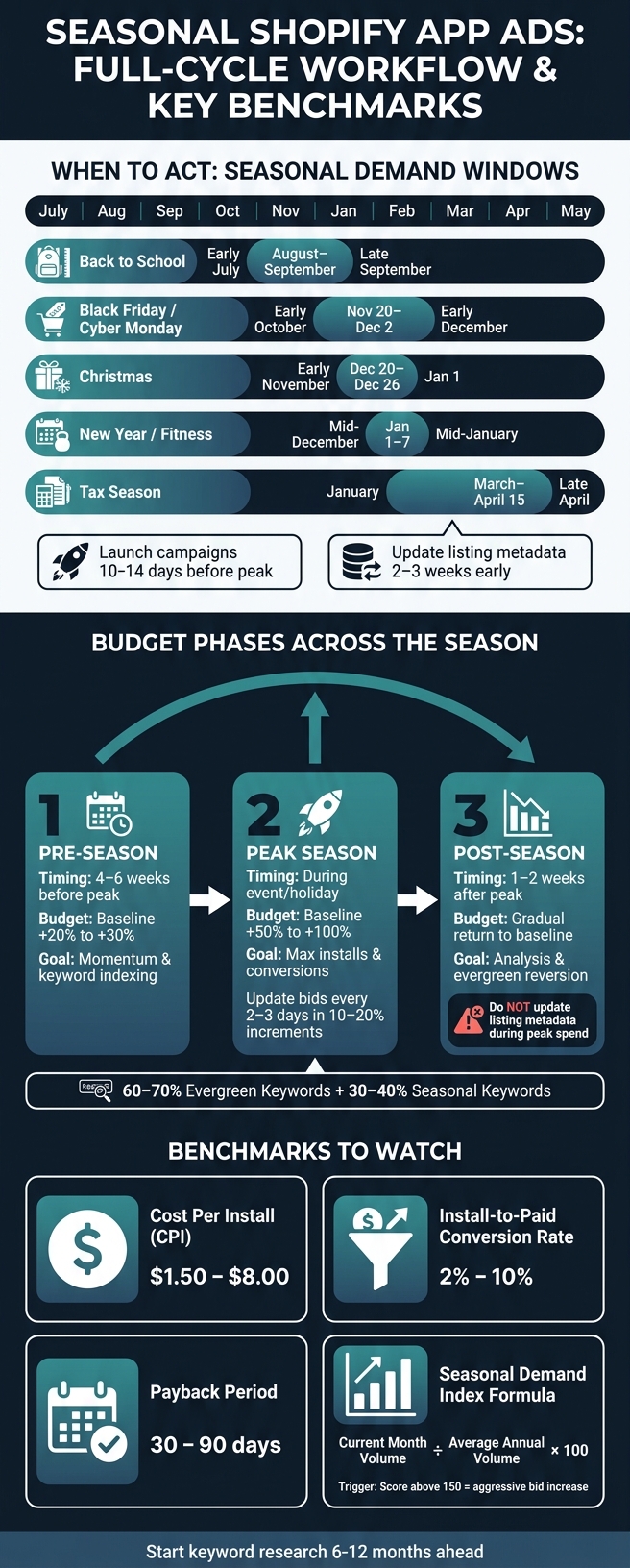
Seasonal Shopify App Ads: Full-Cycle Workflow & Key Benchmarks
Shopify App Store Ads - getting started and optimising

sbb-itb-ce93587
Plan seasonal keywords around demand windows
Once you know which keywords are seasonal, the next step is simple: map them to the exact weeks merchants start searching.
Map demand by month, holiday, and shopping event
Use these windows to time research, budget shifts, and metadata updates.
| Event | Demand Start | Peak Period | End |
|---|---|---|---|
| Black Friday/Cyber Monday | Early October | Nov 20–Dec 2 | Early December |
| Christmas | Early November | Dec 20–Dec 26 | Jan 1 |
| New Year / Fitness | Mid-December | Jan 1–7 | Mid-January |
| Tax Season | January | March–April 15 | Late April |
| Back to School | Early July | August–September | Late September |
Merchants usually need time to install and test an app before the rush hits. That means your timing can't be last-minute.
A good rhythm looks like this:
- Start research 6–12 months ahead
- Launch 10–14 days before peak
- Update metadata 2–3 weeks early
Tell apart recurring demand from short-lived spikes
Not every traffic jump means the same thing.
Recurring seasonal keywords follow predictable yearly cycles tied to holidays, seasons, and school or tax calendars. Short-lived spikes usually last 3–7 days and tend to come from viral trends, flash sales, or major announcements.
That difference matters when you're setting bids and budgets. If a keyword comes back every year, it may deserve a planned seasonal push. If it's just a brief spike, a small test budget is often the safer move.
For recurring keywords, you can calculate a Seasonal Demand Index with this formula:
Current Month Volume ÷ Average Annual Volume × 100
If the index is above 150, that's a strong peak and a good time to increase bids more aggressively. Short-lived spikes need a different playbook: faster reactions, tighter bid caps, and daily monitoring.
Prioritize keywords by intent and category fit
Timing helps, but timing alone won't save a bad keyword choice. The term still needs to match the main job your app does.
After timing, intent is the next filter. Group keywords by merchant problem and install intent. For example, "tax planning" in January points to early research, while "tax filing app" in March–April points to direct commercial intent and a higher chance of install. That's the type of term to push harder.
As a general rule, keep 60–70% of your keyword mix on evergreen core terms and reserve 30–40% for targeted seasonal variants.
| App Category | Key Seasonal Event | High-Intent Keyword Examples |
|---|---|---|
| Shopping | Black Friday / Cyber Monday | "Black Friday deals", "gift finder", "holiday sales" |
| Fitness | New Year | "resolution tracker", "weight loss 2026", "workout planner" |
| Finance & Accounting | Tax Season | "tax filing", "expense tracker", "IRS 1040" |
| Productivity | Back to School | "student planner", "school supplies", "habit tracker" |
| Games | Christmas | "holiday game", "family game night", "Christmas puzzle" |
This filter helps you spend on seasonal terms that line up with a real install need, not just a busy moment in the calendar.
Build campaigns and align messaging with your listing
Turn your seasonal keyword list into campaign themes, ad groups, and listing assets that all tell the same story.
Organize campaigns by seasonal keyword cluster
After you’ve mapped out your seasonal keyword mix, build campaigns around clear seasonal themes instead of broad buckets. A campaign might center on New Year Resolutions, Black Friday Deals, or Tax Planning. Inside each campaign, split ad groups by intent using advertising keyword research, like problem-based keywords versus event-based keywords.
That setup does two things: it keeps ads close to what people are searching for, and it makes bids easier to control. You’re not lumping everything together and hoping it works.
Each seasonal campaign also needs its own schedule. Launch early, push bids and budgets during the peak window, then scale back one week after the event. Set that rollback plan ahead of time so you can switch back to evergreen messaging fast instead of letting seasonal assets linger past their moment.
Once the campaign framework is in place, the next step is the copy itself.
Match ad copy to seasonal search intent
Seasonal ad copy should reflect what the merchant wants right now, not just your app’s standard feature set. If you’re promoting a fitness app in early January, for instance, the message should lean into New Year’s resolutions, not a plain generic pitch.
Use time-based language only when it fits the offer and the sense of urgency. And keep the benefit concrete. The copy should point to what the app actually helps users do, not just sound timely.
Keep ads and your Shopify App Store listing consistent
Your listing should deliver the same seasonal promise as the ad. That means the screenshots, listing text, and calls to action all need to line up. If the ad talks about holiday budgeting help, the listing should continue that same seasonal story, not drop the visitor into a generic product page.
Each seasonal keyword cluster should lead to one matching campaign theme and one matching listing narrative. Here’s how that shift can look from evergreen mode to seasonal mode:
| Element | Evergreen Messaging | Seasonal Messaging |
|---|---|---|
| Ad Copy | "The simple way to manage your money." | "Track holiday spending and gift budgets." |
| Listing Text | "Manage expenses and generate reports." | "Holiday Update: New gift categorization and spending templates." |
| Screenshots | Standard UI with generic data. | UI showing holiday-relevant content (e.g., "Christmas Dinner" budget). |
| Call to Action | "Install now." | "Get holiday budgeting tools - set up in minutes." |
When the ad and listing say the same thing, that seasonal click has a better shot at turning into an install.
Set budgets, track performance, and adjust during the season
Once your campaigns are live and your listing is lined up, the next job is simple: make sure your budget works across the entire season, not just the busiest few days. Use the demand window you mapped earlier to spread spend from the lead-up through the cooldown.
Allocate spend across pre-season, peak, and post-season periods
Seasonal ad spend tends to work best in three phases, and each phase does a different job.
Four to six weeks before the peak, bump your budget by 20–30% above your evergreen baseline. That gives the algorithm time to learn which keywords turn into installs and helps you build momentum early. It’s also a smart window for small tests to see if a seasonal keyword cluster is worth pushing harder.
During peak season, increase spend by 50–100%. This is when search intent is at its highest, and installs are more likely to turn into conversions. Update your cost-per-tap bids every 2–3 days in 10–20% increments so you can stay in the mix without paying more than you need to. And don’t get hung up on the top slot if a lower spot gives you a better return.
One to two weeks after the event, ease spend back to baseline little by little. If seasonal budgets keep running after demand starts to fade, money slips away fast.
| Phase | Timing | Budget Action | Primary Goal |
|---|---|---|---|
| Pre-Season | 4–6 weeks before peak | Baseline + 20–30% | Momentum & keyword indexing |
| Peak Season | During event/holiday | Baseline + 50–100% | Max installs & conversions |
| Post-Season | 1–2 weeks after peak | Gradual return to baseline | Analysis & evergreen reversion |
One more thing: do not update app metadata or listing assets during peak spend. Listing changes can reset indexing and trigger a short-term rank drop at the worst possible time.
Measure installs, conversion rate, and keyword rank movement
The right metrics tell you if seasonal traffic is worth the cost. Start with keyword rank movement for your target seasonal terms. Then watch Cost Per Install (CPI), Cost Per Tap (CPT), activation rate, conversion-to-paid rate, and payback period.
For Shopify apps, CPI often lands between $1.50 and $8.00, depending on the niche and competition level, while install-to-paid conversion rates usually fall between 2% and 10%. If your CPI starts climbing past that range during peak season and you’re not seeing a lift in activation or paid conversions, that’s a sign to scale back the keywords pushing costs up.
You should also check search term data often during the season. Seasonal traffic can bring a surge of irrelevant queries along with the good ones. Adding those as negative keywords fast can stop budget from leaking into clicks that were never going to convert.
Installs alone don’t tell the whole story. Watch the payback period too. For a well-tuned Shopify app funnel, it should stay within 30 to 90 days. If a seasonal campaign brings in installs but those users don’t activate or move to paid plans in that window, the math falls apart, even if the install volume looks strong on paper.
Review results and apply learnings to the next season
The best part of a seasonal campaign isn’t just the short-term lift. It’s the data you carry into the next cycle. After the season ends and spend has returned to normal, do a clean review before you move on.
Focus on:
- Keyword clusters that won: low CPI, strong activation, and a short payback period. These should move to the front of the line next season.
- Keyword clusters that lost: high impressions and clicks but weak installs or low-quality users. Mark these for removal or a full rebuild.
- Copy that won: note which seasonal angles performed best, then lead with that message next time.
- Timing gaps you missed: maybe the pre-season ramp started too late, the peak budget ran out too early, or you missed micro-seasons - short 3–7 day spikes driven by a viral trend or flash sale - entirely
Write those patterns down while they’re still easy to spot so your next seasonal campaign starts with cleaner keyword data and a better ranking base.
Use AppJubilee to monitor seasonal keyword and listing changes
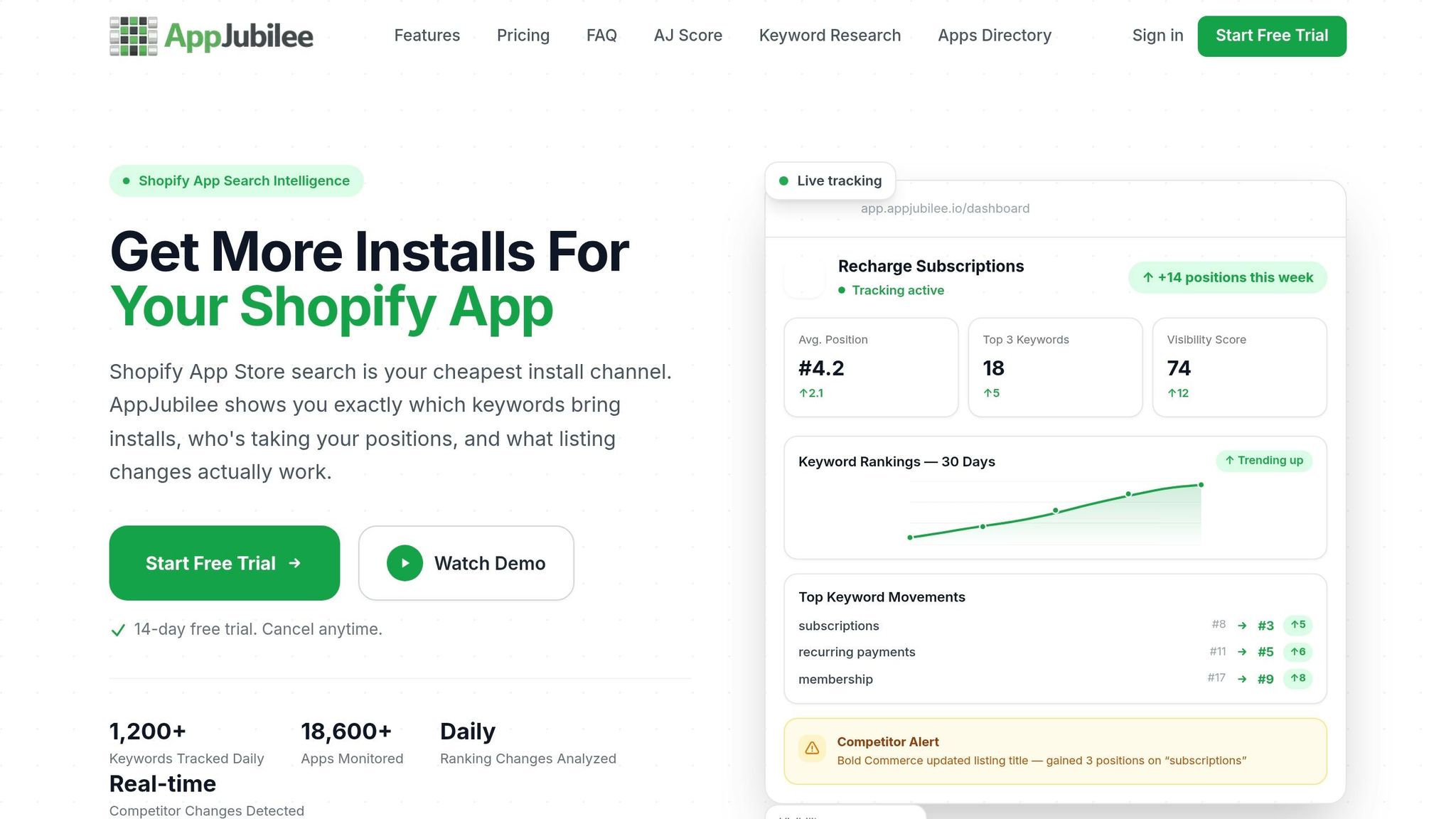
Once your seasonal campaigns are live, use AppJubilee to check what the market is doing each day. It helps you track daily ranking shifts, listing changes, and competitor moves during each seasonal window.
Track daily rankings for seasonal keyword sets
Load each seasonal keyword cluster 4–6 weeks before launch to set a pre-season baseline. With AppJubilee's daily keyword tracking and ranking snapshots, you can see when a seasonal term starts climbing or slipping.
That day-by-day view matters. If a keyword you're bidding on drops in the middle of peak season, that's a clear sign to either increase the bid or revisit the listing copy tied to that term, such as product review keywords. You can also use Visibility to check how often your app shows up on page one for your target seasonal terms.
Use those daily snapshots to make a simple call:
- Raise bids
- Adjust copy
- Hold steady
Watch competitor movement and ad activity during peaks
When rankings move, check whether the change came from your own listing or from a competitor. Peak seasonal periods are when teams move fast. They update icons, swap screenshots, and refresh subtitles.
AppJubilee's competitor alerts help you spot those listing changes fast, so you can react when a rival changes their messaging or creative.
If a competitor's ranking jumps sharply during a peak, look at their listing for recent edits. A new seasonal screenshot or a refreshed subtitle often explains the jump. Seeing that early gives you time to decide whether you should answer with your own listing update.
Conclusion: A repeatable workflow for seasonal Shopify app ads
Seasonal Shopify app ads work best when keyword targeting, listing messaging, budgets, and daily tracking stay aligned through the full season.
FAQs
How do I find the best seasonal keywords for my Shopify app?
Start with your historical keyword tracking data from the past 12 to 24 months. That gives you a clean way to spot seasonal patterns and see which terms did well at different times of the year.
From there, keep an eye on competitor metadata and custom product pages during peak seasons. AppJubilee can help with keyword ranking analysis and competitor mapping, and you can test keywords through Apple Search Ads to see which variations drive the most installs.
When should I start seasonal ads for a Shopify app?
Start 4 to 6 weeks before the seasonal event. That gives you enough time to do keyword research and lock in your creative assets.
Then, submit metadata and creative updates 2 to 3 weeks before the peak. This gives the app stores time for review and lets rankings settle. After that, launch ads 2 weeks before the event so you can test keyword profitability and start building momentum.
What metrics matter most for seasonal Shopify app ads?
Don’t stop at install volume. Focus on the numbers that connect to growth and profit:
- CPI for budget efficiency
- CAC for total acquisition cost
- Revenue per install, paid conversion, and ROAS
AppJubilee can help you track these alongside keyword ranking shifts and listing impact, so your seasonal strategy stays data-driven.