
How to Analyze Competitors on the Shopify App Store
Practical 5-step framework to identify rivals, audit app listings, mine reviews, optimize keywords, and track rankings.
The Shopify App Store hosts over 13,000 apps, with 450 new ones added monthly. Yet, 67% of apps fail to generate $1,000 in Monthly Recurring Revenue (MRR). Why? Missteps like poor pricing, irrelevant features, or weak keyword strategies. Competitor analysis can help you avoid these traps by identifying what successful apps do right and where opportunities exist.
Key Steps to Analyzing Competitors:
- Identify competitors: Define your app’s category and use case, then group competitors into direct, adjacent, and niche categories.
- Study app listings: Evaluate titles, subtitles, descriptions, and visuals to understand how competitors attract merchants.
- Analyze keywords: Find keyword gaps and hidden opportunities to improve your app's visibility.
- Mine reviews: Look for common complaints or feature requests in competitors' reviews to refine your app.
- Track rankings: Monitor competitors' ranking shifts to spot effective strategies.
Tools to Simplify the Process:
Apps like AppJubilee can automate competitor tracking, keyword analysis, and ad intelligence, saving you hours of manual work.
Takeaway: By analyzing competitors, you can sharpen your app’s positioning, improve its appeal, and maximize its chances of success on the Shopify App Store.
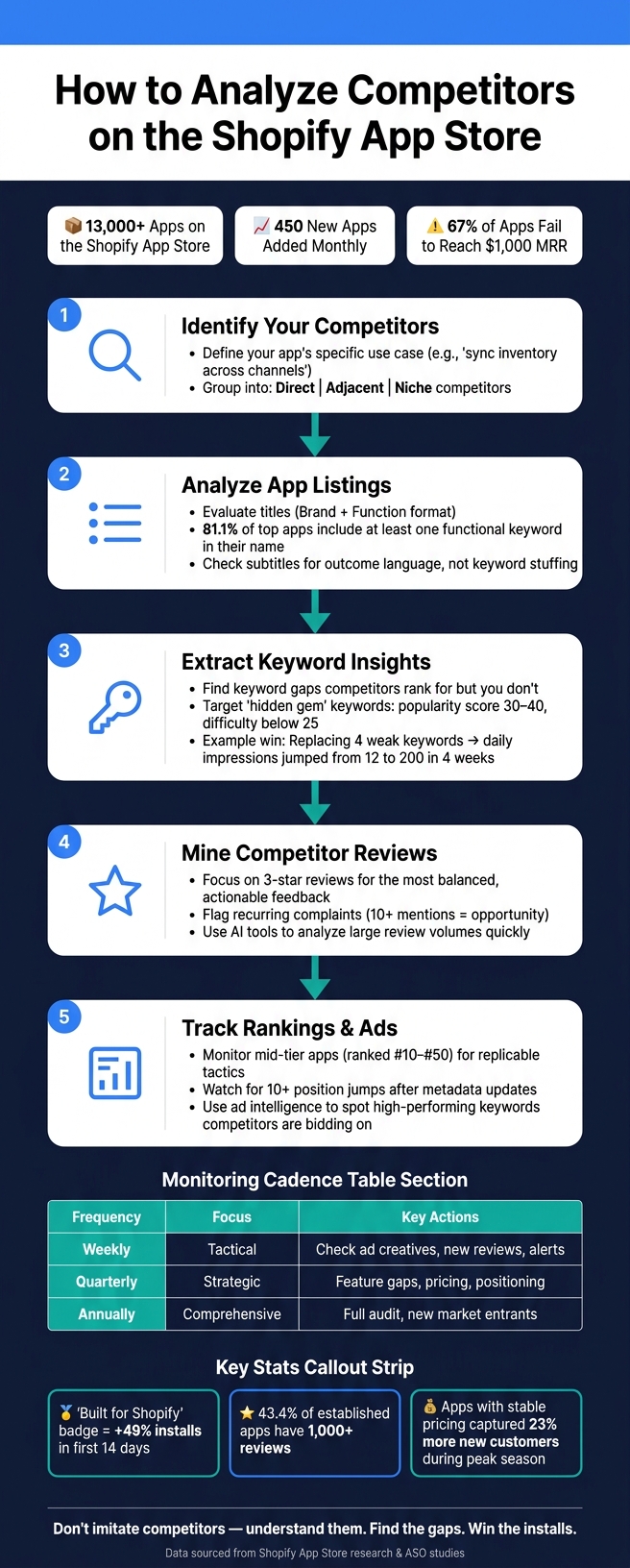
How to Analyze Competitors on the Shopify App Store: 5-Step Framework
How to Identify Your Competitors
It's easy to fall into the trap of mimicking strategies from top-ranked apps without fully understanding whether they’re your true competitors. But identifying who you’re actually up against - and why - is essential for meaningful analysis.
Define Your App's Category and Use Cases
Start by pinpointing your app’s primary purpose for merchants. The key is to focus on the specific outcome your app delivers. For instance, instead of describing your app as a generic "inventory management solution", define it as something like "sync inventory across multiple sales channels in real time." This level of clarity helps you determine relevant categories, keywords, and competitors.
Use category terms to get noticed and use-case terms to drive installs. For example, a loyalty app might cover terms like "rewards points", "customer retention", "VIP program", and "repeat customers." These give you a broader view of the competitive landscape, beyond just the most obvious players.
"The category term gets you considered. The workflow term gets you chosen." - StoreInspect Team
Once you’ve nailed down your use case, you can move on to building and organizing your competitor list.
Build a Competitor List
Use the terms you’ve identified to search for competitors and group them effectively. The Shopify App Store search bar is a great place to start. Typing in your primary keywords and checking autocomplete suggestions can reveal what merchants are actively searching for.
Explore your target category using filters like "Most Installed" to identify market leaders and "Newest" to spot rising challengers. Another useful trick is to search for "[Competitor Name] alternative" directly in the App Store. Apps positioning themselves as alternatives often solve similar merchant pain points, making them relevant competitors.
Organize your findings into three categories:
- Direct competitors: Apps offering the same core function to the same audience.
- Adjacent competitors: Apps with overlapping features but a different primary focus.
- Niche competitors: Apps targeting specialized segments, like B2B wholesale or specific industries (e.g., fashion retailers).
This categorization ensures your analysis stays focused on apps that genuinely compete for installs and sets the stage for deeper data collection.
Document Key Competitor Data
To compare competitors effectively, track essential information in a spreadsheet. At a minimum, include:
- App name
- Category
- Pricing
- Rating
- Review count
- "Built for Shopify" badge status
The "Built for Shopify" badge is a crucial factor - apps with this badge see an average 49% boost in installs within the first 14 days. Also, keep an eye on review counts, as 43.4% of established apps have surpassed the 1,000-review mark. A high review count signals strong market presence, making it a key metric to monitor.
sbb-itb-ce93587
How to Analyze Competitor App Listings
Once you've compiled and documented your list of competitors, it’s time to dig deeper. This step involves examining each app listing to understand how competitors position their offerings and why merchants are drawn to them. By breaking down key elements of competitor listings, you can uncover actionable insights to refine your own approach.
Evaluate Titles and Subtitles
The app name and subtitle are the first things merchants see - and they carry a lot of weight. As Big Moves Marketing puts it, "Your name and subtitle are 80% of your keyword power." That makes these elements critical for analysis.
Start by looking at the structure of competitor app titles. A common and effective format is Brand + Function. For example, "Klaviyo: Email Marketing & SMS" pairs a recognizable brand with a clear description of its purpose. Research shows that 81.1% of established app names include at least one functional keyword, while only 3.8% rely solely on generic terms. Merchants are more likely to trust apps with a clear brand identity and functional clarity.
Subtitles should also be scrutinized for their use of outcome language. The most effective subtitles answer the question, “Why should I care?” by highlighting a specific benefit, such as "Recover carts with email flows." On the other hand, subtitles crammed with keywords - like "Email Marketing SMS Popup Campaign Automation Tool" - tend to perform poorly and may even violate Shopify’s quality guidelines.
"The winning pattern is usually: Distinctive brand plus functional clarity." - StoreInspect Team
Assess Descriptions and Feature Highlights
Descriptions are where competitors flesh out their value propositions, starting with the first 500 characters - what’s visible before the "read more" button. This section typically contains their core pitch and top features. Ask yourself: are they leading with a clear outcome, or simply listing features?
Strong descriptions focus on the merchant's primary need and back it up with relevant features. Pay attention to the language. Apps targeting developers might use technical terms like "webhook-based sync", while those aimed at merchants prioritize outcomes like "instant updates across sales channels." Competitors who adopt merchant-friendly language often resonate better with non-technical users.
A handy trick is the "read more" test. Whatever a competitor highlights above the fold reflects their priorities. Use this to gauge what they consider their most important selling points.
Review Visual Assets
Visuals are just as important as text when it comes to conveying value. Screenshots and videos can reveal how an app communicates its benefits. The best visuals follow a narrative arc: they identify a problem, present the solution, and showcase the result - like increased revenue or saved time.
When analyzing screenshots, focus on caption length and clarity. Captions that are 5–8 words long and combine an action with a benefit - such as "See lost carts flagged on the spot" - tend to be the most effective. Long or vague captions are a missed opportunity. Also, check whether competitors use realistic data in their visuals. Overly inflated or fake numbers can harm credibility.
For demo videos, evaluate their structure. Effective videos follow a sequence: Hook → Pain → Feature → Result. Shorter videos (30–60 seconds) that emphasize a single outcome consistently perform better than longer, feature-heavy walkthroughs. If a competitor’s video is over two minutes and lacks a clear focus, that’s a potential weakness.
| Visual Element | Best Practice | What to Look For in Competitors |
|---|---|---|
| Screenshot count | 8+ for top-tier apps | Fewer than 5 may signal underinvestment |
| Caption length | 5–8 words | Vague or missing captions = weak messaging |
| Video length | 30–60 seconds | Over 90 seconds risks losing attention |
| Screenshot data | Realistic figures | Fake or inflated numbers hurt credibility |
How to Extract Insights from Keywords, Reviews, and Rankings
Going beyond app listings, analyzing keywords, user feedback, and ranking trends can give you a strong edge in the competitive app market.
Analyze Competitor Keyword Strategies
Take a close look at your competitors' app titles, subtitles, and descriptions to understand their keyword strategies and how they position their app's value.
One key area to explore is keyword gaps - terms your competitors rank for but your app doesn’t. For instance, in 2026, a fitness app identified gaps for "home workout" (volume score: 62) and "strength training" (volume score: 55). By replacing four underperforming keywords with these two, the app saw its daily organic impressions jump from 12 to 200 in just four weeks.
"The App Store is a zero-sum ranking environment. For any given search query, there are a fixed number of visible positions." - BoostYourApp Team
Focus on hidden gem keywords - those with moderate popularity and low competition. Aim for keywords with a popularity score between 30–40 and a difficulty score below 25. For example, a meditation app developer in 2026 targeted "sleep meditation stories" (popularity: 39, difficulty: 21) and "5 minute meditation" (popularity: 44, difficulty: 26). These overlooked keywords helped boost their downloads from 15 to 35 per day within three weeks.
Tools like AppJubilee's Keyword Universe simplify this process. It highlights shared keywords between you and competitors, identifies gaps, and eliminates the need for manual spreadsheet analysis.
Once you've refined your keyword strategy, turn your attention to user feedback for deeper insights.
Mine Reviews for Strengths and Weaknesses
User reviews are a treasure trove of competitive intelligence. While most developers focus on glowing 5-star reviews or scathing 1-star complaints, 3-star reviews often provide the most actionable insights. These reviews tend to balance praise with specific critiques, offering a clearer picture of what users like and what’s missing.
When analyzing competitor reviews, look for recurring themes. For example, if the same complaint appears in 10+ reviews or a feature request keeps popping up, it could signal an area where your app can shine. If users frequently mention that a competitor's app setup is too complicated or that an integration is missing, you’ve found an opportunity to improve your product and messaging.
"Never interrupt your competitors when they're making mistakes." - AdScale
To speed up the process, use tools like ChatGPT to sift through large volumes of reviews. By uploading a spreadsheet of competitor reviews, you can quickly identify top complaints, frequently requested features, and sentiment trends. This approach is especially helpful when analyzing multiple competitors at once.
Once you’ve gathered insights from reviews, keep an eye on ranking shifts to validate which tactics are working.
Track Competitor Rankings
Monitoring competitor rankings can reveal which strategies are delivering results. Focus on three groups: direct competitors, adjacent competitors, and mid-tier competitors (those ranked #10–#50). For example, if a competitor jumps 10+ positions for a keyword after updating their metadata, it’s a clear sign that their changes resonated with the algorithm.
Mid-tier apps are particularly interesting to watch. They often use aggressive, replicable tactics that smaller developers can adopt more easily compared to the strategies of category leaders.
AppJubilee’s ranking tools allow you to track these shifts daily. This lets you connect a competitor’s metadata updates to ranking changes, helping you understand which keywords or strategies are driving their growth. You can then apply these insights to refine your own app’s titles, subtitles, and descriptions to better compete with top performers.
Tools and Workflows for Ongoing Competitor Monitoring
Tracking competitors manually can eat up 3–5 hours every week - and that's assuming you're only watching a small group of apps. With over 8,000 apps on the Shopify App Store, monitoring a competitive set of 50+ apps by hand just isn’t practical. This is where tools like ad intelligence come into play, offering a smarter way to identify competitor keyword promotions.
"Manual competitive monitoring isn't just inefficient - it's strategic negligence." - AppScout
Use Ad Intelligence to Spot Competitor Promotions
Paid ad campaigns can reveal a wealth of competitive insights. When a competitor starts bidding on a specific keyword, it's a clear sign that the term is delivering results for them - they’ve essentially done the testing for you. By analyzing competitor ad data, you can uncover high-performing keywords that might be worth targeting. This adds a real-time layer to earlier analyses of app listings.
AppJubilee’s Ads Intelligence feature (available on the Growth plan starting at $99/month) provides a detailed look at which keywords your competitors are bidding on across various markets. It also tracks Share of Voice (SOV) - a measure of how dominant a competitor is on a particular search term. If a competitor has a high SOV for a keyword, it means they’re heavily invested in it. On the other hand, a low SOV on a related term could signal an opportunity for you.
You can even detect when competitors bid on your app’s name to divert potential traffic. With this insight, you can quickly counter-bid to protect your audience.
While ad intelligence is powerful, it works best when paired with a structured monitoring workflow.
Set Up a Recurring Competitor Monitoring Workflow
A consistent system for tracking competitor activity ensures you stay ahead of market shifts. Here’s a tiered review cadence to streamline your efforts:
| Frequency | Focus | Actions |
|---|---|---|
| Weekly | Tactical | Review alerts, check for ad creative updates, monitor new reviews |
| Quarterly | Strategic | Analyze feature gaps, assess pricing changes, evaluate positioning shifts |
| Annually | Comprehensive | Conduct a full competitive audit, identify new entrants in the market |
AppJubilee’s Competitor App Watch and email alerts simplify weekly monitoring. You can configure alerts for key competitors, tracking updates like price changes, listing revisions, rating drops, and new feature announcements. What used to take hours of manual effort can now be handled in a quick 30-minute weekly review.
During these reviews, focus on metrics like rating trends (are competitors gaining or losing favor?), update frequency (a reflection of developer commitment), keyword shifts in descriptions (which could indicate a change in ASO strategy), and pricing adjustments. For instance, 7 out of 10 major email marketing apps on Shopify raised their prices by 15–25% between Black Friday and New Year’s. Interestingly, apps that kept their prices stable during this period captured 23% more new customers.
Key Takeaways for Staying Ahead of Competitors
Keeping up with competitors on the Shopify App Store demands consistent effort and attention. The marketplace is always shifting, so staying informed is key to remaining competitive.
Here are some effective strategies to consider:
- Use workflow-specific language instead of generic terms to better connect with merchants.
- Dive into mixed reviews - they often highlight unmet merchant needs that you can address.
- Leverage technical endorsements like the "Built for Shopify" badge. This badge alone can increase installs by nearly 50% while boosting credibility and search rankings.
"The era of guessing keywords is over. To win in 2025, you must adopt a Competitor-First Strategy." - Leo, ASO & Content Strategist
Tools like AppJubilee make implementing these strategies easier. With features such as Keyword Universe, Competitor App Watch, Ads Intelligence, and Review Tracking, AppJubilee provides actionable insights to help you act fast. Pricing starts at $49/month for the Starter plan and goes up to $199/month for the Pro plan.
The goal isn't to imitate competitors but to deeply understand the market. By identifying gaps in their strategies, you can seize opportunities they’ve overlooked and position yourself ahead of the curve.
FAQs
How do I know which apps are my real competitors?
To figure out who your actual competitors are on the Shopify App Store, take a close look at thriving stores and the tools they rely on. Check out their tech stacks, which include the apps they use, their marketing approaches, and how their stores are set up. Tools like browser extensions or inspecting a site’s source code can help you pinpoint which apps are driving traffic to these stores. Pay attention to apps that offer similar features, integrations, and cater to the same audience as yours. This way, you can not only identify real competitors but also spot opportunities in the market.
Which listing changes can improve my Shopify App Store rankings fastest?
If you're looking to climb the ranks in the Shopify App Store, start by fine-tuning your app's title and keywords to align with what merchants are searching for. Here's how you can make a noticeable difference:
- Refine your app title: Use concise, high-intent keywords that clearly communicate your app's purpose.
- Optimize your description and metadata: Sprinkle relevant keywords throughout your app's description and metadata to improve search visibility.
- Enhance visuals: Upgrade your app's icons and badges to make them more appealing and professional.
- Boost install velocity: Encourage early reviews and create listings focused on driving conversions to increase installs.
These adjustments can help your app gain more visibility and improve its ranking in the Shopify App Store.
How can I turn competitor reviews into a clear product roadmap?
To build a clear product roadmap using competitor reviews, start by diving into their 1-star reviews. These reviews often reveal what frustrates users the most - whether it's missing features, poor usability, or unmet expectations. Group similar complaints into categories to spot patterns and recurring problems. By tackling these pain points, you can transform competitor shortcomings into opportunities to create a product that better aligns with user needs.