
How to Track Keyword Rankings in the Shopify App Store
Build a focused keyword list, track daily Shopify App Store rankings, and connect keywords to installs and conversions.
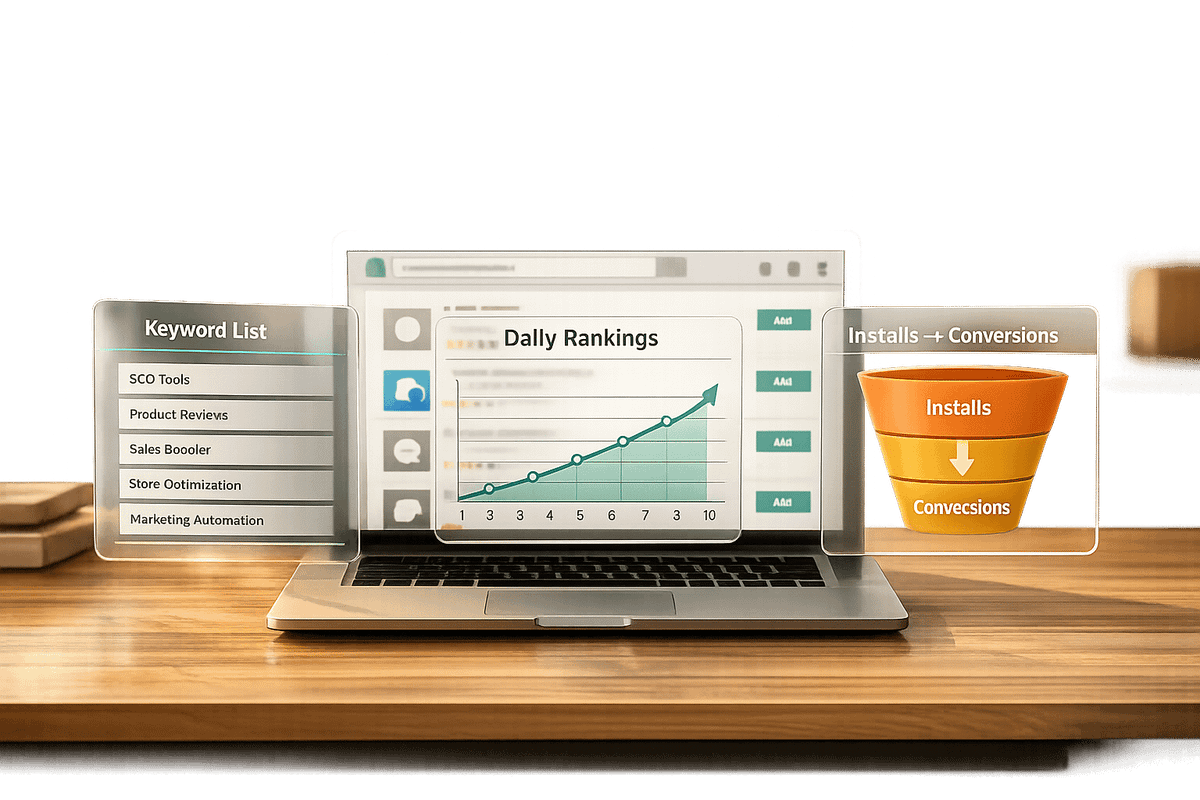
Tracking keyword rankings in the Shopify App Store is essential for app developers aiming to improve visibility and increase installs. With over 13,000 apps and 450 new ones added monthly, ranking higher for relevant keywords directly impacts your app’s success. Here’s how to do it:
- Understand keyword rankings: These determine where your app appears in search results for specific terms.
- Build a focused keyword list: Use terms related to your app’s features and customer pain points, leveraging Shopify’s autocomplete and competitor analysis.
- Track rankings with tools like AppJubilee: Monitor daily changes, connect keywords to performance metrics (installs, conversions), and analyze competitor strategies.
- Optimize app listings: Update titles, subtitles, and descriptions with priority keywords, but make changes one at a time to measure their impact.
- Review regularly: Use weekly and monthly reviews to refine keywords, track trends, and improve conversion rates.
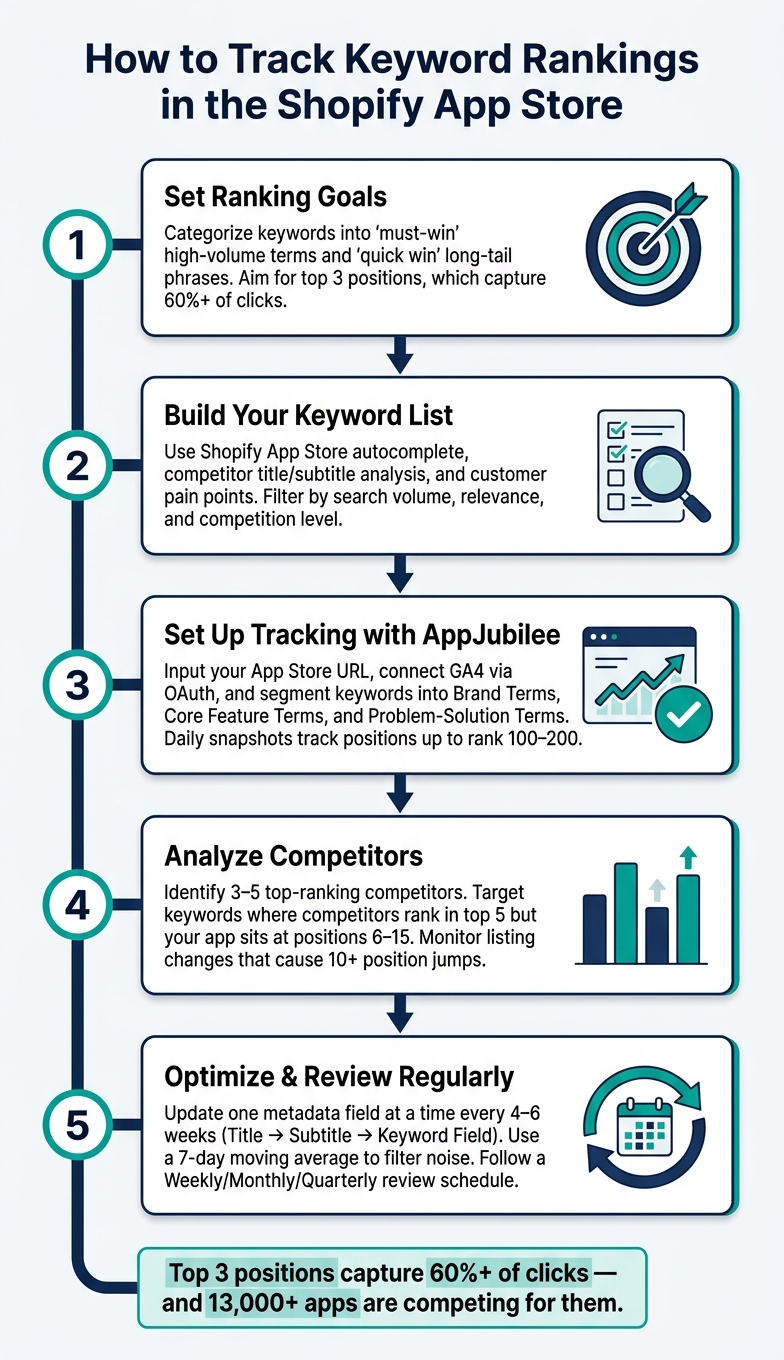
How to Track Keyword Rankings in the Shopify App Store
AppJubilee Keyword Intelligence for Shopify App Store - Demo
sbb-itb-ce93587
Building a Foundation for Keyword Tracking
Before diving into monitoring rankings, it’s crucial to establish a clear structure. Without defined goals or a solid keyword list, your tracking efforts may lead to vague or unhelpful insights. Start by laying the groundwork with clear ranking objectives to guide your efforts.
Setting Clear Ranking Goals
Focus on prioritizing keywords based on their potential impact. You can group keywords into two main categories: "must-win" terms and "quick win" opportunities.
- Must-win keywords are high-volume, competitive terms tied directly to your app’s core functionality. For example, terms like "upsell popup" or "inventory sync" are critical for visibility.
- Quick wins are less competitive, long-tail phrases such as "inventory sync app for Shopify dropshipping." These often have more specific search intent, making them more likely to convert.
To track progress, take a baseline snapshot of your rankings and aim for the top three positions. Apps in these spots typically capture over 60% of clicks.
Building Your Core Keyword List
The best way to build a keyword list is by thinking like a merchant. Consider the problems your app solves and how users might phrase those problems in a search. Start with your app’s core features and expand by incorporating pain points mentioned in customer reviews and support tickets. This approach ensures your keywords match the language merchants actually use.
Next, leverage the Shopify App Store autocomplete feature. Begin typing a core term and note the suggestions Shopify provides. These recommendations reflect real merchant search behavior, making them far more reliable than guesswork. Additionally, analyze the titles, subtitles, and descriptions of your top three competitors. The terms they emphasize are likely contributing to their traffic.
"The category term gets you considered. The workflow term gets you chosen." - StoreInspect Team
Once you’ve compiled a list, filter it using three key criteria:
- Search volume: How often merchants search for the term.
- Relevance: How closely the term aligns with your app’s function.
- Competition level: How strong the ranking apps are for that keyword.
This filtering process ensures your list remains focused and actionable, avoiding overly broad or highly competitive terms that are harder to rank for. Once refined, connect these keywords to performance metrics to measure their actual impact.
Connecting Keywords to App Performance Metrics
Tracking keyword rankings alone won’t provide the full picture. The real goal is to link ranking data to measurable outcomes like installs, trials, and conversions. By tying these metrics to your app listing updates, you can make more informed decisions that improve conversion rates.
The easiest way to track this is by integrating Google Analytics 4 (GA4) with the Shopify Partner Dashboard. This setup allows you to see which search terms are driving traffic to your listing and, more importantly, which ones are converting into installs. A key metric to monitor is the conversion rate per keyword. If a keyword generates traffic but has a low conversion rate, it’s a sign that your listing content might not align with what merchants are looking for.
| Metric | What It Tells You |
|---|---|
| Unique Page Views per Keyword | How much traffic a specific keyword is driving to your listing |
| Unique Events (Installs) per Keyword | The number of installs directly attributed to that keyword |
| Conversion Rate (% CR) | The percentage of visitors from a keyword who install your app |
| Bounce Rate (% Bounce) | The percentage of visitors who leave without installing, indicating a potential content mismatch |
"Rankings without download data and revenue context are vanity metrics. Always tie ranking changes to install volume before declaring success." - Niches Hunter
Setting Up Keyword Tracking with AppJubilee
Once you've built a solid keyword list, tracking is the next step to measure your progress. AppJubilee, designed specifically for Shopify app developers, makes this process straightforward - even if you're not tech-savvy.
Grouping and Segmenting Keywords
Before diving into tracking, it's important to organize your keywords into distinct groups. This approach helps you spot trends and act on insights more effectively. A practical way to structure your keywords is by using these three categories:
- Brand terms: These include your app's name and any branded variations that merchants might search for.
- Core feature terms: Keywords that describe your app's main functions, such as "upsell popup" or "inventory sync."
- Problem-solution terms: Longer, intent-based phrases like "how to recover abandoned carts on Shopify", which reflect the challenges merchants are trying to solve.
Keeping these categories separate allows you to monitor performance at a more detailed level. For instance, if your core feature keywords are improving but your problem-solution terms aren't, it could signal a need to tweak your messaging around specific use cases. Once your keywords are grouped, you can set up AppJubilee to make this data actionable.
Configuring AppJubilee for Keyword Tracking
To get started, input your Shopify App Store URL into AppJubilee. The platform will automatically pull details from your listing - like your app name, description, and screenshots - saving you the hassle of manual entry.
Next, connect your Google Analytics 4 (GA4) property via OAuth. This connection enables AppJubilee to pull keyword search data directly from Shopify through GA4. The result? You'll get reports that focus on actual install button clicks rather than just impressions, filtering out bot traffic and giving you a clearer view of merchant intent.
AppJubilee's Keyword Universe feature can also help you uncover additional relevant terms. Running your segmented keyword groups through this tool ensures you don't miss any opportunities before finalizing your tracking setup. This step lays the groundwork for continuous performance tracking.
Tracking Ranking Changes Over Time
AppJubilee keeps daily snapshots of your app's rankings by searching each keyword in the Shopify App Store. It scans results up to position 100 or 200 and logs your app's ranking with a timestamp. This daily tracking is crucial because Shopify's algorithm often adjusts rankings quickly based on factors like listing updates, reviews, or competitor activity.
Establish a baseline ranking when you finalize your listing or make a major update. Then, review weekly trends to connect ranking changes with specific actions or events. Over time, this routine transforms ranking data into actionable insights, helping you optimize your listing with confidence.
Analyzing Competitor Keyword Rankings
Once your tracking system is in place, the next step is to dig into competitor keyword rankings. This helps you spot opportunities by identifying keywords where your competitors rank but your app doesn’t. These gaps can guide your optimization efforts.
Finding Your Relevant Competitors
To get started, pinpoint competitors whose rankings reveal areas you can target. Apps that rank in the top 5 for your key terms are your direct competition. Begin by typing your app’s main use case into the Shopify App Store search bar. Take note of the apps that consistently show up at the top. Then, check the categories where your app is listed and examine how competitors frame their listings to address the same merchant challenges. This approach helps you uncover strategies that go beyond just matching features.
Once you’ve narrowed it down to 3–5 competitors, analyze their titles, subtitles, and descriptions carefully. Pay close attention to the keywords they prioritize in high-impact fields like the title. These choices reveal which terms they consider most critical for ranking.
Comparing Keyword Rankings Side by Side
Tools like AppJubilee’s Competitor Universe feature make it easy to compare your keyword reach directly with competitors. Look for keywords with a popularity score between 10 and 100 where your competitors rank highly, and your app falls between positions 6 and 15. Small adjustments to your listing can often bump you into the top three rankings, which account for over 60% of clicks.
"Analyzing your competitors' keywords is a strategic way to get direction for your ASO faster, and it's an integral part of keyword research." - Ariel, Appfigures
Keep an eye on how these insights align with any changes competitors make to their listings.
Tracking Competitor Listing Changes
A sudden jump of 10 positions for a keyword is often a sign that a competitor has updated their listing - perhaps tweaking their title or rewriting their description. AppJubilee’s Listing Changes & Impact Analysis feature tracks these updates, capturing changes in titles, descriptions, and even screenshots. This allows you to see how such adjustments influence rankings over time. By combining this data with your own ranking metrics, you can create a dynamic feedback loop, turning competitor analysis into a powerful tool for improving your app’s visibility.
Using Ranking Data to Improve Your App Listing
Now that you’ve got solid tracking and competitor insights in place, it’s time to put that ranking data to work. The goal? Refine your app listing to climb the rankings and attract more users.
Choosing Which Keywords to Prioritize
Start by focusing on keywords ranked between positions 5 and 15. These are the sweet spot: they have high search volume, align closely with your app’s purpose, and face weaker competition. To decide which keywords to prioritize, evaluate three key metrics:
- Search volume: How many people are searching for this term?
- Relevance: Does the keyword reflect what your app actually does?
- Competition strength: Are the top-ranking apps for this keyword easy to outperform (e.g., low reviews or poor ratings)?
If your competitors in these rankings have fewer reviews or lower ratings, you’ve got an opportunity to move up quickly.
On the flip side, don’t cling to underperforming keywords. If a keyword shows no improvement after 3 months, it’s time to drop it from your metadata and replace it with a term that has better potential. Once you’ve identified your top keywords, update your listing to reflect them.
Updating Your App Listing Content
Once you’ve zeroed in on the right keywords, it’s all about strategic placement. The Shopify App Store algorithm prioritizes these areas in order:
- App title: Place your most critical keyword here.
- Subtitle: Use this space for your next most important terms.
- Keyword field: Fill this 100-character space with comma-separated keywords (no spaces or repeats of words already used in the title or subtitle).
Here’s a critical tip: update only one metadata field per cycle. If you change both the title and the description at the same time, you won’t know which adjustment impacted your ranking. Stick to one change every 4–6 weeks for clean, actionable data. After making an update, give the algorithm 24–72 hours to re-index your listing, and expect to see ranking shifts within two weeks.
"Rankings drive impressions. Conversion rate turns impressions into organic downloads. Neglecting one while optimizing the other leaves significant growth on the table." - Niches Hunter Editorial
If your rankings improve but installs don’t, the issue isn’t your keywords - it’s your listing’s ability to convert. That’s the time to evaluate your screenshots, descriptions, or overall presentation instead of continuing to tweak keywords.
Building a Regular Review Process
To stay on top of your ranking data without overreacting to small fluctuations, establish a consistent review routine. Daily shifts of 3–5 positions are normal noise, so don’t stress over them. Instead, use a 7-day moving average to identify actual trends.
Here’s a sample review schedule to keep things organized:
| Review Frequency | Focus Area | Key Actions |
|---|---|---|
| Weekly | Performance pulse | Check 7-day install velocity, review competitor changes, and monitor trends |
| Monthly | Optimization | Assess 30-day averages; make one metadata update if needed |
| Quarterly | Strategic pivot | Analyze 180-day trends; drop stagnant keywords; identify new opportunities |
Set up automated alerts in tools like AppJubilee to notify you of significant drops (e.g., 10+ positions) in your primary keywords. This saves you from constant manual checks and ensures you only act on meaningful changes.
Spencer, founder of DropCommerce, emphasizes the importance of regular monitoring:
"This tool is a must have for your Shopify apps business. I've made it a routine to check it weekly to continuously optimize my app listing."
Don’t forget to track your progress toward the Built for Shopify (BFS) badge. As of May 2026, earning this badge requires at least 50 net installs from active shops on paid plans and a minimum of 5 reviews. Achieving this badge can significantly boost your rankings, so include it in your regular review process alongside keyword performance.
Conclusion
Tracking keyword rankings in the Shopify App Store requires continuous effort and attention. With over 13,000 apps vying for attention and approximately 450 new ones added each month, staying visible is a critical part of achieving growth.
The process itself is simple in theory: create a strong keyword list, monitor rankings regularly, and make informed adjustments based on the data. Developers who stick to this method often see measurable improvements by relying on steady, data-driven updates instead of guesswork. This guide emphasizes blending strategy with practical steps to achieve those results.
As Chris, founder of Gaintage, succinctly explains:
"Rank tells you what happened. Signals tell you what to do next."
Consistent reviews and focused updates are the foundation of successful app listing optimization. Metrics like review velocity, install clicks, and metadata changes provide actionable insights that not only enhance visibility but also boost conversions. By keeping a close eye on these factors and refining your approach, you can set your app up for long-term success in the competitive Shopify ecosystem.
FAQs
How many keywords should I track at once?
Tracking keywords can feel like a balancing act. While there isn't a magic number, aiming for 10 to 30 relevant keywords is a solid starting point. This range keeps things manageable and ensures you're gathering insights that truly matter.
Trying to monitor too many keywords? That can spread your efforts too thin. Instead, a focused list allows you to zero in on optimizing your app's visibility where it counts most. To make this process easier (and more effective), consider using keyword tracking tools. They can help you stay organized and improve your rankings without the guesswork.
How do I know if a ranking gain actually increases installs?
To determine if a boost in rankings leads to more installs, keep an eye on your app's keyword rankings and match them with your install data. Look at time periods where rankings improved and compare them to install numbers. If installs increase after higher rankings for key terms, it's likely there's a connection. Tools that combine keyword tracking with analytics can help spot these trends and confirm if ranking gains are driving downloads.
How long should I wait before changing my listing again?
It's best to wait 7–14 days before making additional changes to your Shopify app listing. This timeframe gives you enough room to gather meaningful data on keyword rankings and assess how your updates are performing. Keeping an eye on things during this period lets you spot trends, track competitor activity, and measure the success of your optimizations before deciding on your next steps.