
Shopify App Store Reviews: How to Use Them for Growth
Treat Shopify App Store reviews as a continuous growth engine — use them to prioritize fixes, sharpen listing copy, and boost installs.
If I want more installs from the Shopify App Store, I start with reviews. They shape trust, affect conversion, and point to what I should fix in the product and on the listing. In this guide, I’d use reviews to spot repeat issues, tighten my app copy, compare Shopify app optimization tools, and track whether each change improves ratings, installs, and churn.
Here’s the short version:
- Reviews help merchants decide fast. When install counts are hidden, people use star rating and review volume as a stand-in for popularity.
- Recent reviews matter most. The article puts extra weight on the last 90 days.
- 4.8+ stars tends to help conversion, while under 4.0 can hurt it.
- Replies matter too. When I reply to reviews, I show support activity and send a positive signal to the store.
- I shouldn’t react to one loud complaint. A simple rule in the article is to treat something as a pattern only if it shows up 3 times in 30 reviews.
- Positive reviews help copywriting. Merchant phrases like saved time or faster setup can become listing text.
- Negative reviews help prioritization. Bugs, onboarding friction, support gaps, and missing features should feed the roadmap.
- Competitor reviews are market research. They show feature gaps, setup pain, and support weak spots I may be able to target.
- I need a repeatable cycle. Weekly or every two weeks, I should tag new reviews, update the backlog, refresh competitor notes, and measure rating, install, conversion, and uninstall trends.
A simple way to think about it: reviews tell me what to fix, what to say, and what to compare. That makes them useful for both app store growth and product decisions.
Build a Review Analysis Workflow
Turn those signals into a review process you can run again and again.
Collect and Tag Reviews in a Consistent Format
Start with the newest reviews. For each one, log a small set of core fields: date, rating, region, app version, and use case. Then tag the review so you can sort problems by frequency and impact.
Use these review-type tags: praise, pain point, workaround, or feature request. If you need more detail, add theme tags like bug, UI/UX, performance, support, or pricing.
Once reviews follow the same format, it gets much easier to turn feedback into product calls.
Use a Spreadsheet or AppJubilee to Spot Patterns
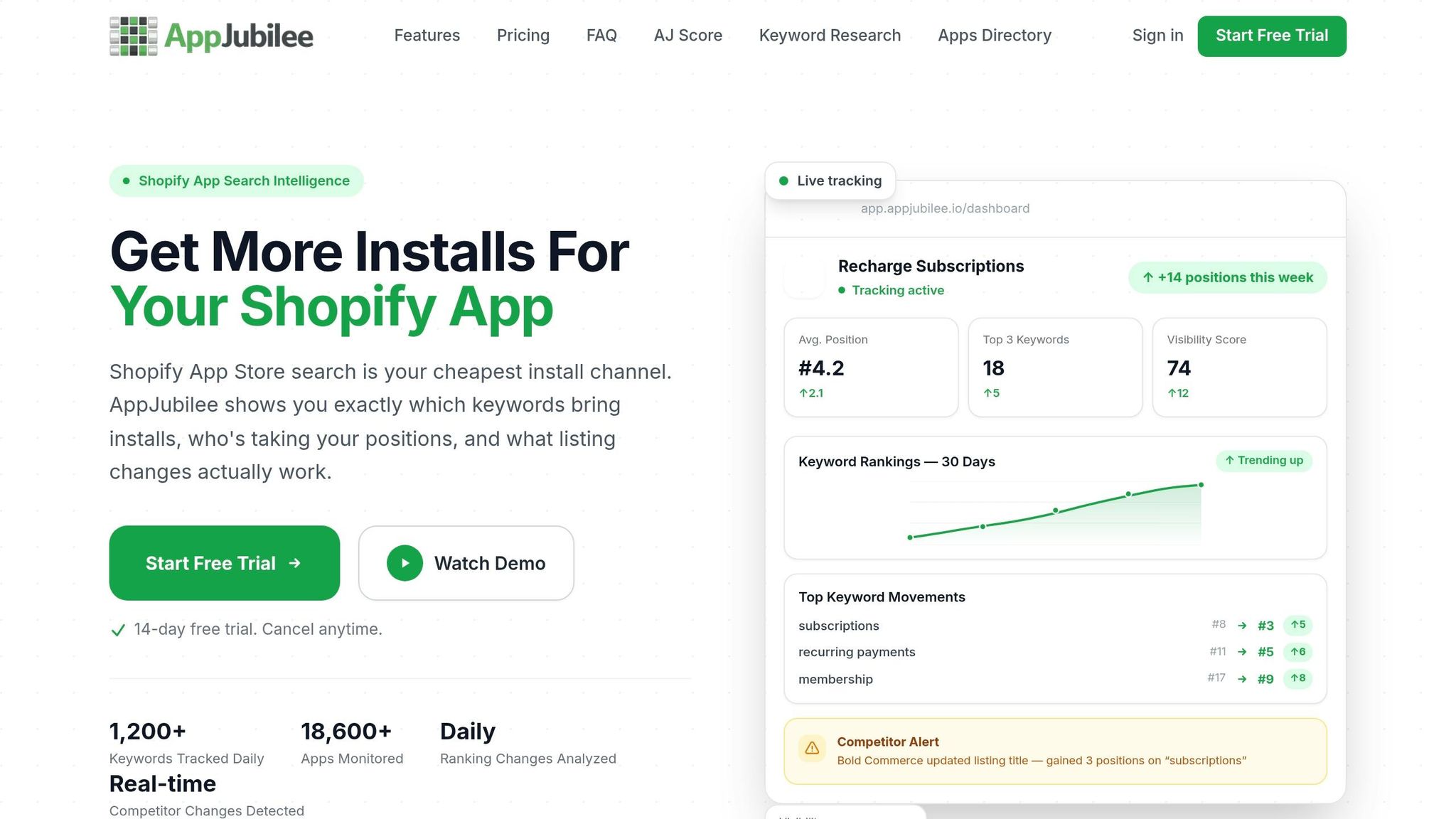
Use filters and pivot tables to rank tags and spot repeated gaps in the product.
For a tight review pass, work from a 30-review sample: read 15 one-star reviews and 15 three-star reviews. Three-star reviews are often the most useful because they tend to be detailed and constructive.
A good rule of thumb: if the same complaint shows up three times in 30 reviews, treat it as a pattern. If it shows up fewer than three times, it's more like an anecdote than a signal you should act on.
If you want everything in one place, AppJubilee can help you track reviews, watch trends over time, and get alerts when new reviews come in.
Those tags then feed into product fixes, listing updates, and competitor comparisons.
Raw Reviews vs. Tagged Reviews: Why Structure Matters Before You Prioritize
Reading reviews one by one is fine for a quick gut check. The problem is that it can pull your attention toward the loudest complaint or the newest one. Tagged reviews help you separate one-off comments from patterns that keep showing up.
| Approach | Advantages | Disadvantages | Best Use Case |
|---|---|---|---|
| Raw Reviews | Fast to read; captures unfiltered merchant language | High noise; hard to spot repeating feature requests | Quick sentiment check or deep-diving into a single complex complaint |
| Tagged & Structured | Reveals hidden patterns; enables data-driven prioritization; easy to share with dev teams | Requires initial time investment to tag; can strip away nuance if tags are too broad | Weekly growth sprints; building product roadmaps; benchmarking review themes |
Use raw reviews when you want a fast read on sentiment. Use tagged reviews when you need to decide what to fix, what to rewrite, and what to benchmark next.
Use the tagged data to choose the fixes and listing changes that matter most.
sbb-itb-ce93587
Turn Review Themes Into Product and Listing Improvements
Tagged review patterns should lead to action. Use them to guide product fixes, feature requests, listing copy, and how you track results.
Use Negative Reviews to Prioritize Fixes and Feature Requests
A simple rule helps here: move a complaint onto the roadmap only when it shows up at least three times in 30 reviews. That keeps one-off gripes from steering product decisions.
Then sort each theme by issue type:
- bugs that break core workflows
- onboarding issues that force workarounds
- support replies that confirm a missing feature
If several merchants point to the same workflow breakdown, that signal carries more weight than a single complaint. For example, if multiple reviews say the app fails above 500 SKUs, that's a pattern worth acting on.
These same themes often appear in competitor reviews too, which makes them useful for benchmarking.
Use Positive Reviews to Sharpen App Store Messaging
Positive reviews tell you what merchants like most about the app. That gives you a direct path to stronger listing copy.
Reuse outcome-driven phrases like saved time, higher revenue, and faster setup in your title, bullets, and screenshot captions. A caption such as Set up in 60 seconds can work better than a plain feature label because it speaks to a result merchants already called out in reviews.
"Merchants describe their needs in their own words - these words are often excellent keyword candidates." - Big Moves Marketing
In the app description, put the top pain points and outcomes in the first two sentences instead of hiding them farther down the page.
Track Before-and-After Impact on Ratings and Installs
Before making any change, log a baseline. After that, review performance each week for 90 days. Use the Shopify Partner Dashboard to watch listing views and install conversion rate. Also track review velocity to spot whether sentiment is getting better.
AppJubilee's listing change impact analysis and review tracking can help tie a specific update to shifts in ratings or installs.
Use this template to track each update:
- Change made: (e.g., bug fix, new feature, listing copy update)
- Baseline rating: (star rating before the change)
- Rating trend (90 days): (improving, stable, declining)
- Listing conversion rate trend: (improving, stable, declining)
- Install and uninstall trend: (improving, stable, declining)
In most cases, product fixes help retention, while listing copy changes help conversion.
You can also use the same tags to compare your review themes with competitor feedback.
Benchmark Competitor Reviews to Find Gaps You Can Win
After you tag your own reviews, stack them up against competitor feedback to spot the gaps merchants mention again and again.
Your review data shows only part of the picture. The rest is sitting in competitor listings, written by merchants who wanted something and didn't get it. Read those reviews through the lens of visibility, conversion, and positioning, and they become a direct input for both your listing and your product roadmap.
Set a Competitor Review Baseline
Start with 3–5 apps. Include:
- 2 direct competitors with the same core function and the same merchant type
- 1–2 adjacent competitors with similar features but different positioning
- 1 market leader for context
For each app, track total reviews, average rating, rating trend over the last 90 days, and review velocity, meaning new reviews per month.
Focus on the last 90 days of reviews first. That period carries the most weight in Shopify's algorithm.
Find Product, Onboarding, and Positioning Gaps in Competitor Feedback
As you read competitor reviews, look for phrases that keep showing up. Those repeated comments usually point to product issues, onboarding problems, or weak positioning.
| Review Pattern | What It Signals | How to Use It |
|---|---|---|
| "I wish this app could..." | Direct feature request | Roadmap candidate |
| "It works fine except when..." | Technical breakpoint | Position your app as the better fit for larger merchants |
| "Support told me this isn't possible" | Confirmed feature gap | Reliable brief for a new capability |
| "I had to export to Excel manually" | Workflow friction | Automate that step as a built-in feature |
| "Confusing" / "Too many steps" | Onboarding friction | Lead with simplicity in your listing |
The mapping here is pretty straightforward. A feature gap goes on the roadmap. Onboarding friction should shape your listing copy. Workflow friction points to a product fix.
Use the same 15/15 sample here too: 15 one-star reviews for volume and 15 three-star reviews for specifics.
"Your competitors' users are already telling you what matters. They highlight what's broken, what's missing, and what they expect." - Claire McGregor, Co-founder & Co-CEO, Appbot
If competitors leave 1-star reviews unanswered, that creates a positioning opening for you. Developer responsiveness is a ranking signal.
Compare Your App and Competitors in a Review Benchmark Table
Use this table to see where your app is ahead, where it's behind, and where it's exposed.
| Metric | Your App | Competitor A | Competitor B |
|---|---|---|---|
| Total Reviews | 150 | 1,200 | 450 |
| Avg. Rating | 4.9 | 4.2 | 4.8 |
| 90-Day Rating Trend | Improving | Declining | Stable |
| Common Positive Themes | Speed, UI Design | Pricing, Basic Features | Support, Ease of Use |
| Common Negative Themes | Price, Learning Curve | Bugs, Slow Support | Missing Advanced Features |
Update the table every 30 days.
Then use it to choose the next product fixes and listing changes to ship.
Make Review Analysis a Repeatable Growth System
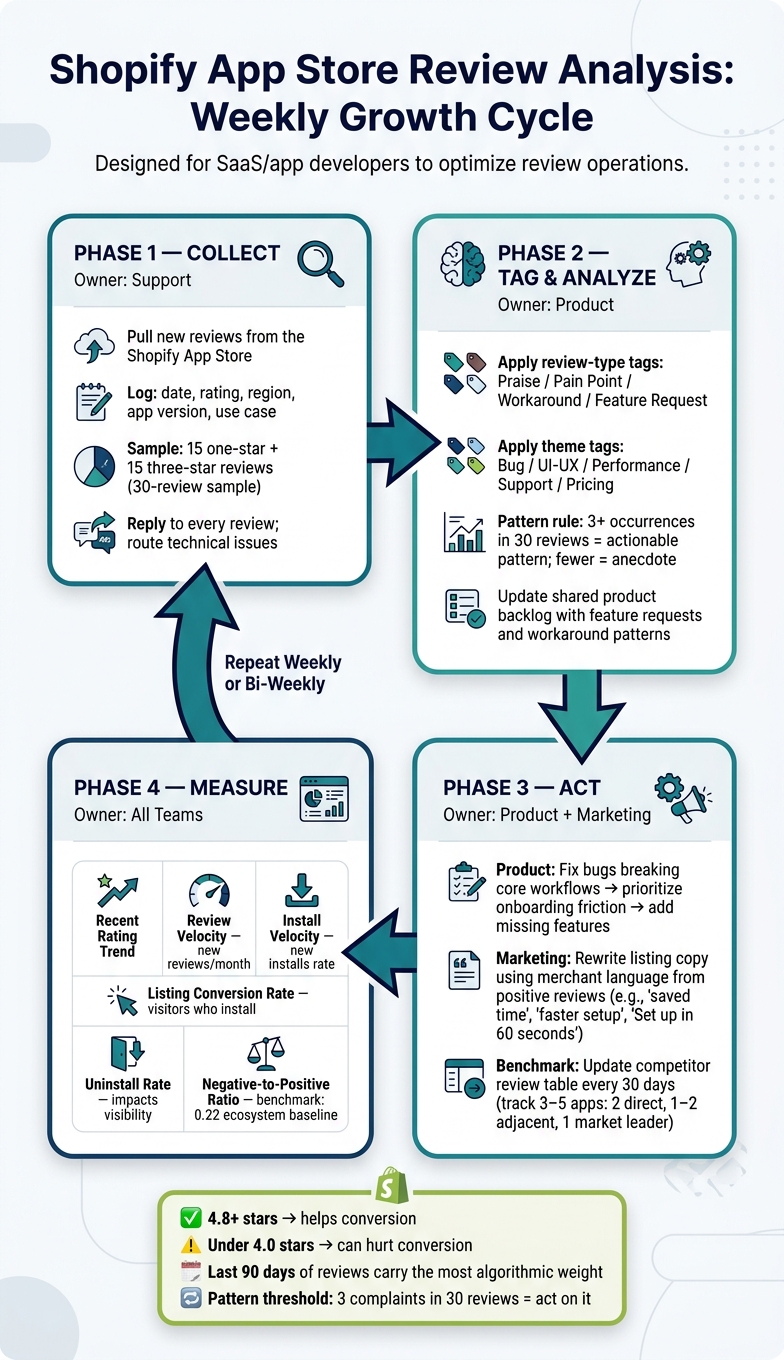
Shopify App Store Review Analysis: Weekly Growth Cycle
Once you’ve tagged reviews and built a benchmark table, the next step is to turn that work into a weekly habit.
Run a Weekly or Bi-Weekly Review Operations Cycle
The goal is simple: create a shared rhythm so review insights stay in motion instead of getting stuck in a spreadsheet.
Each cycle should do a few things. Pull in new reviews, tag each one by its main category, and pull verbatim quotes to use as review analytics evidence. Then update the shared product backlog.
Ownership should stay clear across three teams:
- Support: reply to every review and route technical issues before they block users
- Product: collect feature requests and workaround patterns
- Marketing: rewrite listing copy using merchant language from positive reviews
Once that rhythm is in place, keep using the same tags to check whether each change actually improved performance.
Measure the Business Impact of Review-Driven Changes
After each fix or listing update, look at the same set of metrics in the next cycle. The key is to track them together, not one by one.
| Metric | What It Tells You |
|---|---|
| Recent rating trend | Whether recent, useful reviews are getting better or worse; Shopify weighs newer, trustworthy reviews more heavily |
| Review Velocity | How fast new reviews are coming in; recent feedback matters more than old volume |
| Install Velocity | The rate of new installs over a recent window; a downward slope is an early warning sign |
| Listing Conversion Rate | The share of listing visitors who install |
| Uninstall Rate | High uninstalls can reduce visibility over time |
| Negative-to-positive ratio | Compare this against the ecosystem baseline of 0.22 |
Use each weekly cycle to decide the next fix, the next copy update, and the next benchmark refresh.
Conclusion: Use Reviews as a Direct Input to ASO and Product Growth
The point isn’t to collect review data for its own sake. The point is to turn that data into the next decision.
Teams that treat review analysis like a steady operating process - instead of something they only do after a bad rating - tend to get better visibility, stronger listing conversion, and lower uninstall rates.
"The App Store algorithm is just measuring how well you're doing that [building something merchants genuinely want to keep]." - Taylor Sicard, Ecosystem Strategist
FAQs
How many reviews do I need before trends are reliable?
With fewer than 20 reviews, you usually don't have enough signal to spot trends you can act on. If you want analysis you can trust more, the sweet spot is 200+ reviews.
If you're trying to define a specific feature, review 30 reviews total: 15 one-star reviews and 15 three-star reviews. Then look for at least three repeats of the same complaint. If a complaint shows up fewer than three times, it's usually just an anecdote.
What should I do first if my app rating drops below 4.0?
Start by looking through recent negative feedback to spot the main problem. In many cases, it comes down to bugs, setup friction, or a poor user experience.
Then respond to each negative review with care. A calm, thoughtful reply shows that you take the issue seriously and that you're there to help merchants, not brush them off.
If a review mentions a technical problem, reach out to the merchant directly and work on a fix. Once the issue is resolved, it's fine to ask whether they'd be open to updating their review. Just don't pressure them or offer rewards in exchange.
How can I ask for more reviews without annoying merchants?
Use neutral language and avoid incentives, since those can violate Shopify policies. Ask for feedback as a sincere invitation, not a nudge for positive reviews.
Put review requests in places that don’t get in the way of work or interrupt what someone is doing. One good time to ask is after a positive support interaction. Always give merchants a clear way to decline, and if they opt out, don’t ask again.