
Tracking Algorithm Changes with Ranking Snapshots
Daily Shopify app ranking snapshots reveal algorithm updates, separate noise from real drops, and guide recovery.

If your Shopify app drops in search overnight, don’t guess. Check your ranking history or compare Shopify ASO tools to see how tracking platforms differ. A same-day shift across many keywords, plus similar movement from competitors, often points to a Shopify ranking update, not a problem with your app.
Here’s the short version:
- Store search drives 60%–65% of app installs
- Top 3 results get more than 50% of taps
- Moving from #4 to #3 can lift keyword traffic by 40%–100%
- Normal daily movement is often around ±3 to 5 positions
- If 30%+ of tracked keywords move more than 3 spots in one day, that’s a strong warning sign
- A 14-day baseline and 7-day moving average help separate normal noise from a platform shift
- If 3+ competitors move the same way on the same day, the cause is more likely platform-wide
- Wait about 48 hours before editing your listing after a big drop, then track recovery over 7–14 days
I’d boil the article down to one point: daily ranking snapshots turn ranking drops into something you can read instead of something you have to guess at. They help me tell the difference between normal fluctuation, my own listing edits, competitor pressure, and a Shopify ranking change.
A simple way to think about it:
| What I’m seeing | What it usually means |
|---|---|
| Small daily keyword movement | Normal rank noise |
| Many keywords shift on one date | Possible algorithm change |
| Competitors shift too | Platform-wide change is more likely |
| Only my edited keywords move | Listing change is more likely |
| Rankings recover but installs don’t | Visibility may not be the main problem |
So the article’s main lesson is clear: track rankings daily, log every listing change, watch a few close competitors, and compare rank data with installs and conversion. That gives me a clean way to spot ranking updates before they turn into a bigger traffic and revenue problem.
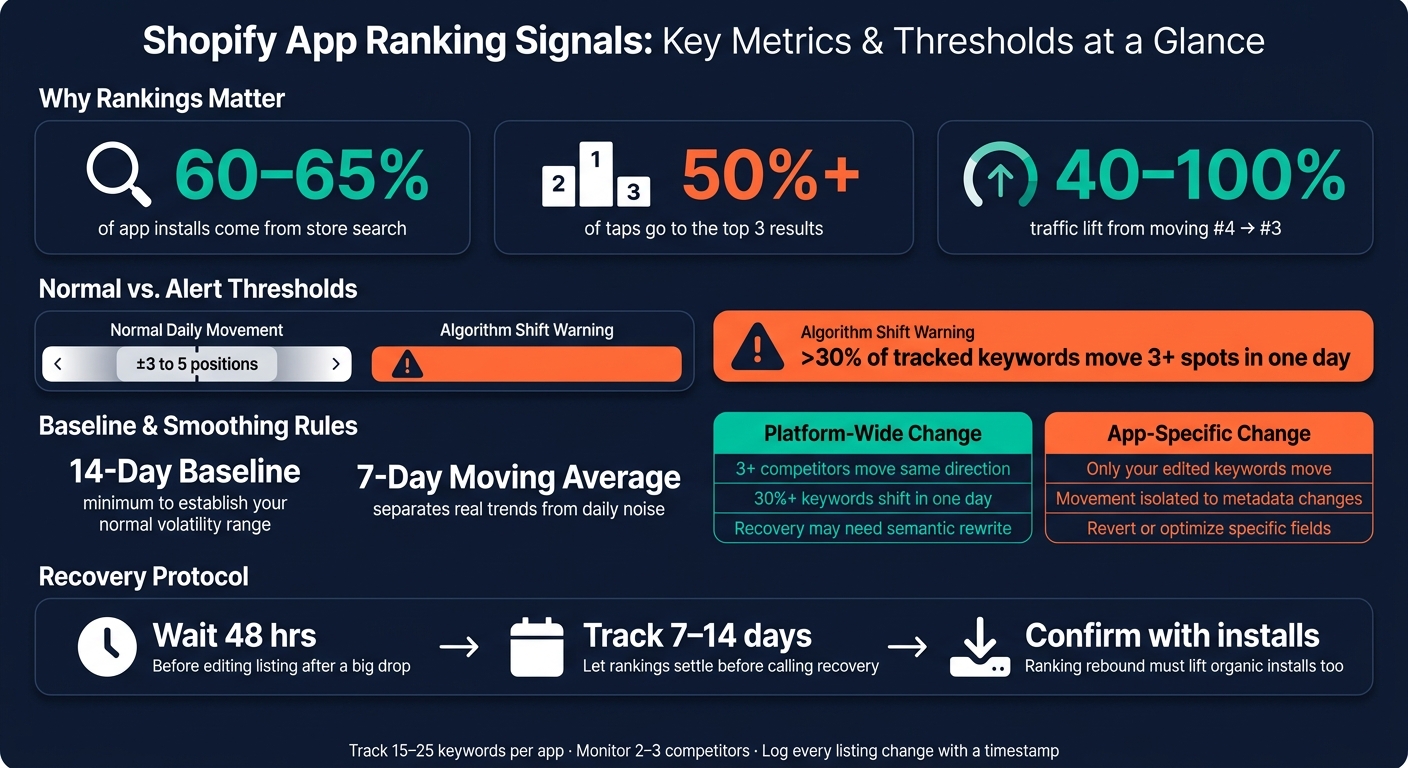
Shopify App Ranking Signals: Key Metrics & Thresholds at a Glance
How to Tell an Algorithm Change Apart from Normal Rank Noise
Shopify rankings move every day. That, by itself, isn't a red flag. The trick is to use snapshots so you can tell routine movement from a real shift. Snapshots give you a baseline, and that baseline lets you compare one day against the next.
Start by defining what's normal. Then look for breaks in that pattern. In most cases, day-to-day rank movement stays within a ±3 to 5 position band. That's normal noise. It usually comes from changing download patterns, small competitor moves, and rankings recalculating all the time.
Common Signs of an Algorithm-Driven Shift
What stands out is synchronized movement across a lot of keywords on the same date, especially when you haven't changed the listing.
If 30% or more of your tracked keywords move by more than 3 positions in a single day, that's a strong sign of an algorithm shift. The case gets stronger when that movement shows up across an entire category, not just a handful of terms.
Mixed movement matters too. During an update, some keywords can go up while close variants drop. That kind of split often points to Shopify reweighting search intent.
Why analytics data Alone Are Not Enough
When rankings fall, installs usually fall too, but not right away. Installs and revenue tell you the impact. They don't tell you the cause. By the time installs dip, the ranking change is already sitting in your snapshot history.
Without daily snapshots, you're left piecing the story together after the fact. Was it a competitor push? A listing problem? A platform-wide update? Snapshots help you see when the shift began.
That timing is what helps you isolate the trigger.
sbb-itb-ce93587
Using Ranking Snapshots to Detect, Confirm, and Isolate the Cause
Use your baseline to tell the difference between platform-wide movement and changes tied to your app.
Set a Daily Baseline for Core and Long-Tail Keywords
A good baseline starts with the right keyword mix. Track 15–25 keywords per app, split across core high-intent terms, feature-specific phrases, and long-tail queries. Each group gives you a different signal. Core terms show your overall visibility. Long-tail terms help you spot traffic from narrower searches.
Track rankings every day at the same time. Weekly snapshots can miss short swings that still matter, which is why a 14-day baseline gives you a clearer view of your app’s normal volatility range. To cut down on one-day noise, pair daily snapshots with a 7-day moving average. Daily data shows when a shift starts. The moving average helps you see whether it’s a real trend or just a blip.
Use that baseline to flag movement that falls outside your normal pattern. Then check whether other apps moved too.
Compare Snapshot Patterns with Competitor Movement
Compare your snapshots with apps in the same category to spot platform-wide movement. If your rankings drop and three or more competitors move the same way for the same keywords, that usually points to a platform-wide change instead of an app-specific issue.
Treat these as likely algorithm signals:
- 10+ point jumps
- 30%+ keyword movement
- Shared competitor shifts on the same day
AppJubilee's competitor analysis and Competitor App Watch feature let you track other apps in the same category next to your own ranking snapshots. That makes it much easier to spot matched movement fast.
If peer apps stay steady, the next step is simple: look at your own changes.
Separate Algorithm Impact from Listing Edits
Log every title, description, and pricing change with a timestamp. Then compare snapshots from before and after the edit. In many cases, algorithm shifts show up within 24–48 hours, while listing edits play out over several days.
| Feature | Algorithm Update Pattern | Listing Edit Pattern |
|---|---|---|
| Scope | Multiple keywords shift across the board | Impact is usually isolated to keywords added or removed |
| Competitor Movement | Other apps in the same category move in the same direction | Competitors remain stable or move independently |
| Recovery Path | May require semantic rewriting or UX fixes | Requires reverting or further optimizing specific metadata fields |
Timestamped edits help you rule out self-inflicted problems before blaming the platform. Also watch for overlap. A review surge landing in the same window as a listing edit can muddy the picture and make the trigger harder to pin down. When timing, keyword scope, and competitor movement line up, the cause becomes much easier to identify.
What to Do After a Ranking Shift
Once your snapshots confirm the shift, stop guessing and start acting. The goal now is simple: focus on the keywords and fixes that can move the needle the most.
Prioritize the Keywords and Categories That Matter Most
Start with your highest-value keywords: title, subtitle, and the top 3–5 keyword-field terms. After that, look at keywords sitting in positions #4–8. That range matters a lot. Moving a keyword from #4 to #3 can increase keyword traffic by 40–100%, so this is often the first place worth your time.
Don’t look at rankings in isolation. Match your ranking snapshots with organic installs and conversion rates to see what’s actually changing. A ranking drop with steady installs points to one kind of issue. Flat rankings with lower conversion points to another. That’s how you tell whether the problem is visibility, conversion, or listing relevance.
Adjust Your Listing Based on Observed Ranking Patterns
If a shift is ±20 positions or more, wait 48 hours before you touch the listing. Moving too fast can trigger re-indexing or quality checks, which makes it harder to tell what caused the original drop.
If the drop is still there after 48 hours, use your snapshots to read what the algorithm seems to be favoring. If competitors that moved up recently changed their titles or subtitles, that’s a clear sign to review your own metadata, such as json ld for seo fields. If apps with stronger review velocity gained ground, the issue may be ratings, retention, or review recency. And if your app is stuck between #15–30 even with solid metadata, the problem usually isn’t more keyword edits. It’s often weaker ratings, retention, or review recency.
One more thing: don’t repeat the same keyword in your title, subtitle, and keyword field. That doesn’t stack ranking power anymore, and it can lead to deindexing for keyword stuffing.
Track Recovery Against a New Baseline
Don’t call it a recovery too soon. Give rankings 7–14 days to settle after a shift or listing update. And don’t rely on one day of data. Use a 7-day moving average to separate actual recovery from normal noise.
A ranking rebound only counts if it also improves organic installs and conversion rates. The cleanest way to check that is to pair ranking snapshots with GA4 so you can see both in one place. Once that new level holds, use it as the baseline for your next round of tracking.
Conclusion: Build a Repeatable Algorithm Monitoring System
Algorithm shifts don't send a warning. One week your rankings look steady. The next, a core keyword slips and there's no clear reason why. Teams recover fastest when they already have a clear record of what changed.
That's why ranking snapshots matter. They're not just a log of past movement. They're part of your monitoring system. When rankings drop, snapshots give you a timeline you can work with. You can trace the drop back to a listing edit, a competitor move, or a platform-wide recalibration. Instead of guessing, you get a sequence of events you can read.
The system itself doesn't need to be complicated: daily snapshots, alert thresholds, and a timestamped change log. Then connect that ranking data to GA4 and Shopify Partners so you can see whether a shift is affecting installs and traffic.
Key Takeaways for Shopify App Teams

In practice, this stays pretty simple. The core pieces are:
- Maintain at least 30–90 days of ranking history to separate normal noise from real trends
- Track 2–3 competitors on the same keywords for context on your own movements
- Document every listing change with a date to separate self-inflicted drops from algorithm-driven ones
- Connect ranking data to installs and traffic to confirm whether a recovery is holding
The goal is straightforward: keep enough history to spot algorithm changes before they turn into revenue problems.
FAQs
How many keywords should I track each day?
Begin with 20 to 30 core, high-priority keywords that match your app’s positioning. Once your process gets more dialed in, expand that list to 50 to 100 keywords to reach more searches.
If it fits the way your team works, AppJubilee tracks more than 1,200 search keywords each day. No matter how long your keyword list is, daily tracking helps you spot ranking jumps and drops before they turn into bigger problems.
How can I tell if a ranking drop came from my listing edits?
Use a change log to track the exact date of each update, what changed, and the keywords you targeted. With that record in place, AppJubilee can match listing edits with past ranking charts, so you can see the before-and-after impact more clearly.
Then give app stores 14 to 30 days to re-index the new metadata. During that stretch, don’t keep tweaking things. Early ranking swings are common, and if you change too much at once, it gets hard to tell what moved the needle.
What should I do first after a sudden ranking drop?
Don’t react right away. Normal day-to-day swings can shake up rankings even when things are fine.
Start by checking whether the drop is limited to one keyword or showing up across several. In AppJubilee, look for likely causes like a competitor move, a listing update, a spike in reviews, or an algorithm change. Then watch it for 5 to 7 days to see if it turns into a steady trend.