
How to Analyze Competitor App Review Sentiment
Turn competitor app reviews into action: collect clean data, label sentiment, tag themes, and prioritize listing, product, support changes.
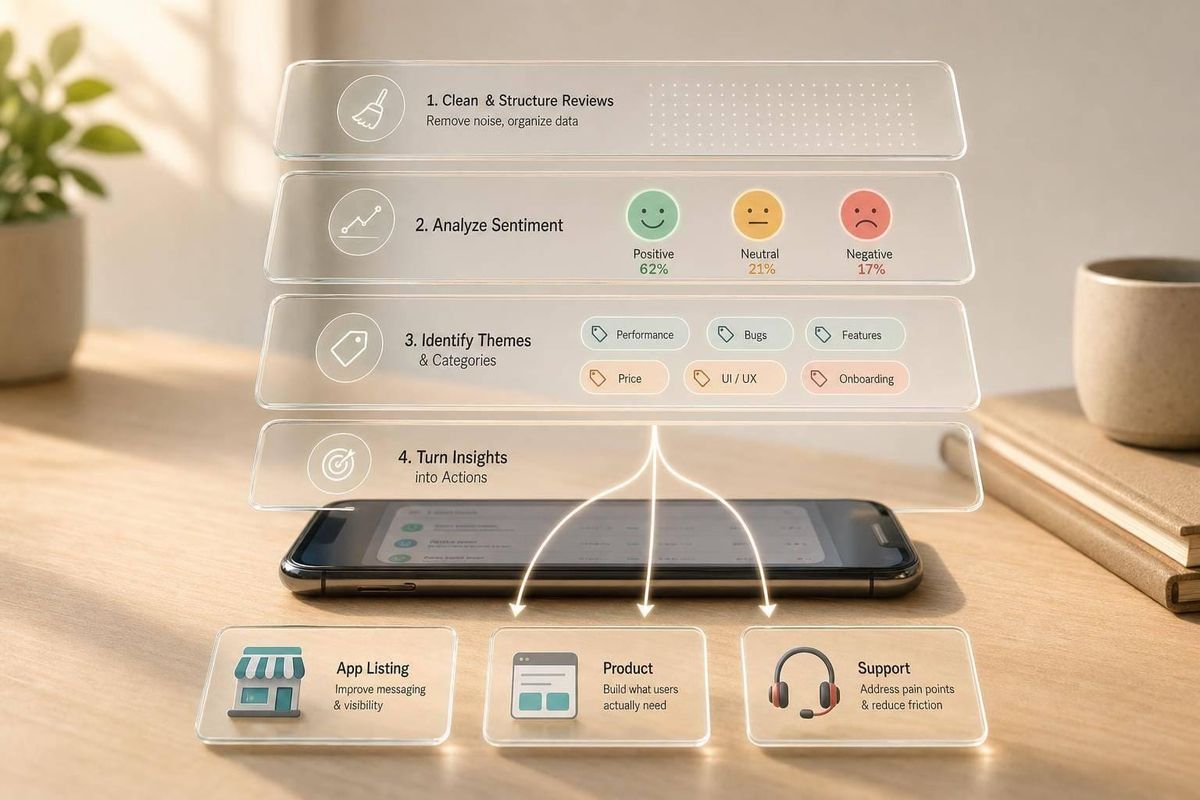
Star ratings tell you how merchants felt. Review text tells you why. If I want useful competitor insight, I need to do four things: build a clean review dataset, label sentiment the same way every time, tag recurring issues like PRICING or SUPPORT, and turn those patterns into listing, product, and support changes.
Here’s the short version:
- I start with 5–15 direct competitors
- I pull reviews into one clean table
- I filter to a 12-month window and flag the last 90 days
- I label reviews as positive, negative, mixed, or unclear
- I tag up to 3 themes per review
- I compare patterns by app, theme, frequency, and recency
- I use repeated complaints and praise to guide ASO copy, roadmap choices, and support fixes
A few numbers matter right away: 4–5 star reviews usually lean positive, 1–2 stars lean negative, and 3 stars often land in mixed. I’d also separate newer feedback because what merchants said in the last 30, 60, or 90 days often matters more than older complaints.
What I like about this process is that it keeps me out of guesswork. Instead of saying, “Competitor X has a 4.3,” or trying to compare Shopify app optimization tools manually, I can say, “Competitor X gets hit on billing, setup, and slow replies, and those complaints have grown in the last 90 days.” That’s the kind of input I can use.
If I had to sum up the article in one line, it would be this: treat competitor reviews like a decision tool, not just a rating check.
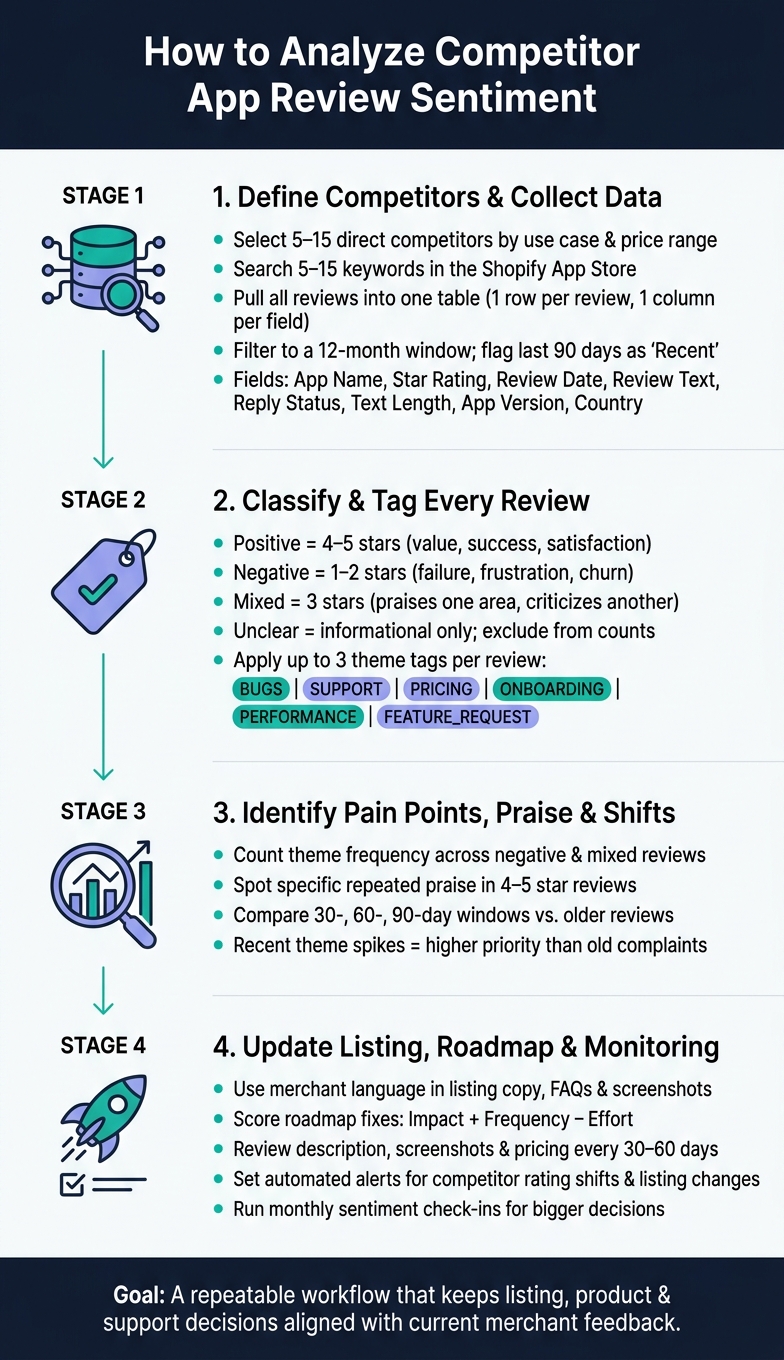
Competitor App Review Sentiment Analysis: 4-Step Workflow
How to Use Sentiment Analysis to Spot Problems | Brand24
sbb-itb-ce93587
1. Define your competitor set and collect clean review data
Start with a direct competitor list and one clean review table. If either piece is messy, sentiment patterns get noisy fast and the output is hard to use.
Choose direct Shopify App Store competitors by use case and merchant segment
A direct competitor solves the same merchant problem, goes after a similar store size, sits in about the same price range, and appears for the same search terms. That matters because the same merchants, keywords, and price bands usually lead to the most apples-to-apples review sentiment.
Here’s a simple example. If you make a product review widget for small DTC brands priced from $19 to $79/month, compare it with other review apps built for that same group, not broad platforms with a different main job.
Start by listing 5–15 keywords merchants use to find apps like yours. Think terms like "product reviews", "subscriptions," or "upsell." Search each term in the Shopify App Store and record the top 10–20 results. Then trim the list. If an app only includes your use case as a side feature, leave it out.
Your goal is a final set of 5–15 apps that compete for the same search intent. Built for Shopify certification can also help narrow the field, since certified apps often sit closest to the install-ready merchants you want to study.
Once you lock the competitor list, put every review into one standard dataset.
Pull reviews into one dataset and standardize the fields
Pull reviews into a single spreadsheet or database with one row per review and one column per field. This gives your team one shared format, which makes cross-app comparisons much easier.
Include these fields:
| Field | Format Example | Why It Matters |
|---|---|---|
| App Name | "Yotpo Product Reviews" | Groups reviews by competitor |
| Star Rating | 1–5 (numeric) | Aligns with sentiment labels |
| Review Date | 07/17/2026 | Enables date filtering and trend analysis |
| Review Text | "Setup was easy but billing surprised me…" | Core material for theme tagging |
| Reply Status | Yes / No | Signals support responsiveness |
| Text Length | 210 characters | Flags thin vs. detailed feedback |
| App Version | 3.4.1 | Helps pinpoint shifts after updates |
| Country/Region | United States | Surfaces geographic patterns |
Use numeric ratings and en-US formatting across the whole dataset. Small formatting mismatches sound minor, but they can throw off filters and reporting later.
With the fields cleaned up, move to date filtering and deduping before you tag sentiment.
Filter by date range, remove duplicates, and separate recent reviews
Filter the full dataset to a 12-month window, then flag the last 90 days as recent. The 12-month view shows persistent patterns and sentiment shifts after product updates. The 90-day slice shows what merchants are running into right now.
Add a Recency Flag column with Recent = Yes for the last 90 days and No for older reviews. That gives you a quick way to switch between long-term and current views.
Then clean the file:
- Remove duplicates, spam, and non-review entries
- Sort by app name, date, and text
- Delete exact duplicates
- Reject any rating outside 1–5 as an import error
That cleaned dataset becomes the input for sentiment labels and theme tags in the next step.
2. Tag sentiment and group reviews by theme
Once your dataset is clean, the next step is simple: label each review and tag the themes it mentions. That gives you a way to compare competitor feedback apples to apples. It also sets up the pain-point scan in section 3.
Classify reviews as positive, negative, or mixed
Start with the rating, then check the written review to make sure it lines up. In most cases, 4–5 stars lean positive, 1–2 stars lean negative, and 3 stars usually fall into mixed.
Set the rules before anyone starts tagging:
- Positive: merchant reports value, success, or satisfaction.
- Negative: merchant reports failure, frustration, or churn.
- Mixed: merchant praises one area and criticizes another.
That last point matters more than it may seem. If a problem would likely affect a merchant’s decision - like recurring bugs, confusing pricing, or slow performance - tag it as mixed, not positive.
Short reviews like Good or Works fine don’t give you much to work with. In those cases, let the rating guide the label and mark the review as low-context. If a comment is just informational and doesn’t show a clear opinion, tag it as neutral/unclear and leave it out of sentiment counts.
Put all of this into a one-page sentiment rubric that the whole team uses. The goal isn’t perfect tagging on every single review. The goal is consistency, especially when more than one analyst is working through the same dataset.
Create theme tags for bugs, support, pricing, onboarding, performance, and feature requests
After sentiment is set, tag the themes merchants are talking about. Keep tag names short and standardized, and use up to 3 tags per review. Use the exact same tag names across every competitor so your frequency counts stay comparable.
| Tag | What It Covers |
|---|---|
BUGS |
Errors, crashes, broken functionality, integration failures |
SUPPORT |
Response time, helpfulness, tone of customer service |
PRICING |
Cost, billing issues, perceived value, plan limits |
ONBOARDING |
Installation, setup, initial configuration, documentation |
PERFORMANCE |
Site speed impact, reliability, checkout behavior |
FEATURE_REQUEST |
Missing capabilities, requests like… |
A shared tag dictionary helps keep this clean. For each tag, write down one label per concept and add two or three example review excerpts. That may sound small, but it saves a lot of cleanup later.
For example, if one analyst uses SUPPORT and another uses CUSTOMER_SUPPORT, your pivot tables start to fall apart. Then cross-app comparisons get messy fast.
A review that says the app works well and boosted conversion, but support took three days to reply and the page speed impact is noticeable would be labeled Mixed and tagged
SUPPORT+PERFORMANCE.
Use a sentiment theme comparison table
A sentiment-theme comparison table helps turn raw tags into something you can act on.
| Competitor | Theme | Sentiment Direction | Frequency | Merchant Impact | Recommended Action |
|---|---|---|---|---|---|
| Competitor A | SUPPORT |
Negative | High | High (Rating drop) | Highlight faster response times in your listing |
| Competitor A | PERFORMANCE |
Mixed | High | High (Store speed concerns) | Optimize code; add performance messaging to your listing |
| Competitor B | PRICING |
Mixed | Medium | Moderate | Introduce a lower-tier Starter plan to capture price-sensitive users |
| Competitor C | ONBOARDING |
Positive | High | High (Install growth) | Audit their setup flow to identify time-to-value shortcuts |
| Competitor D | BUGS |
Negative | Low | Medium | Prioritize stability fixes and monitor recurring issues |
| Competitor E | FEATURE_REQUEST |
Mixed | Medium | Low | Track missing features and compare against your roadmap |
Putting Merchant Impact and Recommended Action in the same table is where this gets useful. Instead of just seeing what people complain about, you can see what matters most and what your team should do next.
Use this view to spot repeated complaints, repeated praise, and changes over time.
3. Find pain points, praise patterns, and gaps worth acting on
Once your sentiment and theme tags are set, use them to sort the patterns that matter most. Some complaints are just noise. Some compliments sound nice but don't tell you much. Here, you're looking for three things: pain points, praise patterns, and shifts over time.
Identify repeated complaints in low-rated and mixed reviews
A real pain point shows up across different merchants and different dates. It isn't just one person having a bad day. Filter for negative and mixed reviews, then count how often each theme appears.
Look at frequency and severity together. A bug that breaks checkout is a big deal even if only a handful of merchants mention it. On the flip side, a small UI annoyance that shows up again and again matters too, but in a different way.
The wording matters a lot here. If merchants say things like "too complicated" or "hidden charges," they're pointing to a specific kind of friction. That language is useful. You can use it in your FAQ copy and help docs so your pages speak the way merchants speak.
Spot strengths merchants consistently praise
Reviews in the 4–5 star range show you what's worth keeping safe. Focus on praise that is both specific and repeated.
"support answered in 10 minutes"
"setup took less than 5 minutes."
That level of detail usually points to a real edge.
Now compare that with praise like "works fine." Comments like that usually mean the competitor is doing the job, not standing out. If most of the positive feedback sounds flat or basic, the app may be doing okay without giving merchants a strong reason to pick it. That's a gap you can go after.
Repeated, specific praise also shows you what not to mess up on your own roadmap.
Check whether sentiment shifts over time
Looking only at the overall sentiment score can hide what's changed. A better move is to compare older reviews with the last 30-, 60-, and 90-day windows.
That often tells a clearer story. Maybe older reviews complain about bugs, while newer ones focus on billing confusion. In that case, the product may be more stable now, but new friction has shown up on the business side. A theme that starts showing up in recent reviews deserves more attention than an old issue that faded after a patch.
Put simply: recent changes matter more than old complaints.
Those shifts will help guide the listing, product, and support updates in the next step.
4. Turn review sentiment into listing, feature, and support changes
Use your sentiment table and pain-point list to decide what to change next in three places: your listing, your roadmap, and your monitoring setup.
Update listing copy with merchant language and trust signals
Use repeated merchant phrases from competitor reviews in your title, description, and benefit bullets - but only when the claim is true. Pull the exact wording from the reviews you tagged. Phrases like "saved us hours on order fulfillment" or "setup took under 10 minutes" come from actual merchant experience. They also show how merchants already compare apps.
Negative competitor reviews help just as much. If merchants complain about "confusing pricing" or "no help during setup", address those points head-on in your FAQ and description. A line like "Transparent flat-rate pricing - no hidden fees" or "Guided onboarding with US-based support available Monday–Friday, 9:00 AM–5:00 PM PT" answers known objections before a merchant even asks.
Review your description, screenshots, and pricing every 30 to 60 days.
Your screenshots should show what merchants care about most. If competitor reviews keep praising a certain report type or dashboard view, show your version of it. Use U.S. date and currency formats, and highlight the same report types merchants mention in reviews.
Prioritize roadmap fixes and feature opportunities
Score each theme from the negative and mixed reviews you tagged based on frequency, impact, and effort. Then rank them with this formula: impact + frequency − effort.
Recurring weak spots are often the clearest product openings. If the same complaint shows up across dozens of 1–2 star reviews and your app handles that issue well, that's something worth calling out. If your app has the same gap, fix that first.
Repeated praise tells you what merchants now expect by default. If several competitors get positive reviews for responsive support or a certain integration, that’s table stakes. You need those in place just to keep up. After that, look for the gaps where you can do more.
Set up ongoing monitoring with review intelligence and competitor alerts
Treat review sentiment like a live feed. The Shopify App Store moves fast. A competitor can roll out a major update, get hit with a wave of complaints, or change their listing copy with little warning. If you’re not watching, you’ll spot the shift only after it affects rankings.
AppJubilee supports this for Shopify app teams. Its review intelligence tracks sentiment patterns over time, and competitor alerts notify your team when a rival’s rating shifts or their listing changes in a material way. Pair that with daily keyword tracking and ranking snapshots, and you can see whether a spike in negative reviews lines up with lower visibility or ranking changes. That makes it easier to time your own listing updates.
Review velocity matters too. An app gaining 50 reviews in 30 days can outrank an app with 500 static reviews.
Once you rank the fixes, keep watching for shifts in competitor sentiment. A shared dashboard works well here. So does a monthly review cadence:
- Use automated alerts for urgent signals
- Use monthly check-ins for bigger decisions
That gives your team a repeatable loop for making listing, product, and support decisions.
Conclusion: Build a repeatable sentiment workflow for better Shopify App Store decisions
Competitor review sentiment analysis pays off when it becomes a habit, not a one-off project. Sentiment gets old fast. What merchants said six months ago may not match what they’re saying now. That’s why a repeatable workflow is more useful than a single snapshot.
Use the tags and table from earlier sections to turn patterns into action. Take the clean dataset, sentiment labels, and theme tags, then use them to decide what to change in your listing, roadmap, and support.
The big difference is cadence. Review sentiment works best as a recurring process, not a one-time audit. AppJubilee can help keep that workflow current with review intelligence and alerts.
To keep the workflow current, start with the newest merchant feedback. Use recent reviews for tactical decisions, and use a 12-month window to check trends. Keep your tagging taxonomy consistent so your comparisons still mean the same thing over time.
The goal is a system that keeps listing, product, and support decisions aligned with current merchant feedback.
FAQs
How many reviews do I need for useful sentiment analysis?
Put more weight on review velocity than on a fixed total. A steady flow of new reviews is often more useful for sentiment analysis than a static review count.
As a starting point, new apps need at least 10 reviews in their first 30 days to build traction and visibility. And even if an app has fewer than 50 reviews, you can still pull useful insights from them, especially around specific problem-based keywords.
Should I tag reviews manually or automate the process?
Automating review tagging is usually the better option if you want consistency and less manual work. Tagging reviews by hand takes longer and leaves more room for human error. Automation makes it much easier to scale insights as review volume grows.
With AppJubilee, you can analyze review sentiment across eight topic categories. That gives you a clearer view of repeat pain points, so you can improve your app listing, features, and support workflows.
How often should I update my review sentiment analysis?
Analyze competitor review sentiment on a steady basis, with a formal review at least once a week. That gives you a clear read on what’s changing in the market before those shifts start to hurt.
When you monitor reviews often, you can spot new pain points, see when a competitor starts gaining momentum, and react before ranking drops turn into bigger problems.