
Competitor Rank Swings Hide Keyword Gaps
Spot competitor rank swings early, classify keyword gaps, update listing copy, and recover search visibility before installs fall.
If a competitor jumps on one of your money keywords, I’d treat it as a keyword gap first, not random rank noise.
Here’s the short version: when an app moves from page two to the top results in 7 to 30 days, it usually comes from changes in listing copy, review flow, or term coverage. And that matters fast, because 62% of installs come from the top 10 results. If I wait 6 to 8 weeks to spot the shift, I’m often too late to stop the damage.
What I’d do right away:
- Check the exact keyword, not just category movement
- Look at 7-day and 30-day rank changes to filter out noise
- Classify the gap as:
- Complete gap: I don’t rank at all
- Ranking gap: I rank, but far below the competitor
- Coverage gap: they rank for a whole term cluster and I don’t
- Score terms by relevance, demand, and chance of improvement
- Update title, short description, and opening copy
- Review results after 14 to 30 days
A few patterns stand out from the article:
- Title edits can move rankings in about 7 days
- Description changes often show impact in 7 to 14 days
- Review spikes can help within 7 to 14 days
- Daily swings of about ±5 spots on high-value terms are often the point where I’d dig deeper
- A move like #12 to #4 on a core keyword is usually a signal worth acting on
My takeaway: rank swings are early warning signs. If I track keywords daily, log competitor moves, and fix gaps in the listing before traffic drops show up, I give myself a much better shot at holding search visibility.
That’s the point of this piece: I’m not trying to explain every ranking move. I’m trying to spot the missed keyword behind the swing and fix it before installs drift away.
Keyword Gap Analysis: Find the Keywords Your Competitors Are Ranking For
sbb-itb-ce93587
What competitor rank swings mean for Shopify App Store search
A competitor rank swing is a fast jump or drop for one search term. Most of the time, that points to a keyword gap, not a market-wide shift. So when you spot a swing, don’t stop at “they moved up.” Find the term they picked up that you’re missing.
Keyword rank swings vs. category movement
Category rankings move at a slower pace because they blend a lot of signals, like installs, revenue, and retention. That makes them useful for a broad health check. But they won’t show which search terms are behind the movement.
Keyword swings are more direct.
If a competitor goes from #12 to #4 for "Shopify subscription app" in a week, that’s a clear sign tied to a query merchants are actively searching. Your category rank might barely move at all, and you can still lose search visibility where it hurts most.
Daily movement of about ±5 positions on high-value keywords is often where teams should dig in. Smaller shifts are often just noise.
Put simply: keyword movement shows you the term that needs attention. Category movement only tells you that something changed.
What usually causes sudden ranking changes
Most sharp swings come from a small set of changes.
Title updates and short description edits are often the strongest triggers. When Klaviyo Email Marketing updated its title, it gained an average of 8.3 positions across core terms, including a move from #9 to #3 for "email marketing." Later, a description rewrite pushed "newsletter" from #18 to #7.
Reviews matter too, especially review velocity. Tracking product review trends helps identify if a competitor's climb is driven by social proof. An app that gains 50 reviews in 30 days can outrank one sitting on 500 static reviews. Rating gains tied to a clear use case can help as well. For example, reviews that mention "easy subscription setup" can strengthen relevance for that search.
Ad activity can also play a part. If a competitor keeps sponsored placements on a keyword, that can drive installs and engagement over time, which may help lift organic rank for the same term.
That’s the thread to follow: look for the signal that likely moved the keyword first.
| Ranking Driver | Typical Impact Window | Likelihood of Causing a Sudden Swing |
|---|---|---|
| App Title Update | 7 days | High |
| Description Rewrite | 7–14 days | Moderate to High |
| Review Velocity Spike | 7–14 days | Medium |
| Screenshot Changes | 7–30 days | Low |
| Install Velocity | Ongoing | Medium |
A fast climb often means the competitor now covers a term your listing doesn’t.
How rank swings expose hidden keyword gaps
Once you spot a swing, classify the gap before you change the listing. That step matters more than it looks.
A sudden jump in rank often means a competitor improved keyword coverage for a term or cluster where your listing is weak. You usually see that shift in search results first. The install losses tend to show up weeks later.
The 3 gap types that matter most
Not all gaps look alike. And if you treat them the same way, you'll waste time.
A complete gap means your app doesn't show up in the top results for a term your competitor ranks for at all. Say your app supports post-purchase offers, but your listing never uses the word "upsell." If competing apps use "Upsell & Cross-Sell" in the title, they can take those searches for themselves. Your app stays invisible to merchants who search that way.
A ranking gap means both of you rank for the same keyword, but they sit on page one while you are stuck on page two or lower, where installs are rare. If a competitor ranks at position 3 and you rank at position 37 for "subscription app," that's a ranking gap. The algorithm sees your listing as relevant, but it sees theirs as a better match.
A coverage gap means a competitor ranks across a cluster of related searches while your listing goes after only one term, or none at all. In that case, one keyword tweak won't fix the problem. The deeper issue is the message in the listing. That's why this label helps you decide which terms to audit first.
Why fast competitor gains often happen on gap keywords
Competitors often make their sharpest gains on gap keywords because the ranking system can shift relevance fast when a listing improves coverage in places where other apps are weak or absent. If a term is under-served, a competitor can go from barely visible to a top-page spot in a short window.
These rank changes act like early warning signs. The swing shows up in search results as soon as the algorithm re-checks relevance. But traffic and install data may not show a clear drop until days or weeks later, after merchant behavior builds over time. By the time the decline stands out in your reports, the competitor may already have momentum on that keyword.
Using AppJubilee to see the gap behind the swing
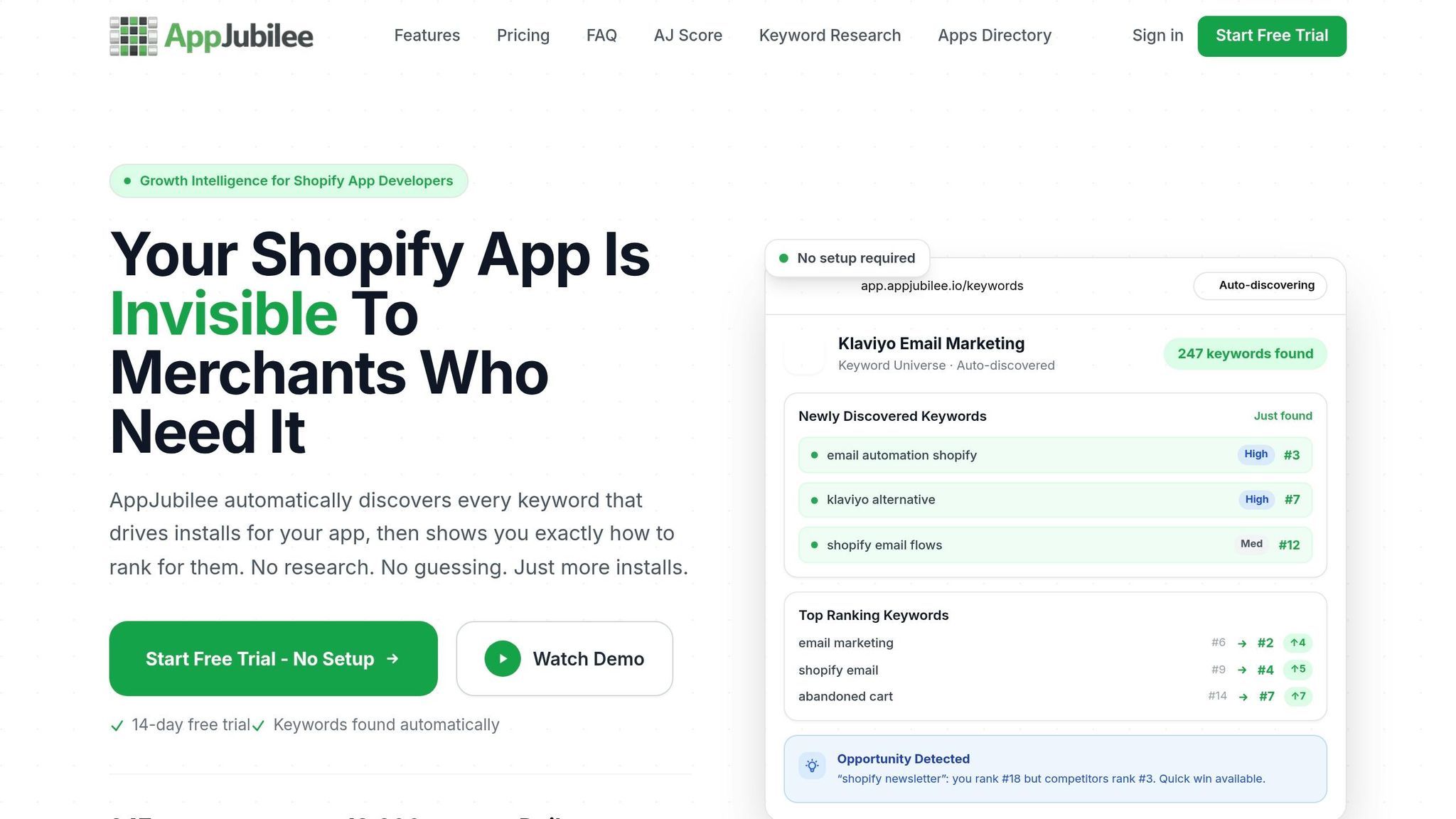
AppJubilee's daily keyword tracking, competitor mapping, ranking snapshots, and competitor alerts can show whether you're missing a term outright or simply trailing a rival across a keyword cluster. Use those signals to compare Shopify ASO tools and build your audit list instead of guessing at the cause.
A step-by-step process to find missed keywords before losses grow
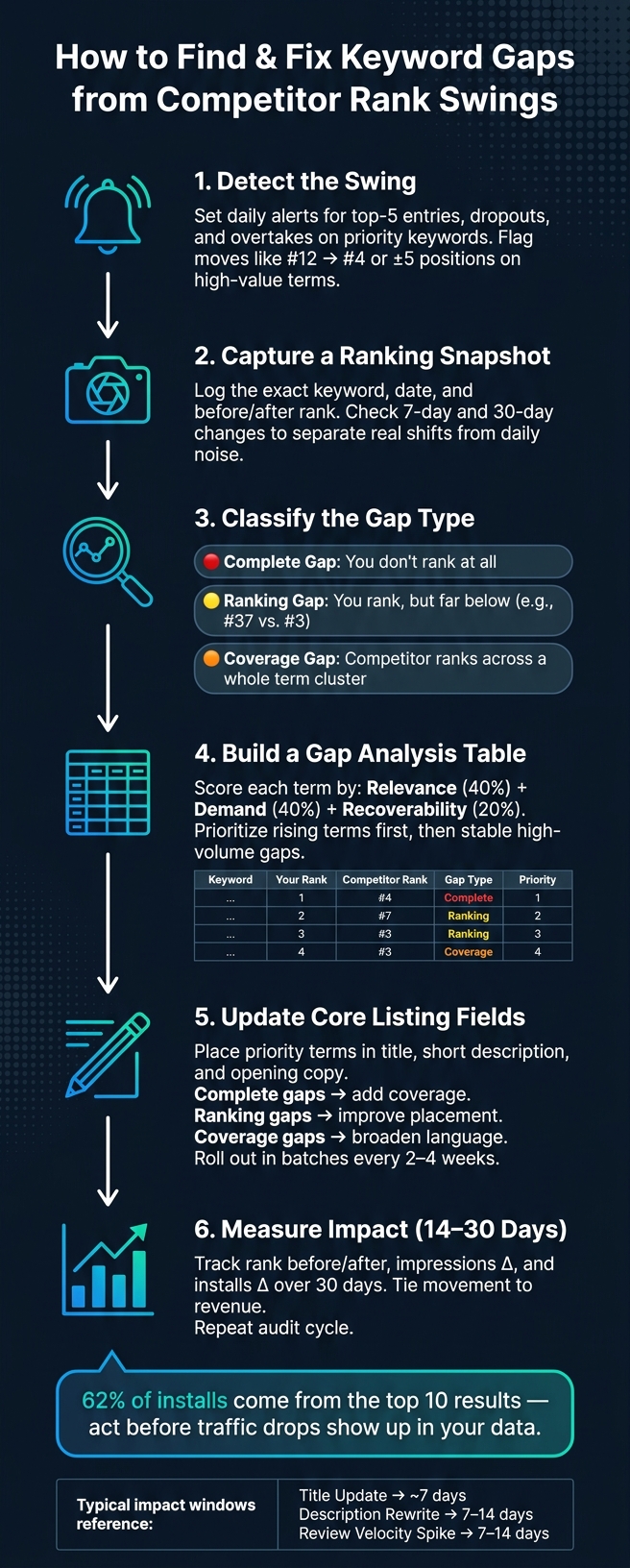
How to Find & Fix Keyword Gaps from Competitor Rank Swings
Now take that diagnosis and turn it into a repeatable audit.
Start with ranking snapshots and competitor alerts
Track your highest-priority keywords every day, and set alerts for top-5 entries, dropouts, and overtakes on your most important terms. Then check 7-day and 30-day rank changes to see whether you're looking at a real shift or just day-to-day noise.
When an alert fires, grab a before-and-after ranking snapshot for that keyword and its close variants. Log the date too. That gives you a clean trail back to a listing update, a competitor move, or a seasonal swing. For each alert, record the exact keyword, date, and rank change before you sort the gap.
AppJubilee's competitor alerts and daily ranking snapshots fit this workflow well. They help you spot rank shifts right away instead of finding out after installs have already started to fall.
Build a competitor set from shared keywords
Build your competitor set from apps that rank for the same search terms as you do. Start with your top 20-50 core terms, then check which apps show up in the top 10 results for each one.
Apps with strong overlap, for example, 10 or more shared top-10 results, should go into your primary competitor set. Put extra focus on high-overlap keywords: terms where 40% or more of your competitor universe already ranks.
Use competitor mapping to pull the terms that overlap in search results. If a competitor moves up on one of those terms and you don't, treat that as a keyword gap. From there, pull only the terms that changed and score them in the table below.
Create a gap analysis table and classify each term
Once you have the set, organize the terms by gap type and rank trend. The point is simple: move from a loose feeling that "we're losing ground" to a clear list of terms you can act on first.
A useful gap table includes these columns: Keyword, Your Rank, Top Competitor Rank, Search Volume, Difficulty, Gap Type, and Trend Direction. Here's a simplified example based on AppJubilee's keyword gap data:
| Keyword | Your Rank | Top Competitor Rank | Search Volume | Difficulty | Gap Type | Trend Direction | Priority |
|---|---|---|---|---|---|---|---|
| subscription discounts | 18 | 2 | 2,400 | Medium | Weak ranking gap | Stable | P1 |
| loyalty points app | Not ranking | 4 | 1,800 | High | Complete gap | Rising | P1 |
| upsell bundles | 7 | 1 | 3,200 | Medium | Weak ranking gap | Rising | P2 |
| email marketing Shopify | 35 | 12 | 5,000 | High | Weak ranking gap | Stable | P3 |
Trend Direction should shape priority. Go after rising terms first. After that, focus on stable gaps with strong search volume. Cut low-relevance terms so your list doesn't get cluttered.
Use this table to decide which terms to add, which ones need a rewrite, and which ones aren't worth your time right now.
How to prioritize keywords and update your listing to close gaps
Choose terms by relevance, demand, and recoverability
Start with the gap type. That tells you what deserves attention first.
If you chase every gap you can see, you end up spreading your effort too thin. The result is usually mediocre. A better move is to score each term on three factors:
- Relevance: how closely the term matches your app’s main use cases, target merchant segment, and paid features
- Demand: estimated monthly search volume or a proxy like impressions
- Recoverability: how likely you are to improve in the next 30–60 days based on your current rank, competitor strength, and keyword difficulty
Use a weighted score of 40% relevance, 40% demand, and 20% recoverability. Then rank terms by projected revenue impact, not traffic alone. That matters because a high-traffic term can look good on paper but still bring weak business results. Your score should also make the next step obvious: which listing fields to update first.
Update core listing fields and monitor change impact
Once you’ve picked your priority terms, place them in the title, short description, and the opening lines of the full description. Different gap types call for different fixes.
- Complete gaps need stronger keyword coverage
- Ranking gaps need better term placement
- Coverage gaps need broader language
Keep the copy plain and direct. No stuffing. No awkward phrasing.
Roll out small updates in batches every 2–4 weeks, then wait 14–30 days before deciding whether the change worked.
Measure before-and-after results with an impact table
After each update window, check the same keywords from your gap table again. Track the keyword, your rank before and after, how the top competitor moved, and the change in impressions or installs over a 30-day period. Here’s a practical example:
| Keyword | Previous Rank | Current Rank | Competitor Rank Change | Impressions Δ (30 days) | Installs Δ (30 days) |
|---|---|---|---|---|---|
| subscription upsell app | 22 | 9 | Main rival: 6 → 8 | +1,200 | +18 |
| Shopify loyalty program | N/A (unranked) | 17 | Main rival: 3 → 2 | +600 | +7 |
| email marketing Shopify | 11 | 7 | Main rival: 5 → 5 | +900 | +10 |
Use this table to tie rank movement back to impressions, installs, and revenue. That way, you’re not guessing. You can see which terms keep moving in the right direction and which ones aren’t worth more space in your listing.
Conclusion: Use rank swings as an early warning, not a mystery
After you measure the impact of a rank swing, use it as a trigger for a keyword audit. A sudden competitor move in the rankings is often an early warning of a keyword gap, not random noise. It may mean a competitor covered a term you missed, tightened up their metadata, or matched search demand more closely. Start by checking keyword coverage.
Track rank changes at the keyword level, sort the gap, focus on the terms with the biggest impact, update the main listing fields, and review results on a set schedule. Use the same gap table from the audit process to decide what to change first. Move fast, and you can stop losses before they stack up.
Without daily tracking, founders often spot a takeover weeks too late. Weekly reviews, backed by snapshots and alerts, help close that gap much faster.
AppJubilee supports that workflow with daily keyword tracking, competitor alerts, ranking snapshots, and listing change impact tracking.
Every rank swing is a question worth answering. Answer it with data, and keyword gaps turn into opportunities. Rank swings stop feeling like a mystery when you read them as keyword signals.
FAQs
How do I tell rank noise from a real keyword gap?
Don’t lean on single-day snapshots. They often show short-term ranking noise, not the bigger picture.
Instead, look at 7-day or 30-day trends.
A keyword gap is real when competitors keep ranking for terms your app doesn’t. Put your attention on keywords they rank for that you miss, especially core keywords that aren’t in your listing.
Which keyword gaps should I fix first?
Start with core keywords. These are terms that at least 40% of your competitors rank for. If you miss them, you can end up invisible to a big chunk of your target audience.
Then use AppJubilee to spot long-tail terms your competitors rank for but you don’t. From there, prioritize those gaps by merchant intent, not search volume alone.
How long should I wait after listing updates?
Wait at least a few days before you judge the impact.
Search terms can index within 24 hours, but ranking shifts for main fields like your app name or subtitle often take up to 7 days.
Single-day movement is usually just noise. So instead of reacting to every little swing, watch the trend over 7 or 30 days.
AppJubilee’s change impact tracking can help you spot how edits affect keyword positions as the data settles down.