
App Store Keyword Gap Tools: Comparison
Compare Shopify-focused keyword gap tools and why daily rank tracking, 90+ days history, and competitor overlap matter.
If I were doing Shopify App Store ASO today, I’d put AppJubilee at the top of the list. It is the only tool in this comparison with verified Shopify App Store search tracking, daily rank updates, automatic keyword gap views, and 90+ days of ranking history available from the start.
Here’s the short version:
- AppJubilee: best fit for Shopify keyword gap work
- App StoreStatistics: useful for listing-change history, but limited keyword tracking
- MobileAction: built for iOS and Android, not Shopify
- ASOAtlas: no verified Shopify support in the source set
- Sensor Tower: no verified Shopify support in the source set
If you care about day-to-day rank checks, Shopify keyword research for missed opportunities, and direct competitor overlap, the main thing to check is simple: does the tool track the Shopify App Store itself, every day, from search results data?
Shopify rank position matters a lot. Apps in #1–#10 get most of the visibility, while apps in #11–#20 get much less. So a tool that shows where competitors outrank you can help you focus on terms where a move of a few spots may matter.
Quick Comparison
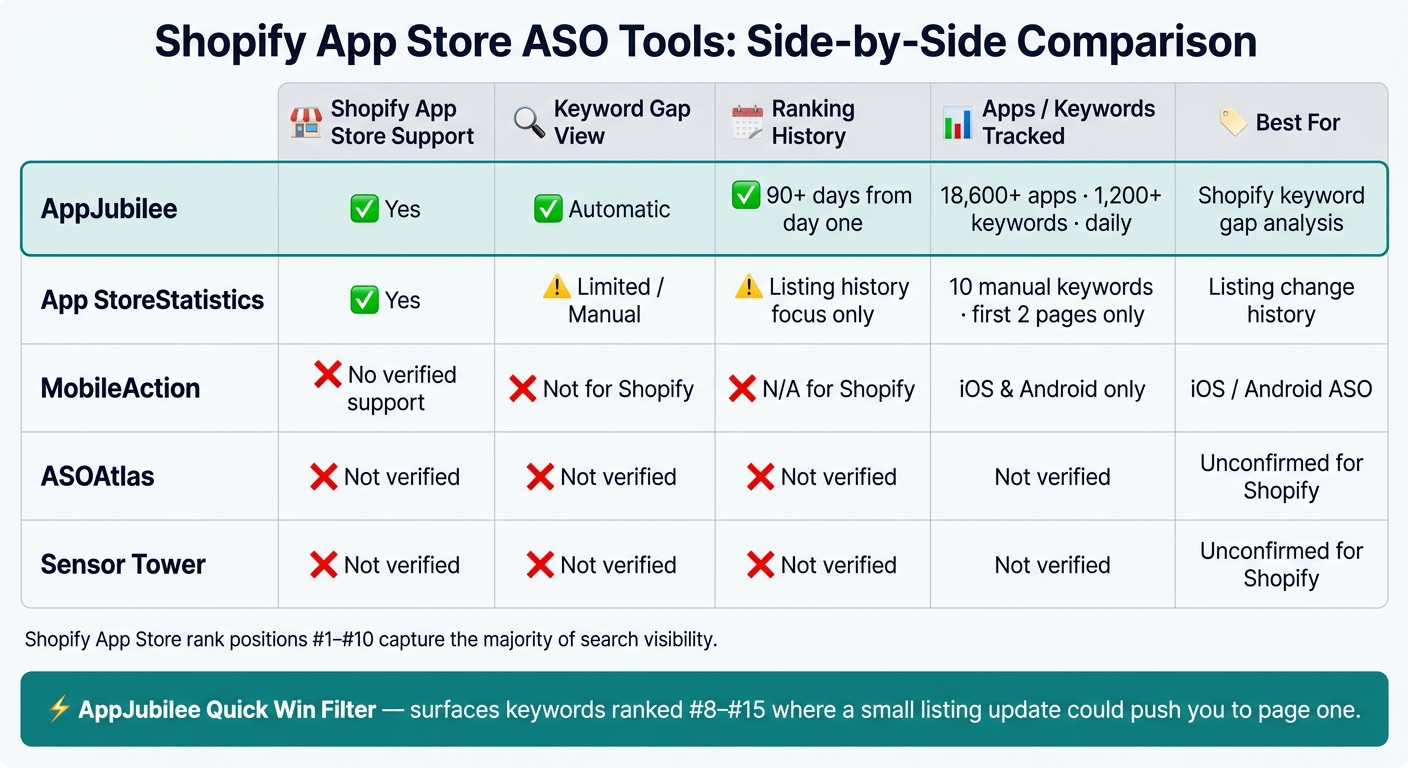
Shopify App Store ASO Tools Compared: AppJubilee vs Competitors
| Tool | Shopify App Store support | Keyword gap view | History | Notes |
|---|---|---|---|---|
| AppJubilee | Yes | Yes | 90+ days | Tracks 18,600+ apps and 1,200+ keywords daily |
| App StoreStatistics | Yes | Limited/manual | Listing history focus | Tracks only 10 manual keywords and first two pages |
| MobileAction | No verified Shopify support | No for Shopify use | N/A for Shopify | Built for iOS/Android |
| ASOAtlas | No verified Shopify support | Not verified | Not verified | Source set does not confirm Shopify use |
| Sensor Tower | No verified Shopify support | Not verified | Not verified | Source set does not confirm Shopify use |
My takeaway: if you want Shopify-specific keyword gap analysis, store fit comes first. A tool can be strong for mobile apps and still be the wrong pick for Shopify search work.
Below, I’ll walk through the tools by the points that matter most: data depth, history, overlap views, alerts, and price.
sbb-itb-ce93587
1. AppJubilee
AppJubilee is built for the Shopify App Store search algorithm. It crawls the full search index every day and tracks 18,600+ apps across 1,200+ tracked keywords. For day-to-day keyword gap work, that matters for three reasons: update speed, history, and competitor overlap.
Data Depth
AppJubilee records all organic rankings for every keyword it tracks and refreshes that data every 24 hours. It pulls from public search results directly, so you don't need GA4 or past traffic data to use it.
That makes a big difference for new apps. Even if your app has no traffic history and no analytics setup yet, you can still get ranking data right away.
Shopify App Store Fit
Setup is simple: paste your app URL and start.
Keyword History
AppJubilee tracks the full store all the time, so 90+ days of historical ranking snapshots are already there when you connect your app. You don't have to wait months to build a baseline.
That history makes it much easier to compare listing edits against ranking changes or compare Shopify app store optimization tools to see how different platforms handle historical data. If you change your title, description, or other listing elements, you can check whether rankings moved after the update instead of guessing.
Overlap Views
Competitor mapping happens automatically. The gap view shows:
- Keywords competitors rank for that your listing doesn't rank for
- Keywords where competitors rank above you
The Quick Win filter highlights keywords where your app ranks #8–#15. Those are terms where a focused listing update may be enough to move you onto page one.
Those daily snapshots also support alerts and the workflow choices covered next.
2. App StoreStatistics
App StoreStatistics, also called App Store Analytics, is built for the Shopify App Store. It now sits inside Mantle (Heymantle). It works best when you need historical context around listing changes, rather than automated keyword-gap discovery.
Shopify App Store Fit
Built for Shopify from the start, it stays focused on Shopify listings and listing changes.
Keyword History
Its main strength is title-and-description history. That helps you connect listing edits to ranking changes. So if you want to look back and see what changed, and what happened after, this is where the tool shines.
Data Depth and Overlap Views
Keyword tracking is limited to 10 manually chosen keywords, and rank coverage only reaches the first two search pages. Competitor monitoring is category-based, not keyword-overlap based, so gap discovery remains manual.
The next tool is a better fit when you need broader keyword coverage and faster gap surfacing.
3. MobileAction
Shopify App Store Fit
MobileAction is built for iOS and Android apps. It does not support the Shopify App Store search index.
That’s the main issue here. If you’re trying to do Shopify keyword gap analysis, the tool is pointed at the wrong store. And when the platform doesn’t match, the data won’t help much.
Because of that mismatch, MobileAction is a weak fit for Shopify keyword gap analysis.
4. ASOAtlas
Shopify App Store Fit
There’s no verified source here showing that ASOAtlas supports Shopify App Store research.
Data Depth
There’s also no verified source here confirming its keyword coverage, rank detail, or side-by-side competitor comparison.
Keyword History
No verified source here confirms historical tracking for Shopify terms.
Overlap Views
No verified source here confirms shared-versus-unique keyword analysis. So the next step is to check workflow fit, alerts, and pricing.
5. Sensor Tower
Shopify App Store Fit
The sources provided do not confirm that Sensor Tower supports Shopify App Store keyword research.
So the issue shifts a bit. If Shopify-specific research isn’t verified, the next thing to look at is whether the tool’s workflow features are strong enough to offset that missing piece.
Based on the sources, there’s also no confirmation around:
- Shopify keyword depth
- Historical tracking
- Shared-versus-unique keyword overlap views
Because of that, the decision comes down to a simpler set of factors: workflow fit, alerts, and pricing.
Workflow Fit, Alerts, and Pricing
For day-to-day ASO, workflow fit matters just as much as data depth. Once you know a tool has solid coverage, the next thing to look at is simple: does it make daily monitoring easier, and does the price make sense for your team?
For Shopify ASO, AppJubilee’s biggest edge is its daily refresh cycle. It crawls the full Shopify App Store search index every 24 hours and sends daily alerts for ranking shifts and competitor listing changes. That means you can spot movement and react the same day instead of playing catch-up later. Its Listing Change Impact feature also connects your edits to ranking movement over seven days.
AppJubilee’s pricing scales based on how many apps you track. As you move up, the main additions are more app capacity, integrations, seats, and support:
| Plan | Price | Apps Tracked | Team Seats |
|---|---|---|---|
| Starter | $49/mo | 1 | 1 |
| Growth | $99/mo | 3 | 2 |
| Pro | $199/mo | 8 | 5 |
| Agency | $499/mo | 30 | 10 |
Growth and higher plans add GA4 and Shopify Partners integrations. The Agency plan also includes API access.
In practice, these tiers line up well with different team setups: solo operators at the low end, small teams in the middle, and agencies that need more seats, tracking, and system access.
Pros and Cons
The big question is simple: does the tool give you enough Shopify-specific depth without making day-to-day ASO work slower?
AppJubilee does well on the points that matter most in this comparison. It scrapes the Shopify App Store index on its own, refreshes rankings every 24 hours, and shows competitor keyword overlap automatically.
The main limitation is scope. AppJubilee is built ONLY for the Shopify App Store, so it won't help much if your work also covers iOS or Android.
That tradeoff sets up the final recommendation.
Conclusion
For Shopify App Store ASO, AppJubilee is the clearest fit. It tracks more than 18,600 apps and 1,200+ keywords every day, and it gives you 90+ days of historical ranking data from day one. That matters because you can start spotting patterns right away instead of waiting around for data to build up. On top of that, daily rankings, competitor overlap mapping, and 24-hour alerts make it useful for the day-to-day work of ASO.
If you're working on iOS or Android ASO, though, go with a tool made for those app stores.
The main idea is simple: pick the tool that fits your store and helps you spot keyword gaps from the start, even if you don't have any traffic history yet.
FAQs
How often should I check keyword gaps?
Review keyword gaps monthly. Each cycle, check category rankings, new competitor moves, and changes in your keyword footprint so you can spot gaps and deal with them early.
For top competitors, or right after a major listing update, review weekly. But don’t chase every one-day jump or dip. First, confirm the gap with 7-day or 30-day trends before you act.
Which keywords should I fix first?
Start with the highest-impact opportunities:
- Add core keyword gaps to your title, description, and listing copy, especially terms that 40% or more of competitors rank for.
- Improve keywords in positions 8–10. Those terms are often the easiest to push onto page one.
- Watch competitor ad activity and target long-tail gaps where rivals rank and you do not.
Can I use this without GA4?
Yes - you can use AppJubilee without Google Analytics 4.
AppJubilee builds your keyword universe automatically from day one by scraping the Shopify App Store search index every day. It does this no matter how much traffic your app gets or how your setup looks.
Connecting GA4 is optional. It simply helps you match traffic data with keyword rankings.