
Competitor Analysis Platform Fit Matrix
Score ASO competitor platforms with a 0–3 weighted matrix across use cases, signals, alerts, rank depth, market views, and team fit.

Most teams pick the wrong tool because they compare feature pages, not job fit. I’d use a simple matrix that scores each platform on 6 points: use cases, signals, alerts, rank depth, market views, and weighted team fit.
Here’s the short version: I’d set the scoring rules before any demo, use a 0–3 scale, add weights that total 100%, and score each tool by how well it supports daily Shopify App Store ASO work. That means checking things like daily keyword tracking, 90+ days of history, competitor mapping, listing change logs, review tracking, ad monitoring, [GA4/Shopify Partners connections](https://www.appjubilee.io/tools/shopify-app-keyword-research/google-analytics-4-ga4), and plan fit from $49/month to $499/month.
What I’d check first:
- Use cases: Can the tool handle ranking, competitors, listing edits, reviews, ads, and rank-change links?
- Signals: Does it track keywords, listings, reviews, and advertising automatically?
- Alerts: Can I set threshold, anomaly, and digest alerts without too much noise?
- Rank depth: Does it track beyond top 10 or top 20?
- Market views: Can I filter by country, keyword set, competitor set, and time period?
- Team fit: Does pricing, seat count, app count, and reporting match how my team works?
Bottom line: I wouldn’t ask, “Which platform has more features?” I’d ask, “Which one fits my workflow, budget, and reporting needs with the least friction?”
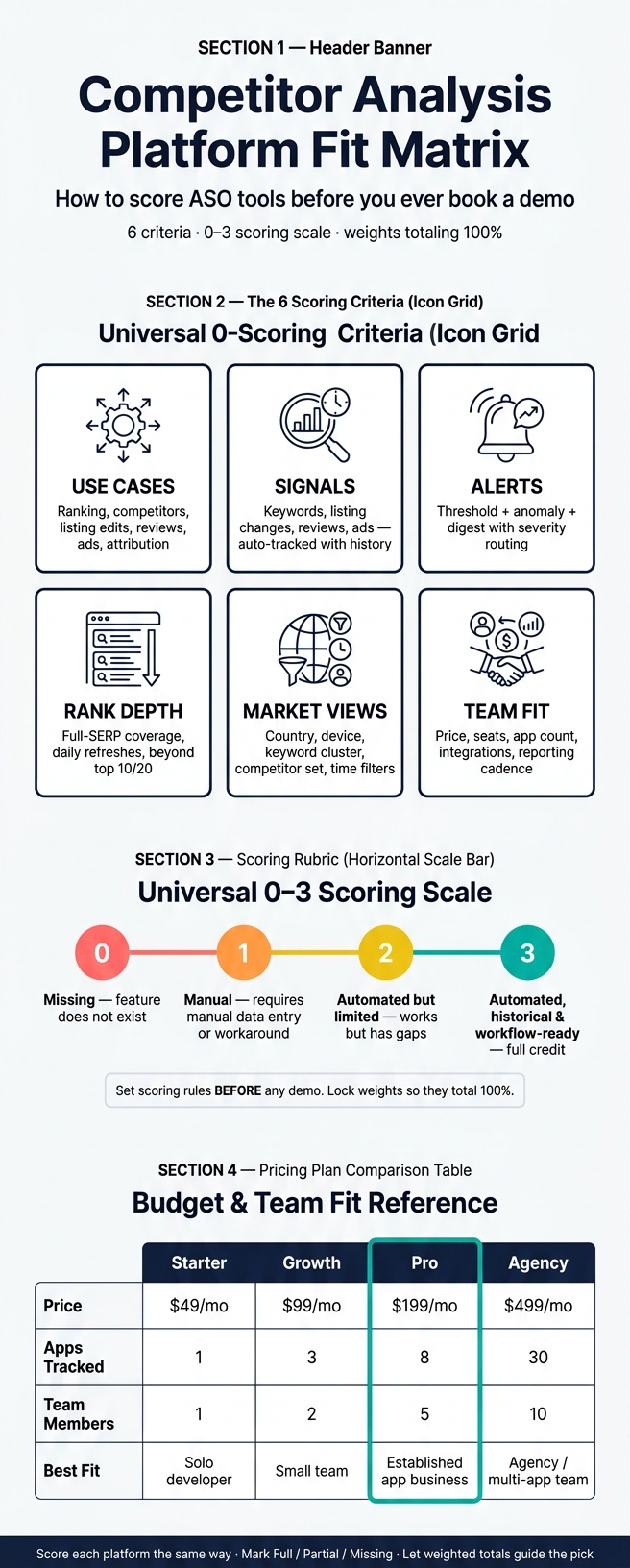
Competitor Analysis Platform Fit Matrix: Scoring Guide for Shopify ASO Tools
Quick Comparison
| Criteria | What I’d look for | Low score | High score |
|---|---|---|---|
| Use cases | Ranking, competitors, listing edits, reviews, ads, attribution | Gaps or manual work | End-to-end workflow support |
| Signals | Keywords, listing changes, reviews, ads | Limited inputs | Auto tracking with history |
| Alerts | Thresholds, anomalies, digests, routing | One alert type | Tunable alerts with delivery options |
| Rank depth | Search-result coverage and refresh rate | Top 10/20 only | Full-SERP, daily updates |
| Market views | Country, device, cluster, competitor, time filters | One flat view | Multi-view filtering and exports |
| Team fit | Price, seats, apps, integrations, reporting | Poor fit for team size | Strong fit for budget and workflow |
If I were building the matrix, I’d keep it simple: score each platform the same way, mark each area as full, partial, or missing, then let the weighted total guide the pick.
sbb-itb-ce93587
Define the matrix columns before scoring any platform
Set up the matrix before you touch a demo or free trial. Put platforms in the rows—you can compare Shopify ASO tools to find your baseline—and criteria in the columns, then score every cell with the same rubric. That way, you're judging each tool by the same standard instead of getting pulled in by a slick interface or a flashy feature page.
For Shopify App Store ASO, the main columns should be use cases covered, signals tracked, alert types, rank depth, market views, and team-fit score. Add a short coverage status to each column too - full, partial, or missing. This gives you a fast way to spot holes before you get into weighted scoring.
Use cases covered
This column checks whether the platform can do the actual job, not just say it can.
Test these workflows:
- daily keyword ranking tracking
- competitor mapping
- listing change impact analysis
- review intelligence
- ad monitoring
- rank-change attribution
Mark each one as full, partial, or missing based on whether the tool handles the workflow from start to finish. For example, a platform might show keyword rankings but fail to connect a title change to a ranking shift. In that case, it should get partial for listing impact analysis, even if the ranking data looks strong on its own.
Signals, alerts, rank depth, and market views
These four columns tell you how good the platform's observation layer is and how it reports what it sees. During the trial, check the data itself - not just the feature labels.
| Column | What to verify during a trial or demo |
|---|---|
| Signals tracked | Which data inputs does it observe - keyword rankings, competitor rank changes, listing updates, review volume and sentiment, ad activity, or visibility and conversion signals? Are they historical, live, or both? Can you export or segment by app, keyword, or competitor set? |
| Alert types | What triggers an alert - rank drops, competitor listing changes, new reviews, ad launches, or keyword movement spikes? Are alerts delivered by email, in-app, Slack, or webhook? Can you set thresholds or severity levels? |
| Rank depth | Does it track only top positions, or does it go deep enough to catch mid- and long-tail movement across search result pages? Are rankings recorded daily? |
| Market views | Can it segment by country, storefront, device, keyword cluster, competitor set, or time period? Or does it only show a single global view? |
Scoring scale and weighting rules
Lock the scoring rules before you look at any platform. If you change the scale halfway through, the whole matrix gets shaky.
A 0–3 scale works well for most Shopify ASO teams:
- 0 = missing
- 1 = manual
- 2 = automated but limited
- 3 = automated, historical, and workflow-ready
After that, set weights based on how your team works day to day. A solo developer may care more about daily keyword tracking and listing change impact. A growth team may put more weight on integrations, alert quality, and attribution. If your process leans on GA4 and Shopify Partners, then integrations should carry more weight. That's the whole point: weights should reflect business impact, not whichever demo looked the most polished. And yes, the weights need to add up to 100% so nothing gets counted twice.
With the rubric in place, the next step is to score signal quality, alerts, rank depth, and market views.
Map Shopify app ASO use cases to checklist criteria
Goals like "improve visibility" or "stay ahead of competitors" sound fine in a meeting, but they don't help much when you're scoring tools. They're too broad. The fix is simple: turn each goal into a clear workflow you can test in a trial or demo.
So instead of "improve visibility", use something you can verify, like: "track daily rankings for your top 50 target keywords, grouped by theme, with 90+ days of history available from day one". That gives you something concrete to place in the use-cases column of your matrix. Fill that column first, then score each platform against it.
The table below maps the main Shopify app ASO workflows to checklist criteria you can actually check.
| Workflow | Checklist Criterion | Coverage Status |
|---|---|---|
| Daily keyword ranking | Updates every 24 hours across a large keyword universe | Full / Partial / Missing |
| Historical ranking depth | 90+ days of exportable history from day one | Full / Partial / Missing |
| Keyword grouping | Group keywords into themed sets (e.g., "upsell", "subscriptions") with filterable views by theme | Full / Partial / Missing |
| Competitor mapping | Auto-detects competitors via keyword overlap - no manual list required | Full / Partial / Missing |
| Listing change detection | Logs title, descriptions, screenshots, icon, and pricing-plan edits with timestamps | Full / Partial / Missing |
| Change–rank correlation | Marks ranking charts when a listing edit occurs and shows the position change over the next 7 days | Full / Partial / Missing |
| Review and rating tracking | Daily monitoring of new reviews, rating shifts, and sentiment themes | Full / Partial / Missing |
| Ad monitoring | Tracks competitor ad activity per keyword; flags whether competitor ads crowd out organic results | Full / Partial / Missing |
Keyword tracking and competitor mapping
Daily ranking refreshes are the bedrock here. If a platform updates once a week, that's too slow for reactive ASO. By the time you notice a shift, the moment to act may already be gone. AppJubilee provides 90+ days of ranking history from day one, which gives teams enough baseline data to spot patterns early instead of guessing.
Competitor mapping is another area where a lot of tools come up short. The key checklist item is automatic competitor detection based on keyword overlap, not a manual list you have to build and maintain yourself. AppJubilee handles competitor mapping this way, surfacing apps that share search terms with yours.
Listing changes, reviews, and ad monitoring
Listing change detection only matters if it ties edits to outcomes. The activity log should track title, descriptions, screenshots, icon, and pricing-plan changes with timestamps. Then it should connect those edits to position movement across the next 7-day window. Without that link, you're just staring at a changelog.
Reviews need the same kind of daily view. Check whether the platform tracks new reviews, rating shifts, and sentiment or topic themes each day. That helps teams spot friction before it snowballs.
Ad monitoring adds one more layer. Look for a platform that shows which competitors are bidding on your brand or category terms and whether that paid activity is pushing organic results down the page.
Role-based importance by team need
Not every workflow matters the same to every team. That's where weighting comes in.
- Founders usually care most about top-line visibility and install impact, so daily tracking and ranking snapshots tend to matter most.
- ASO specialists usually put the most weight on keyword grouping, competitor mapping, and listing diffs.
- Marketers lean harder on ad monitoring and review sentiment to shape campaign messaging and defend branded search terms.
- Analysts care most about whether the platform connects to GA4 and Shopify Partners so ranking data can be matched with install and revenue numbers.
Tag each workflow row with its main role - Founder-critical, ASO-essential, Marketing-high impact, or Analytics-dependent - and use those tags to set the weights in your scoring column.
Once use cases are scored, move to signals, alerts, and rank depth using the same rubric.
Evaluate signals tracked, alert quality, and rank depth
Use cases tell you what a platform should do. This section checks whether it does those jobs fast enough to matter.
Signals tracked and historical context
A platform belongs in your matrix only if it tracks the right signals automatically. For Shopify app ASO, the core set is keyword rankings, listing changes, review trends, and ad activity. If a team has to enter data by hand, don't give that signal full credit.
History matters too. You need at least 90+ days from day one so you can compare before and after without waiting months to build a baseline. AppJubilee gives you 90+ days of historical ranking snapshots immediately upon signup. Retention then depends on plan level, with up to unlimited history on Agency plans.
After that, look at speed. A signal isn't very useful if it shows up too late to act on.
The table below shows the difference between strong and weak coverage:
| Dimension | Strong Coverage | Weak Coverage |
|---|---|---|
| Signals tracked | Keywords, listings, reviews, ads | Keywords only, or manual entry required |
| Alert types | Threshold + anomaly + scheduled digest | Single alert type, no severity tiers |
| Rank depth | Full-SERP coverage across all pages | Top 10 or top 20 only |
| History length | 90+ days from day one | Tracking starts at signup, no historical baseline |
Alert types and delivery options
Most ASO teams need three kinds of alerts.
- Threshold alerts trigger when something crosses a line you set. For example, a top keyword falls out of the top 10, or a competitor's rating drops below 4.0.
- Anomaly alerts flag movement that doesn't match normal volatility. That's handy when you're trying to spot an algorithm shift or a competitor that suddenly turns on ads.
- Scheduled digests send a summary on a set rhythm. Daily works well for ASO specialists. Weekly usually fits leadership better.
This is where many tools fall apart. If every tiny rank swing sends a ping, the alerts that matter get lost in the shuffle.
The fix is severity routing. Critical alerts should go out right away. Lower-priority items should roll into a digest instead. When you review a platform, check two things in particular: can you tune sensitivity by keyword or competitor, and is there a cool-down period that stops the same event from firing again and again?
Then look at rank depth. That's what tells you whether the platform can spot movement early, not after the damage is already done.
Rank depth and refresh cadence
Rank depth shapes how soon you see a threat. Tools that only show the top 10 or top 20 miss the stretch where rising competitors first start to show up. Full-SERP tracking gives you that earlier read.
AppJubilee tracks absolute position across all search result pages. It covers 1,200+ keywords and 18,600+ apps daily. For refresh cadence, daily is the right benchmark. Intraday tracking tends to add noise without adding much signal because Shopify App Store rankings are fairly stable within a single day.
Score a platform higher if it pairs full-SERP depth, daily refreshes, keyword grouping, and exportable history.
Once signals, alerts, and depth are clear, move to market views and weighted team fit.
Check market views, integrations, and weighted team fit
Market views and data integrations
After you’ve checked signals and alerts, the next step is simple: does the platform give you a market view your team can actually use?
For Shopify app ASO, the main checklist items are category-level visibility, keyword universe views, competitor mapping, and country-level filters. A practical way to review these is with a 1–5 scoring matrix. Rate each view based on:
- data freshness
- filter depth
- export options
- support for saved snapshots
- support for repeatable reporting
Then score each one based on a basic standard: does this help the team take action?
AppJubilee supports daily keyword tracking, competitor mapping, ranking snapshots, listing change impact tracking, review intelligence, ad monitoring, and broad market coverage with coverage of 1,200+ keywords and 18,600+ apps daily.
Once those views are scored, check how well the platform plugs into your reporting stack. Put Google Analytics 4, Shopify Partners, CSV exports, and recurring snapshot reports near the top of the list. GA4 helps connect rankings to traffic and installs. Shopify Partners helps tie keyword movement to install activity. AppJubilee supports GA4 and Shopify Partners connections with one-click OAuth.
Exports and snapshots cut down on manual reporting. They also make it much easier to share progress with founders, product managers, or growth leads.
Weighted scoring by team size, budget, and workflow fit
Once the views and integrations are clear, score the platform with a weighted matrix. Add an integrations column, then assign weight to each column based on what your team needs most.
A larger growth team will often put more weight on integrations, reporting cadence, and day-to-day workflow. You should also account for onboarding effort, the number of apps tracked, and how often the team needs to report results. That part matters more than people think. A tool can look good on paper and still be a poor match if it slows the team down.
Budget should be part of the score too. AppJubilee's current plan structure gives a useful reference point: Starter at $49/month for 1 app and 1 team member, Growth at $99/month for 3 apps and 2 team members, Pro at $199/month for 8 apps and 5 team members, and Agency at $499/month for 30 apps and 10 team members. Seat limits, app limits, and reporting needs all shape usable fit, so include them when assigning weight to integrations and workflow.
| Plan | Monthly Price (USD) | Apps Tracked | Team Members | Best Fit |
|---|---|---|---|---|
| Starter | $49 | 1 | 1 | Solo developer, single app |
| Growth | $99 | 3 | 2 | Small team, scaling portfolio |
| Pro | $199 | 8 | 5 | Established app business |
| Agency | $499 | 30 | 10 | Agency or large multi-app team |
Multiply each weighted score by its weight, then total the matrix.
FAQs
How do I choose the right weights for my team?
Focus on your team’s main goals for search visibility and competitive position. Start with your AJ Score, a 0–100 snapshot that blends keyword coverage, ranking quality, core keyword presence, ad exposure risk, and competitive position.
If discovery matters most, put more weight on keywords that sit closer to #1 and on Core Keywords where 40% or more of competitors rank.
What should I test first in a product demo?
Start with the Keywords page. Open the Keyword Opportunities tab to find terms your competitors rank for while you don't. That gives you a clear view of keyword gaps and places where you can grow.
Then head to the Listing Changes page. Use it to connect past updates with ranking shifts and check whether your optimization work made a difference.
How do I score partial workflow coverage?
Score partial workflow coverage by looking at how well a platform handles the exact tasks your team needs against your full day-to-day workflow.
Give higher scores to tools that offer full visibility and automate more of the process, from keyword discovery and competitor tracking to action-ready insights, instead of showing only disconnected snapshots. Weigh each capability based on what your team needs most, like the number of apps you manage, so you can spot serious gaps fast.