
Localized Keywords for Shopify Apps
Map market-specific merchant terms to Shopify App Store fields, update localized metadata, and track rank and installs by locale.

If I want more installs from Shopify App Store search, I can’t just translate U.S. keywords word for word. I need to use the exact terms merchants search in each market, map those terms to my listing, and track rank changes after every edit.
Here’s the whole process in plain English:
- I start with merchant problems, not my feature names
- I build a base en-US keyword list for analytics
- I expand it by market using local search phrasing
- I group terms by use case and intent
- I place them into the right listing fields:
- title
- description
- search terms
- I log a baseline rank before changes
- I track results at 7, 14, and 30 days
- I compare ranking moves with installs, conversion rate, and revenue
A simple example shows why this matters. A U.S. merchant may search “abandoned cart recovery,” while a U.K. merchant may search “abandoned basket emails.” Same problem. Different words. If my listing uses the wrong phrasing, I miss those searches.
The article also explains how I can keep this process organized with a keyword-market matrix, locale owners, change logs, and daily rank tracking in AppJubilee. That’s the main idea: use local merchant language, make focused listing updates, and measure what changes by market instead of guessing.
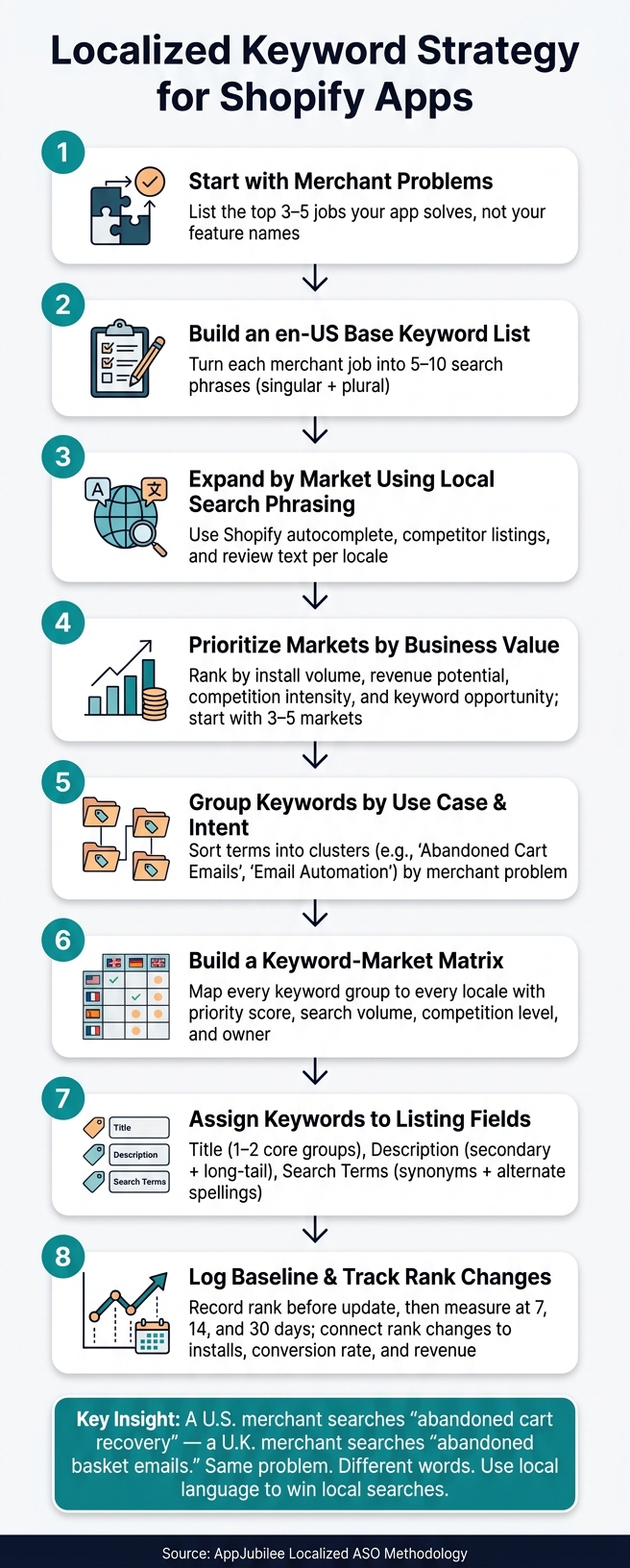
Localized Keyword Strategy for Shopify Apps: Step-by-Step Workflow
How to find localized keywords by market and search intent
Build an en-US base keyword list from merchant problems
Start with the problem a merchant wants to fix, not the feature list on your app page. If you have a subscriptions app, for example, your keyword list should center on terms like recurring payments, subscription app, manage subscriptions, and membership billing. That’s a lot better than leaning on internal product wording that merchants may never search for.
A simple way to do this is to write down the top 3–5 jobs your app handles for merchants. Then turn each job into 5–10 search phrases, including singular and plural versions. For an upsell app, you might start with post-purchase upsell and build out related phrases like one-click upsell, cart upsell, and cross-sell app.
Keep your focus on high- and mid-intent terms. Broad, low-intent keywords may look tempting, but they often bring the wrong traffic.
Expand each market's keyword list using local search behavior
Use your en-US list as the starting point, then swap in local wording one market at a time.
A good first move is Shopify App Store keyword research tools and autocomplete. Search each base term and write down the suggestions you see. This gives you a direct look at how people phrase their searches in that market.
Competitor listings can help too. Check the titles, subtitles, and descriptions of top-ranked apps in your category for that market. If several competitors keep using stock sync instead of inventory sync, that’s a strong hint that merchants there prefer that wording. Review text can also be useful because merchants often explain the app’s value in plain language, with phrases like keeps my products synced across channels.
Treat the terms that show up across most top-ranked apps in the category as your core keywords.
Prioritize markets by business value
Once you have your base list and local lists, pick where to apply them first. If you try to localize every market at the same time, you spread your effort too thin and make it harder to see what’s paying off. It usually works better to rank markets by business value before you do the keyword mapping.
The most useful inputs are install volume, revenue potential, market fit, and competition intensity, using the last 30, 60, or 90 days of data. Sometimes a market with moderate search volume and weaker competition is worth more than a high-volume market where the top positions are already locked down. Start with 3–5 markets where demand and ranking opportunity look strongest, then build a separate keyword set for each one before moving to the next group.
| Priority Factor | What to Look At |
|---|---|
| Install volume | Which markets already send you installs? |
| Revenue potential | Where do merchants spend more per app? |
| Competition intensity | How crowded are the top results? |
| Keyword opportunity | Are there high-intent terms with weak competition? |
After you pick the first 3–5 markets, group each market’s terms by use case and map them to your listing fields.
sbb-itb-ce93587
Group keywords and map them to listing fields
Create keyword groups by app use case
Once you have a keyword list for each market, don't treat it like one long pile of terms. Sort the keywords by the merchant problem they speak to. Each group should represent one clear job the merchant wants done.
For an email marketing app, that could break into three separate groups: email capture popups (such as "email popup", "newsletter signup", "email capture app", and "Shopify popup form"), abandoned cart emails ("abandoned cart recovery", "cart reminder emails", "Shopify abandoned cart app"), and email automation for Shopify ("Shopify email automation", "welcome email flow", "post-purchase email sequence"). Grouping phrases by use case makes it much easier to place them in the right listing field without making the copy read like a keyword dump.
Build a keyword-market matrix
Use those keyword groups to build a locale-by-locale matrix before you compare Shopify ASO tools and update the listing. The point is simple: map every keyword group to every target locale, along with its priority and current rank, so nothing gets missed when updates go live.
A practical matrix uses one row per keyword and includes columns for the keyword group, locale (such as en-US), whether the term is primary or supporting, search intent, current rank, search volume, competition level, and a priority score. That priority score should lean toward terms with high volume, low competition, and weak current rankings.
| Column | What It Captures |
|---|---|
| Keyword Group | Use case cluster (e.g., "Abandoned cart emails") |
| Locale | Market (e.g., en-US) |
| Primary / Supporting | Whether it's a lead term or a supporting variant |
| Search Intent | Informational, commercial, or transactional |
| Current Rank | Where you stand today |
| Search Volume | Relative demand for the term |
| Competition Level | How hard the term is to win |
| Priority Score | A weighted view of opportunity |
| Owner | Who maintains the locale's keyword set |
Assign an owner to each locale's keyword set so updates stay steady as the app changes over time.
Assign keywords to title, description, and search terms
Each listing field does a different job. The keywords you place in each one should match how people in that market actually search, not just help you check a coverage box.
The app title carries the most weight, so it should hold one core group, or two at most, written in a natural way. Use the description for supporting groups and long-tail variants, and work them into full sentences. Use search terms for synonyms, alternate spellings, and phrases that don't fit cleanly into visible copy. Think of that field as added coverage, not a place to repeat title terms.
| Field | Best Keyword Type | Key Constraint |
|---|---|---|
| App Title | Core keywords (1–2 groups) | Must stay readable and concise |
| Description | Secondary groups, long-tail variants | Cover each phrase once, in full sentences |
| Search Terms | Synonyms, alternate spellings, long-tail | Avoid duplication of title phrases |
One simple rule helps prevent stuffing: don't repeat the same primary phrase across fields. Put the core group in the title, use the description for supporting variants, and save the search terms field for market-specific synonyms or alternate spellings that don't fit naturally in visible copy. If the core group isn't in the title, fix that first before spending time on secondary variants or long-tail terms.
After you map keywords to fields, record a ranking baseline before updating the listing. Once the keywords are assigned, set that baseline and track how the next listing update affects rank by locale.
How to measure ranking changes after each listing update
Set a baseline before changing localized metadata
Use your keyword-market matrix as the tracking sheet before you publish any update. First, log the current organic rank for each keyword-locale pair. Then add the listing version, update date, and the fields you edited.
A clear version label makes this much easier to read later. Something like "US v4 – new localized title, description unchanged" helps you connect a rank move to one specific change instead of taking a wild guess.
Track daily rankings and compare before vs. after
Once the update is live, track rankings every day. Then compare performance across fixed windows: 7, 14, and 30 days.
Each window tells you something a little different:
- The 7-day window shows short-term reaction.
- The 14-day window shows whether that early movement sticks or starts to fade.
- The 30-day window is where you judge lasting impact.
For each window, calculate the average rank before and after the update. Then record the rank change for each keyword-locale pair.
"Treat daily rank data as a snapshot. Trends over 7 or 30 days are more reliable signals of actual ranking movement." - AppJubilee Methodology
| Keyword | Locale | Avg. Rank Before | Avg. Rank After (14-day) | Rank Change |
|---|---|---|---|---|
| product reviews app | en-US | 18 | 11 | +7 |
| review app Shopify | en-US | 25 | 22 | +3 |
| avis clients boutique | fr-FR | 11 | 9 | +2 |
If results stay flat or move in the wrong direction, the update didn't help that term in that locale.
Connect ranking movement to installs and revenue
Next, connect those rank changes to installs and revenue. A better rank only matters if it leads to more installs, a higher conversion rate, or more revenue.
After each update, compare installs, conversion rate, and revenue using the same locale and the same date window. Keep each market separate. That way, you don't blur U.S. results with performance from other locales.
How to use AppJubilee to run a repeatable localization workflow
Manage localized keyword sets and daily rank tracking in AppJubilee
Use the keyword-market matrix from the previous section as your working file inside AppJubilee. Think of it as your home base for each market.
For every locale, save the keyword set with the localized term, locale tag, use case, and intent. Then, once that locale is in place, track the same keyword set after each listing update. That way, you're not guessing. You're checking the same terms over time and seeing what changed.
Rank snapshots refresh daily for each keyword-locale pair. Paid plans include 90 days of historical ranking data for baseline comparisons.
Log listing changes and analyze impact by locale
Once you have a baseline, log every edit under the locale it was meant to help. When you update a listing, add the change in AppJubilee's Listing Changes page. Record the timestamp in U.S. format, the locale you edited, and a short note on what changed and why. Include the title, description, search terms, and any other edited fields.
This step matters more than it may seem at first. If you change three things at once and don't write them down, it's hard to know what moved the needle. A simple log gives you a clean paper trail.
From there, AppJubilee's Change Impact Tracking shows net position change for each affected keyword. That makes it easier to see whether a localized edit helped visibility or whether rankings just bounced for a short time.
AppJubilee also helps you keep an eye on the market. Competitor alerts show when another app changes its title or description, so you can check whether your keyword mix should change too. Review intelligence surfaces merchant phrasing by locale (like dianxiaomi) and can feed new terms into your keyword groups.
Conclusion: A repeatable process for localized Shopify App ASO
AppJubilee turns localization into a repeatable loop: build locale sets, log each update, and compare ranking changes by market.
FAQs
How do I validate localized keywords before updating my listing?
Use AppJubilee to spot high-potential terms and check the competition around them. You can also add target keywords to your tracking dashboard by hand, even if your app doesn’t rank for them yet.
The platform flags keywords where competitors rank above you - or where you’re missing from the results altogether. That makes it easier to focus on high-intent terms using difficulty scores, so your listing updates are based on data instead of guesswork.
How many keywords should I target per market?
Start with 3 to 5 low-competition keywords that line up with how merchants search for your features.
Then work on closing gaps in your Core Keywords. These are the main terms that at least 40% of competitors rank for. After that, branch into long-tail keywords where competitors show up in search results but you don't.
What should I do if rankings improve but installs do not?
Treat this like a conversion problem. Merchants are seeing your listing, but they’re not finishing the install.
If impressions are high but clicks or installs are low, there’s usually a mismatch somewhere. Your copy, title, or visuals may not line up with the keyword’s intent or the promise your listing makes.
Update your app introduction and screenshots. Then watch that keyword’s conversion rate and install momentum over 3, 7, and 14 days.
The goal isn’t just better rankings. It’s making sure installs move up too.