
5 Ways Competitor Keywords Shape Rankings
Competitor keywords make app ranking repeatable: find gaps, pick winnable terms, track momentum, and place them in key metadata.

If you want more Shopify App Store installs, start with competitor keywords. I’d use them to find missing terms, judge how hard each term is, watch daily rank shifts, and place the right phrases in the title, subtitle, and description.
Here’s the short version:
- Competitor rankings show merchant search language, like analytics or reporting.
- Keyword gaps show where my app is missing search visibility.
- Difficulty checks help me avoid crowded terms like product review first.
- Daily movement helps me spot terms that are starting to move.
- Metadata placement shows where a keyword is most likely to help.
A few numbers stand out:
- AppJubilee tracks 18,600+ apps and 1,200+ keywords each day.
- It stores 90+ days of ranking history.
- A keyword is treated as a Core Keyword when 40%+ of a competitor set ranks for it.
- Moving from ranks 8–15 into the Top 3 can lead to a much better install rate.
- Top-3 rankings average 4.6x the daily organic installs of positions 8–15.
Keyword Gap Analysis: Find the Keywords Your Competitors Are Ranking For
sbb-itb-ce93587
Quick Comparison
| Method | What I use it for | Best use case | Main limit |
|---|---|---|---|
| AppJubilee | Daily tracking, competitor overlap, listing change checks | Managing ranking work in one place | Depends on tracked data |
| Keyword Gap Analysis | Finding terms competitors rank for that I miss | Building a target keyword list | Doesn’t show much by itself about movement |
| Keyword Difficulty Benchmarking | Sorting terms by win chance | Picking easier targets first | Works best after I already have a keyword list |
| Fast-Moving Term Tracking | Watching rank shifts and new momentum | Catching terms before they get crowded | Movement alone doesn’t mean easy to win |
| Metadata Placement Analysis | Deciding where each keyword should go | Title, subtitle, and description edits | Only helps after I know which terms matter |
My takeaway is simple: I wouldn’t copy a competitor’s listing. I’d use competitor keyword data to see how merchants search, pick the terms that fit my app, and track results over a 7-day and 30-day window.
Why Competitor Keywords Matter in Shopify App Rankings
Competitor keywords help close the visibility gap. When you look at what competing apps rank for, you see which merchant-intent phrases Shopify already sees as relevant. That makes competitor keyword data the starting point for the ranking moves that come next.
How keyword relevance affects app visibility
Your title, subtitle, and the first lines of your description carry the most weight. So relevance needs to show up there first. Competitor listings make this easier to spot because they reveal which phrases match a query closely enough to appear in search.
Why competitor terms reflect how merchants search
Competing apps are tuned against live search results. Developers change titles and descriptions to match the wording that drives clicks and installs. In plain English, they tend to follow the language merchants already use, not the internal feature names developers might prefer.
For example, merchants may react more to "Shopify loyalty program" than to "customer rewards system." If competing apps keep using the same phrase in their titles, that’s a strong sign it lines up with real search intent. AppJubilee labels Core Keywords as terms that 40% or more of a competitor set ranks for, making them the highest-consensus signals for a given category.
How rankings connect to installs, reviews, and category context
Keyword targeting by itself won’t move rankings far. Shopify adds behavior signals on top of relevance - installs, retention, reviews, and CTR all play a role. Category placement matters too. An app listed under "Sales and conversion optimization" competes for a different group of keywords than one placed in "Store management," and each area may have gaps worth targeting, such as for a mobile app builder.
Once you know which signals matter, competitor data becomes much more useful. It helps you find gaps, judge difficulty, and spot terms that are moving fast. That’s why competitor keyword data matters in the five ways covered next.
1. AppJubilee
Once you know which competitor terms matter, use AppJubilee to spot gaps, size up difficulty, and track movement each day. AppJubilee is a Shopify App ASO platform built for the Shopify App Store. It tracks 18,600+ apps and 1,200+ keywords daily, so you can see where you rank and where competitors move past you. That makes competitor keyword data useful in practice, not just another spreadsheet full of terms.
Missed query discovery
Keyword tracking and competitor mapping show which keywords competitors rank for that you don't. Ad monitoring also shows which terms competitors pay for, so it's easier to add the right wording to your listing.
Ranking difficulty signals
Volatility scores label keywords as stable, moderate, or volatile, which helps you judge which gaps are worth going after. Review intelligence shows review volume, ratings, and sentiment by topic.
Daily movement and listing impact
Rankings update daily, and 90+ days of history help you tell random fluctuation from actual movement. Competitor alerts flag listing changes within 24 hours. Listing change tracking connects title, description, and screenshot edits to later ranking shifts, while integrations with Google Analytics 4 and Shopify Partners connect keyword visibility with traffic and installs.
Next, use keyword gap analysis to turn those signals into the exact terms worth targeting.
2. Keyword Gap Analysis
Keyword gap analysis looks at the keywords your app ranks for and compares them with the terms your competitors rank for. The gaps between those two sets are searches from merchants that your listing isn’t showing up for.
Missed query discovery
Start with full search phrases that merchants actually type in. Then group them into feature, problem, and category terms like product add-ons. When the same terms keep showing up across competitors, that usually tells you how the category is being described in search.
Ranking difficulty signals
Once you spot the gaps, sort them by how hard they’ll be to win. Look at who holds the top results and what’s helping them stay there: brand strength, an exact metadata match, or both. In most cases, lower-difficulty gaps make the best place to start.
Daily movement visibility
Next, check whether those gaps are steady or in motion. Track 7-day and 30-day shifts to see if a gap is opening up, closing, or getting crowded. If a term starts getting easier to win, that can be an early opening to optimize before the space gets tougher.
Listing optimization guidance
Use the best gaps only where they fit your listing in a natural way. Match each priority gap to the listing field where it makes the most sense, then rewrite the copy around the merchant problem. After that, measure ranking changes on a fixed schedule.
3. Keyword Difficulty Benchmarking
Keyword gap analysis shows you what you're missing. Difficulty benchmarking shows you how hard it'll be to close those gaps.
That matters because not every missing keyword is worth chasing right away. Some terms are crowded with big apps that have tons of reviews and installs. Others are more open. So before you rewrite the listing, benchmark your gap candidates and sort them by win probability.
Ranking difficulty signals
Difficulty goes up when the top results are packed with apps that have high review counts, high install counts, and strong ranking positions. It drops when the results are spread across mid-size apps with mixed metadata. For example, a niche term like under construction often shows lower difficulty than broad category terms.
That simple check can shrink a huge keyword list into a much shorter set of targets you can actually go after.
A useful benchmark: a keyword counts as a Core Keyword when 40% or more of your competitor set ranks for it. That level points to high consensus. In plain English, the category is starting to crowd around the same phrase. And when that happens, getting to the top usually takes more time and more effort.
For a loyalty app, "Shopify loyalty program" might hit that threshold. "Shopify rewards points" may stay below it, with fewer strong competitors locked into the top spots.
Low-difficulty opportunities
Put more weight on terms with:
- Fewer active competitors
- Weak title matches
- Uneven rank distribution
These are good signs. They often point to terms you can target in a practical way, not just on paper.
Volatility signals
Even hard terms can open up when rankings move around. That's why volatility matters.
If a term has moderate difficulty and the results keep shifting, it can become one of the best near-term targets. The window may not stay open for long, but it's often where smart listing updates can make a dent.
Listing optimization guidance
Use difficulty scores to decide where each term belongs in the listing.
Higher-priority terms usually deserve your strongest fields, like the title or subtitle. Terms that are harder to win, less central, or still in testing may fit better in the description. The goal is simple: match your best listing real estate with the terms that give you the best shot.
4. Fast-Moving Term Tracking
Once you know which gaps matter and how hard each term is, the next step is to watch which ones are picking up speed. Difficulty benchmarking tells you what the competition looks like right now. Fast-moving term tracking shows where things may be going next.
Missed Query Discovery
Daily snapshots can surface terms competitors are picking up before those queries fully take off. If rival apps keep climbing for a phrase and your app still doesn't rank, that's a gap worth a closer look.
Ranking Difficulty Signals
A rising keyword only matters if there's room to move. When apps keep swapping positions, the term is still up for grabs. But if the same few apps stay parked at the top, winning that term gets much harder.
AppJubilee's volatility scoring tracks this directly, marking keywords as stable, moderate, or volatile so you can focus on terms that are actually moving.
Daily Movement Visibility
One-day jumps are usually just noise. Wait for repeated gains before you treat a trend as momentum.
Listing Optimization Guidance
When a term keeps climbing, place it in the field that carries the most ranking weight, such as for a product personalizer app. Terms with steady upward movement belong in high-weight fields like your title or subtitle. Queries that are still starting to build fit better in the description or screenshot copy.
Then check change-impact tracking to see whether the update shifted rankings within the next 7 days.
5. Metadata Placement Analysis
Once you've found the keywords that are moving, the next step is simple: put the strongest terms in the fields that matter most.
Finding target keywords is only half the work. The other half is placement. Where a term appears can change how much weight it carries. Competitor metadata analysis helps here because it shows how top apps use keywords in the app name, subtitle, opening description, and body copy. That makes it much easier to shape your own listing with intent instead of guesswork.
Missed Query Discovery
A field-by-field view shows which high-intent terms competitors put in the app name and subtitle. AppJubilee can point out these gaps by showing which terms competitors rank for that don't appear in your high-impact fields.
Ranking Difficulty Signals
Placement also shows which terms competitors see as primary targets. When a query appears in app names across most top-ranked apps, that's a strong sign of both value and difficulty. Those teams are using their most important metadata space on that term.
By contrast, terms that show up only in body copy are often secondary. AppJubilee defines Core Keywords as terms that 40% or more of your competitor universe ranks for. That's a strong signal that a keyword may belong in your title or subtitle instead of being tucked away in body copy.
Daily Movement Visibility
You can also watch whether moving a term into a higher-weight field changes rankings within 7 days. AppJubilee's listing change impact tracking ties specific metadata edits to ranking shifts during that window.
Listing Optimization Guidance
Treat your app name as the place for one clear, high-intent descriptor (like product bundles) that merchants know right away. Use the subtitle for one or two high-intent phrases plus a clear value promise. Keep the opening description and headings focused on merchant-facing language, and place long-tail variants deeper in the body copy.
A simple way to think about it:
- App name: your main descriptor
- Subtitle: extra high-intent phrases and value
- Opening description/headings: clear merchant language
- Body copy: long-tail variants and support terms
Move the highest-value term into the app name or subtitle only if it fits the app's core function. Competitor structure should act as a guide, not a script. Then check daily rankings to see what changed.
Use these placement rules to compare the tactics in the table below.
Quick Comparison Table
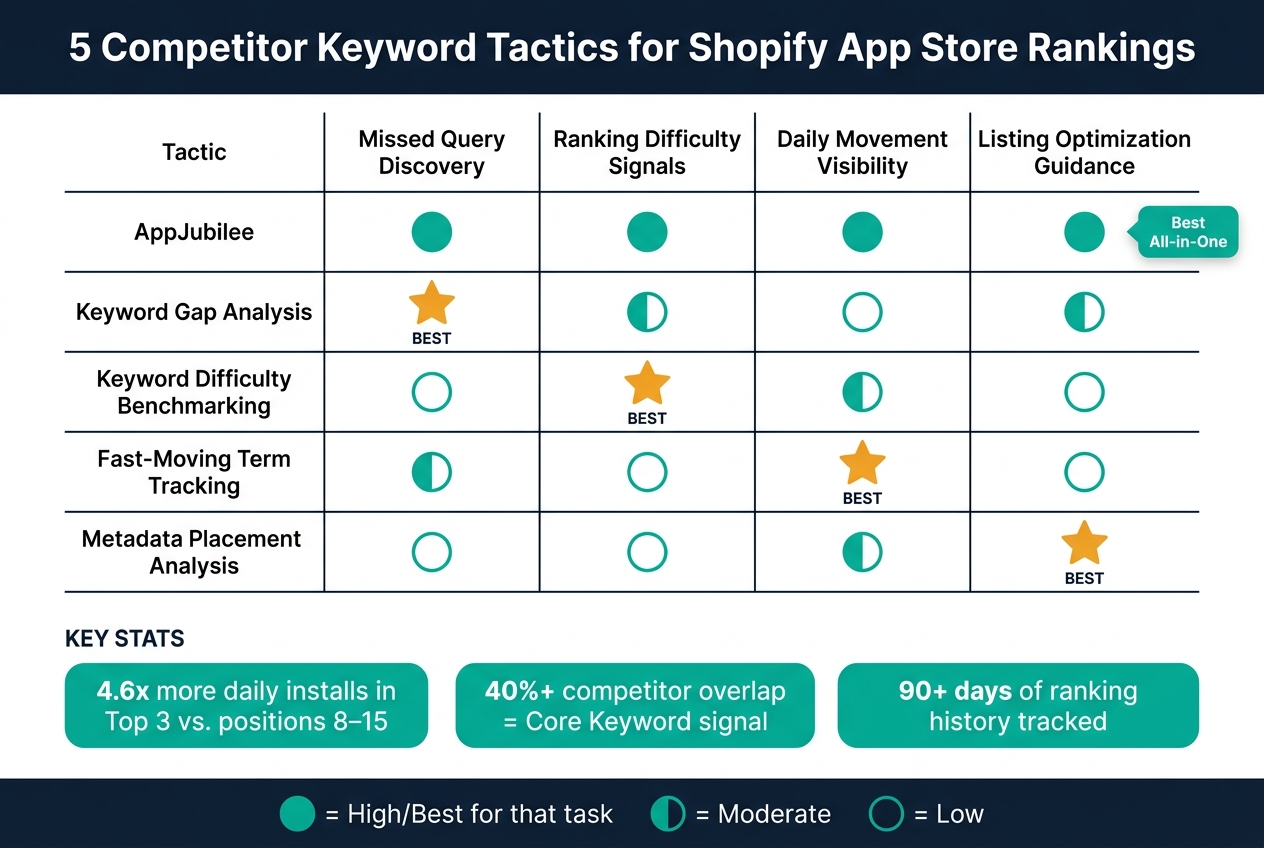
5 Competitor Keyword Tactics for Shopify App Store Rankings
Use this quick reference to match each tactic to the ranking job it handles best.
| Tactic | Missed Query Discovery | Ranking Difficulty Signals | Daily Movement Visibility | Listing Optimization Guidance |
|---|---|---|---|---|
| 1. AppJubilee | High - automatic overlap mapping | High - Easy/Medium/Hard scoring | High - daily snapshots and alerts | High - links edits to ranking shifts |
| 2. Keyword Gap Analysis | Best for - finding missing terms | Moderate - shows overlap only | Low - point-in-time comparison | Moderate - flags title and sales channel subtitle gaps |
| 3. Keyword Difficulty Benchmarking | Low - evaluates known terms | Best for - estimating Top 10 difficulty | Moderate - adds volatility context | Low - shows where to compete |
| 4. Fast-Moving Term Tracking | Moderate - catches emerging queries | Low - focuses on speed, not difficulty | Best for - detecting rapid rank shifts | Low - use alongside a placement strategy |
| 5. Metadata Placement Analysis | Low - works with identified terms only | Low - placement signals priority, not difficulty | Moderate - post-change tracking | Best for - placing terms in the right field |
Pick the task in front of you, then use the tactic that fits. If you need one tool that ties together daily tracking, competitor alerts, snapshots, and the effect of listing edits, AppJubilee does that in one place.
How to Apply Competitor Keyword Data to Ranking Work
Competitor keyword data works best when you turn it into a simple routine. First, find the right competitors. Then score the terms that matter most, place them in the right listing fields, and check results on a set schedule. The five steps below work in sequence, so each step supports the next.
Find the right competitor set
Begin with 3–5 high-intent searches your app solves. Then look at which apps show up again and again in the top 10–20 results for those searches. That group is your competitor set.
A smaller, tighter set usually gives you cleaner data than pulling in a whole category. In practice, that means focusing on 10–20 overlapping apps instead of every app that looks loosely related. AppJubilee can help here by finding ranking competitors based on shared keyword rankings across its tracked universe of more than 18,600 apps.
Once you’ve narrowed the set, the next move is simple: score the shared terms instead of going after every overlap.
Score keywords by value and difficulty
Score each keyword using four signals:
- Relevance
- Demand
- Top-10 crowding
- Your current rank
Put your attention on terms with 1,000+ monthly searches, a strong match to your app, and rankings in positions 8–15. That range is often the sweet spot. You’re close enough that a small metadata update can move you onto page one.
Keywords sitting outside the top 50 usually belong in the backlog for a later cycle. They may matter, but they’re less likely to move with small edits right now.
After you’ve picked your priorities, match each term to the listing field that gives it the best shot.
Update listing fields with clear intent
Each keyword should go where its intent fits best. Primary terms belong in the title. Secondary terms fit the subtitle. Supporting language should show up in the opening description and the rest of the body copy.
That structure keeps the listing clear and avoids stuffing everything into one spot. It also makes review easier later, because you can see which field changed and what happened after the update.
Use the next review cycle to decide whether to keep, revise, or drop each change.
Track results on a fixed review schedule
A fixed review rhythm helps you separate real movement from noise. Daily tracking shows whether Shopify has processed your metadata edits. Monthly snapshots, taken on the same schedule every month, give you steadier comparison points for rankings, installs, and trial starts.
At each monthly review, check your Tier 1 and Tier 2 keyword positions. Then compare those changes against installs and trial starts. The 30-day change column is the most reliable signal for whether your optimization work is moving the needle.
If rankings, installs, and trial starts all move up together, keep the change. If they don’t, revise the target keyword, the field placement, or both.
Conclusion
Competitor keyword data takes ranking from guesswork to a repeatable process: find gaps, judge difficulty, spot rising terms, and put the right keywords in the right fields.
Used together, these five methods create a practical optimization loop. Each one helps answer a different ranking question, but they all point to the same thing: spend time on terms you have a real shot at winning.
Moving a keyword from positions 8–15 into the top 3 can sharply lift installs. Top-3 placements average 4.6x the daily organic installs of ranks 8–15. In most cases, that lift should appear first in installs and trial starts. A 30-day gain in rankings, installs, and trial starts is the clearest sign that the update worked. Use the signal, make the change, and check the result in the next 30-day cycle.
FAQs
How do I choose the right competitor set?
Choose competitors based on keyword overlap - the apps that rank for the same searches as yours. AppJubilee maps these for you, so you spend less time guessing.
You can also track nearby apps or new entrants by hand in App Watch. Then focus on the competitors that have the biggest effect on your visibility and conversion. Look at shared keywords, review velocity, and listing activity.
Which keywords should I target first?
Prioritize core keywords first. These are terms that 40% or more of your competitors rank for. If you’re not showing up for them, you likely have a major visibility gap.
Then look for quick wins: keywords where you already rank in positions 8–15. With a bit of work, those can often move onto page one.
After that, review long-tail, high-intent terms tied to your features or the pain points merchants deal with day to day. Use AppJubilee to spot competitor keywords you don’t rank for, then put the ones with the best reach and feasibility at the top of your list.
How long should I wait before judging ranking changes?
Don’t judge rankings based on a single day. Timing and personalization can add noise, so the picture can look worse - or better - than it is.
A better way to read performance is to look at 7-day and 30-day trends. That gives you a cleaner view of what’s actually changing.
After you log updates like title changes or search term edits, check results at 3, 7, and 14 days. Some high-impact fields can get indexed within a week, but noticeable ranking shifts and install changes often take 2 to 4 weeks.