
Competitor Listing Alerts: Setup Guide
Automate competitor app listing monitoring: track titles, pricing, badges, and reviews; set focused alerts and reduce noise.
Monitoring competitor app listings can save you time and help you stay ahead. Automated alerts notify you about changes like pricing, features, or reviews - so you don’t have to manually track competitors. Tools like AppJubilee can reduce hours of work and ensure you respond to updates quickly.
Key Takeaways:
- What’s Tracked: Titles, taglines, descriptions, pricing, screenshots, reviews, and badges.
- Why It Matters: Small changes, like a pricing tweak or a new Shopify badge, can impact rankings and visibility.
- Setup Tips: Focus on 10–15 competitors, set meaningful alert triggers, and group competitors by type (direct, indirect, adjacent, aspirational, emerging).
- Actionable Alerts: Use thresholds to avoid alert fatigue, like tracking only major ranking drops or spikes in negative reviews.
- Delivery Methods: Route urgent alerts via Slack or Teams; use email digests for broader trends.
By automating competitor monitoring, you save time and gain insights that manual tracking often misses. Below, we’ll detail how to set up alerts and analyze their impact effectively.
What Competitor Listing Alerts Track
Key Listing Changes to Monitor
Competitor listing alerts go far beyond just tracking price changes - they monitor a variety of updates that can reveal shifts in strategy. These include changes to app titles, taglines, descriptions, screenshots, and icons, all of which could indicate new keyword targets or rebranding efforts. Pricing and plan adjustments are also flagged, such as updates to subscription tiers, free trial periods, or labels like "Free to install." Even review activity is tracked, as sudden spikes in negative reviews might hint at potential ranking issues.
One important detail to watch is the "Built for Shopify" badge. This badge can increase installs by an average of 49% within just two weeks. Monitoring its presence or absence could provide valuable insight into a competitor's momentum. By keeping tabs on these specific updates, you can better understand why real-time alerts are so crucial.
Why Real-Time Monitoring Matters
Relying on manual checks simply isn’t fast enough. Automated monitoring, which scans for updates every two hours, ensures you can act quickly to protect your app’s visibility. This speed is essential, as even small tweaks to a competitor’s metadata can have a significant impact on search rankings.
"Important changes slip through, and by the time you notice, the competitive window has closed." - PageCrawl
How AppJubilee Supports Competitor Alerts
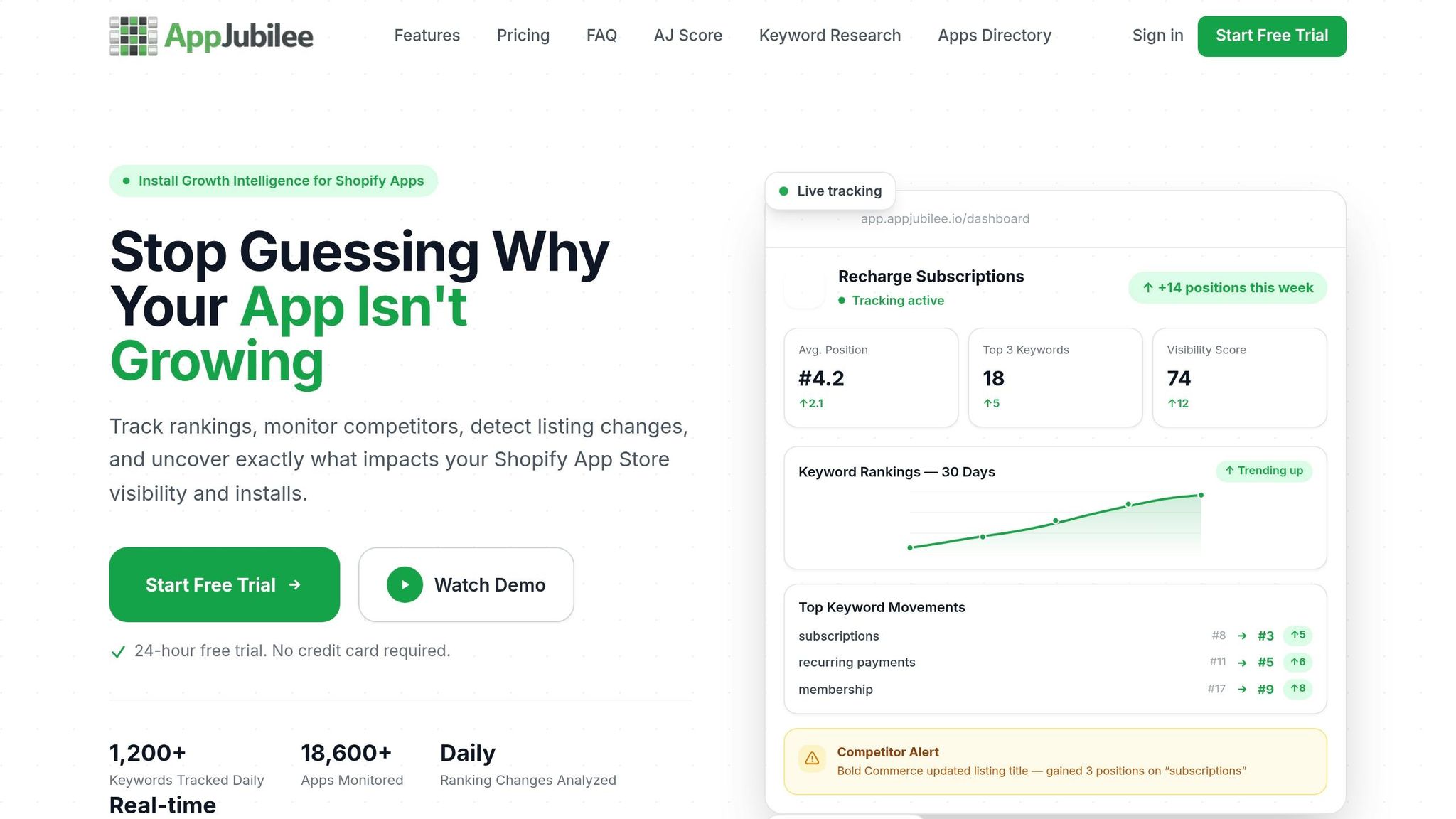
Timely responses to listing updates are essential, and AppJubilee simplifies this process. Their Listing Change Impact Analysis links updates to changes in ranking and visibility, helping you understand which shifts are strategic and which are routine. Historical ranking snapshots add further context, allowing you to make informed decisions quickly.
Build Your Competitor Watch List
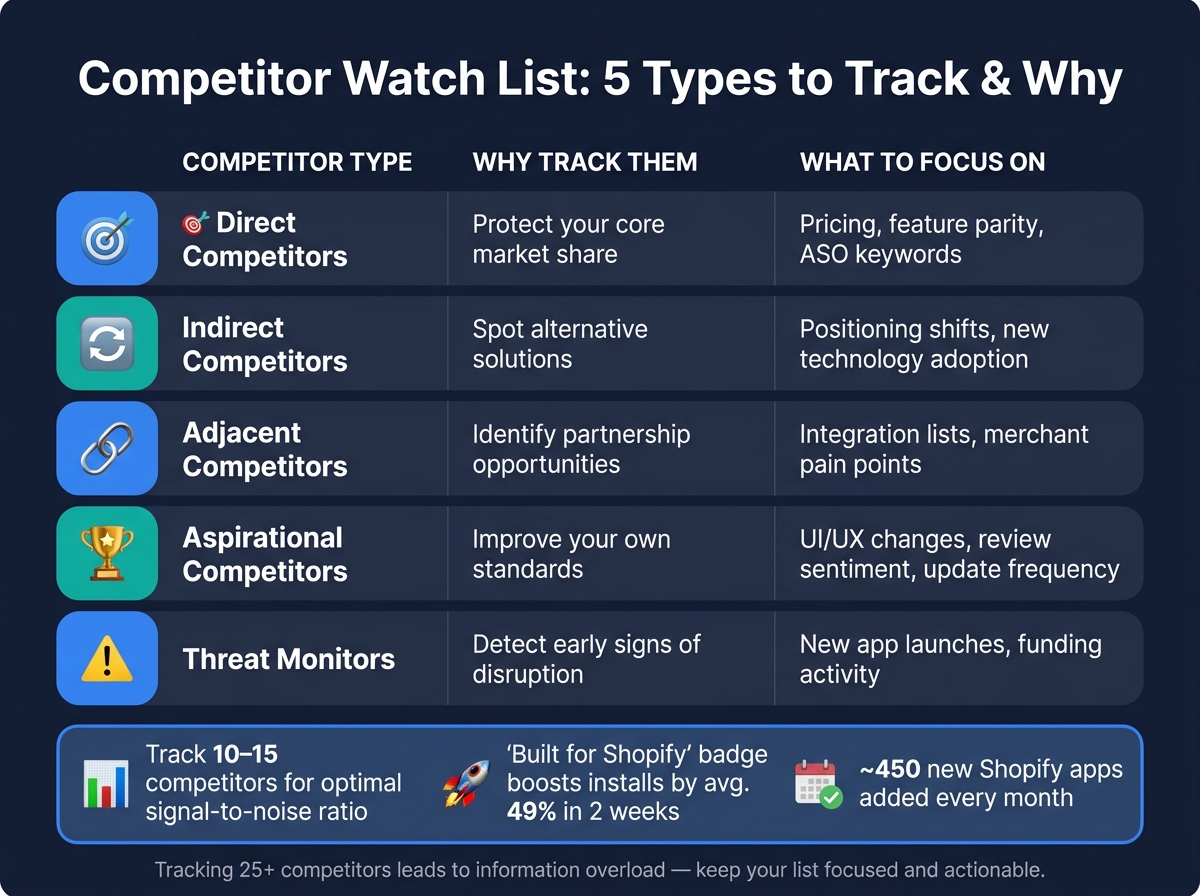
Competitor Watch List: 5 Types to Track & Why
How to Choose Competitors to Track
Keep your competitor watch list focused on the essentials. Limiting it to around 10–15 direct competitors ensures the alerts you receive are actionable and not drowned out by unnecessary noise. Tracking over 25 competitors often leads to information overload and makes it harder to act on insights effectively.
When building your list, consider competitors from five different categories:
- Direct competitors: These tackle the same problem using a similar approach.
- Indirect competitors: They solve the same problem but use a different method.
- Adjacent competitors: These target the same merchants but provide a different solution.
- Aspirational competitors: Market leaders from whom you can learn and improve.
- Threat monitors: Emerging players with significant funding or innovation that could disrupt your niche.
Each type offers unique insights into your market position and strategy.
| Competitor Type | Why Track Them | What to Focus On |
|---|---|---|
| Direct | Protect your core market share | Pricing, feature parity, ASO keywords |
| Indirect | Spot alternative solutions | Positioning shifts, new technology adoption |
| Adjacent | Identify partnership opportunities | Integration lists, merchant pain points |
| Aspirational | Improve your own standards | UI/UX changes, review sentiment, update frequency |
| Threat | Detect early signs of disruption | New app launches, funding activity |
Keyword overlap is another useful way to identify competitors. Apps that consistently rank for the same high-intent keywords as yours are likely your most direct rivals for installs. Additionally, keep an eye on rating counts - apps with more reviews often hold greater influence over merchant decisions.
How to Organize Your Watch List
An organized watch list is key to staying ahead. Without structure, it’s easy to miss critical updates - especially when the Shopify App Store adds about 450 new apps every month.
To streamline management, group your competitors by type and tag them based on focus areas like pricing, keyword strategies, or listing changes. This makes it easier to understand the context of an alert without sifting through a cluttered dashboard. Tools like AppJubilee offer features like Competitor Universe, helping you map and connect tracked apps to your overall competitive landscape.
For maximum efficiency, route alerts to the appropriate teams. For example, pricing changes can go to marketing, while ASO updates are sent to the relevant optimization team. This ensures that the right people act on the right information without overwhelming the entire team with irrelevant notifications.
Set Up Alert Rules and Notifications
Configuring Alert Triggers
Once your watch list is set up, it's time to decide what should trigger an alert. Focus on capturing only meaningful changes.
Most alert systems allow you to set triggers at different levels - like a specific app, an entire publisher's catalog, or even a broad category. Start by prioritizing apps that pose the most direct competition, then expand your scope as needed.
You can configure triggers for various changes, such as updates to metadata (titles, descriptions, screenshots), new versions (changelogs), pricing adjustments, or changes to featured status. Instead of monitoring an entire listing page, zero in on specific sections - like the "What's New" area for release notes or the "In-App Purchases" section for monetization changes. This approach keeps your alerts targeted and actionable.
To avoid being overwhelmed by notifications, set thresholds. For example, instead of triggering an alert for any keyword ranking change, configure it to notify you only when a ranking shifts by more than 5 positions, or when a competitor gets over 5 negative reviews in one day. For ranking-specific alerts, you can set a floor - such as only triggering when an app enters the top 100 rankings - so you're focused on changes that actually impact downloads. These thresholds are essential for keeping your monitoring system effective and manageable.
"App store listings are one of the most underused competitive intelligence sources. They contain dense, structured information that changes frequently, and every change reflects a deliberate decision by the competitor's product, marketing, or pricing team." - PageCrawl.io
AppJubilee offers a Competitor App Watch feature, included in all plans, to help you track listing changes and get notified when significant updates occur.
Notification Delivery Methods
Once you've set your triggers, the next step is choosing how alerts will be delivered based on their urgency. The delivery method should align with who needs to act and how quickly.
| Delivery Method | Best Use Case | Urgency Level |
|---|---|---|
| Slack / Teams | Team collaboration and immediate response | High |
| Email (Instant) | Individual tracking of high-priority apps | Medium–High |
| Email (Digest) | High-level summaries and trend monitoring | Low–Medium |
| Dashboard Feed | Manual review of historical changes | Low |
For urgent events - like a competitor slashing prices or earning a "Built for Shopify" badge - route alerts to Slack or Teams to ensure immediate action. For broader trends, a daily or weekly email digest is better suited, keeping your inbox tidy. AppJubilee supports email alerts across all plans, offering an easy way to stay updated without requiring a complicated setup.
For critical updates, consider multi-channel redundancy - set up alerts to notify via both email and Slack to ensure nothing is missed. Assigning a specific person to review each alert and decide on the next steps can also help streamline the process.
Reducing Alert Noise
Once your alerts are set up, the next challenge is minimizing notification overload.
Alert fatigue is a common issue. If every minor change triggers a notification, people start ignoring them - defeating the purpose of the system.
The solution lies in combining threshold triggers with targeted monitoring. Focus only on listing elements that directly impact your strategy, and use numeric conditions to filter out minor changes. For example, use text-specific monitors to catch description updates while ignoring small fluctuations in ratings or reviews.
"Set conditions on alerts... trigger alerts only when the price drops below a threshold or changes by more than a certain percentage. This reduces noise from minor fluctuations." - PageCrawl.io
Adjust your monitoring frequency based on how fast your category moves. Rapidly changing niches may require daily checks, while more stable markets can be reviewed weekly. If you're tracking a large number of competitors, use templates with pre-defined thresholds to maintain consistency and scalability. This ensures your alert system remains efficient and easy to manage.
sbb-itb-ce93587
Analyze the Impact of Listing Changes
Getting an alert is just the first step - what really matters is understanding how it affects your app’s visibility and deciding how to respond.
Key Metrics to Check After an Alert
When an alert pops up, it’s crucial to assess how it impacts your app's performance. Focus on these key indicators: keyword ranking changes, install rate trends, review activity, and rating stability.
- Keyword Rank: This is the clearest signal of your app's visibility. Small rank changes (3–5 positions) are common and usually just noise. But if you see a sustained drop of 10+ positions over a week, that’s a red flag.
-
Install Rate: This measures the pace of new installs over a given period. A dip here can often predict ranking issues. As Chris, founder of Gaintage, explains:
"The rank chart is the result. The install slope is often the warning." - Chris, Founder, Gaintage
- Rating Floor: Even a small drop in your app’s average rating can hurt conversions. For example, a 0.5-star drop can cut conversion rates by 25%. Falling below 4.0 stars poses an even bigger risk, as apps with lower ratings may be filtered out.
- Competitor Badges: If a competitor earns something like the "Built for Shopify" badge, it can instantly boost their credibility and trustworthiness. This can shift organic discovery in their favor, so it’s worth tracking.
Here’s a quick breakdown of what to monitor and why it matters:
| Metric | What to Look For | Why It Matters |
|---|---|---|
| Keyword Rank | Drops of 10+ positions over 7 days | Indicates a real visibility issue, not random noise |
| Install Rate | Changes in the slope of new installs | Can signal upcoming rank changes |
| Review Recency | Spikes in 1- or 2-star reviews | Can quickly drag down your rating |
| BFS Badge Status | Competitors gaining or losing badges | Immediate impact on trust and discovery |
Once you've reviewed these metrics, the next step is to use historical data to understand the full picture.
Using Historical Data to Measure Change
A single data point can highlight a change, but historical data helps you understand its significance. By comparing before-and-after snapshots of your metadata, you can pinpoint which updates might have triggered shifts in your competitive position.
Keeping at least 90 days of listing history is crucial. Without it, you might miss long-term trends or fail to spot gradual declines. For instance, apps that go unmonitored for months often lose 40–50% of their keyword rankings in six months. Without a historical baseline, much of this loss can go unnoticed.
Tools like AppJubilee simplify this process. Their Listing Changes & Impact Analysis feature lets you compare historical data and see how updates affect rankings. Combine this with daily keyword tracking to connect competitor listing edits with any changes in your own performance.
Keep Your Alerts Updated Over Time
Real-time alerts are crucial, but their true power lies in keeping them updated. Competitors evolve, and new apps enter the scene, so your alert system must adapt. Without regular updates, your system risks becoming a source of irrelevant noise instead of actionable insights.
When to Update Watch Lists and Thresholds
Here’s a practical tip: keep your watch list between 10–20 key competitors. Tracking more than 25 apps often results in an overwhelming number of alerts with little actionable value. If a competitor hasn’t shown any recent activity, consider removing them from your list. This allows you to focus on those actively shaping the market.
On the flip side, be quick to add new competitors when the data justifies it. For example, if a new app garners over 50 reviews in its first month, it’s likely more than just another listing - it’s a potential disruptor. Similarly, set price-change alerts to trigger only when shifts exceed 5%, filtering out minor changes that don’t warrant attention.
Pay close attention to competitors making strategic moves. A shift in messaging from "simple" to "enterprise-grade" is a clear sign of a repositioning worth tracking. After adjusting your watch list and thresholds, make sure your system continues to reflect the latest market dynamics.
Keeping Your Alert System Current
Regular reviews are essential to maintaining an effective alert system. With well-defined triggers in place, these reviews ensure your system remains relevant and responsive to market changes.
- Weekly: Check critical alerts each Monday to address any overdue responses.
- Monthly: Analyze changes in app descriptions and competitor updates.
- Quarterly: Reevaluate the overall scope of your monitoring efforts.
"The developers who succeed in the next phase of Shopify app development won't be those with the best initial ideas - they'll be those who adapt fastest to changing market conditions." - AppScout
Don’t overlook a competitor's "What's New" section during your monthly reviews. This area offers valuable insights into their strategy - whether they’re rolling out features incrementally or saving them for major updates, it can reveal their roadmap. Including this step in your process keeps your alerts sharp and aligned with the ever-changing market landscape.
Conclusion
Keeping tabs on competitor listings is a practice that becomes more valuable the longer you stick with it. The process is simple: create a targeted watch list, set up effective alert triggers, ensure notifications reach the right people, and regularly analyze the data. This approach shifts your team’s focus from being reactive to becoming predictive. Think about it - manual competitor research can eat up 3–5 hours each week and still miss key developments due to delays in detection. Automated monitoring eliminates that lag, giving your team the crucial lead time to act before a competitor’s move turns into their advantage.
AppJubilee is designed to handle this kind of ongoing intelligence. Its features, like competitor alerts, tracking the impact of listing changes, and ranking snapshots, deliver clear, actionable insights for Shopify app developers. Whether you’re using the Starter plan to monitor a single rival or managing multiple apps with the Pro plan, the aim is the same: convert listing updates into informed decisions - not just notifications.
The developers who maintain their edge won’t be the ones manually checking listings - they’ll be the ones leveraging systems that handle the heavy lifting, turning every insight into a competitive advantage that lasts.
FAQs
What alert triggers should I set first?
Set up alerts to keep an eye on your competitors' store or app listings. This way, you can spot important updates and adjust your approach accordingly. Here's what to focus on:
- Main collection or top product pages: Watch for updates or new product launches.
- Best-selling products: Track any price changes or promotional offers.
- App listing updates: Pay attention to version notes or 'What's New' sections for insights on updates.
Make sure these alerts are routed to tools like Slack or your email. This ensures your team stays in the loop and can respond quickly to any shifts in the competitive landscape.
How do I avoid alert fatigue?
Reducing alert fatigue involves a few key actions. Start by auditing and removing alerts that are no longer necessary or relevant. Make sure every alert has a clear owner and a documented response process, so nothing falls through the cracks. Adjust thresholds using recent data to ensure alerts are triggered only when genuinely needed.
Another helpful step is grouping related alerts into a single incident. This approach prevents redundant notifications and keeps your focus on what matters most. These strategies help cut down on noise, making sure you only get updates that truly require action.
How can I tell if a competitor's change hurt my rankings?
To figure out if a competitor's move has affected your rankings, keep an eye on how their rankings change over time. If you notice their rankings dropping, it might mean their relevance has decreased. On the flip side, a sudden jump in their rankings could point to a recent marketing push. Tools like AppJubilee are handy for this - they track daily keyword rankings and send alerts about competitor changes. This allows you to dig deeper, spot patterns, and even check sentiment to see how these shifts might be influencing your visibility.