
7 Ways to Extract Feature Requests from App Reviews
Turn app reviews into a ranked backlog: tag, group, dedupe, score by frequency and pain, check competitors, and track trends.
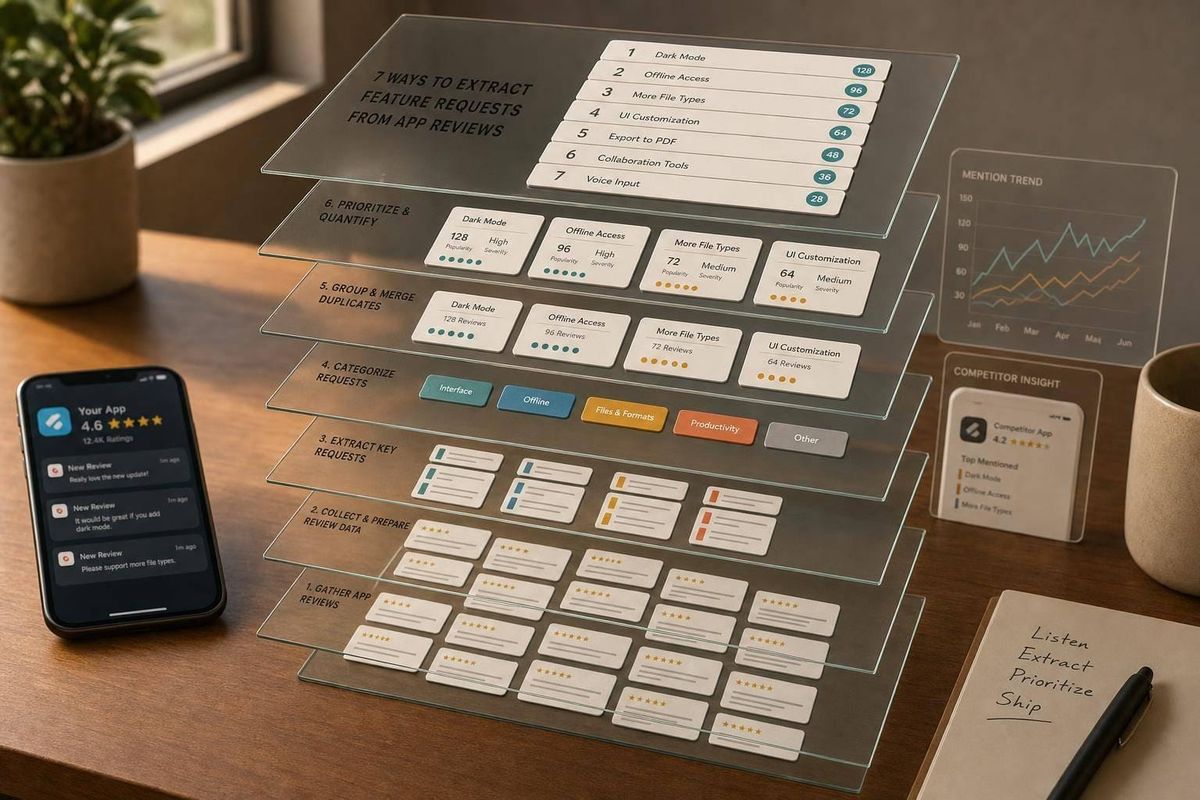
App reviews can become a ranked feature backlog if I process them the same way every month. With 17,891 active apps and 807,113 reviews as of July 18, 2026, the main job is simple: tag requests, group similar asks, score pain and frequency, remove repeats, check competitor reviews, rank what to build, and watch trends over time.
If I had to boil the article down, it says this:
- Direct asks matter, but workarounds matter too
- I should sort reviews into missing features, usability gaps, and wrong expectations
- I should track dates, ratings, app version, merchant type, and time in app
- I should score themes by frequency, pain severity, and clarity
- I should compare my themes with competitor complaints
- I should rank requests with revenue impact and build effort
- I should review trends weekly and monthly
In other words: don’t read reviews one by one and hope patterns appear. Build a repeatable system that turns raw comments into build decisions.
Quick comparison
| Method | What I do | Main output |
|---|---|---|
| 1. Auto-tag reviews | Label each review by request type | Tagged request list |
| 2. Group phrases | Merge similar wording by intent | Feature themes |
| 3. Score themes | Rate frequency, pain, and clarity | Priority scores |
| 4. Remove duplicates | Combine same asks into one request | Clean backlog |
| 5. Mine competitor reviews | Check if gaps show up across other apps | Market gap list |
| 6. Rank with roadmap scoring | Add revenue impact and effort | Build order |
| 7. Track trends over time | Compare volume and severity by period | Trend lines by theme |
That’s the whole system in one view.
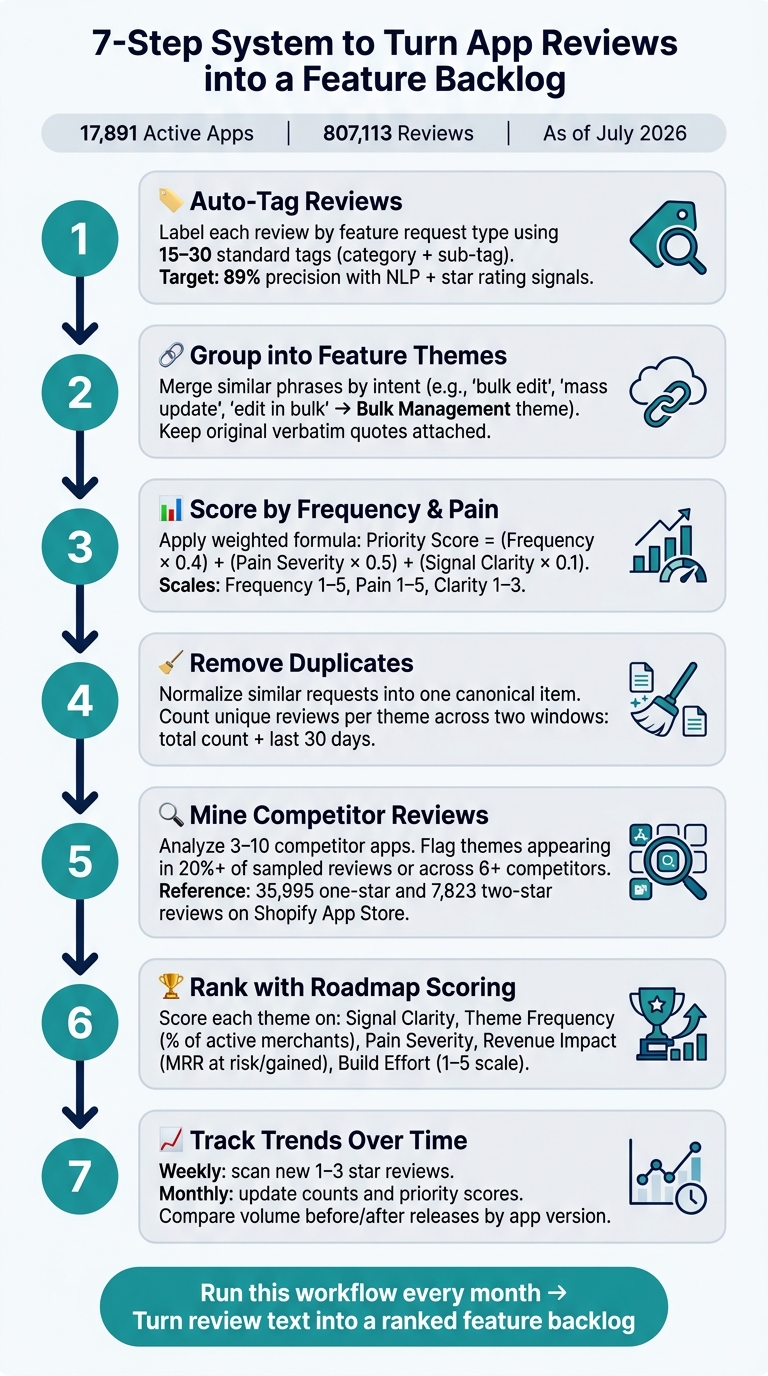
7-Step System to Turn App Reviews into a Feature Backlog
Why Shopify App Reviews Are Useful Product Input
Shopify app reviews often contain feature requests in the merchant’s own words. And that makes them more than public feedback. They can show you what users wanted, where they got stuck, and where your app listing may have set the wrong idea from the start.
In most cases, review feedback lands in three buckets: missing features, usability gaps, and cases where listing copy or screenshots set the wrong expectation. Once you label reviews that way, the next step is to pair those labels with metadata so you can tell random complaints from demand that keeps showing up.
Metadata helps you separate one-off issues from product signals. A complaint about a broken workflow doesn’t mean the same thing in every case. It matters when the review was posted, which app version was live, and what kind of merchant left it. That context changes how you read the feedback.
The table below shows why each metadata field matters:
| Metadata field | Why it matters |
|---|---|
| Review date | Detects trend shifts after releases; flags regressions |
| Star rating | Separates blockers (1–3 stars) from nice-to-haves (4–5 stars) |
| App version | Connects feedback to specific builds and code changes |
| Merchant type and location | Reveals whether a request is segment-specific or broadly needed |
| Time in app | Distinguishes onboarding friction from long-term issues |
Merchant segment also changes the meaning of a request. The same request can point to very different priorities depending on who’s asking for it. A new merchant, for example, may be dealing with setup friction, while a larger store may be hitting workflow limits. Those signals become the base layer for tagging and grouping requests.
AppJubilee brings this review intel into one place with keyword tracking, ranking snapshots, and competitor analysis. That makes it easier to connect review signals to search performance.
sbb-itb-ce93587
1. Auto-Tag Reviews by Feature Request Type
Auto-tagging means labeling each review by the feature it asks for. A simple way to do this is to set up 15–30 standard tags in two layers: a category and a sub-tag. For example, you might use "Integrations" as the category and "Meta Ads integration" as the sub-tag. From there, apply those tags with keyword rules or an NLP model. Research on mobile app review classification found that combining text classification with star rating and sentiment features can reach 89% precision for detecting feature requests. Once your tags are set, you can count requests, score them, and weed out duplicates.
Signal clarity
Only tag clear, direct requests. Good signals include phrases like "please add", "I wish it had", "it would be great if", and "I'm missing." If the feedback is vague, label it "needs triage" instead of guessing. Bad tags throw off the numbers.
Once you've tagged the clearest requests, look for repeated wording and group it into themes.
Theme frequency
Track the number of distinct reviews for each tag over a rolling 90-day window. Then divide that by total review volume. If 5%–10% of new reviews mention the same feature, that's a priority theme. If a request shows up in 30% or more of your 1–2 star reviews, treat it as a critical theme that likely ties to churn.
Pain severity
Frequency alone doesn't tell the whole story. You also need severity.
A request inside a 5-star review is usually a nice-to-have. The same request in a 1-star review, especially with words like "urgent" or "blocking", points to a blocker.
Roadmap impact
Tie each tag to a roadmap item. Then track request count, severity, and merchant segment for that tag, so you can see whether the gap actually closes after launch.
2. Group Keywords and Phrases into Feature Themes
After tagging, group similar phrases by intent into one feature theme. Reviews almost never use the exact same words. One merchant says "bulk edit", another says "edit in bulk", and a third asks for "mass update." Those all point to the same gap: a bulk management or batch processing theme. If you split them into separate requests, you break up the pattern and make the signal harder to spot. At this stage, you're only grouping requests. You're not scoring them yet.
The key is to group by intent, not wording alone. Look at the workflow problem behind each phrase, then map it to a theme name that describes the solution. In plain terms, turn complaint language into feature language. For example, "I have to export to Excel to edit" maps to In-App Bulk Editing. That gives the team something concrete to build against.
Keep the original wording tied to the theme. As Shawn North, Founder, GapQuery, puts it:
"AI summaries smooth out the specific language that makes complaints actionable ('500 SKUs' becomes 'large catalogs' in a summary, and 'large catalogs' is too vague to build against)."
So don't strip away the raw phrasing. Attach verbatim quotes to each theme so the exact technical breakpoints stay in view. Once the theme is named, score it in the next step.
3. Score Reviews by Frequency and Pain Severity
Once you've grouped themes, give them scores so you can rank what matters most. Gut feel doesn't hold up for long.
Signal Clarity
Treat clarity as a tie-breaker, not the main factor. A simple 1–3 scale is enough:
- 3 = a specific request with workflow context
- 2 = a partial request
- 1 = a vague comment
Theme Frequency
Count how many reviews mention a theme in the last 90 days, not across all time. Then turn those raw counts into a 1–5 frequency band. For example, 1 = 1–2 mentions, 3 = 5–9 mentions, and 5 = 15+ mentions and growing month over month.
Old volume can be noisy. Recent growth matters more.
Pain Severity
Frequency shows how many merchants care. Severity shows how much they care.
A practical 1–5 scale works well:
- 1 = minor annoyance with no workflow impact
- 3 = needs a workaround or extra manual steps
- 5 = blocks a core task, leads to support contacts, or points to churn risk
Watch for direct language like "this breaks our checkout" as a strong sign of severity. A 2-star review about a broken workflow will often rank above a 5-star review with a casual idea.
Roadmap Impact
Roll the scores into one priority number. Score each theme, not each review.
Priority Score = (Frequency × 0.4) + (Pain Severity × 0.5) + (Signal Clarity × 0.1)
Pain severity gets the most weight because one blocker can matter more than a pile of minor complaints.
For instance, a theme with Frequency = 4, Pain Severity = 5, and Clarity = 3 gets a score of 4.4. That's a near-term priority.
A theme with Frequency = 3, Pain Severity = 2, and Clarity = 2 gets 2.4. That's more of a nice-to-have.
Use this score to rank themes during sprint planning.
| Dimension | Scale | High Score Signal |
|---|---|---|
| Signal Clarity | 1–3 | Specific request with workflow context |
| Theme Frequency | 1–5 | 15+ mentions in the last 90 days, trending up |
| Pain Severity | 1–5 | Blocks core tasks; churn risk or 1–2 star reviews |
| Priority Score | Composite | Higher severity and frequency rank first. |
After scoring, remove duplicate requests so each theme reflects unique demand.
4. Remove Duplicates and Normalize Similar Requests
After you score your themes, combine requests that mean the same thing even if people phrase them differently. For example, “bulk price update,” “mass edit prices,” and “change prices for multiple products at once” should count as one request, not three.
This step turns messy review language into a cleaner backlog: one item for each user need.
Start by cleaning the raw text. Lowercase it, remove punctuation and emojis, and fix common misspellings. Then group reviews by intent. In most cases, a quick manual pass through each cluster is enough to check that people are asking for the same outcome.
From there, create one canonical request, such as Add a bulk price editor for multi-product updates, and attach every related review to it.
Once the list is clean, the next move is to group similar requests into feature themes.
Signal Clarity
Only merge requests when the outcome matches.
If a cluster starts to feel too broad, split it. Don’t force different asks into one fuzzy label.
Theme Frequency
After merging duplicates, count unique reviews per theme - not total mentions scattered across your notes.
Track that in two time windows:
- Total count
- A recent window, such as the last 30 days
That gives you both the long-term pattern and the near-term shift in demand.
Pain Severity
When every review tied to the same request sits in one place, the severity pattern is much easier to spot. You can see how many are 1- or 2-star reviews, and how many use terms like “impossible” or “costing us sales.”
Roadmap Impact
A deduplicated theme list makes priority scoring more accurate because Reach and confidence reflect actual demand, not repeated wording.
With duplicates removed, it’s also easier to compare your themes against competitor reviews cleanly.
5. Mine Competitor App Reviews for Feature Gaps
Once you've cleaned up your own review backlog, look at competitor reviews next. This helps you check whether the same unmet needs show up across the market. Low-rated competitor reviews often spell out what merchants wanted but couldn't get. That's a direct signal of what buyers still need. Use those reviews to confirm which requests appear beyond your own app.
The Shopify App Store has 35,995 one-star reviews and 7,823 two-star reviews.
Filter competitor complaints into clear feature requests
Start by turning competitor complaints into plain feature requests. Focus on 1–3 star reviews, turn implied pain points into direct needs, and ignore vague comments that don't say much, like those found in returns and exchanges apps where feedback is often generic.
Split feedback into two buckets:
- Explicit requests: "add bulk discount rules"
- Implicit requests: "I have to manually update every product one by one"
Then rewrite the implicit ones as direct feature requests before you add them to your list. In this case, that might become bulk product update support. This step matters because raw complaints are messy, but product requests are much easier to compare across apps.
Group themes across competitors
After you collect reviews from 3–10 competitors, group them by theme instead of tracking every wording change. People describe the same pain in different ways, but the pattern is what counts.
For example, a theme like "multi-store inventory sync" might appear in 43 mentions across six competitors. Treat a theme as a real gap when it shows up across several competitors or in about 20% of sampled reviews. AppJubilee can help surface repeat themes through review intelligence and competitor mapping.
When the same request appears in multiple apps, you're not looking at a random complaint. You're looking at a market gap.
Prioritize by business impact
Some gaps are minor annoyances. Others cost merchants money. Put the most weight on gaps tied to lost sales, churn, or switching to another app. Reviews that mention workarounds or migrations are especially useful because they show the pain is strong enough to push people out the door.
Decide what belongs on your roadmap
When a shared feature gap appears across multiple competitors with both high frequency and high pain severity, it becomes a strong roadmap candidate. Use that pattern to decide whether the feature belongs on your roadmap. That gives you a cleaner handoff into prioritization.
6. Prioritize Requests with a Roadmap Scoring Framework
Once you've tagged, grouped, deduped, and checked competitor reviews, you can turn all that feedback into a ranked backlog.
The simplest way to do that is with one weighted score per theme based on four inputs:
- frequency
- severity
- revenue impact
- build effort
That gives you a clear way to compare requests side by side instead of relying on whoever spoke up last.
Signal clarity
Use clarity as a gate.
If a theme is still vague, keep it in triage until it's specific enough to build. A request like “make the app better” doesn't help much. But if several merchants describe the same issue, in the same part of the workflow, with enough detail to act on, you have something your team can use.
Theme frequency
Measure frequency by the share of active merchants mentioning a theme, not just raw review count.
That matters because 20 reviews from low-intent trial users don't always beat a smaller group of paying merchants with bigger stores. If you can, weight this by merchant value. For example, a handful of high-GMV merchants asking for a bulk pricing API may matter more than a larger batch of trial accounts asking for a cosmetic UI tweak.
Pain severity
Use severity to tell the difference between minor friction and problems that put retention at risk.
This is where you separate “slightly annoying” from “blocking day-to-day work.” Reviews with low star ratings, sharp language, or direct mentions of lost sales, churn, or uninstall behavior should stand out fast.
Revenue impact
Revenue impact is the MRR at risk or gained if you ship the feature.
Look at both sides: MRR that may be lost if the issue stays unresolved, and upside from stronger adoption on higher tiers. AppJubilee can connect review themes to revenue metrics, which makes this part much less guessy.
Effort to build
Score effort from 1 to 5, where 1 is a small fix and 5 is a major build.
Use effort to sort between themes that are otherwise close in value. It shouldn't cancel out a request with clear business impact, but it does help when two items look similar and one can ship much sooner.
| Scoring Factor | What to Measure | High Score Indicator |
|---|---|---|
| Signal clarity | How specific and actionable the request is | Multiple reviews describe the same behavior with clear context |
| Theme frequency | % of active merchants mentioning the theme in the last 90 days | Appears across merchant segments and high-value accounts |
| Pain severity | Star rating, language intensity, workflow impact | 1–2 star reviews; mentions lost revenue or uninstalls |
| Revenue impact | MRR at risk, upsell potential, strategic fit | Affects higher-tier merchants or unlocks a new pricing tier |
| Effort to build | Engineering time, testing complexity, maintenance | Small, well-scoped work that can be delivered quickly |
Document the scores in a spreadsheet or product tool so support, marketing, and founders can all see why a request sits where it does. That shared view cuts down on debate and makes priority calls easier to explain.
Then use that score as your baseline. Over time, trend tracking will show whether demand is heating up or cooling off.
7. Track Feature Request Trends Over Time
A snapshot tells you what merchants wanted at one moment. But once you score and dedupe requests, you can start to see something more useful: which needs are picking up speed, which are holding steady, and which are fading out. That’s why review data should be treated like a time series, not a static list.
Signal clarity
Use dates and app versions to compare request volume before and after releases. This makes it much easier to spot whether a launch helped, hurt, or sparked a new wave of feedback.
It also helps to keep one canonical tag for each request type. People rarely ask for the same thing in the same words, so a single tag keeps related phrasing on one trend line instead of scattering it across your data.
Theme frequency
For each theme, track recent mentions from the last 30 days and compare that number with the prior period. A theme that stays steady means one thing. A theme that suddenly jumps after a release means something else entirely.
A simple rhythm works well here:
- Scan new 1–3-star reviews every week to spot new themes early.
- Do a monthly review to update counts and refresh prioritization scores.
Volume tells you how many merchants a theme touches. Severity tells you how urgent it is.
Pain severity
Track average severity over time. If severity goes up while volume stays flat, that usually points to a problem getting worse, even if more people aren’t mentioning it yet.
Roadmap impact
When both frequency and severity climb quarter over quarter, move that theme up in priority. Then reflect those shifts in your backlog, along with any search and listing decisions tied to that issue.
AppJubilee can connect review trends with keyword performance analytics and listing changes.
Tables to Support the Article
The tables below turn tagged reviews, grouped themes, and scores into two practical outputs: coverage gaps and roadmap priorities. Use the first table to see where your app falls short. Use the second to decide what to build next.
Table 1: Feature Coverage Comparison
This table gives you a feature-gap map based on mined review themes. It helps you compare feature coverage across apps at a glance.
| Feature Theme | Your App | Competitor A | Competitor B |
|---|---|---|---|
| Reporting & Analytics Depth | Implemented | Frequently Requested | Missing |
| Automation Rules & Workflows | Frequently Requested | Implemented | Implemented |
| Multi-store / Multi-language Support | Missing | Frequently Requested | Implemented |
| Onboarding & Setup Experience | Implemented | Implemented | Frequently Requested |
| Integration Coverage (e.g., GA4, Klaviyo) | Implemented | Missing | Frequently Requested |
| Performance & Speed | Frequently Requested | Implemented | Missing |
| Support & Documentation Quality | Implemented | Frequently Requested | Missing |
A Missing vs. Implemented row points to a clear gap. A Frequently Requested vs. Implemented row points to a chance to stand out.
That’s the point of this table. It doesn’t just show what exists. It shows where users are pulling the market, and where one app may be behind another.
Coverage gaps show opportunity. The next table turns that opportunity into a build order.
Table 2: Feature Request Prioritization
This table ranks deduplicated themes for build order.
| Feature Theme | Frequency (1–5) | Severity (1–5) | Est. Annual Revenue Impact (USD) | Strategic Fit | Effort |
|---|---|---|---|---|---|
| Automation Rules & Workflows | 5 | 4 | $24,000 | High | Medium |
| Reporting & Analytics Depth | 4 | 4 | $18,000 | High | Medium |
| Multi-store / Multi-language Support | 3 | 5 | $12,000 | High | High |
| Integration Coverage (GA4, Klaviyo) | 4 | 3 | $9,600 | High | Low |
| Onboarding & Setup Experience | 3 | 3 | $6,000 | Medium | Low |
| Performance & Speed | 4 | 2 | $4,800 | Medium | Medium |
The strongest near-term candidates are the themes with:
- High frequency
- High severity
- Strong revenue impact
- High strategic fit
- Low-to-medium effort
In plain English: if a feature shows up often, causes pain, fits your product direction, and won’t take forever to ship, it should move up the list.
Update both tables monthly or after major releases. AppJubilee can surface review velocity and rank impact to help keep them current.
How the 7 Methods Work Together
After the tables show the main gaps and priorities, use this workflow to move from review data to action. The flow is simple: tag reviews, group similar wording, remove repeats, score severity and frequency, check competitor reviews, rank the backlog, and track change over time.
Once you've cleaned up duplicate themes, look at competitor reviews to see whether the same gap shows up there too. That helps you tell the difference between a gap in your own product and a problem across the whole category.
What makes this process repeatable is that it uses both qualitative and quantitative proof. The numbers show how many merchants are affected and how severe the issue is. The review excerpts show why it matters and give your team the merchant context needed to make better calls.
For each high-priority theme, pair a small data card with two or three review excerpts that reflect the problem on the ground. Include:
- Mention counts
- Average rating
- Merchant segment mix
Use both together: counts show scale; excerpts show context.
After launch, compare mention volume and average rating for that theme before and after the release. AppJubilee can track review velocity and rank impact after releases.
Treat the output as the input for the next review cycle.
Conclusion
Reading Shopify App Store reviews one by one doesn’t scale. You need a workflow you can run again and again, so review text becomes product input instead of a pile of comments.
That’s why the process matters. These seven methods work best as one system: tagging, grouping, scoring, deduplication, competitor mining, roadmap prioritization, and trend tracking. Together, they give you a ranked feature backlog based on merchant language, frequency data, and pain severity. In plain English, they help you turn review text into a prioritized backlog.
Run the workflow every month, and track changes by app version.
The reviews are already there. The workflow turns them into a roadmap.
FAQs
How many reviews do I need before trends are reliable?
There isn’t one fixed cutoff. In practice, patterns are easier to trust when you look at data over longer stretches, like 30-day windows.
For newer apps, getting 10 reviews in the first 30 days can help build early traction. Once you reach 50 reviews, you’re often beyond the first visibility phase.
That said, one number alone doesn’t tell the whole story. Steady review velocity matters more than hitting a single total.
Should I score feature requests differently for free and paying merchants?
Yes. Feedback from paying merchants should usually carry more weight.
Why? They often give sharper input on high-value features and business impact. They’re the ones using the product in ways that tie directly to revenue, team workflows, and day-to-day results. So when they point out a gap, it often links to something with direct business stakes.
That said, feedback from free users still matters. It can show you broader patterns, common friction points, and entry-level fixes that may help more people get started. That kind of input is useful when you're trying to balance your roadmap between growth and long-term health.
What’s the best way to handle vague reviews that hint at a missing feature?
Treat vague reviews as actionable intent signals, not noise you should brush off. They can help sharpen both your listing and your product plan.
Start by comparing that sentiment with your current keyword rankings. This can show whether your app is pulling in the wrong audience. If the same complaint keeps showing up, look at the pain point behind it and ask whether that feature lines up with the problems your target keywords promise to solve.