
Shopify Partners Review Data: Ranking Impact
Review velocity, rating bands, and recency drive app-store rank and installs—treat reviews as time-based signals for analysis.
Yes - review data can affect Shopify App Store performance, but not in a simple one-to-one way. From what I see in this analysis, the review signals that matter most are review velocity, recent rating changes, total review count, and rating level - then I need to check those against keyword rankings, installs, conversion, and churn before I make a call.
Here’s the short version:
- Recent review flow matters more than old totals for short-term rank movement.
- A rating above 4.5 stars tends to support steadier performance.
- A rating below 4.0 often leads to weaker install results.
- More reviews usually help conversion, especially once an app moves past early low-volume ranges.
- Timing matters: rank shifts may show up in about 2–7 days, while install and conversion impact can take up to 30 days.
- Reviews alone do not prove causation. I have to compare them with listing changes, keyword relevance, retention, and uninstall trends.
A few numbers stand out right away:
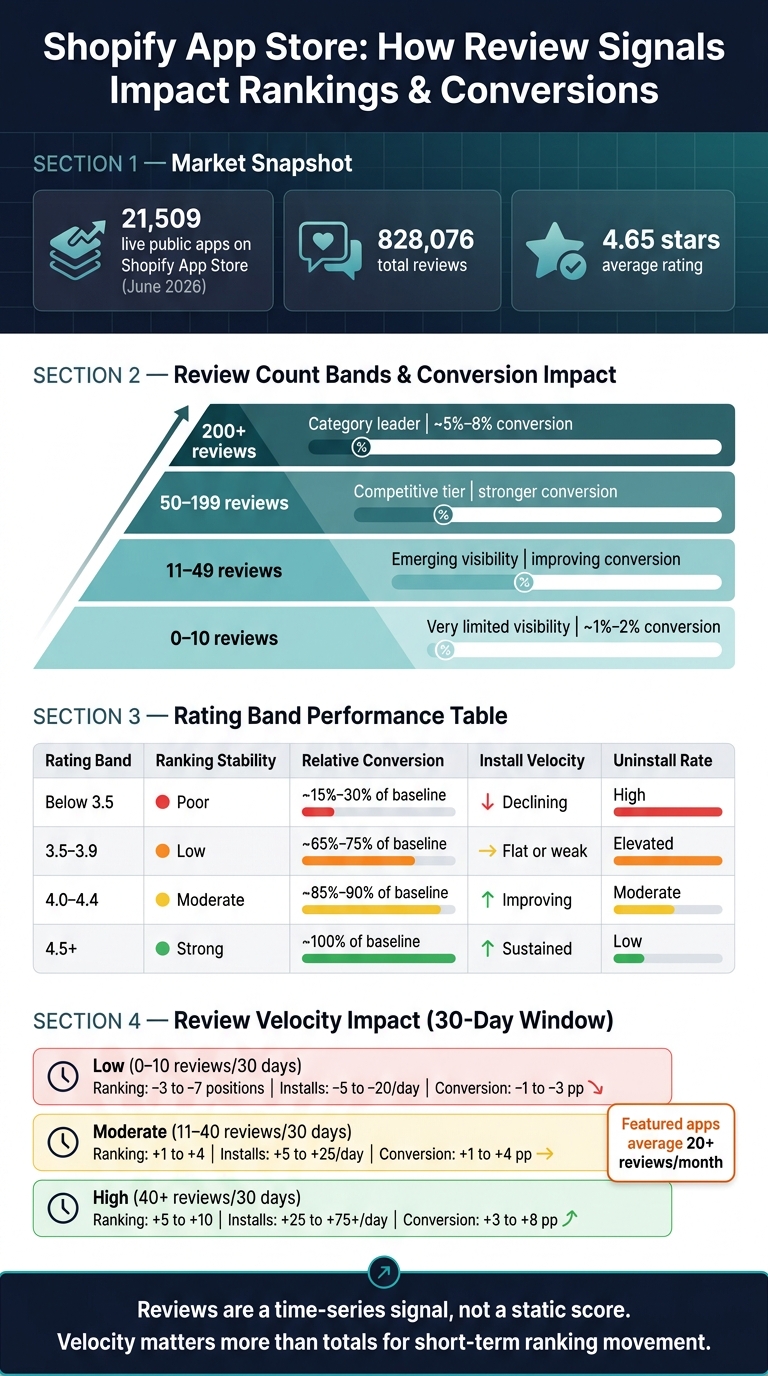
- The Shopify App Store had 21,509 live public apps and 828,076 reviews in June 2026
- The average app rating was 4.65 stars
- Apps with under 25 reviews tend to convert at about 1%–2%
- Apps with 200+ reviews tend to convert at about 5%–8%
- Apps with 40+ new reviews in 30 days often see stronger ranking and install movement than slower-moving apps
If I were reviewing app performance, I’d start with this order:
- Review velocity
- Rating trend
- Total review count
- Keyword movement
- Installs, uninstalls, and conversion
| Signal | What I’d use it for | What I would not assume |
|---|---|---|
| Review velocity | Spot short-term momentum | That it alone caused rank gains |
| Rating trend | Track merchant satisfaction shifts | That averages tell the whole story |
| Review count | Judge social proof and maturity | That more reviews always mean better rank |
| Recency | Check whether sentiment is current | That recent reviews always change installs |
| Installs/churn | Confirm business impact | That reviews were the only reason |
Bottom line: I would treat reviews as a time-based signal, not a static score. When reviews spike, ratings slip, or new feedback clusters around product review issues, that’s my cue to line up Shopify Partners data with keyword tracking and see what changed.
Shopify App Store: Review Signals & Their Impact on Rankings
Review volume and rating thresholds tied to visibility
Review count bands and ranking tiers
Review count thresholds matter. A simple way to think about them is through four bands: 0–10, 11–49, 50–199, and 200+. Each one points to a different level of visibility and a different degree of statistical stability.
Apps with 0–10 reviews usually don't have enough social proof to win much visibility. The 11–49 range is where discovery starts to pick up, but a single new review can still swing the average. The 50–199 band is where things get more competitive and easier to measure with confidence. Once an app reaches 200+ reviews, it tends to carry the strongest trust and install signal.
| Review Count Band | Visibility & Ranking Impact | Performance Context |
|---|---|---|
| 0–10 | Very limited visibility | Early |
| 11–49 | Emerging | Emerging |
| 50–199 | Competitive | Competitive |
| 200+ | Category leader | Leader |
This lines up with Shopify listing benchmarks. Apps with under 25 reviews convert at about 1%–2% from view to install, while apps with 200+ reviews convert at about 5%–8% view-to-install.
Average rating thresholds and performance shifts
Average rating has its own breakpoints, and they matter just as much.
A rating below 3.5 is high risk. The 3.5–3.9 range is still weak. Dropping under 4.0 is tied to about a 40%–50% decrease in install success rates compared with top-tier competitors. Ratings in the 4.0–4.4 band usually lead to steadier rankings and modest install gains. At 4.5+, ranking stability is at its strongest. Featured placements tend to cluster at 4.8+.
| Rating Band | Ranking Stability | Relative Conversion | Install Velocity | Uninstall Rate |
|---|---|---|---|---|
| Below 3.5 | Poor | ~15%–30% of baseline | Declining | High |
| 3.5–3.9 | Low | ~65%–75% of baseline | Flat or weak | Elevated |
| 4.0–4.4 | Moderate | ~85%–90% of baseline | Improving | Moderate |
| 4.5+ | Strong | ~100% of baseline | Sustained | Low |
Relative conversion values are indexed to the 4.5+ band as the baseline.
Why review count and rating work together
Review count and rating make more sense when you look at them together. Volume adds credibility. Rating shows current sentiment. One without the other can give you the wrong read.
For example, a high average rating with very few reviews looks good on the surface, but it doesn't carry much weight. On the flip side, a large review base with a slipping average can be a warning sign. That's often where teams get tripped up.
Teams that watch both signals side by side - using Shopify Partners install data along with keyword ranking snapshots from AppJubilee - can spot those gaps early. Then the choice becomes clearer: push for more reviews, or fix the product issues behind the negative sentiment.
The next question is whether recent reviews move rankings faster than lifetime averages.
sbb-itb-ce93587
Review timing, freshness, and lag effects
Recent reviews and review velocity
If review volume shows scale, timing shows momentum. Fresh reviews matter because they show that trust is still growing, not that it only grew once in the past.
Shopify's rating system gives more weight to recent, useful, and trustworthy reviews than to older ones. That means a steady stream of new reviews can matter more than a big total that hasn't moved in months.
Here’s what that looks like in practice: an app that gets 50 reviews in 30 days will often rank above an app with 500 total reviews built up over several years if that older app has little recent activity. This pace of incoming reviews is called review velocity. It usually looks at how many new reviews an app gets in a 7-day or 30-day window.
| Review Velocity Band (30 days) | Ranking change | Daily install change | Conversion change (pp) |
|---|---|---|---|
| Low (0–10 reviews) | –3 to –7 | –5 to –20 installs/day | –1 to –3 pp |
| Moderate (11–40 reviews) | +1 to +4 | +5 to +25 installs/day | +1 to +4 pp |
| High (>40 reviews) | +5 to +10 | +25 to +75+ installs/day | +3 to +8 pp |
Long gaps in review flow can wear down momentum over time. That’s why teams often track review velocity as a working benchmark using Shopify App Store optimization tools, not just total review count. Featured apps on the Shopify App Store average 20+ reviews per month, which gives teams a clear target to measure against.
Lag between review events and ranking movement
Review changes don’t shift rankings on the spot. There’s usually a delay, so it helps to measure review events against rankings, installs, and conversion in fixed before-and-after windows.
For positive review bursts, early ranking movement is often visible within 7 days, with results usually settling over 7 to 21 days. Negative review clusters can change the displayed rating within 24 to 48 hours, while the follow-on effect on keyword rankings and install volume often appears over the next 3 to 14 days.
A simple way to track this is to use 14- to 30-day pre- and post-event windows. Then compare keyword rankings, daily installs, and conversion after each review shift. That makes it easier to see whether review changes came before the movement in rankings and conversion, or whether something else was going on.
Connecting review changes with keywords and conversion
Mapping review trends to keyword ranking changes
Put review events, keyword data, and conversion data on the same timeline. That makes it much easier to spot whether a change in reviews shows up in rankings or in listing performance.
A practical setup is to track 5–15 core keywords and 20–50 supporting terms. Then, when a review event lands - like a sudden wave of 1–2 star reviews tied to a main feature - check both groups for 3–5-position moves.
Here’s the key read: if rankings drop for core terms like "subscription app" or "subscription billing" while supporting terms hold steady, the issue may be trust around the app’s main job, not a broad visibility problem. Repeated feature mentions can also help clarify how merchants see the app’s position in the market.
Comparing review trends with listing retention and churn
When rankings shift, look at installs and retention next. Reviews don’t sit in a vacuum. They should be read next to listing conversion rate, uninstall rate, and revenue per merchant.
The basic diagnosis is pretty simple:
- If rankings improve and listing views go up, but conversion stays flat, the lift in reviews may not be enough to win over merchants.
- If average rating improves and reviews get more detailed - mentioning ease of setup, support quality, or clear outcomes - and conversion rises even when rankings stay flat, that points to better review quality shaping install decisions.
Detailed, credible reviews can also screen users in a helpful way. When reviews spell out specific use cases and realistic expectations, they help merchants decide whether the app fits before they install it. That can improve merchant fit and cut early churn, even if the rating itself only moves a little.
Using AppJubilee and Shopify Partners data together
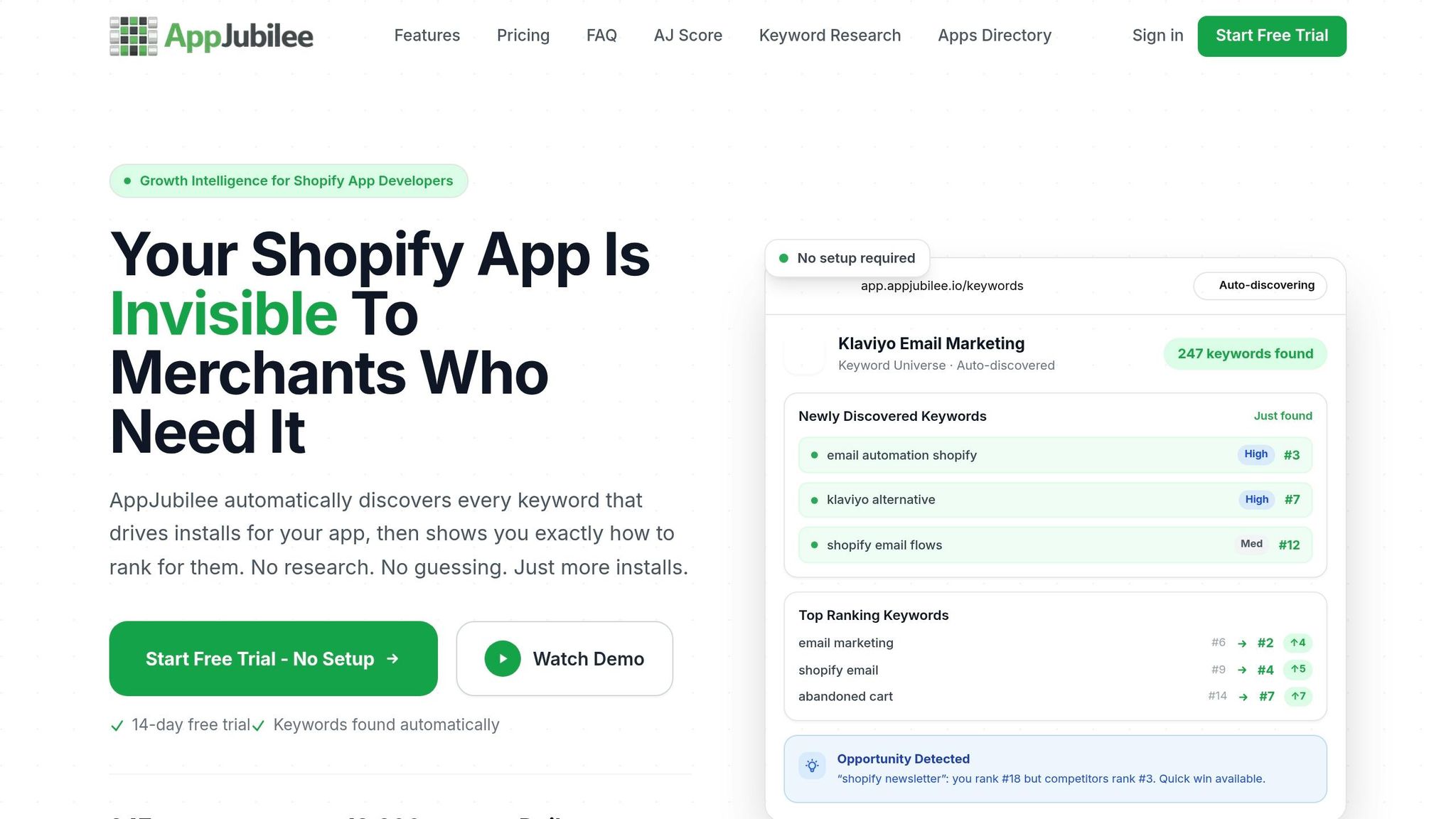
This comparison works best when review data, ranking data, and Shopify Partners data all use the same date range. AppJubilee can line up daily keyword rankings, review signals, and Shopify Partners performance by day.
Use that combined view to tell the difference between shifts tied to reviews and shifts caused by listing or funnel changes.
Conclusion: Which review signals matter most for ranking analysis
Put it all together, and one thing stands out: review signals matter most when they move over time, not when they sit there as static totals.
They also don’t all matter the same way. For short-term ranking analysis, review velocity is the first signal to check. But you can’t read it in a vacuum. It makes the most sense when you look at it next to total review volume and average rating. As AppJubilee's 2026 report puts it:
"Review velocity matters more than total reviews for short-term ranking moves. An app gaining 50 reviews in 30 days will outrank an app with 500 older reviews."
So the reading order is pretty clear: start with velocity, then use volume and rating for context. Total review volume still works as a trust baseline, but the ranking bump starts to level off after key review-count bands. And rating still shapes conversion. Staying above about 4.5 stars helps; falling below 4.0 hurts.
When a review event happens, use the same post-event window each time so your analysis stays consistent. A 7-day post-event window works well for checking ranking movement. If keyword rankings move during that stretch, compare that change against any listing edits before you tie the movement to reviews.
Key points to carry into ongoing app store analysis
The main takeaway is simple: reviews are a time-series signal, not a total. What matters is how those numbers change, and whether those changes line up with keyword rankings, installs, and churn.
Use review spikes, rating shifts, and recency as prompts to check keyword rankings and install changes in Shopify Partners. Treat each meaningful review event as a data point worth checking. Track rating shifts daily. Keep review events, keyword movement, and Shopify Partners metrics on the same timeline. That’s the gap between using review data after the fact and using it to make sharper calls about listing performance and support quality.
FAQs
How many new reviews are enough to move rankings?
Review velocity matters more than total review count. For new apps, getting at least 10 new reviews in the first 30 days can help build early traction.
In plain English: a steady stream of new feedback usually works better than a big pile of old, inactive reviews.
For example, 50 reviews in 30 days can outperform 500 older reviews.
Can a high rating still underperform if review volume is low?
Yes. In the Shopify App Store, review velocity - how many new reviews an app gets over time - can matter more for ranking than total review count.
That means an app with a high rating but very little new review activity can still rank below apps that have stronger review momentum.
How do I tell if reviews caused the ranking change?
Look at how review velocity lines up with keyword position changes over time. In AppJubilee, you can compare each new review with keyword rank movement in the 7 days that follow.
When you match review activity with past ranking charts, you can spot whether a spike in reviews happened before a rank change. That makes it easier to tell review-driven momentum apart from listing updates or competitor moves.