
Feature Gap Analysis for Shopify Apps: 4 Tools
Four practical tools—keyword gaps, competitor tracking, review mining, and listing change logs—to diagnose and fix app feature gaps.
If I need to find why a Shopify app is losing installs, I don’t start with one tool for everything, even when I compare Shopify app optimization tools. I match the tool to the problem: search visibility, rival moves, user complaints, or listing edits that changed rankings.
Here’s the short version:
- Keyword-based gap finding shows where an app misses search demand
- Competitor feature tracking shows what rival apps are pushing in listings and pricing
- Review mining shows what merchants like, dislike, and keep asking for
- Listing change logs show what changed, when it changed, and what happened next
A few numbers stand out from the article:
- 1,200+ keywords tracked daily
- 18,600+ apps monitored
- 90+ days of history available from day one
- Some keywords can swing by up to 5 positions in a week
- Review feedback is grouped into 8 topic categories
Quick Comparison
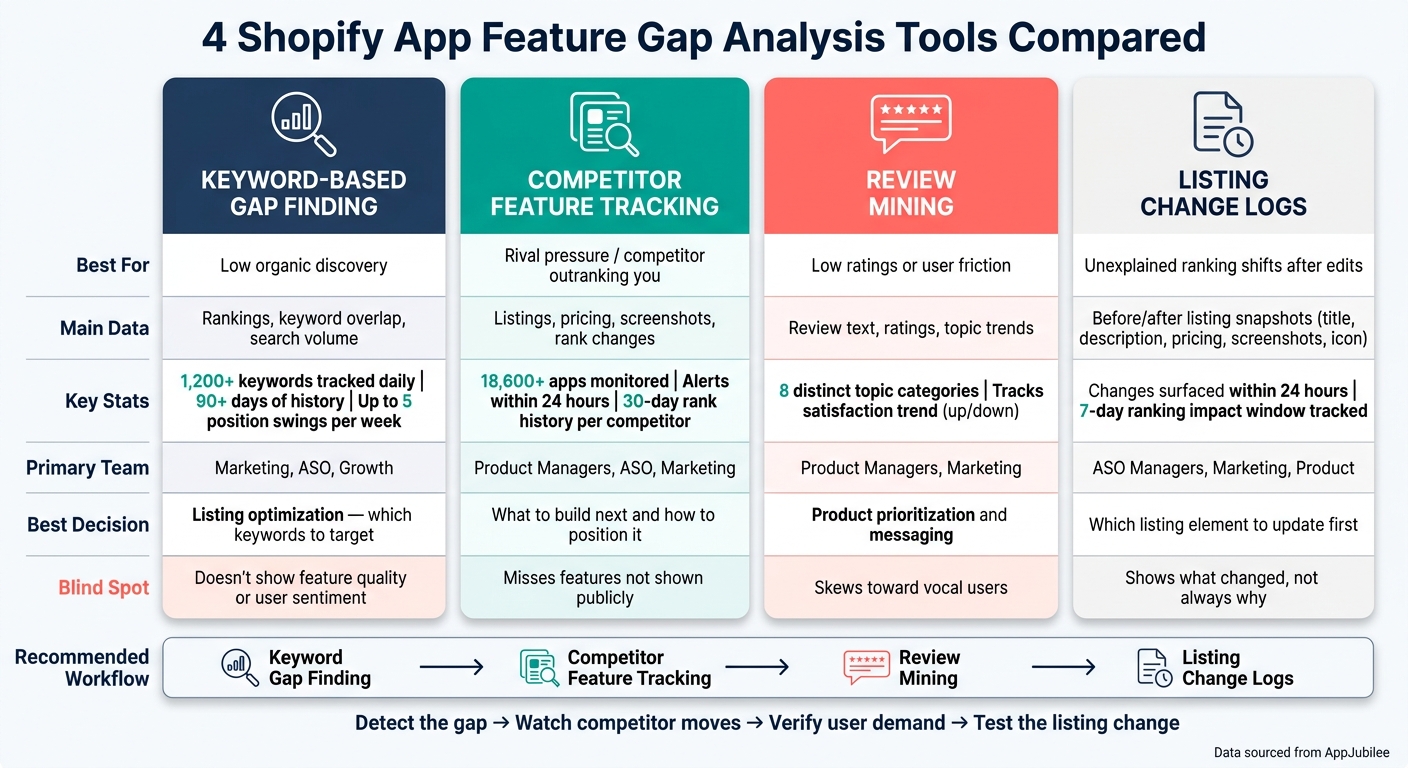
4 Shopify App Feature Gap Analysis Tools Compared
| Tool | Best for | Main data | Best use |
|---|---|---|---|
| Keyword-based gap finding | Low discovery | Rankings, keyword overlap, search volume | Pick ASO terms to target |
| Competitor feature tracking | Rival pressure | Listings, pricing, screenshots, rank changes | Compare offers and plan product or copy moves |
| Product review mining | Low ratings or user friction | Review text, ratings, topic trends | Find pain points and feature requests |
| Listing change logs | Rank swings after edits | Before/after listing snapshots | Check which listing changes may have led to movement |
My takeaway is simple: use keyword tools to find demand, competitor tracking to compare offers, reviews to confirm what users want, and change logs to check what may have caused ranking movement. That gives me a clean path from signal to action.
sbb-itb-ce93587
1. Keyword-Based Gap Finding
Gap Type Detected
Keyword-based gap finding shows three things fast: visibility gaps, intent gaps, and competitor-only gaps.
The easiest place to start is the quick-win zone. That’s where your app sits between positions #8 and #15 - the bottom of page 1 or the top of page 2. Push those terms onto page 1, and organic installs often move up first.
There’s another angle here too. A keyword gap isn’t always just an SEO issue. In many cases, it points to demand for a feature users want but can’t find. When that happens, competitor tracking helps you see how other apps package, frame, and sell that feature.
Tracked Data
This tool tracks daily organic rankings, keyword volatility, and competitor keyword overlap.
AppJubilee tracks 1,200+ Shopify App Store keywords and updates rankings daily so you can separate organic rankings from paid placements. It also gives you 90+ days of history from day one, which makes it easier to spot patterns instead of looking at a single moment in time.
That matters because the same ranking drop can mean two very different things:
- Your listing needs work
- There’s a real feature gap in the market
Keyword volatility adds another layer. Some keywords can swing by up to 5 positions in a week. That’s a big shift in a short span, and it gives fast-moving teams room to gain ground with a focused listing update.
Primary Team
Marketing, ASO, and growth teams use this tool type most when they’re trying to grow organic acquisition.
Product managers use it too, mainly to check whether search demand lines up with planned features.
Best Decision Supported
This tool is best for listing optimization. It helps teams decide which keywords belong in the title, subtitle, or description.
AppJubilee also flags Core Keywords - terms ranked by 40%+ of apps in the tracked set.
Still, keyword data has limits. It won’t tell you why merchants are frustrated, and it won’t show how a competitor built a certain feature. If a keyword gap starts to look like a product gap, competitor tracking is the next step.
2. Competitor Feature Tracking
Gap Type Detected
Keyword gaps show what people search for. Competitor feature tracking shows how other apps try to turn that demand into installs.
In plain English, this tool helps you see how competitors position their apps in the market. It surfaces gaps in features, content, pricing, and positioning by tracking changes in app listings and pricing. Use it when you want to know which features competitors are pushing, not just which keywords they rank for.
Tracked Data
This tool tracks competitor app titles, descriptions, screenshots, pricing plans, and keyword positions. If a competitor rewrites its description or adds a new screenshot, you can usually spot that change within a day.
AppJubilee tracks 18,600+ apps and 1,200+ keywords daily and automatically maps your closest competitors based on keyword overlap. That matters because it can surface apps you might have missed. It also tracks review volume, review pace, ad status, and 30-day rank history for each competitor.
One smart use case: watch rank movement for 7 days after a listing update. That gives you a clearer read on whether the update improved visibility before you copy the same move. A listing change might look smart on the surface, but rank movement tells you whether it actually worked.
Primary Team
Shopify app developers and product managers use this data to help sort roadmap choices. At the same time, marketing and ASO teams use it to refine listing copy and spot keyword openings where competitors rank ahead of them.
Best Decision Supported
This tool is best for two connected decisions: what to build next (like product bundles) and how to position it.
It helps answer:
- What are competitors offering that you don't offer yet?
- How are they framing that offer to drive installs?
Competitor feature tracking is proactive. You’re not waiting for users to flag missing features after the fact. You’re watching the market shift as it happens. And if the gap still feels fuzzy, check reviews to see whether merchants are asking for that feature directly.
3. Review Mining
Gap Type Detected
Feature tracking tells you what competitors say their apps do. Review mining tells you whether merchants buy that story.
That difference matters. Reviews show how merchants react to apps that already exist, which helps you spot missing features, friction points, and expectations that still aren’t being met. If the same setup complaint keeps showing up, that’s often a gap you can own. If a feature gets praised again and again, it’s worth a closer look—just ensure you aren't being misled by fake reviews.
Tracked Data
Review mining looks at review text, groups feedback into topics, and surfaces patterns that keep repeating over time. It also helps you see whether satisfaction is moving in the right direction or starting to slip.
AppJubilee's review intelligence organizes merchant feedback into 8 distinct topic categories and tracks whether a competitor's user satisfaction is trending up or down. Before you copy a competitor feature, check that trend line. A spike in complaints can mean the feature looks good on paper but falls short in actual use.
Primary Team
This makes review mining useful for both roadmap and messaging.
Product managers use it to decide what to build next. Marketing and ASO teams use it to spot weak points in competing apps and find sharper positioning angles.
Best Decision Supported
Review mining supports product prioritization and messaging by showing which problems keep coming up across the category and which features merchants still want solved better. In plain English: it helps teams find gaps tied to merchant experience, not just competitor claims.
4. Listing Change Logs
Gap Type Detected
If reviews show what people want, listing change logs show how competitors react.
A rival changing an app title, rewriting a description, or adjusting pricing isn't random. It's a signal. Change logs can reveal messaging, keyword, and pricing gaps by showing when competitors shift how they position features, target core security terms, or set up their plans.
Tracked Data
A listing change log records timestamped snapshots of an app's:
- title
- short description
- full description
- pricing plans
- screenshots
- app icon
AppJubilee's Activity Feed surfaces competitor moves within 24 hours, and Change Impact Tracking measures the ranking impact over the next 7 days.
Primary Team
ASO and marketing managers use change logs to spot visibility gaps and move fast when a competitor updates something. Product managers use them to watch feature rollouts and pricing shifts.
Best Decision Supported
Change logs work best when the team needs to decide which listing element to update first. With Change Impact Tracking, teams can connect specific edits to the ranking movement that followed and then focus on the changes most likely to improve rankings.
If rankings drop, check the change log first. A recent listing edit may be the actual cause. That gives you a clean way to weigh speed against evidence depth in the next section.
Pros and Cons of Each Tool Type
No single tool type does it all. Each one shows you a different part of the same problem, and each one misses something too. The tradeoff is pretty simple: speed helps you spot signals, while depth helps you confirm what's going on.
Use the tradeoffs below to match the tool to the decision in front of you.
| Tool Type | Gap Type Confirmed | Fastest Insight | Evidence Depth | Blind Spots | Risk of Misinterpretation |
|---|---|---|---|---|---|
| Keyword-Based Gap Finding | Visibility and search demand | Fast, with daily rankings and 90+ days of history | High | Doesn't show feature quality or implementation | Single-day snapshots can be noisy |
| Competitor Feature Tracking | Positioning and value proposition shifts | Fast, with alerts within 24 hours | Moderate | Misses features not shown publicly | Keyword overlap doesn't always mean direct competition |
| Review Mining | User pain points and unmet expectations | Slower, because patterns emerge over time | High, but biased toward vocal users | Skews toward vocal users | Overreacting to a single outlier review |
| Listing Change Logs | Messaging and keyword positioning shifts | Fast, with side-by-side diffs | High, but limited to what changed | Shows what changed, not always why | Confusing correlation with causation |
Across all four tools, the biggest mistake is mixing up correlation with causation. A ranking jump might happen after a title change, a burst of reviews, or both. That doesn't mean one event directly caused the other. In practice, ranking movement usually tells a clearer story over a longer time window than it does on any single day.
The next move is to pick the first tool based on the gap you need to solve. Put together, these tools follow a simple sequence: detect the gap, watch competitor moves, verify user demand for analytics, then test the listing change.
Which Tool Type Should You Start With?
Start with the tool that fits the problem in front of you: discovery, competitor pressure, review sentiment, or ranking movement that doesn't make sense.
If discovery is weak, start with keyword-based gap finding. It surfaces high-volume search terms your listing currently misses. If a competitor keeps outranking you and you can't tell why, start with competitor feature tracking. It shows which listing elements they lean on and surfaces recent changes. If installs are steady but ratings are slipping, start with review mining. It points to the friction points and missing features users mention most. If you've been updating your listing but can't tell whether those edits helped or hurt, start with listing change logs. They connect each edit to the ranking change that comes after it.
Here’s the first signal to check for each problem:
| Immediate Problem | Start Here |
|---|---|
| Low organic discovery | Keyword-Based Gap Finding |
| Competitor outranking you | Competitor Feature Tracking |
| Low ratings hurting conversions | Review Mining |
| Unexplained ranking shifts | Listing Change Logs |
Use all four together to double-check what you're seeing. A simple flow works well here: discover, compare, verify, then test. That way, one tool checks the next, and a single data point turns into something you can trust.
FAQs
Which tool should I start with first?
Start with your AJ Score. It gives you a quick baseline for your app’s overall visibility and shows where it stands in its category.
Then head to Keywords and review Keyword Opportunities. That’s where you’ll find terms your competitors rank for but you don’t.
After that, check your current rankings, the Competitors page, and the Ads page. This helps you confirm your baseline and spot which keywords your rivals are targeting.
How long should I track ranking changes?
Don’t put too much weight on 1-day swings. Most of the time, that’s just noise.
Instead, look at 7-day and 30-day trends to find patterns that actually mean something.
After you update a listing, check performance at 3, 7, and 14 days. That gives you a clean read on what changed and whether it had an effect.
For a bigger-picture view of app health and where you stand against competitors, review 30-, 60-, and 90-day themes. AppJubilee can help with daily ranking snapshots and listing change impact analysis.
How do I tell a keyword gap from a feature gap?
A keyword gap happens when merchants search for a term, but your app either doesn’t show up or lands too far down the results to get noticed. You can spot this by tracking search volume and rankings over time.
A feature gap shows up when your app is missing something merchants keep asking for. The easiest way to find it is to look for patterns in feedback, like repeated complaints or the same feature requests showing up again and again.