
How Categories Impact Shopify App Rankings
How the right app store category boosts visibility, installs, and rankings, plus simple testing and monitoring tips.

Categories in the Shopify App Store directly influence how apps are discovered, ranked, and downloaded. Choosing the right category can boost your app's visibility, while a poor choice can bury it in search results. Here's what you need to know:
- Categories define competition: Broad categories like "Marketing" attract high traffic but face intense competition. Niche categories may have less traffic but offer better chances to rank higher.
- Rankings matter: Apps in the top 3 positions can see 5–20x more downloads than those ranked 26 or lower.
- Merchants rely on categories: Accurate categorization helps merchants find apps that meet their needs, improving installs and conversions.
- Key factors for success: Match your app’s core function to the right category, analyze competitors, and monitor performance metrics like installs and rankings.
Bottom line: Select a category that aligns with your app’s purpose and offers a realistic chance to rank well. Use tools like AppJubilee to track performance and refine your strategy over time.
Shopify App Store Categories Explained
What Are Shopify App Store Categories?

Shopify structures its App Store using a three-tier system: Categories, Subcategories, and Tags. Each level helps narrow down an app's primary function.
There are seven main categories: Sales channels, Finding products, Selling products, Orders and shipping, Store design, Marketing and conversion, and Store management. When submitting your app, you’ll need to pick a primary tag that best describes its main function. If your app has a secondary feature, you can also add a secondary tag.
Shopify reviews all classifications during the submission process, so it’s important to choose accurately. If you need to change your app’s category later, you can do so once via the Partner Dashboard. Any further changes require a formal appeal.
Categories vs. Tags vs. Keywords
Each of these elements serves a distinct purpose. Here’s a breakdown of how they differ:
| Element | Primary Purpose | Visibility | Quantity Allowed |
|---|---|---|---|
| Categories & Tags | Browsing and filtering | Visible on the app listing | 1 primary category; up to 2 tags |
| Hidden Keywords | Search engine matching | Hidden from merchants | Exactly 5 slots |
| On-Page Keywords | Conversion and search relevance | Visible in app name, subtitle, and description | Naturally integrated into text |
In essence, categories and tags are designed to improve browsing, helping merchants discover apps while exploring the store. On the other hand, hidden keywords optimize search traffic by matching specific merchant queries with targeted keywords. As Shopify explains:
"App categories, subcategories, and tags allow merchants to find apps that meet their specific needs."
This system not only simplifies browsing but also plays a vital role in boosting your app’s visibility across the platform.
Why Categories Affect Visibility
Accurate categorization is key to your app’s success in both rankings and browse-based discovery. The category you select signals Shopify’s algorithm about your app's purpose, which helps merchants find it when searching for specific solutions. While around 70% of app discoveries start with search queries, browsing remains an essential discovery method - especially for merchants who know their problem but haven’t decided on a specific app yet.
Your category choice also determines your competition. A broad category like Marketing and conversion places your app alongside thousands of others, while a more focused tag can narrow your competition significantly. Rankings are influenced by factors like install rates, reviews, and engagement metrics, which are updated continuously. To stay ahead, developers often compare Shopify App Store optimization tools to find the best tracking and analytics features. Misclassifying your app can hurt its visibility, confuse potential users, and lead to lower conversions or higher uninstall rates.
sbb-itb-ce93587
[SaaS Opportunity] Top 5 Categories on the Shopify App Store - According to Shopify
How Categories Affect Rankings and Merchant Behavior
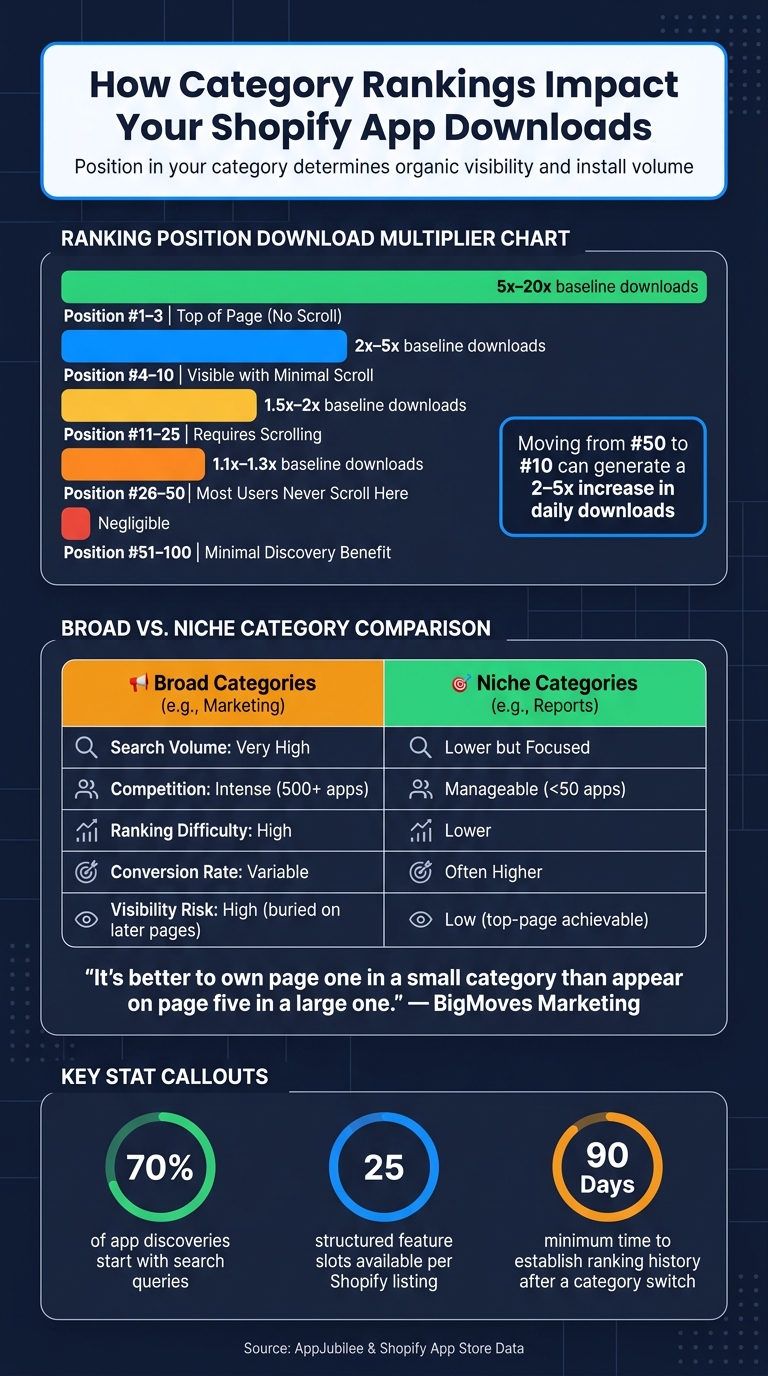
Shopify App Store Rankings: How Category Position Impacts Downloads
Categories do more than just organize apps - they shape rankings and influence merchant decisions in powerful ways.
How Category Selection Affects App Rankings
Choosing the right category for your app does more than define its place in the store - it determines how visible it is. The category you pick decides which category pages your app appears on and where it shows up in "related apps" sections. This directly impacts organic traffic and sets off a chain reaction: better rankings lead to more installs, which in turn improve keyword performance.
Apps that rank high in their categories enjoy exponential benefits. For instance, apps in the #1–3 positions can see a 5x to 20x increase in baseline downloads. Even positions #4–10 deliver a 2x to 5x boost. But if your app falls below position #100, its discovery potential plummets to almost nothing. This makes early and accurate category selection a critical step for long-term growth.
How Merchants Use Categories to Find Apps
Shopify App Store categories act like well-organized aisles in a store, helping merchants quickly find what they need. For example, a merchant dealing with shipping delays will head straight to Orders and shipping or sourcing, while someone focused on abandoned cart recovery will explore Marketing and conversion. These merchants arrive with a specific problem in mind, ready to install an app that solves it.
This intent-driven behavior highlights the importance of proper categorization. When your app is listed in the right category, it gets more clicks and installs. On the flip side, if it’s misplaced, merchants are likely to ignore it - even if it ranks well. As Ashley Taylor, Product Manager at Cleverence, explains:
"If you assign your app to an irrelevant category, potential users might never find it. Correctly categorizing your app can make it visible to the merchants that need it most."
Category placement also shapes how merchants evaluate your app. Shopify allows developers to list up to 25 structured features per category, which appear directly on the app listing. Choosing the most relevant category ensures that merchants see features that align with their needs, making it easier for them to decide if your app is the right fit.
Understanding how merchants search helps you decide between targeting broad or niche categories.
Broad vs. Niche Categories: Pros and Cons
The decision to go for a broad or niche category comes down to where your app can compete effectively. Broad categories like Marketing and conversion attract a lot of traffic but are dominated by well-established apps with thousands of product review counts. On the other hand, niche categories may have lower traffic but face far less competition, making it easier for newer apps to stand out.
"It's better to own page one in a small category than appear on page five in a large one." - BigMoves Marketing
| Factor | Broad Categories (e.g., Marketing) | Niche Categories (e.g., Reports) |
|---|---|---|
| Search Volume | Very high; attracts the most traffic | Lower; focuses on specific needs |
| Competition | Intense; dominated by apps with many reviews | Lower; easier for new apps to rank |
| Ranking Difficulty | High; requires strong install rates | Lower; fewer downloads needed to rank |
| Conversion Rate | Variable; harder to stand out | Often higher; better matches merchant intent |
| Visibility Risk | High; risk of being buried on later pages | Lower; better chance of top-page visibility |
The choice depends on your app’s strengths. If your app serves a specific function, it’s often better to dominate a niche category than to get lost in a crowded broad category. Picking the right category - and sticking with it - is key to maintaining strong rankings over time.
How to Choose the Right Category for Your Shopify App
Picking the right category for your Shopify app is more than just a box to check - it’s a key decision that impacts visibility and attracts the right merchants. To get it right, focus on three steps: define your app’s main features, study competitors in your desired category, and align with merchant expectations. Let’s break these steps down.
Matching Your App's Features to a Category
Start by identifying your app’s core function - what’s the main problem it solves? Try summing it up in a single sentence. For example: “My app helps merchants track orders to reduce delivery delays.” That core function often points directly to the most fitting category. For instance, an app that tracks orders belongs in Orders and shipping, not Marketing and conversion, even if the latter has more traffic.
As SEO/ASO expert Jakaria highlights:
"Choosing the right category is a must for a ranking boost that many developers ignore."
Once you’ve selected the primary category, create a list of up to 25 structured features that showcase your app’s functionality. These features will appear on your app listing and help merchants compare it to similar solutions.
Researching Competitors in Target Categories
Take a close look at the top 10 apps in your target category. Do they solve the same problem as your app? Are they designed for the same type of merchants? Apps with high review counts or badges like "Built for Shopify" often indicate a competitive, established market. If the top apps in the category don’t address the same need, that’s a red flag - it’s likely the wrong category, no matter how much traffic it gets.
Shopify’s developer documentation emphasizes this approach:
"To discover categories applicable to your app, research apps that are similar to yours on the Shopify App Store and use the categories that they use."
By understanding competitor strategies, you can make sure your app fits naturally into the category merchants are exploring.
Balancing Merchant Expectations with Category Fit
It can be tempting to choose a high-traffic category, but if it doesn’t align with your app’s function, it could confuse potential users. Accurate categorization not only boosts downloads but also ensures merchants find the solutions they’re looking for. Merchants browse categories with specific needs in mind, so misplacing your app disrupts their search and reduces its relevance.
As one expert explains:
"Category mismatch creates relevance friction. If a merchant browses 'Orders and shipping' and finds your email marketing app... they'll ignore it."
Pay attention to how merchants describe their challenges - whether in support tickets, forums, or app reviews. If they frequently mention phrases like “automate workflows,” “analytics,” or “sync inventory,” use that feedback to guide your category choice. Matching their language to your app’s placement ensures you meet expectations and stand out in the right way.
Using Data and Competitor Analysis to Refine Category Choices
After selecting a category, it’s crucial to monitor its performance using real data. This helps confirm whether your decision is driving results - and allows for adjustments when it’s not.
Tracking Category-Based Performance Metrics
Your app’s ranking in a category is heavily influenced by install and review velocities, key factors in Shopify's ranking algorithm. And where you land on the list matters - a lot. Moving from position #50 to #10 can generate a 2–5x increase in daily downloads, while breaking into the top 3 positions (visible without scrolling) can lead to a 5–20x boost in downloads.
| Position Range | Visibility | Daily Download Multiplier |
|---|---|---|
| #1–3 | Visible without scrolling | 5–20x baseline |
| #4–10 | Visible with minimal scrolling | 2–5x baseline |
| #11–25 | Requires scrolling | 1.5–2x baseline |
| #26–50 | Most users never scroll this far | 1.1–1.3x baseline |
| #51–100 | Minimal discovery benefit | Negligible |
To measure your progress, track metrics like installs, listing conversion rates (views to installs), and review activity weekly. A straightforward "before vs. after" spreadsheet can help you compare your ranking position and identify what’s driving changes. Once you have this baseline, you can dig deeper by analyzing your competitors’ strategies.
Mapping Competitors and Their Category Strategies
Understanding how competitors operate in your category can refine your approach. Start by identifying the top 10 apps in your chosen category. Look closely at how they communicate their value - pay special attention to the language in their app names, subtitles, and descriptions. If several top-ranking apps use similar phrases, it’s a sign those terms resonate with merchants and align with what they’re searching for.
Another critical factor is competitive density. Some categories are packed with over 500 apps, while others have fewer than 50. For example, an app with 500 installs per month might rank #5 in a smaller category but only #45 in a crowded one like Marketing or sales channel categories. If breaking into the top 30 of a popular category feels out of reach, shifting to a less saturated niche where you can dominate the top 10 might yield better results.
"Choosing strategically aligned but less saturated categories achieve higher chart positions and better organic conversion rates." - ASOWorld
Keep a close eye on competitors' rankings. If a rival app suddenly climbs the charts, investigate whether they updated their listing, launched a promotion, or introduced new features. Over time, tracking these patterns can reveal what’s driving their success.
Using AppJubilee to Optimize Category Placement
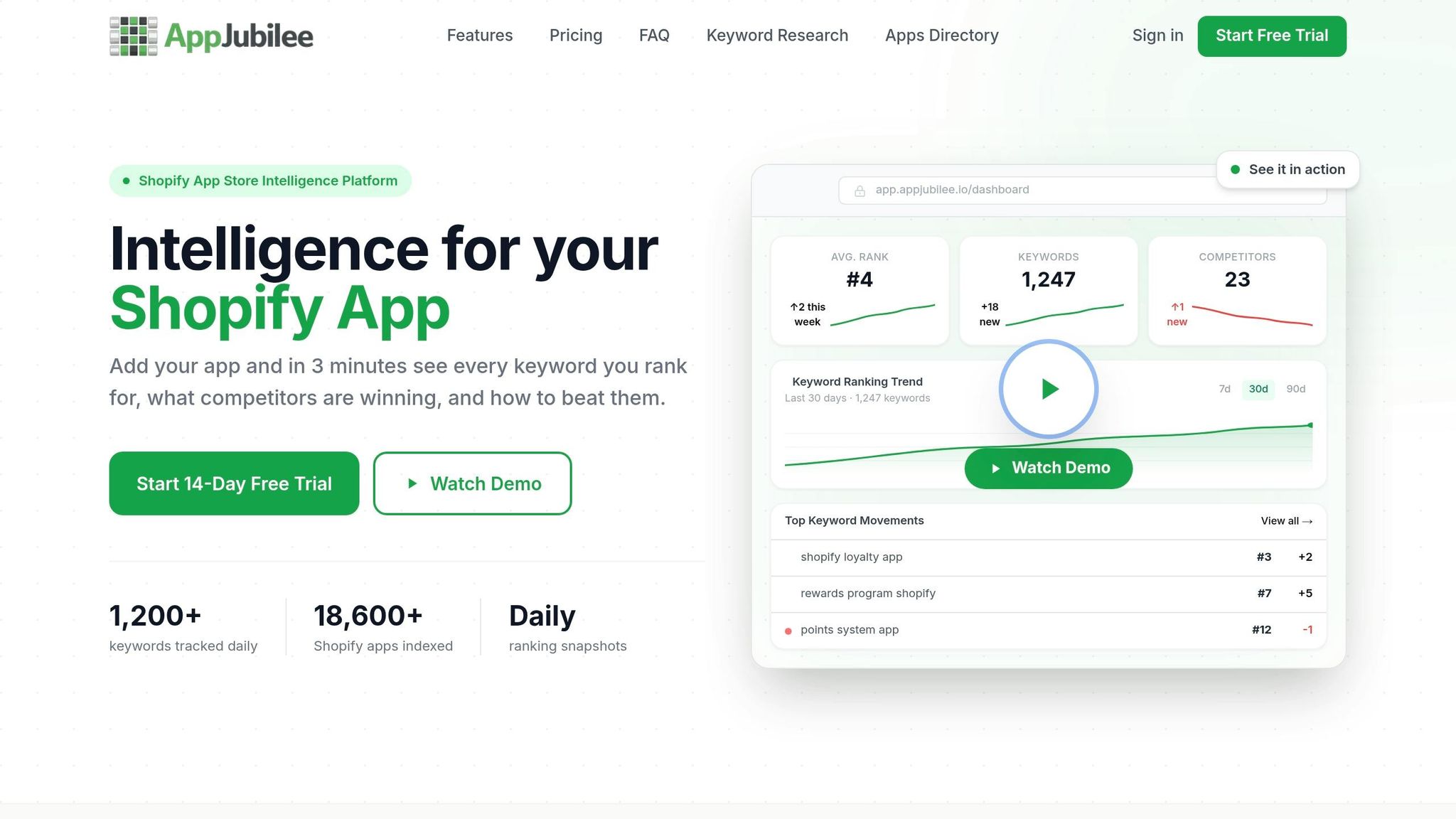
Manually conducting this kind of analysis can be tedious and error-prone. That’s where tools like AppJubilee come in. Designed for ongoing category intelligence, AppJubilee tracks daily ranking changes, monitors competitors’ updates, and sends alerts when a rival moves up the charts.
With features like Listing Changes & Impact Analysis, you can pinpoint how metadata or category tweaks affect your rankings. The Competitor App Watch tool allows you to monitor specific competitors and link their updates to shifts in ranking. When paired with GA4 and Shopify Partners integrations, AppJubilee provides a full picture of how your category position impacts key business metrics like trial starts and paid conversions - not just install numbers.
Keeping Your Category Placement Relevant Over Time
When it comes to category-driven rankings, choosing the right category isn't a one-time task. As market conditions shift and your app evolves, your initial category might not remain the best fit. Keeping your category placement relevant is just as crucial as selecting it in the first place.
Auditing Whether Your Category Still Fits
Start by comparing your app to the top 10 apps in its current category. Are they solving similar problems? If not, merchants browsing that category might overlook your app - not because it's lacking, but because it feels out of place. This misalignment, often referred to as relevance friction, can hurt your conversions.
If you notice a steady drop in installs or fewer recent reviews over several weeks, it might not mean your app is performing worse. Instead, the category itself could have become more competitive. Shopify also periodically updates its taxonomy and may automatically reclassify apps. After any major platform updates, double-check that your app’s category placement hasn’t been changed without you knowing.
Once you've identified a potential issue, start evaluating alternative categories by comparing them to your current performance metrics.
How to Test a New Category Before Committing
Before making a switch, assess whether your app can perform well in the target category. For example, can your install volume secure a top 20–30 position? Remember, rankings depend on consistent installs and reviews. An app with 500 monthly installs might perform well in a niche category but struggle to break into the top 50 in a crowded one like Marketing. If the numbers don’t indicate a strong finish, it's better to stick with your current category.
If the target category looks promising, timing the switch is key. Keep in mind that switching categories resets your ranking history. While reviews carry over, other performance signals do not. To measure the impact effectively, track your installs, conversion rates, and search positions weekly. Compare data from the 30 days before and after the switch. Tools like AppJubilee’s Listing Changes & Impact Analysis can help automate this process, giving you a clear picture of how the change affects your rankings. You can also find answers to common questions about how these tracking and monitoring tools work.
"Frequent category switching to gain 'new in category' visibility resets your ranking history and confuses merchant expectations about your app's purpose. The disruption typically outweighs any discovery advantage." - Big Moves Marketing
When to Make Category Changes
Timing is everything when changing categories. Align your updates with merchant expectations to maintain visibility. Here’s a quick guide for common scenarios:
| Scenario | Recommended Action |
|---|---|
| Stuck outside Top 30 for 6+ months | Look into a less crowded, related category |
| Major feature release coming | Switch categories before the launch to maximize momentum |
| App submitted within the last 90 days | Hold off - let the current category build ranking history |
| Black Friday/Cyber Monday approaching | Wait - don’t risk losing visibility during peak traffic |
| Core functionality has shifted significantly | Submit a formal recategorization appeal to Shopify |
If your app’s primary functionality has changed - say, it started as a marketing tool but now focuses on inventory management - you’ll need to submit a formal appeal through Shopify’s app submission form. Unlike feature updates, which you can make anytime, changing the primary category requires approval from Shopify’s review team.
"Changing categories isn't a sign of failure but rather an indication of your app's ability to adapt to market needs." - Ashley Taylor, Product Manager, Cleverence
Conclusion: Better App Rankings Through Category Selection
Picking the right category for your app isn't just a checkbox - it's a decision that directly impacts how visible your app is to potential users. David Bell, CEO at Gummicube, emphasizes this point:
"Choosing the right category for your app is one of the most critical decisions you'll make for App Store Optimization (ASO)."
Choosing poorly can stifle your app’s growth, while a well-thought-out choice can boost its visibility and downloads. The key is to align your app's primary function with a category where it has a realistic chance of ranking high. Aiming for a top-10 spot in a niche category is often more rewarding than getting buried in a high-traffic category. For example, apps in a niche category with a top-5 ranking can see 5–20× more daily installs compared to their baseline. In contrast, apps ranked between #26–50 in crowded categories like Marketing usually experience only a modest 1.1–1.3× increase in installs.
This isn’t a one-and-done task. Regular monitoring and adjustments are essential. Make sure to fill all 25 structured feature slots in your Shopify listing to improve your app’s visibility in filtered searches. Keep an eye on metrics like installs, conversion rates, and search rankings weekly, and give any new category choice at least 90 days to establish ranking history. If your app’s functionality evolves significantly, you can always request a category change through the Shopify Partner Dashboard.
For those looking to streamline this process, tools like AppJubilee can be a game-changer. These tools offer daily tracking of category rankings, competitor analysis, and insights on how listing changes affect performance - helping you make smarter, data-driven decisions.
As DM Jakaria aptly puts it:
"Shopify app store optimization is more important than what you have built."
FAQs
How do I know if my app is in the wrong category?
It’s crucial to ensure your app’s main features align with what merchants are looking for in its category. If there’s a mismatch, you risk facing low engagement, weak retention rates, or even negative reviews.
Take the time to audit your app’s category. Compare your app to the top 10–20 apps within that space. Pay attention to their features, the keywords they target, and the type of audience they attract. If you notice significant differences, it might be worth considering a category change.
For tracking performance and assessing how changes to your listing impact visibility, tools like AppJubilee can be incredibly helpful. They provide valuable insights to help you make informed decisions.
Will changing categories hurt my installs or reviews?
Changing your app's category won’t impact your existing reviews since they’re directly linked to your app listing. However, categories play a crucial role in how visible your app is in charts and search results. Picking a category that doesn’t align well with your app can lead to less relevant traffic, fewer installs, and make it harder for users to find you. On the flip side, choosing a category that fits your app better - or one with less competition - can increase visibility, draw in the right audience, and lead to more installs.
How long should I wait before judging a category change?
Shopify doesn’t provide a specific timeline for reviewing category updates. To gauge the impact of these changes, keep an eye on performance metrics such as conversion rates and ASO (App Store Optimization) data over time. Rankings are heavily influenced by factors like user engagement, so it’s essential to analyze trends consistently.
Tools like AppJubilee make this process easier. With features like daily keyword tracking, ranking insights, and listing change analysis, you can better understand how your app’s category adjustments are performing and make smarter decisions moving forward.