
How Visual Updates Affect Shopify App Rankings
Optimize app icons, screenshots, captions, and videos to improve CTR, install velocity and retention; test one change at a time and track results.
Better visuals mean better app performance. Here's why: Visual elements like your app icon, screenshots, and videos directly impact user behavior. They improve metrics like click-through rates (CTR) and view-to-install rates, which Shopify's algorithm uses to rank apps.
Key insights:
- 59-65% of app downloads come from search.
- Merchants spend just 7 seconds scanning a listing.
- Shopify's stricter visual requirements (effective March 26, 2026) demand actual UI in screenshots and prohibit decorative elements.
Follow these steps to boost your app's rank:
- Focus on first impressions. App icons and the first 3 screenshots are critical.
- Use captions wisely. Include keywords - Shopify indexes text in screenshots.
- Test updates. Change one element at a time and track results over 3–4 weeks, or compare Shopify app optimization tools to find the best tracking solution.
Better visuals drive installs, signaling quality to Shopify's algorithm. The result? Higher rankings and more visibility for your app.
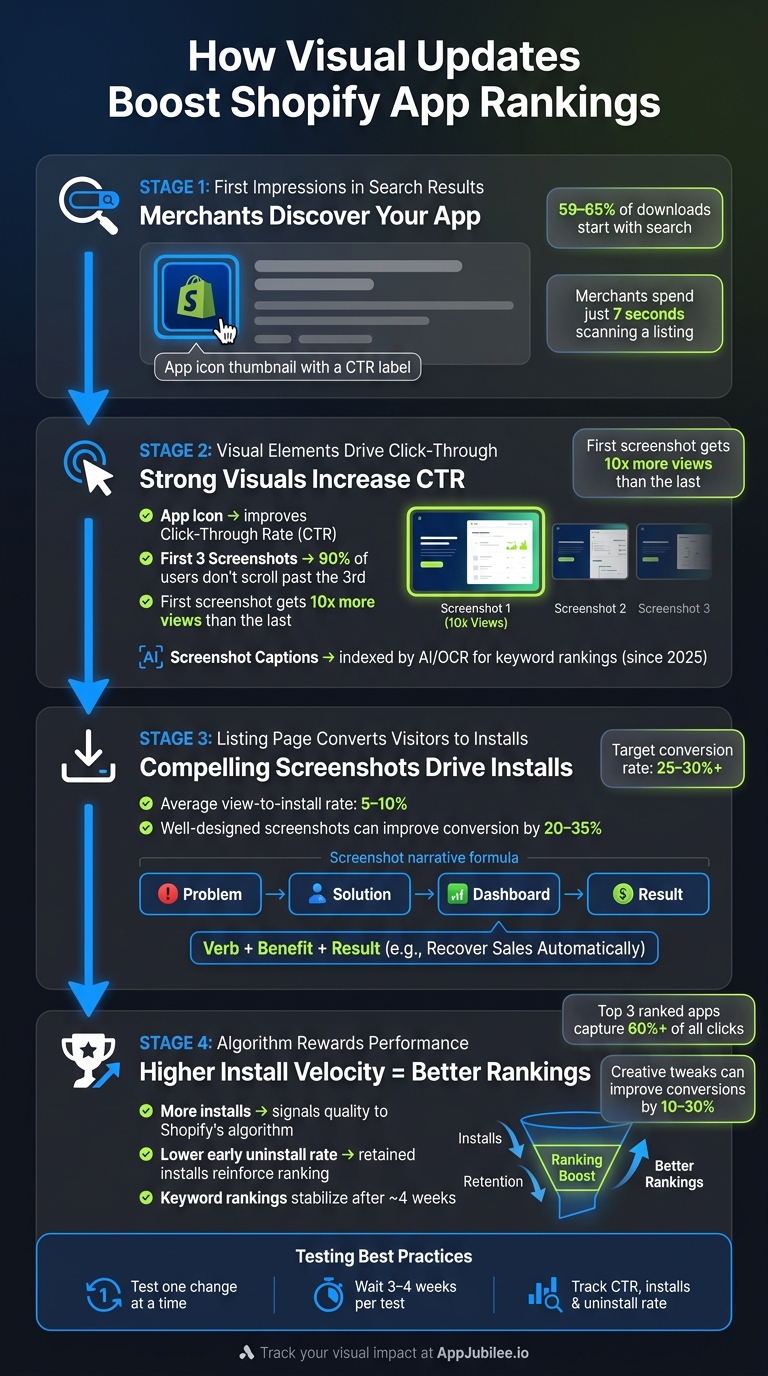
How Visual Updates Boost Shopify App Rankings: A Step-by-Step Flow
How Visual Elements Affect Shopify App Rankings
Where Visuals Fit in the Merchant Journey
Visual elements play a crucial role at two key stages of a merchant's experience: search results and your listing page. In search results, merchants often see only your app icon before deciding whether to click. On the listing page, screenshots and videos either entice merchants to install your app or cause them to move on. These moments directly impact two critical metrics - Click-Through Rate (CTR) and view-to-install rate - which are central to Shopify's ranking algorithm.
When merchants routinely bypass your app in favor of competitors, Shopify's algorithm interprets this as a signal of lower relevance, which can lead to a drop in rankings. On the flip side, strong visuals that drive better CTR and conversion rates can help improve your app's visibility.
Behavior Metrics That Visuals Drive
While visuals don’t directly determine your app's rank, they heavily influence user behavior, which in turn impacts ranking metrics. Here’s how it works: a great app icon increases CTR, leading to more visitors. Once on your listing page, compelling screenshots and videos convert those visitors into installs. This boosts your install velocity - a key factor in Shopify's ranking model that tracks the rate of downloads over a given period.
Another important metric is the early uninstall rate. When your screenshots accurately represent the app's interface, merchants know what to expect, reducing the likelihood of disappointment and early uninstalls. ASO Specialist Tatiana Odnorozhenko emphasizes this point:
"Most teams lose rankings... because the listing promises one thing and the app delivers another - and the algorithm catches it through user behavior."
Well-designed screenshots can improve conversion rates by 20–35%. With the average view-to-install rate on the Shopify App Store ranging between 5% and 10%, even small improvements can lead to significant long-term gains.
Which Visual Updates Have the Most Impact
Not all visual updates carry the same weight. Here's a breakdown of the most impactful elements and their influence:
| Visual Element | Primary Metric Impacted | How It Influences Rankings |
|---|---|---|
| App Icon | Click-Through Rate (CTR) | Indirect - drives traffic volume from search |
| First 3 Screenshots | View-to-Install Rate | Indirect - boosts install velocity |
| Screenshot Captions | Direct Keyword Reinforcement | Direct - indexed by AI/OCR as metadata |
| Explainer Video | Conversion & Retention | Indirect - especially effective for complex apps |
The first three screenshots are especially critical. Studies show that 90% of users don’t scroll past the third screenshot in a gallery, and the first screenshot gets 10x more views than the last one. This makes the first three images the most valuable real estate on your listing page.
Additionally, screenshot captions shouldn’t just be treated as design elements - they’re a chance to reinforce keywords. Since 2025, app store algorithms have used OCR and AI to index text within screenshots. This means the words in your captions can directly strengthen the keywords in your app's title and description. As Appfigures explains:
"The keywords in the keyword list and in the screenshots work a little differently: they reinforce the other keywords and give them more focus and context."
sbb-itb-ce93587
How to Plan and Execute Visual Updates
Setting a Visual Baseline Before You Start
Before making any changes to your visuals, it's crucial to document your current metrics. Start by noting your impression-to-page conversion rate (a healthy range is between 5–15%) and your page-to-download conversion rate (typically 30–60%). Don’t forget to include your early uninstall rate as well. These numbers act as your benchmark - without them, you won’t know if your updates are driving improvements or causing setbacks.
Next, review your screenshots to ensure they meet Shopify's requirements. As of March 26, 2026, Shopify's guidelines (Requirements 4.4.4 and 4.4.5) specify that screenshots must display the actual app UI. This means no desktop backgrounds, browser windows, or graphics that only feature logos. Additionally, each image in the gallery must be unique. Listings that don’t comply risk rejection, so addressing any issues upfront ensures your experiments won’t be derailed by compliance problems.
With these steps completed, you’ll have a solid foundation for designing visual updates that aim to enhance your key metrics.
Designing Visuals That Drive Installs
A strong set of screenshots tells a story: Problem → Solution → Dashboard → Result. Each screenshot should focus on a single feature or benefit. Avoid cramming multiple features into one frame - it can overwhelm viewers. This focused approach is critical because users form a first impression of your app’s visuals in as little as 17 to 50 milliseconds.
For captions, stick to a "Verb + Benefit + Result" format. For example, "Recover Sales Automatically" is far more engaging than a generic label like "Sales Recovery Feature." Since 2025, app store algorithms have started indexing caption text using OCR (optical character recognition), so captions with benefit-driven language not only attract users but also help with keyword rankings.
In terms of design, current trends lean toward dark gradients, bold sans-serif typography (80px or larger), and minimal or no device frames. This marks a departure from the plain white backgrounds and thin fonts that were popular in earlier years.
"Confidence is not data. Even if you believe the new screenshots perform better, test them." - Screenshot Lab
Once your visuals are updated, it’s time to validate their impact with controlled experiments or by using tools to compare AppJubilee and Rankbase for listing change detection.
Running Controlled Visual Experiments
After optimizing your visuals, the golden rule for testing is to make one change at a time. Start with the first screenshot since it’s the one every visitor sees. Once you’ve tested that, move on to other elements like screenshot order, captions, and color schemes.
Each test should run for 3–4 weeks. This timeline allows keyword rankings to stabilize, as they typically take about four weeks to reflect changes. Data from the first week is often unreliable due to noise, so patience is key. A great example of this approach comes from the developers of the Essential Grid Gallery Shopify app. In 2026, by changing only the featured listing image and observing results over two weeks, they saw an 11.8% increase in installs and nearly doubled their paid subscriptions. These results were only possible because they isolated variables and allowed enough time for the changes to take effect.
How to Track the Impact of Visual Updates on Rankings
Tracking Keyword and Category Ranking Changes
Keeping track of your app's rankings is crucial to understanding how visual updates influence its visibility. Once your visual update goes live, monitor your app's performance for both target keywords and category rankings. These two metrics often behave differently - a visual tweak might improve your keyword ranking without immediately affecting your category position. Keeping an eye on both gives you a fuller picture of your app's overall visibility.
It's best to check rankings weekly since daily fluctuations can be misleading noise. Here's why this matters: about 65% of app downloads start with a search query, and apps ranking in the top three positions for a keyword capture over 60% of all clicks. Even a small improvement in ranking can have a noticeable impact.
Tools like AppJubilee are designed specifically for this purpose. They provide daily keyword ranking data and historical snapshots, allowing you to compare your app's performance before and after your visual updates. If you're using Shopify, AppJubilee's integration can also pull in install data, letting you connect changes in your app listing to actual performance metrics.
Measuring Conversion and Engagement After Updates
Once your visuals attract users, the next step is to evaluate how well they engage. Rankings reflect visibility, but conversion metrics reveal how effectively your app resonates with users. Two key metrics to track are your click-through rate (CTR) - how often users tap on your app after seeing it in search - and your conversion rate (CR) - how often users install your app after visiting the listing.
It's also important to monitor install velocity over 7- and 30-day periods and to keep an eye on early uninstall rates. A surge in uninstalls following a visual update may indicate that your visuals set expectations your app doesn't meet. Post-install retention is a critical factor for app store algorithms.
"Metadata can be fixed in a day. The gap between promise and product can't." - Tatiana Odnorozhenko, ASO Specialist
For deeper insights, connect Google Analytics 4 (GA4) to your app listing. AppJubilee's GA4 integration helps you identify which keywords are driving install clicks, offering a better understanding of user intent beyond simple impressions.
Using Listing Change Impact Tools
Linking visual updates to ranking changes can be tricky. For instance, if you update your app's screenshots on a specific date but notice ranking shifts two weeks later, you'll need a clear record to connect the dots.
This is where automated listing changelogs come in handy. AppJubilee’s Listing Changes & Impact Analysis tool logs every update - whether it’s a new screenshot, icon change, or caption tweak - and aligns these changes with your ranking and conversion data. This feature provides a clear before-and-after comparison, helping you pinpoint which updates drive improvements and which don’t.
"Rankbase tracks changes to your app listing over time... This helps you correlate listing changes with position changes." - Rankbase Documentation
How to Keep Improving Visuals Over Time
Building a Visual Testing Roadmap
Updating your app's visuals once and calling it a day won't cut it. Data reveals that 49% of top apps updated their screenshots at least twice in 2024, with many refreshing visuals 2–4 times a year.
A smart approach is to follow a two-tier schedule: plan two major updates annually - these are full redesigns tied to big UI changes or new feature launches - and two minor updates. The minor ones can be simple tweaks, like swapping a single frame based on A/B testing results. This strategy ensures your visuals stay fresh without risking your app's ranking stability.
"A screenshot set that's been in market for six months with stable rankings is often more valuable than a 'better' one that reset the algorithm." - AppScreenshotStudio
Start by testing the most impactful elements, like the first screenshot, as part of your roadmap. Then, move on to refining the screenshot order, captions, and visual elements like color and contrast. This step-by-step approach ensures you tackle the most critical factors first.
To make your updates even more effective, incorporate insights from competitor strategies and user reviews.
Using Competitor and Review Data to Guide Updates
Competitor and review data can be goldmines for improving your visuals. Start by auditing the top 10 apps in your category. Pay attention to their screenshot counts, caption strategies, background styles, and use of device frames. For example, successful apps often feature 7 to 9 screenshots, while lower-ranked ones stick to just 4 or 5.
Tools like AppJubilee's competitor mapping feature can simplify this process, giving you a clear view of how rivals present their apps. This way, you can quickly adapt when they roll out updates.
User reviews are another valuable resource. Look for feedback mentioning "misleading screenshots" or confusion about your app's features. These comments point to a mismatch between what users see and what they experience. Use this feedback to refine your captions, emphasizing a clear problem/solution narrative in your screenshots.
"Your screenshots are your storefront, your pitch deck, and your sales page rolled into one." - Alperen Güntekin, Software Engineer
Connecting Visual Changes to Business Outcomes
Once your testing schedule is in place and competitor insights are gathered, focus on how visual updates impact your business. The goal isn't just better rankings - it’s installs and revenue growth. For reference, a solid page view-to-install conversion rate in 2026 is 25–27%, with anything over 30% considered excellent. Creative tweaks can improve conversion rates by 10–30%.
That said, high conversion rates can backfire if your visuals overpromise. Keep an eye on Day 1 and Day 7 retention metrics after any visual update. If installs spike but uninstalls follow quickly, it’s a sign your screenshots might be attracting the wrong users.
"A variant that sets realistic expectations might convert fewer users, but those users stay longer." - App Store A/B Testing Guide
Tie every visual experiment to a business metric like analytics for monthly recurring revenue (MRR), subscription growth, or retained installs. This ensures you're building long-term value, not just chasing short-term wins. Apps that grow steadily over time aren't necessarily the ones with the biggest budgets - they're the ones that iterate consistently.
"The difference between apps that grow organically and apps that plateau isn't talent or budget - it's consistency." - Oğuz Delioğlu, Founder of Appalize
Conclusion
Your app's visuals aren't just a one-time task - they're a continuous opportunity for growth. For example, a recent update to a featured image led to noticeable increases in installs. These kinds of results come from treating visuals as assets that can be measured and improved.
The idea is simple: better visuals lead to more installs. More installs signal quality to Shopify's algorithm, which boosts your rankings and brings more merchants to your listing. But this process requires patience. It typically takes about four weeks for keyword rankings to stabilize after an update.
"Shopify app store optimization is more important than what you have built. Because merchants will never see your app's feature or value if you are invisible to them." - DM Jakaria
The difference between apps that grow steadily and those that stall isn't a bigger design budget - it’s a consistent, data-driven approach. Regularly audit your performance, make updates with purpose, allow time for results to settle, and then refine. Tools like AppJubilee can make this process easier by tracking ranking shifts, monitoring competitor updates, and analyzing the effects of your changes. This way, you'll always have clarity on how your updates are performing.
FAQs
Which visual change should I test first?
Start by focusing on testing the first screenshot. This image is crucial - it’s what most visitors see first and often appears in search results, making it a key factor in driving conversions. Experiment with different approaches, such as feature-focused visuals versus lifestyle imagery, captions with more text versus minimal text, or variations in how devices are framed. To track the impact of these changes, use tools like AppJubilee. Be sure to test one change at a time to ensure accurate results, avoiding adjustments to other elements during the process.
How long should I wait to see ranking results?
Updating the visuals on your Shopify App Store listing can lead to rapid results. Some developers have seen a boost in installs within just two weeks of making changes. While updates typically go live within a few days, it’s important to keep an eye on their long-term impact. Tools like AppJubilee can be incredibly helpful for tracking listing updates, monitoring keyword rankings, and analyzing competitor trends. This way, you can fine-tune your listing to maximize visibility and drive better outcomes.
How can I track visual updates vs installs?
To see how visual updates influence app installs, try A/B testing. This involves running one set of visuals, updating them, and then comparing their performance over a set period. Since Shopify doesn’t provide install counts directly, you’ll need to monitor total installations before and after making changes. Tools like AppJubilee can simplify this process by tracking listing changes and linking them to performance trends. For accurate results, focus on testing one visual element at a time - this helps pinpoint its exact effect.