
Keyword Portfolio Platforms for Shopify ASO
Rank visibility alone won't cut it—Shopify ASO needs keyword portfolios tied to installs, competitor moves, and listing-change attribution.

If you want more than rank tracking, use a Shopify-native ASO tool. That’s the short answer.
I’d break the options into five groups: AppJubilee, ASO platforms and competitors, Shopify-focused rank trackers, SEO suites, and in-house spreadsheets/BI setups. The main split is simple: some tools only show keyword positions, while others connect rankings to installs, clicks, CTR, competitor changes, and listing edits.
Here’s what matters most if I were choosing:
- Daily rank tracking tells me where my app stands
- Keyword grouping helps me sort core terms, weak spots, and near-page-one terms
- Install-linked data shows whether rankings lead to results
- Change tracking helps me judge whether title, description, pricing, or screenshot edits had an effect
- History from day one makes trend review much easier
For Shopify app teams, the article’s main point is clear: rank visibility alone is not enough when I need to decide which keywords to work on first. A Shopify-native setup is better suited when I want rankings tied to merchant search behavior and install data.
Quick Comparison
| Platform type | Best for | Main limit |
|---|---|---|
| AppJubilee | Teams that want rankings tied to installs and competitor movement | Focused only on the Shopify App Store |
| General ASO platforms | Teams managing iOS, Android, and other app stores in one place | Not built around Shopify merchant search |
| Shopify-focused rank trackers | Teams that want basic Shopify rank tracking | Often lighter on competitor and listing-change data |
| SEO suites | Teams that also care about Google keyword research | Google search data does not match Shopify App Store behavior well |
| Spreadsheets / BI | Small teams with a tight budget and a small keyword set | Manual work grows fast |
One stat stands out: the article says AppJubilee tracks 1,200 Shopify App Store keywords, 18,600+ apps, and gives 90+ days of history from day one. That’s the kind of setup that shifts the job from “collecting data” to making decisions.
So if I only need a simple view of rankings, a basic tracker or spreadsheet may be enough. But if I need to connect keyword work to install movement, this article points toward a Shopify-native platform.
sbb-itb-ce93587
1. AppJubilee
For Shopify app teams, AppJubilee turns raw ranking data into a keyword portfolio you can actually act on. It tracks 1,200 Shopify App Store keywords and 18,600+ apps every day, and it pulls search results on its own. That means teams don't have to build keyword lists by hand.
Once you connect an app, AppJubilee automatically creates a Keyword Universe made up of terms your app already ranks for. It also builds a Competitor Universe based on keyword overlap. In plain English: you can see where you show up, who you're bumping into, and where the fight is getting crowded.
It also gives you 90+ days of historical ranking data from day one, even for terms you weren't tracking before signup. That's a big deal because you don't have to wait around for data to pile up before spotting patterns.
For prioritization, AppJubilee sorts keywords into a few clear buckets:
- Core Keywords: terms ranked by 40%+ of competitors
- Quick Wins: keywords in positions 8–15 that can move to page 1 with light optimization
- Keyword Opportunities: terms competitors rank for that your app is missing
Each keyword also gets a Volatility Score, so teams can tell whether search results are stable, moderate, or volatile.
AppJubilee also pulls in GA4 and Shopify Partners data, including impressions, clicks, CTR, installs, and uninstalls, so ranking data isn't floating around on its own. You can tie keyword movement to what people did next.
Once you've set priorities, AppJubilee helps connect updates to ranking movement with Listing Change Impact Analysis. This tracks the 7-day ranking movement after changes to titles, descriptions, screenshots, or pricing. Alongside competitor alerts that flag rival listing changes or major ranking moves within 24 hours, teams get a clearer read on what changed, when it changed, and what likely moved the needle.
2. General ASO Platforms
General ASO platforms are built for the Apple App Store and Google Play. Their keyword workflows are shaped around consumer apps, not merchant app marketplaces. So while they handle daily rank tracking, keyword research, and competitor analysis well, that setup doesn't map neatly to the Shopify App Store.
For Shopify teams, the main issue isn't whether a tool can track rankings. It's whether it can put merchant-intent keywords first.
These platforms usually refresh rankings each day and let teams sort keyword lists with tags and filters. They can surface terms that are close to page-one positions, which is useful. But their scoring models are based on consumer app behavior, so they can misread Shopify merchant searches. If a platform assumes install volume works the same way across app stores, it can miss what merchants are actually looking for.
The same problem shows up in intent scoring. Most of these tools infer intent from broad keyword labels like brand, generic, feature, or competitor. They don't rely on Shopify-specific install signals, which limits how much those labels can tell you in a merchant context.
Where these platforms do help is competitor research and keyword gap analysis. They can show which competitors rank for shared terms, and they can give a global view for teams serving merchants in multiple countries. That's handy if you're trying to spot overlap, missed terms like dropshipping, or patterns across markets.
The tradeoff is on the data side. These tools rarely connect with Shopify Partners data or Shopify listing-change history. So if a team wants to compare rankings with installs, they usually have to stitch that data together by hand in a spreadsheet or BI workflow.
That's the gap Shopify-native rank trackers are built to fill, especially when teams need to decide where to focus across a larger app portfolio.
3. Shopify-Focused Rank Tracking Tools
Shopify-focused rank trackers turn Shopify App Store search data into a keyword portfolio a team can actually use. They show how an app ranks for the terms that matter, so it's easier to see where the app is holding ground and where it's slipping.
The main job is daily keyword rank tracking. Each day, the tool logs a keyword's rank, page position, and day-over-day movement. That daily rhythm gives teams a steady signal without the distraction of intraday swings.
Keyword portfolio grouping makes life a lot easier when a team is tracking dozens or even hundreds of terms. Instead of checking each keyword one by one, teams can group terms by brand, feature, problem/solution, competitor, or install-intent theme. That setup helps them spot missing, rising, and declining keywords like product add-ons fast. And if those terms are missed, visibility can drop across a big part of the market.
Traffic value and install intent are where these tools become much more useful. Once keyword data ties into downstream metrics, teams can sort terms by likely impact instead of visibility alone. That's a big deal. A keyword that looks good on the surface might not drive many installs, while another term with less obvious appeal might bring in users who are ready to act.
Workflow integration is what closes the loop. If a team updates an app title or description, the platform can save a snapshot of that change and track ranking movement over a seven-day window, showing whether the update helped or hurt. Competitor alerts can also fire within 24 hours when a rival changes their listing, pricing, or screenshots. That turns rank tracking from a reporting task into a clear signal for what to do next.
4. SEO Suites Adapted for App Keyword Monitoring
SEO suites built for Google and tools built for Shopify solve two different problems.
Shopify-focused tools are made for merchant search. SEO suites are made for Google search. So even when an SEO platform shows keyword data, that data doesn't line up neatly with how search works in the Shopify App Store.
There's also a timing problem. Most SEO suites don't refresh fast enough to keep up with ranking swings in the Shopify App Store. And when rankings move often, slow data makes it hard to decide which product bundles keywords or other high-intent terms deserve attention first.
Keyword portfolio grouping has the same issue. Tagging systems built for Google SEO don't match Shopify-native keyword portfolio buckets, which makes keyword organization clunky for app teams.
The bigger gap is attribution. Without Shopify-specific data and listing-change tracking, teams can't tie keyword movement back to installs. And without listing-change attribution, they can't tell whether an optimization actually worked.
5. In-House Spreadsheet and BI Workflows
When teams want full control over keyword data, they often end up in spreadsheets and BI tools. The draw is simple: you can shape the workflow exactly the way you want, right from the start, around Shopify App Store keyword prioritization.
But control has a downside. Scale becomes the problem. Manual tracking can work for a small keyword set. Once you try to cover Shopify's keyword and competitor volume, though, things get messy fast.
Traffic value and install intent add even more work. Teams have to join Google Analytics 4 data with Shopify Partners API data to track impressions, clicks, CTR, and daily install and uninstall counts by keyword. A spreadsheet can still help group keywords into priority buckets, but every update depends on manual work.
There's also a deeper issue here. Spreadsheets are good at recording what happened. They're not good at showing why it happened.
Attribution is the hardest part. A team can log rank changes and note updates over time, but a spreadsheet can't cleanly separate cause from correlation. So people end up comparing rank movement with other signals, like reviews, and then making their best read on the impact.
Another catch: manual tracking begins with no history. There is no backfilled data, which means trend analysis only starts after collection begins. That limitation is what the next section measures across platform types.
How These Platform Types Compare on Core Shopify ASO Criteria
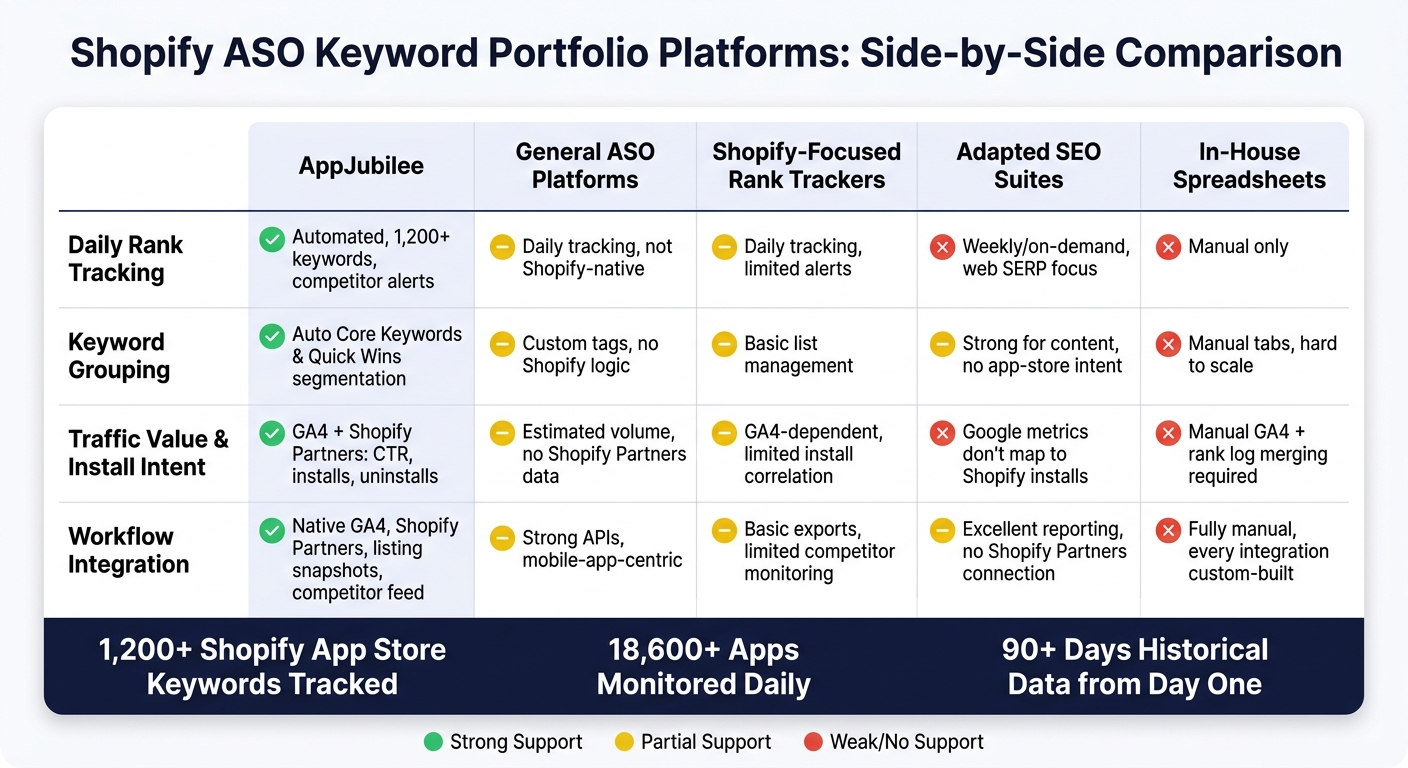
Shopify ASO Keyword Portfolio Platforms: Side-by-Side Comparison
These five platform types split apart most clearly on four Shopify ASO criteria: daily rank tracking, keyword grouping, traffic value and install intent, and workflow use.
The table below puts those tradeoffs in one place. After the feature-by-feature review above, this makes it much easier to see which platform types help with prioritization right away and which ones leave you doing manual cleanup.
| Criterion | AppJubilee | General ASO Platforms | Shopify-Focused Rank Trackers | Adapted SEO Suites | In-House Spreadsheets |
|---|---|---|---|---|---|
| Daily Rank Tracking | Automated daily updates across 1,200+ curated Shopify keywords, with competitor alerts and ranking snapshots | Daily tracking, but alerts are not Shopify-native | Daily position tracking; alert depth varies; listing change alerts often absent | Weekly or on-demand cadence; alerting built for web SERP, not app-store volatility | Manual only unless custom scripted |
| Keyword Grouping | Automatic Core Keyword and Quick Win segmentation based on competitor-consensus signals | Custom tag-based grouping; no Shopify-specific category logic | Basic list management; limited automated segment views | Strong grouping for content workflows; no app-store intent layer | Manual tabs and pivot tables; hard to scale |
| Traffic Value & Install Intent | GA4 integration surfaces per-keyword CTR and impressions; Shopify Partners ties rankings to installs and uninstalls | Estimated search volume available; rarely connects to Shopify Partners install data | Often GA4-dependent for traffic signals; lacks independent install-intent correlation | Google metrics do not map cleanly to Shopify install intent | No native intent data; teams manually merge GA4 exports with rank logs |
| Workflow Use | Native GA4 and Shopify Partners connections; listing snapshot diffs; competitor activity feed | Strong APIs and dashboards; integrations are mobile-app-centric, not Shopify-specific | Basic reporting and exports; competitor listing monitoring limited | Excellent reporting and export options; no Shopify Partners connection | Fully custom; every integration requires manual setup and ongoing maintenance |
A simple pattern shows up here.
AppJubilee is built to connect ranking data with what Shopify app teams care about day to day: install movement, keyword priorities, and competitor changes.
General ASO platforms can still track rankings and search demand, but they usually stop short of Shopify-specific workflow support. You get data, but not always the context needed to act on it fast.
Shopify-focused rank trackers sit somewhere in the middle. They often handle position tracking well, yet can fall short on alerts, install-intent mapping, or competitor monitoring.
Adapted SEO suites are useful when your team already lives inside SEO tools. The catch is pretty straightforward: web search metrics and app-store behavior don't line up neatly, so teams often have to translate the data by hand.
And then there are in-house spreadsheets. They give you full control, sure, but they also pile on manual work. Once rank logs, GA4 exports, and Shopify Partners data all live in separate places, keeping everything synced can turn into a grind.
If you're trying to prioritize keywords without stitching together five exports and a pivot table, the difference isn't subtle. Some platform types support that workflow directly, while others mostly hand you raw parts and expect your team to build the rest.
Pros and Cons by Platform Type
Use this summary to match each platform type to the workflow it supports best.
| Platform Type | Pros | Cons | Best-Fit Use Case |
|---|---|---|---|
| AppJubilee | Connects keyword rankings directly to installs and competitor movement; ad intelligence starts on the Growth plan ($99/mo) | Limited to the Shopify App Store | Teams that need keyword portfolio prioritization tied to install data |
| General ASO Platforms | One dashboard across iOS, Android, and other app stores | Not native to Shopify App Store prioritization | Teams managing apps across multiple stores |
| Shopify-Focused Rank Tracking Tools | Fits into existing Shopify SaaS workflows | Competitive intelligence and listing-change correlation can be shallow | Teams that want basic rank visibility without a separate platform |
| SEO Suites Adapted for App Keyword Monitoring | Strong for external keyword research | Web search metrics do not map to Shopify App Store ranking signals | Apps driving meaningful traffic from Google search to their listing |
| In-House Spreadsheets and BI Workflows | Fully customizable | Slow to maintain and hard to scale | Early-stage developers tracking a small keyword set with no budget for paid tools |
If your team needs to connect keyword choices to installs and watch competitor movement in the same place, AppJubilee stands out. That link between rankings, install data, and ad intelligence on the Growth plan at $99/month gives teams a clearer way to decide which keywords deserve attention first.
That said, not every team needs that level of depth. General ASO platforms make more sense when you're managing apps across iOS, Android, and other app stores from one dashboard. Shopify-focused rank tracking tools fit better when you just want rank visibility inside an existing Shopify SaaS setup, even if the competitive view and listing-change correlation are a bit thin.
There’s also a different lane here. SEO suites adapted for app keyword monitoring can help when Google search plays a real part in driving traffic to your app listing. The catch is simple: web search metrics don’t line up neatly with Shopify App Store ranking signals. And for early-stage teams with a small keyword list and no room in the budget for paid software, in-house spreadsheets and BI workflows can still do the job, though they tend to get messy as tracking needs grow.
The final section turns these tradeoffs into a simple recommendation for choosing the right workflow depth.
Conclusion
Choosing the right platform comes down to one thing: do you just need rank visibility, or do you need keyword prioritization tied to installs?
If all you want is simple rank visibility, manual tracking or researching competitors like PageFly can do the job. But if you need keyword prioritization tied to installs, a Shopify-native platform makes more sense. The Shopify App Store runs on its own ranking signals, and it’s hard to tell whether rank shifts are changing installs unless your platform is built around those signals. That means putting daily rank tracking, keyword grouping, install intent, and listing-change attribution in the same place.
For Shopify app teams, that usually points to a platform that connects rankings, installs, and listing changes in one view. AppJubilee includes daily tracking, 90-day historical data, and Shopify data integrations on paid plans.
The rule is simple: match the platform to the level of decision-making you need - visibility alone, or visibility plus install-driven prioritization.
FAQs
What is keyword portfolio prioritization?
Keyword portfolio prioritization means picking the search terms most likely to drive organic installs in the Shopify App Store.
Space in an app listing is limited, so teams can't stuff in every keyword they find. They have to choose. That usually means weighing a few things at once: merchant intent, competition, and business value - not just raw search volume.
Tools like AppJubilee help make that call with keyword discovery, scoring, daily rank tracking, competitor mapping, and listing change impact analysis. That gives teams a clearer view of which keywords are most likely to move the needle.
How does install data change keyword decisions?
Install data changes how you pick keywords. Instead of looking at rankings alone, you can use AppJubilee to focus on keywords that do more than get your app seen. The goal is to find terms that also lead to installs.
It also helps you spot fit issues fast. If a keyword gets lots of impressions but few clicks, your listing may not line up with what people expect. If it gets plenty of clicks but few installs, the keyword may be promising something the app doesn’t quite deliver. When you track installs next to rankings, you can see whether you’re attracting the right audience.
When do Shopify app teams need more than rank tracking?
Shopify app teams need more than rank tracking. They need a way to tie search visibility to business results like installs, revenue, and subscriber growth.
Rank tracking tells you where you stand. It doesn’t tell you why rankings moved or whether those shifts led to better performance. To get the full picture, teams also need insight into listing changes, competitor moves, review sentiment, and which keywords actually drive conversions.