
Shopify App Listing Optimization: A Complete Checklist
Optimize Shopify app listings with keywords, metadata, visuals, reviews, and tracking to boost visibility and installs.

Want your Shopify app to stand out? With over 70% of app installs coming from search results, optimizing your app listing is crucial. Merchants often decide whether to install based on your listing’s trustworthiness and relevance. This guide explains how to improve visibility and drive installs by refining keywords, metadata, visuals, and reviews.
Key takeaways include:
- Keyword Strategy: Use merchant-friendly terms and avoid jargon.
- Metadata Optimization: Perfect your app name, subtitle, and search terms.
- Visuals: Focus on clean icons, UI screenshots, and demo videos.
- Reviews: Collect quality feedback and maintain a 4.0+ rating.
- Tracking Performance: Monitor metrics like impressions, conversion rates, and install velocity regularly.
Pro tip: Treat optimization as an ongoing process. Regular updates and competitor analysis ensure your app stays relevant in a competitive marketplace.
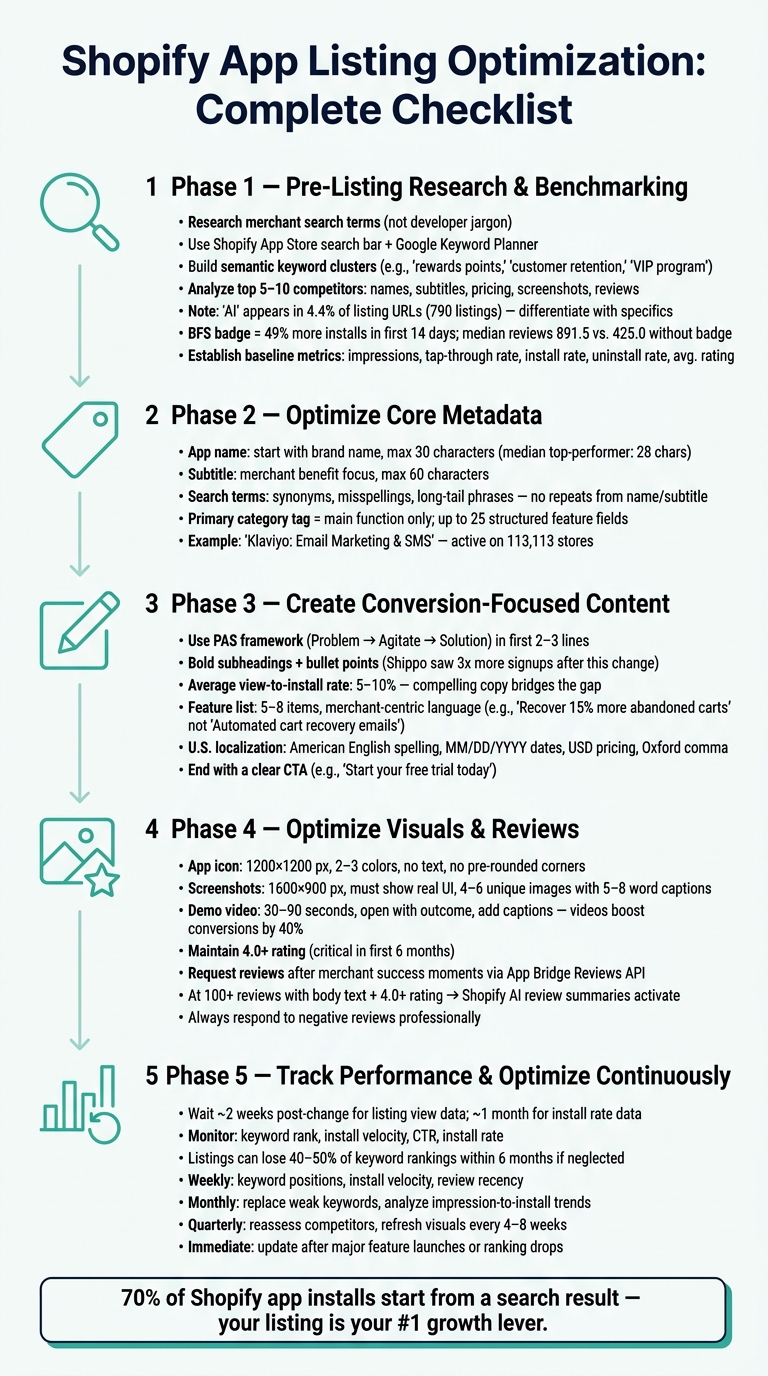
Shopify App Listing Optimization: Complete Checklist
Pre-Listing Research and Benchmarking
Market and Keyword Discovery
Understanding how merchants search is the first step. Merchants typically search based on their challenges, not technical jargon. For example, someone dealing with cart abandonment isn’t going to type "transactional email sequencing." Instead, they'll search for terms like "abandoned cart" or "recover lost sales." Your keyword strategy needs to reflect that mindset.
A good starting point is the Shopify App Store search bar. Enter partial queries related to your app's core function to observe how merchants phrase their searches. Then, cross-reference this data with tools like Google Keyword Planner to identify broader trends in e-commerce. If your listing already receives some external traffic, Google Search Console can provide additional insights.
To capture a variety of search intents, create semantic clusters. For instance, if you’re promoting a loyalty app, include related terms like "rewards points", "customer retention", and "VIP program" in your strategy. This approach broadens your reach without awkwardly overusing a single phrase.
"Keyword research is upstream of every other listing decision." - Gaintage
One trend to note: as of April 2026, "AI" is one of the most crowded keyword families in the Shopify App Store, appearing in 4.4% of listing URLs (790 listings). If your app leverages AI, combine the term with a specific function, such as "AI support" or "AI product search." Standing out with just "AI" is becoming increasingly difficult.
Use these keyword insights to pinpoint your competitors and set benchmarks.
Competitor Analysis
Once you’ve built a keyword list, use it to identify your main competitors - the apps ranking for those same terms. Focus on the top 5–10 competitors and analyze their app names, subtitles, descriptions, pricing, trial lengths, screenshots, and reviews. The goal isn’t to mimic them but to find opportunities they’ve overlooked.
Take a closer look at their reviews, not just the star ratings. Reviews often highlight common pain points, like confusing setup processes or slow support. These insights can guide you in addressing those weaknesses in your own app listing.
Don’t overlook visual branding. If most apps in your category use similar blue-toned icons or dashboard screenshots, opting for a different color scheme or design can make your app stand out in search results - even before merchants read your app name.
Pay attention to which competitors have the "Built for Shopify" (BFS) badge. Apps with this badge tend to perform better, with 49% more installs in the first 14 days compared to non-BFS apps. They also have higher median review counts (891.5 vs. 425.0). If your competitors have this badge and you don’t, it’s an area worth addressing.
These competitor insights help reveal market gaps and provide a foundation for measuring your app’s performance.
To simplify competitor tracking, tools like AppJubilee’s Competitor App Watch can be invaluable. This feature monitors competitor listings for changes, such as updates to titles, descriptions, or screenshots, and sends alerts. This way, you can respond quickly rather than discovering changes weeks later.
Baseline Performance Metrics
Before making any changes to your app listing, it’s essential to establish baseline metrics. These numbers will help you measure the impact of your optimization efforts. Focus on tracking the following areas:
| Metric Category | What to Track | Where to Find It |
|---|---|---|
| Discovery | Impressions, keyword rank, category rank | Shopify Partner Dashboard, AppJubilee |
| Conversion | Tap-through rate, install conversion rate | Shopify Partner Dashboard |
| Retention | Uninstall rate, net installs, 30-day retention | Shopify Partner Dashboard |
| Trust | Average rating, review volume, review recency | Shopify App Store listing |
Additionally, monitor install velocity (new installs over the past 7 and 30 days). As Chris, founder of Gaintage, explains:
"The rank chart is the result. The install slope is often the warning."
AppJubilee’s Growth plan ($99/month) integrates with both Google Analytics 4 and your Shopify Partner account, consolidating all these metrics into one dashboard. This makes it easier to connect listing updates with performance changes, eliminating the need to juggle multiple tools. With your baseline metrics in place, you’ll have a clear benchmark for evaluating future improvements.
sbb-itb-ce93587
Boost Your Shopify App Listing With These Quick Optimization Techniques

Optimizing Core Metadata
After analyzing competitors and setting performance benchmarks, the next step is refining your app's metadata. This process enhances your app's visibility in search results, laying the groundwork for creating descriptions that drive conversions in the next phase.
App Name and Subtitle
Start with your brand name to build trust and set your app apart. For example, "Klaviyo: Email Marketing & SMS" showcases this strategy effectively. As of April 2026, Klaviyo is active on 113,113 live stores.
Stick to the 30-character limit. Research on 17,949 Shopify App Store listings revealed that all top-performing apps adhered to this rule, with a median name length of 28 characters. A name that gets cut off in search results risks being overlooked by merchants.
When crafting the subtitle, focus on merchant benefits within 60 characters. Avoid stuffing it with extra keywords. Instead, clearly communicate value. For instance, "Create print-on-demand custom puzzles to increase product sales" is far more engaging than a generic phrase like "Custom puzzles".
"Your app name should be unique and start with your brand name (not a generic descriptor). Lead with your distinctive brand to differentiate from similar apps." - Shopify Dev Docs
Search Terms and Hidden Metadata
The search terms field is a prime spot for adding synonyms, common misspellings, and long-tail phrases merchants might use. Avoid repeating keywords already included in your app name or subtitle, as Shopify’s algorithm automatically indexes those fields. For example, instead of repeating "metafield enrichment workflow", consider alternatives like "bulk product edit" or "real-time inventory sync".
"The mistake is building a keyword list that sounds right to a developer and invisible to a merchant." - Gaintage
To evaluate keyword performance, try running a small-scale ad campaign. This helps identify which phrases generate the most impressions and clicks. Tools like AppJubilee's Keyword Universe can track daily ranking changes for each term, helping you pinpoint which keywords are gaining momentum and which need adjustment.
Beyond keywords, proper categorization is equally crucial for aligning your app with merchant searches.
Category and Tag Selection
Choosing the right category ensures your app matches merchant intent and improves its discoverability. Shopify requires a primary tag that reflects your app’s main function, and a secondary tag can be added only if the primary tag doesn’t fully capture its purpose.
"If your app is mainly for email marketing and only has a small SMS marketing feature, then you should add only the email marketing tag." - Shopify.dev
Each category allows up to 25 structured features, which help merchants compare apps directly. Fill these out thoroughly, as they provide clear reasons for merchants to select your app. If your app’s functionality changes significantly over time, you can request a category update through Shopify’s app submission form.
Creating Conversion-Focused Content
Let’s talk about turning visitors into app installs. On the Shopify App Store, the average view-to-install rate hovers around 5–10%. That means most merchants who discover your app leave without installing it. To bridge that gap, you need compelling, merchant-focused copy.
Writing a Strong Long Description
The first two or three lines of your app's description are critical. This is where you grab attention with your strongest value proposition and primary keyword. A framework like PAS (Problem, Agitate, Solution) can work wonders here: start by identifying the merchant’s pain point, emphasize the consequences of not addressing it, and position your app as the solution.
Once you’ve hooked your audience, keep your paragraphs short and use bold subheadings to help skimmers quickly find the information they need. This approach has proven effective. For example, when Shippo revamped its Shopify App Store listing in September 2018, they added bold subheadings and bullet points to improve readability. They also included a Shopify-specific onboarding video. The result? Three times more signups than in a typical week.
"We added bold subheadings and bullet points to make it easier to read to make it clear how our app can help them." - Michelle McNamara, Shippo
Wrap up your description with a clear call to action, such as: "Start your free trial today to recover lost revenue in your first week."
Feature List Optimization
When listing your app’s features, focus on how each capability benefits merchants. Use plain, straightforward language and tie features directly to outcomes merchants care about. Aim for 5–8 features that are concise and easy to understand.
Here’s an example of how to shift from technical jargon to merchant-friendly copy:
| Technical Language | Merchant-Centric Language |
|---|---|
| Metafield enrichment workflow | Bulk product edit |
| Automated cart recovery emails | Recover 15% more abandoned carts |
| Calendar View | Never miss a deadline |
| Developer-friendly architecture | No coding needed |
"The listing is your first sales pitch, it dictates whether a person will take a chance on your app, continue using it, and, finally, leave a positive review." - CartCoders
If your app offers multiple pricing tiers, consider adding a comparison table. This makes it easier for merchants to understand what they’re getting at each price point, sets clear expectations, and aligns with Shopify’s requirement to process all charges through the Billing API.
Localization for U.S. Merchants
If your app was originally created for a global audience, adapting it for U.S. merchants is crucial. Around 87% of Shopify merchants use third-party apps to run their stores, and many of these merchants are based in the U.S. Small details like formatting and language can signal professionalism and build trust.
Here’s what to keep in mind for U.S. localization:
- Use U.S. English spelling (e.g., "color" instead of "colour", "optimize" instead of "optimise").
- Format dates as MM/DD/YYYY (e.g., 05/17/2026).
- Use commas as thousand separators (e.g., 123,000).
- Display prices in USD with the $ symbol (e.g., $29.99/mo).
- Include the Oxford comma for clarity in lists (e.g., "products, variants, and collections").
U.S. merchants also respond better to specific, results-driven social proof. For instance, saying "helps merchants increase repeat purchases by 15%" is far more effective than generic claims like "powerful" or "easy to use".
Next, focus on improving your visuals and leveraging customer reviews to further drive conversions.
Optimizing Visuals and Leveraging Reviews
Icons, Screenshots, and Media
Visuals are often the first thing merchants notice about your app, and they can determine whether someone clicks or keeps scrolling. A well-designed icon and thoughtfully chosen screenshots can make all the difference.
For your app icon, simplicity is key. Stick to a clean design with just 2–3 colors and avoid text, which becomes unreadable at smaller sizes. Shopify automatically applies rounded corners, so submit a square image at 1200 x 1200 px without rounding the edges yourself. Keep the main graphic around 750px, leaving a 75px margin as a safe zone to ensure nothing gets cut off.
Screenshots are where decisions are often made. Shopify has strict rules (effective March 26, 2026): your screenshots must display the actual UI of your app - no browser frames, desktop backgrounds, or logo-only images. Each screenshot should highlight a unique feature or app state. A good approach is to guide the viewer through a brief user journey:
- Start with the problem your app addresses.
- Show the app in action.
- Highlight the dashboard or key features.
- End with the results your app delivers.
Aim for 4–6 unique screenshots with short captions (5–8 words) that clearly explain the action and its benefit. Additionally, include a demo video. Videos are powerful - they can boost conversion rates by 40%. Keep it between 30–90 seconds, start with the outcome or "aha moment", and make sure to add captions for viewers watching without sound.
| Asset | Recommended Size | Key Rule |
|---|---|---|
| App Icon | 1200 x 1200 px | No text, no pre-rounded corners |
| Screenshots | 1600 x 900 px | Must show real UI; each image must be unique |
| Demo Video | 30–90 seconds | Open with the outcome; include captions |
For UI screenshots, use lossless PNG files to keep text sharp, and anonymize any demo data to protect privacy. Once your visuals are polished, the next step is to build trust through reviews.
Ratings, Reviews, and Social Proof
After perfecting your visuals, reviews become the cornerstone of credibility. They do more than just reassure merchants - they directly impact your app's ranking. Since Shopify doesn't display install counts, merchants rely heavily on your rating and review volume to gauge quality. Maintaining a 4.0+ rating in your first six months is crucial; anything below that often raises red flags for potential users.
Timing is everything when it comes to collecting reviews. Request feedback after a merchant has experienced a clear success with your app - like completing setup, recovering a sale, or hitting a key milestone. Shopify’s App Bridge Reviews API allows you to trigger a review modal directly in the admin interface, or you can deep-link to the review form using #modal-show=WriteReviewModal. Keep your messaging neutral, such as: "We value your feedback! It helps us improve our product." Avoid offering incentives or asking for "positive" reviews, as this violates Shopify’s policies and could lead to demotion.
Responding to reviews, especially negative ones, is just as important as collecting them. A well-thought-out reply to criticism demonstrates your dedication to improvement. If a bug caused the issue, fix it first, then politely ask the reviewer to consider updating their feedback. Once your app reaches 100 reviews with body text and maintains a 4.0+ rating, Shopify’s AI-powered review summaries will showcase your app’s strengths to potential users.
Tools like AppJubilee's Review Tracking & Impact Analysis can simplify this process. It tracks reviews in real-time, highlights how your score affects rankings, and monitors competitor trends, helping you respond proactively and maintain visibility.
"Positive reviews make your app appear higher in Shopify App Store search results and category pages." - Shopify Documentation
Performance Tracking and Continuous Optimization
Post-Change Performance Monitoring
Making changes to your app listing is only worthwhile if you can measure their impact. Whether you're testing new keywords, updating descriptions, or refreshing screenshots, it's essential to track how those updates perform.
After implementing a change, give it about two weeks to gather meaningful data on listing views. However, if you're looking at install rate changes, you may need up to a month to see significant results. Acting too quickly can lead to decisions based on incomplete information.
Key metrics to keep an eye on include:
- Keyword rank
- Install velocity
- Click-through rate (CTR)
- Install rate (percentage of listing views leading to an "Add app" click)
Among these, install velocity is especially critical. As Gaintage explains:
"The rank chart is the result. The install slope is often the warning."
A drop in install velocity can signal an upcoming ranking decline, giving you time to make adjustments before it's too late.
Since Shopify doesn’t provide built-in query reports for discovery, you’ll need to combine data from multiple sources to get a complete picture. Tools like AppJubilee’s Listing Changes & Impact Analysis can track updates and map them against performance trends over time. Pairing this with your GA4 account allows you to monitor server-side events like shopify_app_install and view_item, offering deeper insights into your installation funnel.
When analyzing your data, be mindful of outside factors that could skew results. For example, a surge in negative reviews, seasonal events like Black Friday, or shifts in traffic sources can all impact your metrics. Once you’ve identified trends, schedule regular reviews to keep your listing optimized and competitive.
Setting a Regular Optimization Schedule
Optimizing your app listing isn’t a one-and-done task. If left unattended, listings can lose up to 40–50% of their keyword rankings within six months. Staying competitive requires a structured, ongoing approach.
Here’s a practical schedule to follow:
- Weekly check-ins: Track keyword positions, install velocity, and review recency.
- Monthly audits: Replace underperforming keywords and analyze trends from impressions to installs.
- Quarterly overhauls: Review competitor listings and update visuals - keeping screenshots and demo videos fresh every 4–8 weeks helps maintain relevance.
- Immediate updates: Make changes right away for major feature launches or sudden ranking drops.
| Review Frequency | Focus Area | Key Activities |
|---|---|---|
| Weekly | Signal Tracking | Monitor keyword rank, install velocity, and review recency |
| Monthly | Performance Audit | Replace weak keywords and analyze impression-to-install trends |
| Quarterly | Strategic Overhaul | Reassess competitors and refresh visuals |
| Immediate | Event-Driven | Update listing after major feature releases or ranking drops |
Tools like AppJubilee’s Competitor App Watch and email alerts can simplify weekly monitoring. These alerts notify you of competitor updates to their copy, pricing, or visuals, ensuring you’re always in the loop. As experts in the field often say:
"ASO is not a one-time project, it's an ongoing discipline."
Conclusion and Key Takeaways
Improving your Shopify app listing isn't a one-and-done task - it's an ongoing process. Every aspect of your listing, from the app name and keywords to visuals and customer reviews, works together to enhance visibility and attract merchants. With 70% of app installs starting from a store search, the quality of your listing has a direct impact on how easily merchants discover your app.
This process involves several key elements: keyword research, clear and concise metadata, eye-catching visuals designed to convert, and trustworthy social proof. Each piece plays a role. For example, even the most engaging description won’t perform well if paired with a lackluster icon or poor ratings. When combined, these elements create a unified strategy that consistently drives results.
Iteration is the secret to scaling success. As Admin from AppDrift puts it:
"The difference between 100 downloads and 100,000 downloads often comes down to how well your listing is optimized - not how much you spend on ads." - Admin, AppDrift
What separates high-performing apps from the rest is their commitment to constant improvement. Regular updates, like weekly performance tracking and monthly audits, keep your listing aligned with shifting market trends. Tools such as AppJubilee's Keyword Universe, Competitor App Watch, and Listing Changes & Impact Analysis make this process more efficient, helping you base decisions on real data instead of guesswork. This continuous refinement ensures your app stays competitive and relevant over time.
FAQs
Which keywords should I target first for my Shopify app?
Choose keywords that align closely with your app's primary features and what merchants are actively searching for. Aim for terms that are specific to your app's category and clearly describe its functionality or benefits. These keywords should naturally fit into your app's title, subtitle, and description to improve its visibility in search results.
Focusing on precise, descriptive terms rather than broad, generic ones will help you attract the right audience. This approach not only enhances your app's ranking but also ensures you're reaching users who are genuinely interested in what your app offers.
What listing changes typically improve installs the most?
To boost app installs on the Shopify App Store, focus on two key areas: visibility and appeal. Start by refining your app's title and description with carefully chosen keywords to improve its ranking in search results. Next, make sure your visuals stand out - use eye-catching icons and polished screenshots to grab attention and drive clicks. Finally, showcase positive reviews and strong ratings to build trust and demonstrate the app’s dependability. These steps can play a big role in driving more installs.
How can I ask for reviews without breaking Shopify rules?
Shopify has strict rules against incentivizing or explicitly asking for reviews, as doing so breaches their review policies and the Partner Program Agreement. Instead, prioritize creating an exceptional app experience. You can include a subtle call-to-action within your app that encourages users to share their feedback naturally. This approach helps you collect honest reviews while adhering to Shopify's guidelines.