
Why Your Shopify App Ranking Drops and How to Fix It
Find why your Shopify app lost visibility—keywords, reviews, installs or competitors—and follow a 7‑day plan to recover rankings.

If your Shopify app ranking has dropped, your app’s visibility and installs may be at risk. Rankings are determined by relevance (how well your app matches searches) and performance (merchant engagement). Drops can disrupt the momentum of installs, making recovery critical.
Key Reasons for Ranking Drops:
- Keyword issues: Poor optimization or competitor updates can hurt relevance.
- Negative reviews: Recent complaints, especially about performance or billing, can lower trust.
- Install trends: Slowing install velocity or high uninstall rates signal problems to Shopify’s algorithm.
- Competitor activity: Competitors earning badges or improving listings can push your app down.
- Listing changes: Poorly aligned updates to your title, description, or visuals can reduce visibility.
Quick Fixes:
- Optimize keywords: Focus on merchant-friendly terms and unique keywords in titles, subtitles, and hidden fields.
- Improve listings: Use clear, benefit-driven visuals, captions, and descriptions.
- Manage reviews: Address complaints, request updated feedback, and maintain a strong average rating.
- Monitor competitors: Track their updates and adjust your strategy accordingly.
- Boost engagement: Refine pricing, visuals, and messaging to convert visitors into installs.
Regularly monitor performance metrics like install velocity, conversion rates, and review trends to catch issues early. Tools like AppJubilee can simplify tracking and analysis. A proactive approach ensures your app stays competitive in a constantly evolving marketplace.
Diagnosing the Causes of Ranking Drops
Recognizing Ranking Drop Patterns
Ranking drops don’t always mean the same thing - they often hint at specific issues. For example, if a single keyword suddenly drops, it might just mean a competitor updated their metadata. But if you notice a sudden drop across several keywords, it could point to app quality problems, an increase in negative reviews, or even a broad algorithm update. Monitoring product review trends is essential for identifying these shifts. On the other hand, a gradual decline over weeks often suggests slowing install rates or a drop in the frequency of recent reviews.
If you see a drop right after editing your title, subtitle, or description, this could indicate a compliance review or poorly aligned keywords. In such cases, rolling back to the previous version can quickly stabilize things.
Using Data to Find the Problem
Once you’ve identified the type of ranking drop, it’s time to dig into the numbers to uncover the root cause. Start by analyzing key metrics:
- Install velocity: Check how your installs have trended over the last 7 and 30 days. A decline in this metric often correlates with ranking drops.
- Conversion rate: Use the Shopify Partner Dashboard to see how well your listing is converting visitors into installs. A healthy conversion rate typically falls between 25% and 35%. If yours is lower, it could mean people aren’t finding your app relevant enough to install.
Tools like AppJubilee can make this process easier. They track daily keyword rankings, highlight listing changes, and show review trends - all in one place. This kind of consolidated data helps pinpoint exactly when and why your rankings took a hit.
Common Causes of Ranking Drops
There are a few usual suspects when it comes to ranking drops. Poor keyword optimization and competitor updates can make your app less relevant. Negative reviews, especially those mentioning performance issues or unexpected billing, can also weigh heavily on your ranking. Shopify’s algorithm tends to prioritize recent, trustworthy feedback.
Competitor activity is another big factor. For instance, when a competitor earns the "Built for Shopify" badge, they get a boost in visibility. Apps with this badge often see a 49% increase in new installs within just 14 days. High uninstall rates are another silent ranking killer - they suggest your app might not be meeting user expectations.
Here’s a quick breakdown of common ranking drop patterns and their likely causes:
| Drop Pattern | Cause | Initial Check |
|---|---|---|
| Sudden (single keyword) | Competitor metadata update | Competitor title and subtitle |
| Sudden (multiple keywords) | Quality flag or algorithm update | Performance metrics and recent reviews |
| Slow decline | Falling install velocity or stale reviews | 7-day and 30-day install counts |
| Post-edit drop | Compliance issue or broken relevance | Recent listing changes |
Next, we’ll dive into how to tackle these issues with focused optimization strategies.
sbb-itb-ce93587
How to Fix Shopify App Ranking Drops
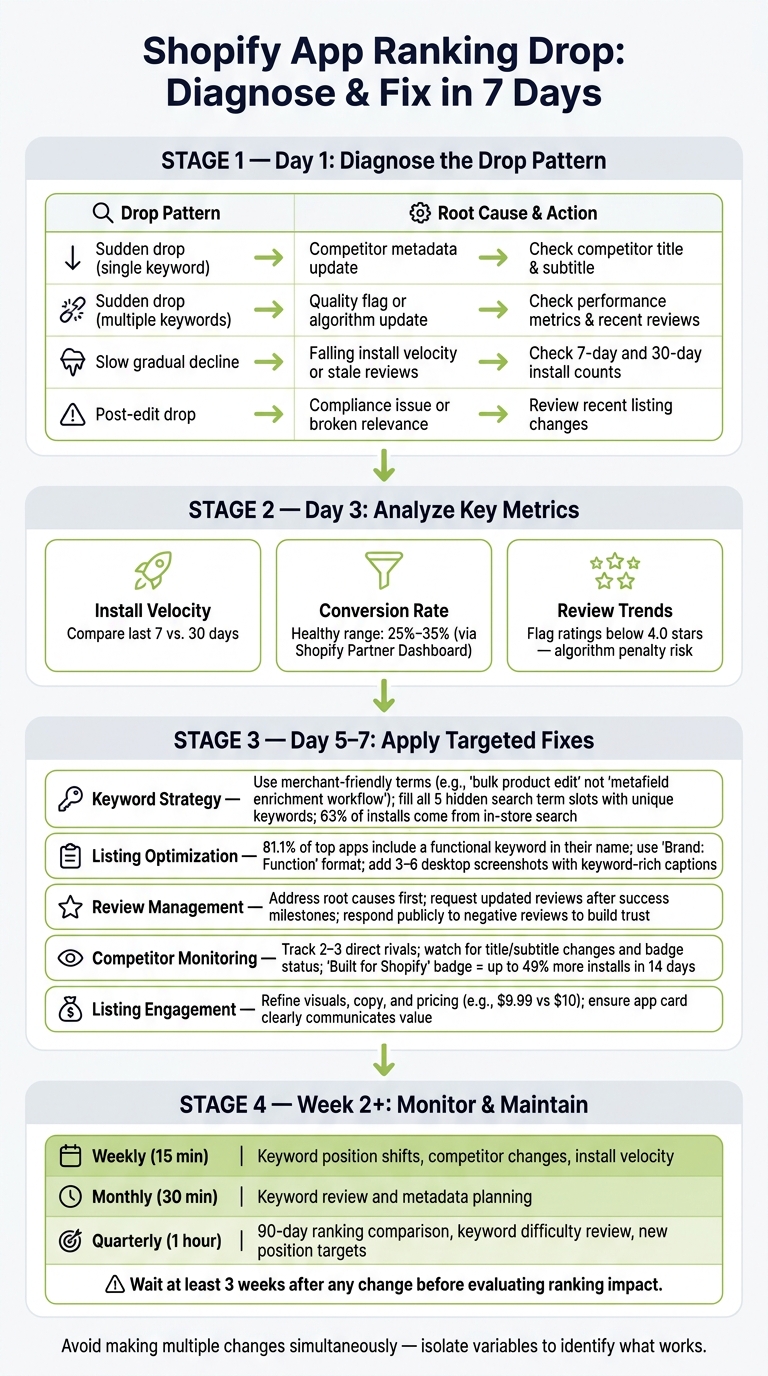
Shopify App Ranking Drop: Diagnose & Fix in 7 Days
Now that the causes of ranking drops are clear, let's dive into actionable steps to restore and improve your app's position. Tackling one issue at a time can make the recovery process smoother and more effective.
Improving Your Keyword Strategy
Speak the language of your audience, not developers. As Chris, Founder of Gaintage, explains:
"The mistake is building a keyword list that sounds right to a developer and invisible to a merchant."
For instance, instead of technical terms like "metafield enrichment workflow", use merchant-friendly phrases such as "bulk product edit." You can identify these terms by analyzing Shopify App Store autocomplete suggestions, competitor listings, and even the language merchants use in support tickets.
Since 63% of app installs come from search queries within the Shopify App Store, keyword strategy is vital. Use relevant keywords across your app name (30-character limit), subtitle, and all five hidden search term slots. Each field should feature unique keywords - Shopify automatically removes duplicates - and avoid using "Shopify" in hidden terms, as it’s already implied. To test your keyword effectiveness, consider running a short advertising campaign within the app store. The data from impressions and installs can guide your final metadata decisions.
Optimizing Your App Listing
Your app listing should quickly communicate what your app does, who it’s for, and why it stands out. If merchants can’t grasp this from your app card or the initial screen, you risk losing conversions - an issue that can hurt your ranking.
Interestingly, 81.1% of top-performing Shopify app names include at least one functional keyword, while only 3.8% start with a generic term. A common and effective naming format is "Brand: Function", such as "Klaviyo: Email Marketing & SMS" or "Judge.me Product Reviews App." This approach strengthens brand recognition while keeping the app searchable.
For visuals, include 3 to 6 desktop screenshots with concise captions that highlight key benefits. Since Shopify increasingly indexes screenshot text for search relevance, use captions to include additional keywords. Similarly, in your "Key Benefits" section, use headings that are searchable - for example, "Abandoned Cart Recovery" is far more effective than vague phrases like "Never Lose a Sale".
Handling Negative Reviews
An influx of negative reviews, especially those mentioning billing or performance issues, can severely impact your ranking. Apps with an average rating below 4.0 stars often face penalties. Maintaining a strong rating is essential.
Start by addressing the root causes of complaints, then notify affected merchants and politely request an updated review. Avoid pressuring or incentivizing feedback. When responding publicly to negative reviews, demonstrate how you resolved the issue - this builds trust with potential users.
Timing your review requests is equally important. Ask for reviews after merchants achieve a success milestone, such as completing their setup or recovering their first abandoned cart. Avoid requesting reviews immediately after installation. Consistently high ratings not only improve your app’s metrics but also shield it from further ranking drops.
Responding to Competitor Moves
Competitor updates can affect your ranking, even if you haven’t changed anything. For example, a competitor earning the "Built for Shopify" badge or tweaking their metadata can shift visibility. Instead of mimicking their approach, analyze their changes - such as updates to titles, subtitles, or feature headings. If they’re targeting keywords you previously ranked for, consider reinforcing your presence or pivoting to related long-tail phrases like "real-time inventory sync".
Tools like AppJubilee’s Competitor App Watch can notify you of changes in competitor listings, helping you stay informed and adapt quickly. This proactive approach ensures your app remains competitive and aligned with merchant search trends.
Improving Listing Engagement
If merchants visit your page but don’t install your app, it’s time to refine your listing. Poor engagement directly impacts your ranking, so focus on improving visuals, pricing, and messaging. Ask yourself: Does the app card clearly communicate its value? Do the screenshots showcase the app in action, or are they just generic UI images?
Pricing can also influence decisions. Psychological pricing, like $9.99 instead of $10, often appeals to merchants filtering by cost. By fine-tuning your copy, visuals, and pricing structure, you can boost engagement, increase installs, and help restore your app’s ranking.
Monitoring Rankings Over Time
Fixing a ranking drop is just the first step. The real challenge is staying ahead of future drops and catching them early - before they start affecting your installs.
Setting a Weekly and Monthly Review Schedule
Regularly monitoring your app’s performance is essential. A quick 15-minute weekly review can help you spot sudden ranking drops, competitor updates, and shifts in install trends. Then, once a month, dedicate 30 minutes to a deeper analysis of keyword performance and metadata planning.
| Cadence | Time | Focus |
|---|---|---|
| Weekly | 15 min | Keyword position shifts, competitor changes, install velocity |
| Monthly | 30 min | Keyword review and metadata planning |
| Quarterly | 1 hour | 90-day ranking comparison, keyword difficulty review, new position targets |
To simplify this process, tools like AppJubilee, which you can compare to other Shopify ASO tools, offer daily keyword tracking and email alerts. These features notify you of significant ranking changes, so you don’t have to manually check every day. Once you’ve identified changes, document them carefully to track what’s impacting your rankings over time.
Tracking the Impact of Product and Pricing Changes
Whenever you update your app’s title, pricing, or features, it’s crucial to log the change. Use a changelog - something as simple as a spreadsheet works well - to track these updates. This makes it easier to connect any ranking shifts to specific changes, whether they occur 2 or 4 weeks later. Without this record, it’s nearly impossible to determine if a ranking drop was due to your edits, a competitor’s actions, or an algorithm tweak.
A key rule to follow: wait at least 3 weeks after making any changes before assessing their impact. Rankings often go through an indexing period, and evaluating results too soon can lead to unnecessary adjustments, which might further destabilize your rankings. AppJubilee’s Listing Changes & Impact Analysis feature can help by linking your logged updates to ranking movements, giving you a clearer view of what’s working and what’s not.
Keeping Your Keyword and Competitor Strategy Current
The Shopify App Store is constantly evolving. Merchant search behavior shifts, competitors refresh their listings, and algorithm signals change. A keyword that once performed well might lose its effectiveness over time.
Make it a habit to review your tracked keywords monthly. If a keyword has been declining for three consecutive months, it’s time to explore alternatives. Long-tail keywords, which you can find using Shopify App Store autocomplete, often reflect how merchants are searching in real time. On a quarterly basis, compare your current rankings to the past 90 days to spot broader trends and adjust your position targets accordingly.
When it comes to competitors, focus on tracking 2 to 3 direct rivals. Pay close attention to changes in their titles, subtitles, or badge statuses. For instance, if a competitor earns the "Built for Shopify" badge, which can lead to a 49% increase in new installs within just 14 days, that’s a clear signal to revisit your strategy and adapt quickly.
Conclusion: How to Recover and Hold Your Rankings
Recap of Causes and Fixes
Before rankings start to slip, there are often early warning signs: slower install rates, outdated keywords, or stagnant reviews. These indicators usually surface before any visible ranking change, giving you a chance to act proactively.
Ranking drops typically fall into a few common categories: outdated keyword relevance, poor listing quality, stronger competition, or a loss of trust from merchants due to negative or outdated reviews. Each of these issues has a clear path to resolution. Update your keyword strategy with merchant-focused terms, refresh your listing visuals, actively engage with reviews, and keep a close eye on competitor activity.
If a drop does happen, timing is everything. A structured recovery plan can make all the difference. Start diagnosing the issue immediately, analyze competitors by the third day, implement targeted fixes by day seven, and track the results through the second week. Avoid making too many changes at once, as it can muddy the waters and make it harder to pinpoint what’s working .
Final Recommendations
To maintain your rankings and recover quickly when needed, consider these essential habits:
- Consistent monitoring: Regularly track keyword performance, install rates, and review freshness to catch potential issues early.
- Document changes: Keep a detailed log of every update - titles, screenshots, pricing - so you can connect specific edits to shifts in your rankings.
- Focus on merchants: Write with merchants in mind, addressing the problems your app solves (e.g., "bulk product edit") instead of just listing technical specs. This approach converts impressions into installs .
Tools like AppJubilee simplify this process by offering daily keyword tracking, competitor alerts, and a Listing Changes & Impact Analysis feature. Whether you’re managing one app or a portfolio of thirty, staying ahead of potential drops is far easier than trying to regain lost ground. Proactive efforts pay off in the long run.
FAQs
How long does it take for ranking changes to show up after I update my listing?
When you update your Shopify app listing, changes in rankings don’t happen instantly. It can take anywhere from a few days to several weeks for the updates to show up. Even preliminary steps, such as assigning a reviewer, might take over a week before the actual review process kicks off. It’s important to stay patient while the updates are reviewed and eventually reflected in the rankings.
Which metrics should I monitor first to detect a ranking drop early?
To spot a ranking drop early, keep a close eye on your app's keyword rankings and install velocity - both play a big role in how visible your app is. Pay attention to recent reviews too, especially negative or outdated ones, as they can affect user trust and your app's ranking. By consistently tracking these metrics, you can catch potential issues early and address them before they escalate.
What should I do if my ranking drops right after editing my title or keywords?
If your Shopify app ranking takes a hit after tweaking your title or keywords, it’s time to take a closer look at your app listing. Start by monitoring performance weekly to spot any trends or issues early. Use relevant, well-researched keywords that align with what your audience is searching for, but avoid making frequent or dramatic changes to your listing - this can confuse the algorithm.
Beyond keywords, pay attention to other ranking factors like review recency (how fresh your reviews are) and install velocity (how quickly users are downloading your app). These elements play a big role in stabilizing and boosting your ranking. The key here is steady, thoughtful optimization - small, consistent improvements can help you recover visibility over time.