
Shopify Source Attribution vs HubSpot Source
Explains why order-level and contact-level sources differ and how custom CRM properties reconcile attribution across platforms.

Here’s the short answer: Shopify and HubSpot do not mean the same thing by “source.” Shopify tells me what drove a session or order. HubSpot tells me how a contact first came in, or what their latest tracked source was. That’s why one customer can show Paid Social in Shopify and Offline sources or Organic Search in HubSpot at the same time.
If I need clean reporting, I use this rule:
- Shopify for order and session attribution
- HubSpot for contact acquisition
- Custom HubSpot properties for raw Shopify UTM and referrer data
- A custom Lead Source field if I want one shared reporting label
One more thing matters: 30%–50% of Shopify orders can fall into Direct or Unknown when UTMs or referrer data are missing. And if a Shopify contact syncs into HubSpot without a tracked HubSpot session, HubSpot may label that contact as Offline sources instead of the paid or email channel that drove the sale.
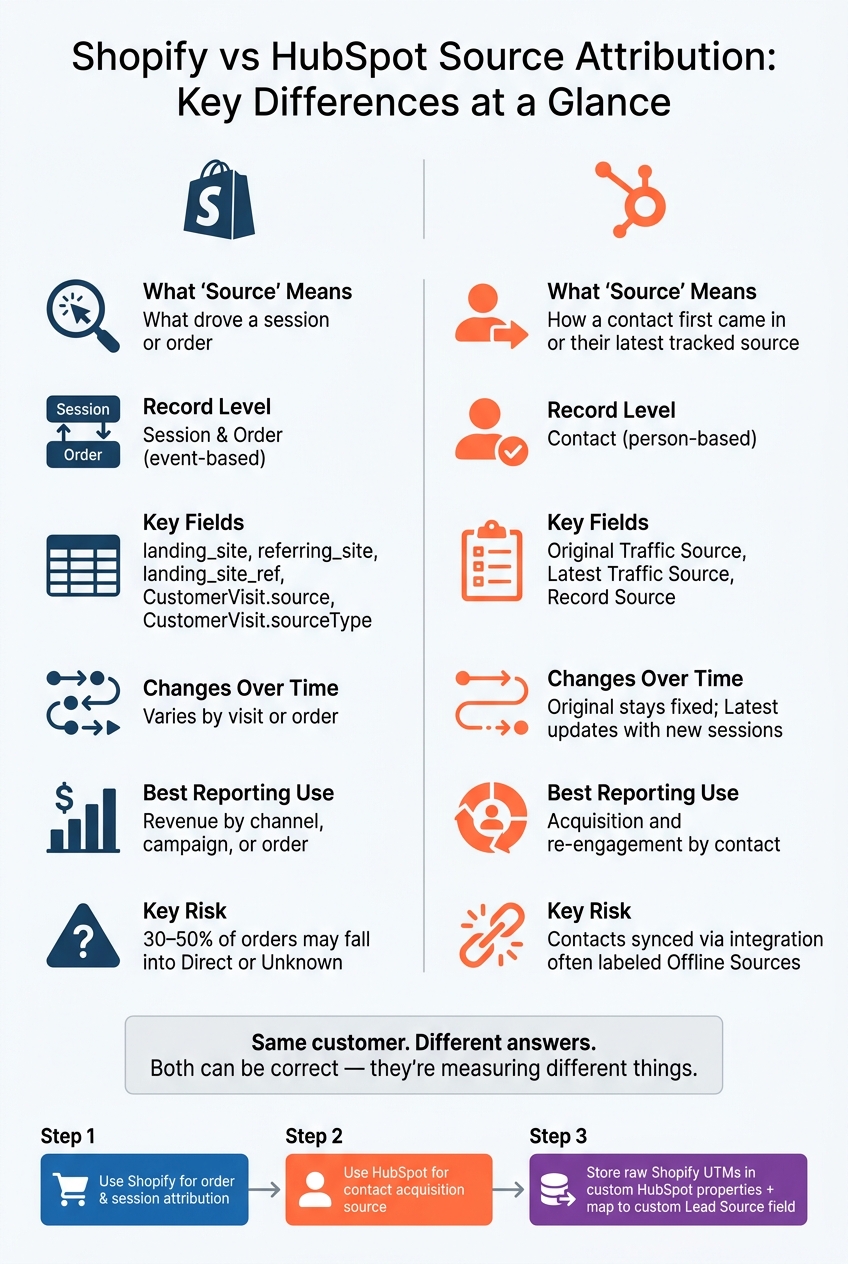
Shopify vs HubSpot Source Attribution: Key Differences at a Glance
HubSpot for Shopify: The Ultimate Guide to Boosting Sales | Hubspot User Group '25
sbb-itb-ce93587
Quick comparison
| Area | Shopify | HubSpot |
|---|---|---|
| What “source” means | Visit or order attribution | Contact acquisition or latest tracked source |
| Main level | Session and order | Contact |
| Main fields | landing_site, referring_site, landing_site_ref, CustomerVisit.source, CustomerVisit.sourceType |
Original Traffic Source, Latest Traffic Source, Record Source |
| What it answers | What drove this visit or order? | How did this person enter or return to the funnel? |
| Changes over time | Varies by visit or order | Original stays fixed; Latest changes |
| Sync behavior | Source lives in Shopify data | Built-in source fields are set by HubSpot, not Shopify |
| Best reporting use | Revenue by channel, campaign, or order | Acquisition and re-engagement by contact |
So if you’re comparing reports and the numbers don’t match, that usually isn’t a bug. It’s a scope problem. Shopify is event-based. HubSpot is person-based. Once I treat them that way, the reporting gets much easier to read.
Shopify source attribution fields: what the platform actually stores
Shopify stores source data at two levels: order and visit. They do different jobs, and if you blend them together, attribution falls apart.
Order attribution fields: landing site, referring site, and UTM data
When a customer places an order, Shopify saves three main fields on the order object.
landing_site stores the first page URL in the session that led to the purchase, including UTM tags. referring_site stores the external URL that sent the visitor to the store. And landing_site_ref pulls referral tokens from the landing URL - such as ref, source, or r - and saves only that value.
Taken together, these fields help explain how the order got credit. If there's no referrer and no UTM data, the order will often look like Direct. If the referrer is social and the UTM tags also point to social, it usually lands in Social. The messy part? For many stores, 30–50% of orders end up in Direct or Unknown because referrer data is missing or blocked, or because UTM tags never make it onto the order.
Order fields show what converted. Visit fields show what happened before the conversion.
Visit and session fields: CustomerVisit.source and sourceType
Shopify's GraphQL Admin API exposes another attribution layer through the CustomerVisit object, which you can access through Order.customerJourneySummary.
CustomerVisit.source is a text value that points to where the visit came from, such as Facebook, Google, email, direct, or unknown when Shopify can't figure it out. CustomerVisit.sourceType is an enum that describes the marketing method behind that visit, like paid ads, organic search, email marketing, or social posts.
This is where teams often get tripped up: these fields do not line up one-to-one with HubSpot's source properties. That's the starting point for many source mismatches.
A simple way to think about it:
- Order data supports revenue attribution
- Visit data supports journey analysis
| Field | What it stores | Example value |
|---|---|---|
landing_site |
First page URL of the converting session | /products/widget?utm_source=google&utm_medium=cpc |
referring_site |
External URL that sent the visitor | https://www.google.com |
landing_site_ref |
Parsed referral token from the landing URL | creator123 |
CustomerVisit.source |
High-level source string | Google, Facebook, direct, unknown |
CustomerVisit.sourceType |
Marketing tactic enum | Paid ad, organic search, email, social |
Visit-level data covers the full funnel, not just purchases. That matters because HubSpot usually stores source on the contact, not on the order.
HubSpot source properties: how contacts get classified
HubSpot source is contact-level, not order-level. That’s the key thing to understand. Original Traffic Source stores first acquisition, and Latest Traffic Source stores the most recent tracked interaction. A contact gets one Original Traffic Source and one Latest Traffic Source, even if they place several orders or return across many sessions.
That setup is a big reason Shopify and HubSpot don’t always line up. The same Shopify customer can end up tied to a different HubSpot source because HubSpot is classifying the contact, not each purchase.
Original and latest traffic source properties
HubSpot automatically sets two main properties on every contact: Original Traffic Source and Latest Traffic Source. Original Traffic Source records the first known channel that brought someone into your HubSpot database. Latest Traffic Source updates based on the most recent tracked interaction.
HubSpot sorts traffic into standard buckets like Organic Search, Paid Search, Email, Social, Referrals, Direct, and Offline. Drill-down fields add more detail, such as the campaign or referrer. But there’s a catch: HubSpot sets those fields on its own, and you can’t edit them in the UI.
For reporting, the split is pretty simple:
- Use Original Traffic Source for acquisition reporting.
- Use Latest Traffic Source for re-engagement analysis.
If you use Latest Source to measure acquisition, recent channels like Email marketing will get too much credit. That can skew your read on what actually brought the contact in.
That brings up another field people often mix up with marketing attribution: Record Source.
Record Source vs traffic source vs custom lead source
Record Source tells you how the record was created in HubSpot, such as Import, Form submission, API, or Salesforce integration. It describes the mechanism, not the marketing channel.
So yes, a contact can have Record Source = "API" and Original Traffic Source = "Paid Search" at the same time.
This matters a lot when contacts come into HubSpot through imports or integrations. In those cases, Original Traffic Source is often Offline sources, and the drill-down fields may reflect the creation source instead of a marketing channel.
When those default values feel too broad, custom properties can make reporting much cleaner. Many teams add a custom Lead Source property for company-specific values like Partner Referral or Trade Show. That’s common because HubSpot’s built-in source fields are built for analytics, not Shopify-specific attribution.
| Property | What it answers | Who sets it | Editable? |
|---|---|---|---|
| Original Traffic Source | First marketing channel that acquired the contact | HubSpot analytics | No |
| Latest Traffic Source | Most recent tracked marketing interaction | HubSpot analytics | No |
| Record Source | How the record was technically created in HubSpot | HubSpot system | No |
| Custom Lead Source | Business-defined source category | Your team | Yes |
Shopify Source Attribution vs HubSpot Source: field mapping, sync limits, and mismatch risks
Shopify stores attribution on orders and sessions. HubSpot stores source data on contacts. That one difference explains most reporting mismatches.
| Dimension | Shopify Attribution Fields | HubSpot Contact Source Properties |
|---|---|---|
| Scope | Per order/session (purchase-level) | Per contact (lifecycle-level) |
| Record level | Order/session | Contact |
| Lifecycle | Fixed after save | Original never changes; Latest updates with new tracked sessions |
| Typical values | landing_site, referring_site, UTM parameters |
Organic search, Paid search, Email marketing, Organic social, Paid social, Referrals, Direct traffic, Other campaigns, Offline sources |
| Data origin | Shopify session tracking and UTMs | HubSpot tracking code and forms |
| Primary use case | Revenue by campaign for specific orders | Acquisition and engagement by source for contacts |
That gap matters because the native sync moves records, not attribution rules.
How the Shopify-HubSpot sync handles source data
This is where things start to drift.
HubSpot sets Original Traffic Source and Latest Traffic Source based on its own tracking. It does not use incoming Shopify attribution fields to fill those properties. So fields like landing_site and referring_site don't automatically feed HubSpot's contact source data.
When contacts come in through the Shopify integration, HubSpot often marks their Original Traffic Source as Offline sources or Offline integration. Why? Because HubSpot sees the contact as coming from an outside system, not from a tracked web session.
Why the same customer can show different sources in each system
A simple example makes this easier to see.
A new customer clicks a Facebook ad with UTM tags, lands on your Shopify store, and buys. Shopify records landing_site with utm_source=facebook, so the order gets tied to paid social. But if HubSpot creates that contact through the integration sync instead of through a HubSpot-tracked page visit, HubSpot has no cookie trail for that session. As a result, it may label the contact as Offline sources instead of Paid social.
You see the same issue with repeat buyers.
Say a subscriber clicks a promo email and then converts. Shopify can credit that order to email based on the UTM fields. HubSpot, though, may still show Original Traffic Source as Organic search if that person first found the brand through Google months earlier.
So both systems can be "right." They're just answering two different questions:
- Shopify: What drove this order?
- HubSpot: How did this contact first enter the funnel?
Sync limits that affect attribution reporting
The source mismatch isn't the only problem. A few sync limits make shared attribution reporting tougher.
Orders sync one way from Shopify into HubSpot, and once they land in HubSpot, they're read-only. That means there's no built-in way to take Shopify order-level attribution and use it to override or backfill HubSpot contact source properties.
Timing also gets in the way. HubSpot's sync usually runs within 10 minutes, not in real time. That delay can matter. If the contact gets created in HubSpot only after the purchase is done, HubSpot never sees the browsing session that happened before the sale. So its source label comes from the integration context, not the first campaign that brought the shopper in.
There’s another snag too: some source-related fields, including landing site and referring site, have been removed from certain sync flows over time. That cuts down what can move between the two systems.
The end result is pretty straightforward: Shopify UTM and referrer data often end up in custom properties or timeline events, not in HubSpot's built-in source fields.
When native source properties can't hold Shopify attribution, custom HubSpot properties are usually the better fit.
When custom HubSpot properties make more sense
Native sync can’t remap Shopify attribution into HubSpot source fields. That’s the core issue.
So if you want to keep Shopify attribution data, custom properties are usually the cleanest fallback. HubSpot source fields are built to track how a contact was acquired. Shopify attribution is about order and session performance. Those are not the same job. Trying to force one into the other usually creates a mess.
Custom properties let you keep the Shopify data as-is without overwriting HubSpot source fields.
A better model: store Shopify attribution in custom properties
A cleaner setup is to use two layers.
First, create custom contact properties that mirror the raw Shopify fields, such as shopify_utm_source, shopify_referring_site, and shopify_landing_page. These fields work as a plain record of what Shopify actually captured.
Second, use HubSpot workflows to turn those raw values into a business-defined Lead Source dropdown. That dropdown can include standard categories like Paid Search, Email, or Partner Referral.
This gives you a separate reporting layer while leaving HubSpot source fields alone. For example, you might map shopify_utm_source=google and shopify_utm_medium=cpc to Paid Search.
Guardrails for reliable source reporting
Custom properties only stay clean if you put a few rules around them. Without guardrails, things drift fast.
The main ones to set up are below:
| Guardrail | What it does |
|---|---|
| Locked first-touch fields | Stops overwrites and manual drift by setting fields only when empty and limiting who can change them |
| Controlled dropdowns | Replaces free-text fields with approved values, which helps stop messy naming |
| Ownership rule | Spells out which system owns which field - Shopify owns order/session attribution, and HubSpot owns contact acquisition source |
Conclusion: the simplest rule for choosing the right source field
The rule is pretty simple: use Shopify for order and session attribution. Use HubSpot for contact acquisition source. Then store raw Shopify values in custom properties and map them into a custom Lead Source field.
FAQs
Why do Shopify and HubSpot show different sources for the same customer?
Shopify and HubSpot can report different sources for the same customer because they don’t look at attribution the same way.
Shopify uses its own tracking signals and system limits. HubSpot, on the other hand, fills source properties based on marketing tracking events inside HubSpot, including UTM parameters, ad data, and campaign rules.
That gap can lead to mismatches. Timing can shift what gets recorded. Geography can affect what each platform sees. Personalization can change links or page behavior. And if UTMs aren’t passed cleanly from one step to the next, the source in HubSpot may not match the source in Shopify.
When should I trust Shopify source data over HubSpot source data?
Trust Shopify source data for direct install counts, churn, and earnings. It comes straight from your Shopify Partners account, so it’s the record to use for app-level performance.
Use HubSpot for broader CRM tracking.
For traffic quality, impressions, and click-through rates, use connected Google Analytics 4 data. AppJubilee uses that data to give you a clearer view of install intent.
Should I create custom HubSpot fields for Shopify attribution?
Yes - custom HubSpot fields are a smart fix when Shopify attribution data doesn’t line up neatly with standard HubSpot properties.
They help you keep data clean, support internal reporting, and track conversion signals that a default integration can miss. They can also help you avoid sync caps and property mapping issues.