
Competitor Pricing Changes: Q&A for Shopify Apps
Track only pricing changes that matter—price cuts ≥10%, new free tiers, trial jumps, and feature moves—and act within 7–14 days.
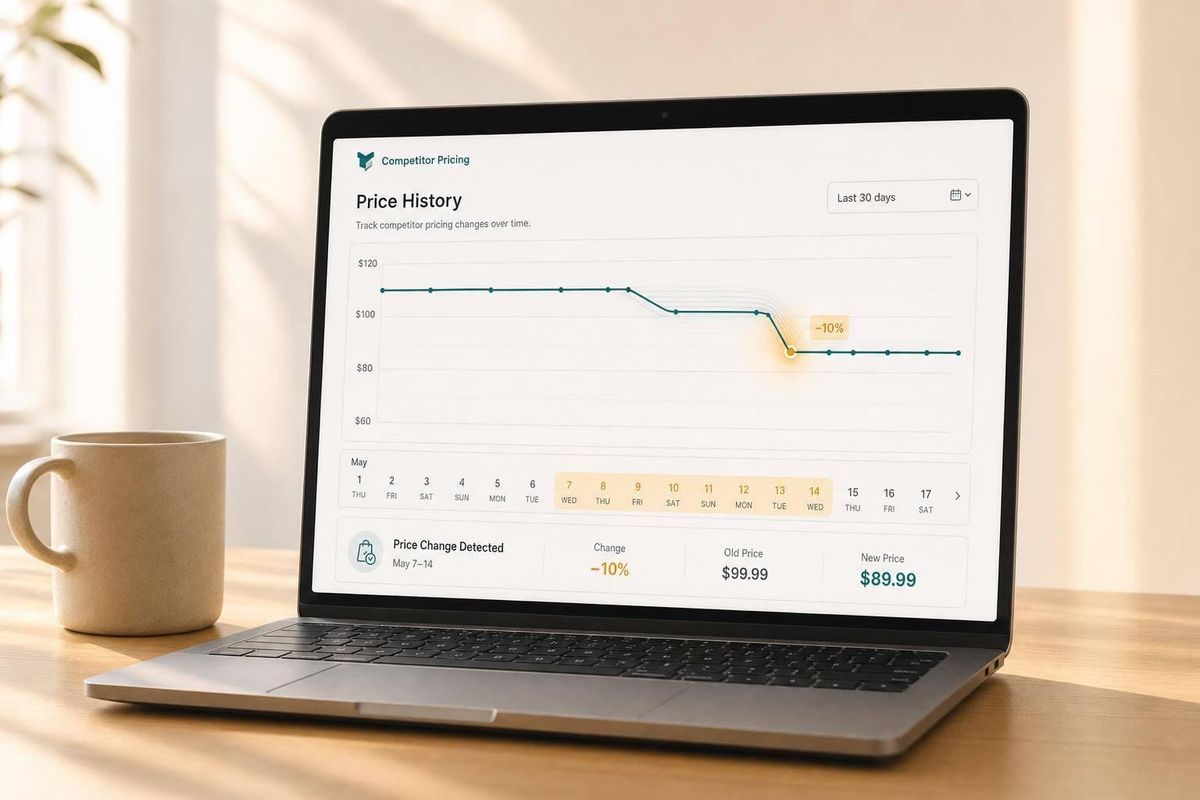
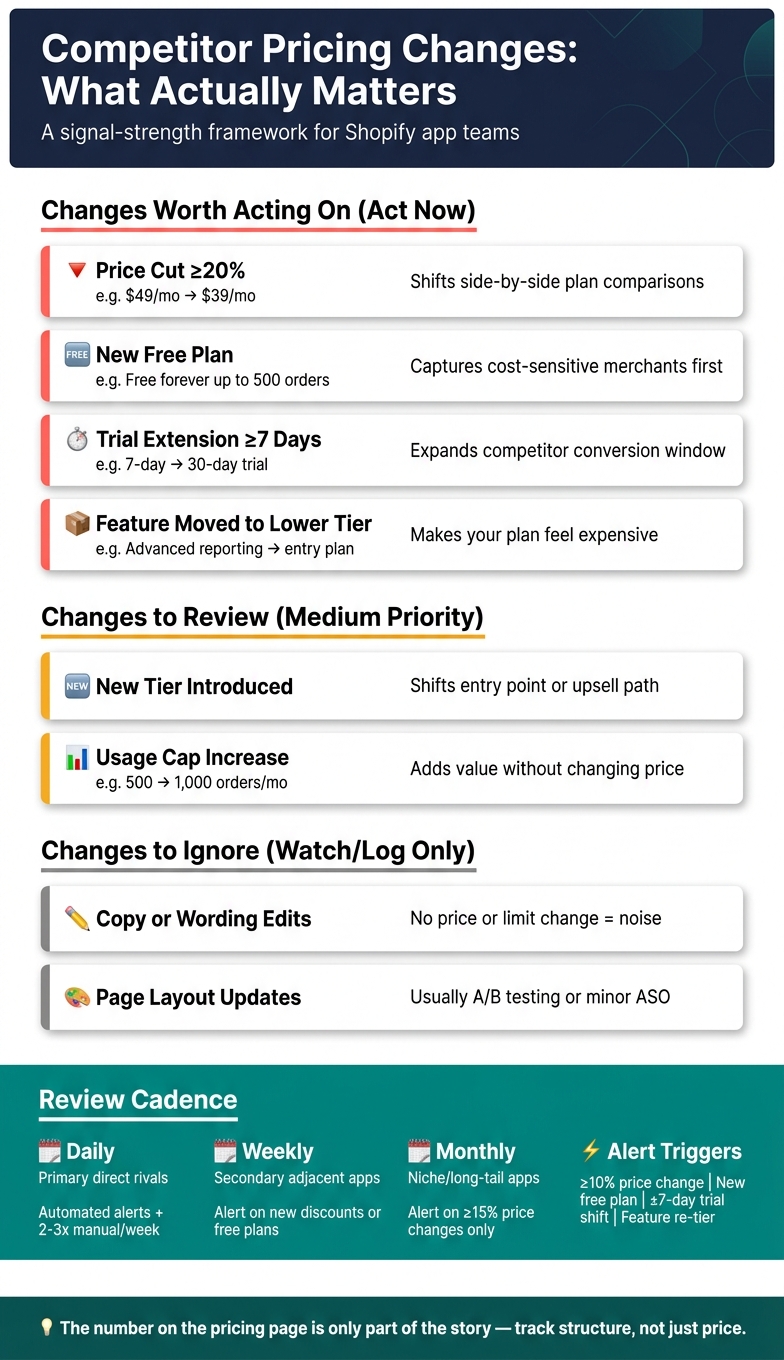
Most competitor pricing updates are noise. The ones worth your time are plan price shifts of 10%+, new free plans, trial changes of 7+ days, and feature moves between tiers.
If I were running a Shopify app team, I’d keep it simple:
- I’d track price, trials, free tiers, usage caps, discounts, and feature packaging
- I’d check top direct rivals daily and other apps weekly or monthly
- I’d ignore copy edits, layout tweaks, and minor wording changes
- I’d review any big change against rank, installs, conversion, and churn over the next 7–14 days
Here’s the short version: the number on the pricing page is only part of the story. A competitor can keep a $29/month plan and still change merchant choice by adding more orders, more seats, or a top feature to that same tier. And a move like a new free plan or a trial jump from 7 to 30 days can change install behavior fast.
A simple way to think about it:
| What I’d watch first | Why I’d care | What I’d do |
|---|---|---|
| Price cut of 10%–20%+ | Can change side-by-side plan comparison | Review plan gap and messaging |
| New or removed free plan | Can shift install volume fast | Recheck free/trial offer |
| Trial change of 7+ days | Can change install-to-paid flow | Check onboarding and time-to-value |
| Feature moved to a lower tier | Can make my plan look expensive | Review packaging |
| Usage cap increase | Can change perceived value without a price move | Compare plan limits |
| Copy-only change | Usually low impact | Log it and move on |
The goal is not to track everything. The goal is to track the few pricing changes that can affect merchant choice.
That’s the lens I’d use for the rest of this topic.
Shopify App Competitor Pricing Changes: What to Track, When to Act
What to track in competitor pricing
Track the full pricing setup, not just the sticker price. The pricing page tells the real story, especially when you compare Shopify app optimization tools to see how competitors structure their offers. Trials, free plans, feature bundles, and usage caps often say more than the monthly number at the top.
A competitor can shift its offer in a big way without changing that headline price at all.
Plan prices, trials, discounts, and free tiers
Track the monthly recurring price in USD for every plan. Then log the annual price too, along with the effective discount percentage.
Some changes are obvious. If a competitor drops from $49/month to $39/month, that’s a direct pricing move. But some shifts are less obvious and still matter just as much. If they move from $49/month flat to $29/month plus usage fees, they’re not just changing price. They’re changing who the plan is for and what the final bill may look like.
Free tiers and trial length deserve the same level of attention. If a competitor goes from no trial to a 14-day free trial, the app becomes much easier to install and test. That can put pressure on apps that still ask users to pay from day one. The same goes for free plans. Adding one, or removing one, can change install volume fast.
It also helps to log seasonal discounts and limited-time promos apart from base prices. Those offers cut the entry cost during the promo period, even if the list price stays the same.
Tier names, feature limits, and packaging changes
Sometimes the monthly price stays put, but the offer gets better.
Say a competitor keeps a $29/month plan and quietly moves the order cap from 500 to 1,000 orders per month. Or they add Shopify Flow support. That plan just got stronger, even though the price did not move.
Track plan names, included features, support level, integrations, API access, and usage caps with exact limits. Write them down as they appear:
- "up to 1,000 orders/month"
- "3 seats"
- "API access on Pro only"
Also note whether limits are hard cutoffs or overage-based. That small detail changes the customer experience a lot. Hitting a hard cap can stop usage cold. Overage pricing keeps the customer moving, but at a higher cost. In many cases, price-perceived value changes through packaging, not through the monthly fee.
A comparison table to separate strong signals from weak ones
Use this table to sort pricing changes by impact. It helps you decide what needs daily checks and what can wait.
| Field | Why it matters | Signal strength | Change frequency |
|---|---|---|---|
| Monthly plan price (USD) | Direct impact on merchant acquisition and conversion | High | Low (quarterly or yearly) |
| Trial length | Main driver for install-to-paid conversion rates | High | Moderate |
| Free tier availability | Changes install volume and competitive pressure | High | Rare |
| Feature migration between tiers | Adds more for the price without changing headline price | High | Moderate |
| Usage caps (orders/month, seats) | Shows how far merchants can grow on a given plan | High | Moderate |
| Annual discount percentage | Pushes longer retention and affects LTV comparison | Medium | Low |
| Setup or usage fees | Changes the true entry price and can hint at a move upmarket | Medium | Low |
| Tier name changes | Often cosmetic, though they can hint at repositioning | Low | Moderate |
| Copy and page layout edits | Often A/B testing or minor ASO work; rarely changes competitive standing | Low | High (monthly) |
Next, match these signals to a review cadence.
sbb-itb-ce93587
How often to check competitor pricing
Check competitor pricing based on how much those apps can affect your business: daily for primary apps, and weekly or monthly for secondary ones. The signal strength from the previous section should guide this. If a competitor has strong overlap with your keywords, category, and search placement, it deserves more attention.
Set different check intervals for primary and secondary competitors
Not every competitor needs the same level of tracking. Primary competitors - usually the top 3–5 apps that target your main keywords and show up near your app in Shopify App Store search results - should be checked daily. In fast-moving categories like email/SMS marketing, subscription billing, and upsell funnels, pricing can change fast, and those changes can affect both conversion rates and rankings.
Secondary competitors are different. These apps may overlap on a few features or keywords, but they are not close substitutes. In most cases, a weekly or monthly review is enough. Their pricing tends to change less often, so missing a small update usually won’t call for an instant reaction.
A daily snapshot is enough for most teams. Set up automated daily checks, then spend 10–15 minutes reviewing primary competitors by hand 2–3 times a week. Only step in when the move is big enough to matter, like a new free plan, a major price cut, or a big shift in what features sit in each tier.
Use alerts instead of manual page checks
Checking pages by hand doesn’t scale. Spreadsheet tracking does not scale. Alerts fix that.
Instead of refreshing pricing pages over and over, set rules and let the system flag changes that matter. AppJubilee, a Shopify App ASO platform, provides competitor alerts, ranking snapshots, and listing change impact tracking. It also connects pricing changes to keyword ranking shifts over the next 7 days. That extra context matters. A price change alone is just a fact. A price change tied to ranking movement gives your team something to act on.
To keep alerts from turning into noise, focus on threshold-based events:
- A price change of 10% or more on a key plan
- A new free plan
- A trial length change of 7 days or more
- A major feature moving from one tier to another
Small copy tweaks and tiny rounding changes don’t need instant attention. Those can go into a weekly summary instead.
A cadence table for review rules
The thresholds above translate into the review schedule below.
| Competitor Tier | Suggested Check Interval | Core Alert Triggers |
|---|---|---|
| Primary – direct category leaders | Daily automated alerts; 2–3 manual reviews per week | Price changes ≥10% on main plans; new or removed free plan; trial length changes ≥7 days; major feature re-packaging |
| Primary – close substitutes | 2–3 times per week plus alerts | Price changes ≥10% on entry/mid tiers; new plan introduction; annual discount changes ≥10%; trial length changes ≥7 days |
| Secondary – adjacent apps | Weekly review plus alerts | New discounts or bundles; new plan overlapping your core segment; free plan introduction |
| Secondary – niche or long-tail apps | Monthly or quarterly review; minimal alerts | Price changes ≥15%; major new tier launches; removal of legacy plans |
Which pricing changes matter most and how to filter out noise
Once alerts flag a pricing update, use this filter to decide whether you should act or ignore it. The goal is simple: separate changes that can move installs, conversions, or category position from updates that just make the page look different.
High-impact changes: price cuts, free plans, trial extensions, and feature moves
The pricing changes that matter most are the ones that shift how merchants judge value, not just the amount they pay.
A 20%+ cut on a main plan is a big signal. If a competitor drops from $49/month to $39/month, merchants are likely to notice during side-by-side comparisons. Even a smaller drop can matter if it puts that app below your matching plan on price.
A new free plan can also change the game fast. Merchants in the Shopify App Store often look for free options first. So if a competitor goes from a $19/month starting price to a "Free forever" tier up to 500 orders/month, that app can pull in cost-sensitive merchants before they even look at paid options. It can also change what people expect from the category, especially if features that used to be paid start to feel like the default.
Trial extensions deserve the same level of attention. A shift from a 7-day trial to a 30-day trial gives merchants more time to see results before paying. That means a competitor isn’t just changing pricing terms. They’re competing for the same conversion window you rely on.
Feature moves between tiers are often the quietest change and sometimes the one that hurts most. If a competitor moves a premium feature like advanced reporting or multi-store support into a cheaper plan, merchants may start to treat that feature as standard. Your pricing may stay the same, but your comparable plan can suddenly feel expensive.
Low-impact changes: copy edits, page layout updates, and minor wording changes
Most pricing-page changes are just surface-level. If the price, usage limits, trial terms, or plan structure didn’t change, treat it as noise and log it for reference.
A decision matrix to classify watch versus act-now signals
Use the same filter in weekly reviews so everyone applies one rule set instead of making judgment calls on the fly.
| Change Type | Impact on Us | Suggested Response | Priority |
|---|---|---|---|
| Price cut ≥20% on a main plan (e.g., $49 → $39) | Makes the competitor more attractive to price-sensitive merchants | Compare plans and consider differentiator-focused updates | Act now |
| New free plan or major free tier expansion | Captures more trials and raises expectations for what should be free | Review free/trial strategy and refine the value narrative for paid plans | Act now |
| Trial extension from 7 to 30 days | Reduces perceived risk and gives merchants more time to evaluate value | Audit onboarding and time-to-value; explore trial adjustments or stronger activation flows | Act now |
| Premium feature moved into a cheaper plan | Raises category expectations and can make your equivalent plan look expensive | Review feature tiering and consider whether your packaging needs to change | Act now |
| New tier shifts the entry point or upsell path | Can shift competitive positioning at a specific price point | Analyze the merchant segment being targeted and update positioning if needed | Review |
| Copy edit or wording change with no price/limit change | Minimal direct impact on merchant decisions | Log it for reference; no immediate action needed | Watch |
| Log only if pricing or limits also changed | Usually cosmetic | Monitor for ranking shifts over the next 7 days; no strategic response needed | Watch |
Next, connect act-now pricing changes to keyword rankings and conversion trends.
How pricing changes connect to Shopify App Store rank and team workflow
Connect pricing events to keyword rankings and conversion trends
For any change you tagged as act now, watch what happens to keyword rankings and installs over the next 7–14 days. Pricing doesn’t directly change Shopify App Store rank. But it can change installs, product reviews, and retention, which can then affect keyword visibility.
The practical move is simple: compare competitor pricing changes with your own daily keyword rankings, click-through rate, and install trends during that 7–14 day window. AppJubilee supports this with daily keyword tracking and ranking snapshots. If a competitor rolls out a new free tier and your rankings start slipping on priority keywords, that’s a signal you shouldn’t ignore.
Once you know which signals matter, fold them into a simple weekly rhythm.
Build a simple weekly review workflow
A repeatable four-step process can keep the team on the same page without adding extra work.
- Collect all competitor pricing alerts from the week.
- Classify each alert with the severity filter: monitor, analyze, or act now.
- Correlate the change with your own install and conversion data to check for a measurable effect.
- Decide whether to hold, adjust your messaging, or run a test.
That’s the link between alerts and decisions. Instead of reacting to every pricing tweak, your team can focus on the changes that may affect growth.
Conclusion: Track fewer signals, review them consistently, and tie them to visibility
Track structural pricing changes each week, ignore cosmetic edits, and step in only when installs, retention, or reviews may shift.
FAQs
What counts as a major pricing change?
A major pricing change is any competitor app pricing update that meaningfully changes what customers pay. That can include:
- moving from free to paid, or from free to freemium
- changing subscription tiers or price points
- changing the pricing plan structure
These updates matter because they can affect rankings.
How can pricing changes affect app rankings?
Pricing changes can affect app rankings mostly through listing freshness.
Here’s the simple version: when you update pricing, app stores may treat that as listing maintenance. And a listing that gets updated every 30 to 60 days can sometimes rank better.
That said, rankings don’t move for just one reason. They’re shaped by multiple weighted factors, which is why it’s smart to watch what happens after each change.
AppJubilee helps with that by linking pricing edits to ranking movement through a diff viewer.
What should my team do after a pricing alert?
After a competitor pricing alert, compare before-and-after pricing and keyword position changes.
Then check if the rank movement matches any other listing changes. For example, did the competitor also update their title, subtitle, screenshots, or promo text? Price changes don't always act alone.
Put your attention on actions tied to your highest-converting and core keywords first. Then update your listing or pricing plan as needed.
Watch results at these checkpoints:
- 3 days for early indexing shifts
- 7 days for short-term movement
- 14 days to see whether the change sticks
This helps you separate early indexing effects from movement that lasts.
In AppJubilee, review the alert in App Watch/Notifications. If you're getting too many alerts, adjust the alert severity or frequency to cut down on noise.