
How Keyword Updates Affect Shopify App Rankings
How title and search-term edits affect Shopify app visibility, and why installs plus 14-day retention decide lasting rank.
A keyword edit can move your Shopify app rankings in days, but installs and retention decide if those gains last.
If I had to boil this down, it would be this:
- Title and Search Terms matter most for search visibility
- Re-indexing often happens within about 1 week
- Rankings usually settle in 2 to 4 weeks
- Wrong-fit traffic can hurt performance fast
- I should change one field at a time and track installs, uninstalls, and 14-day retention
A keyword update does two things at once. First, it helps Shopify decide whether my app should show for a search at all. Then merchant behavior helps decide where it stays. If people click, install, and keep using the app, rankings can improve. If they bounce, skip install, or churn, rankings can slide back.
A few numbers stand out right away:
- High-impact fields are often re-indexed within 7 days
- Rankings often stabilize in 2 to 4 weeks
- Ratings below 4.0 can cut install success by 40% to 50%
- If a keyword brings 50+ visits but no installs, it may be a poor fit
What I’d do in practice is simple: pick keywords based on intent, map each term to the right field, publish edits in small batches, and review results on day 3, day 7, and day 14. That keeps ranking changes easier to read and lowers the chance of making the wrong call from noisy data.
A fast way to think about it:
| Part of the process | What I focus on |
|---|---|
| Keyword choice | Relevance, install intent, competition |
| Field placement | Title first, then Search Terms, then subtitle |
| Rollout | One change at a time |
| Measurement | Rank, installs, uninstalls, 14-day retention |
| Decision point | Keep, revise, or remove after enough data |
So the core idea is not just “add better keywords.” It’s match the keyword to the right merchant, then watch whether that traffic turns into installs that stick.
How to rank high in the Shopify AppStore - App Store Optimisation

sbb-itb-ce93587
How Shopify App Store Rankings Respond to Keywords
Once keyword relevance is set, the next step is figuring out where those keywords matter most. Keywords determine whether your app can show up for a search. Performance signals then shape how high it appears.
Which Listing Fields Have the Most Keyword Impact
Start with the fields Shopify reads most directly.
The app name is your strongest search signal. That makes the title prime real estate. A brand-plus-function format usually works best, as long as you stay within the 30-character limit. Judge.me Product Reviews is a good example of this approach in action.
Next come the five hidden Search Term slots in the Partner Dashboard. These act as direct signals to Shopify’s ranking system. Use them for distinct, high-intent phrases that your title doesn’t already include. You don’t want to repeat yourself when you could cover more ground.
The app card subtitle sends a secondary signal. It works best when it explains a clear benefit instead of stuffing in extra keywords. The long description is different: it has weak direct ranking impact, but it matters a lot for conversion and for Google search visibility.
| Listing Field | Character Limit | Ranking Impact | Strategic Priority |
|---|---|---|---|
| App Name (Title) | 30 | Critical | Primary functional keyword + brand |
| Search Term Slots | 5 slots | High | Non-redundant, high-intent phrases |
| App Card Subtitle | 62 | Medium | Secondary keywords + benefit statement |
| App Category | N/A | Medium | Specificity over broadness to match intent |
| Description | 500 (short) | Low (direct) | Conversion and Google search |
Why Better Keywords Can Still Fail to Improve Rankings
Good keywords alone won’t hold a ranking if merchant behavior doesn’t line up. That’s the part many teams miss.
If a keyword update brings in the wrong traffic, any ranking bump can disappear fast. Say your new listing pulls in merchants who click around but don’t install, or who install and churn soon after. Shopify can treat that as a poor match and push the app back down.
Reviews matter here too. Recent reviews carry more weight than old ones. So an older app with hundreds of reviews can still lose ground to a competitor with 100 recent reviews. Ratings also shape install performance. Falling below a 4.0 average rating correlates with a 40%–50% drop in install success rates, and that drop can feed right back into weaker rankings.
A simple way to spot the problem is to look at the funnel or compare Shopify App Store optimization tools:
- Low clicks usually point to weak relevance
- Low installs usually point to weak persuasion
- High uninstalls usually mean the keyword brought in the wrong audience
That’s why keyword work can’t stop at visibility. The search term has to match what the merchant expects to find when they land on the listing.
Plan Keyword Updates Before Editing Your Listing
Keyword edits can move rankings fast. So don’t jump into your listing and start swapping words on the fly. Plan the update first.
Before you edit anything, decide which keywords matter, where they should go, and what outcome you want. That gives you a clean way to judge whether the change did its job.
Choose Keywords by Intent, Relevance, and Ranking Opportunity
Start with the words merchants already use. Pull language from reviews, support tickets, and onboarding calls, then compare that list with Shopify autocomplete and competitor listings. This matters because merchants often describe the same job in plain terms that differ from developer language. For example, they may search for "bulk product edit" instead of "metafield enrichment workflow".
Once you have a list of possible terms, score each one on three factors: relevance, intent fit, and competition level.
- Relevance: Does the keyword describe your app correctly?
- Intent fit: Is the merchant likely close to installing?
- Competition level: Are strong, well-reviewed apps already holding that term?
Each update should also have a clear target. Maybe you want to move a mid-page keyword into the top 5. Maybe you want to show up for a new use-case cluster you haven’t covered yet. Or maybe you want to swap out a broad term that brings in the wrong merchants. If you don’t set a target first, it’s hard to tell if the edit worked.
After you score the terms, assign each one to the listing field where it can pull the most weight.
Map Each Keyword to the Right Listing Section
Put your top-priority functional keyword in the app name. Use the subtitle for secondary terms. Then use the five Search Terms slots for separate phrases that do not already appear in the visible listing.
Use this table as a starting point before making changes:
| Keyword | Current Rank | Relevance | Competition | Planned Placement |
|---|---|---|---|---|
| Product reviews | #12 | High | High | App Name |
| Photo reviews | #45 | High | Medium | Subtitle |
| UGC social proof | Unranked | Medium | Low | Description / Search Slot |
| Review importer | #8 | High | Medium | Search Term Slot |
Use AppJubilee to Decide What to Change First
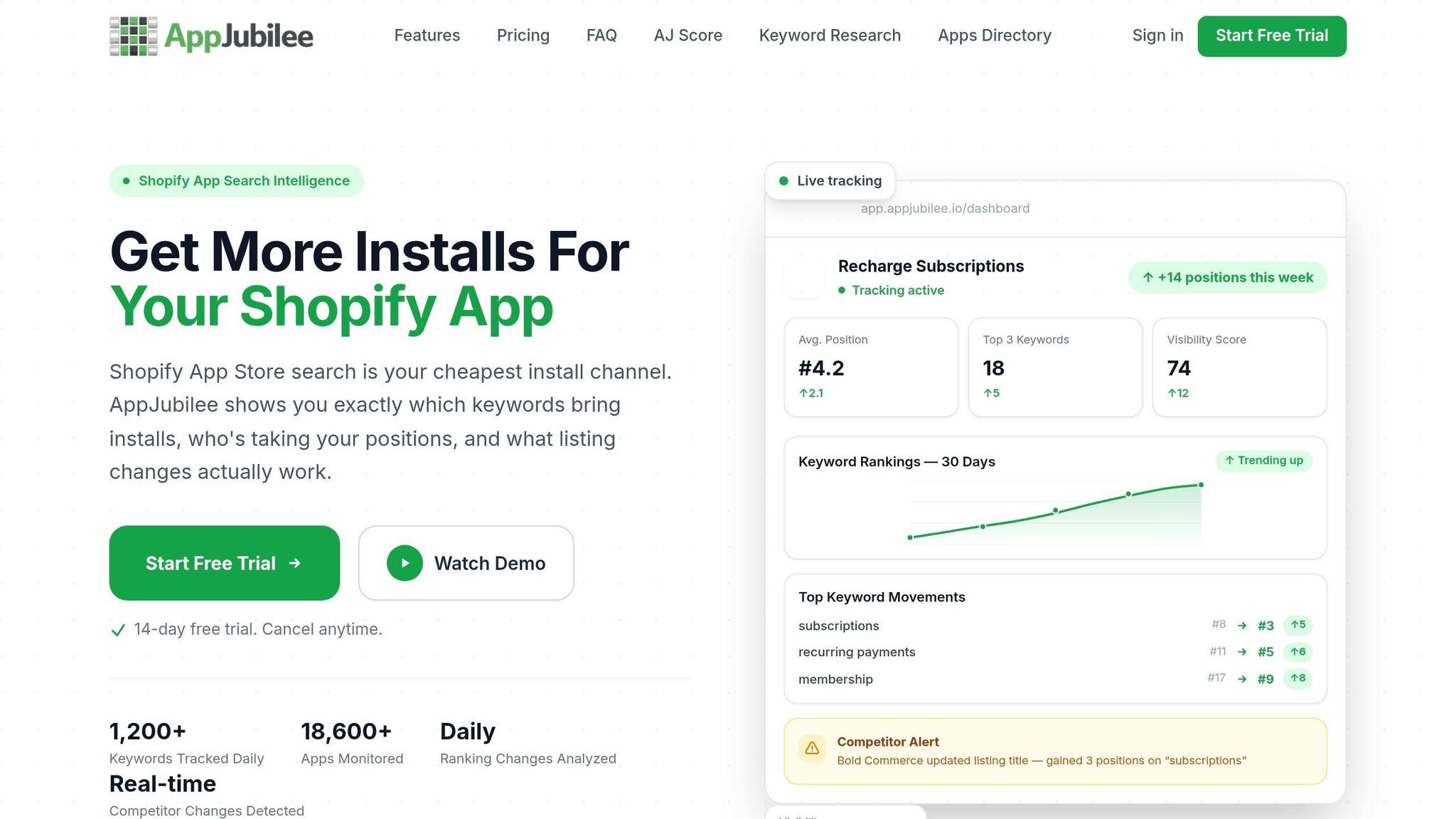
The goal here is not to rewrite the whole listing in one shot. It’s to figure out which edits to test first. That makes ranking movement much easier to read.
AppJubilee tracks 1,200+ keywords daily and gives you 90+ days of ranking history as soon as you add an app, which helps you spot slipping terms and keyword gaps - keywords you already rank for but haven’t fully used in your listing. It also alerts you within 24 hours when a competitor changes its title or gains positions on target keywords.
Once your keywords are mapped, publish changes in small batches and watch the ranking shift after each update.
How to Implement and Measure Keyword Changes Safely
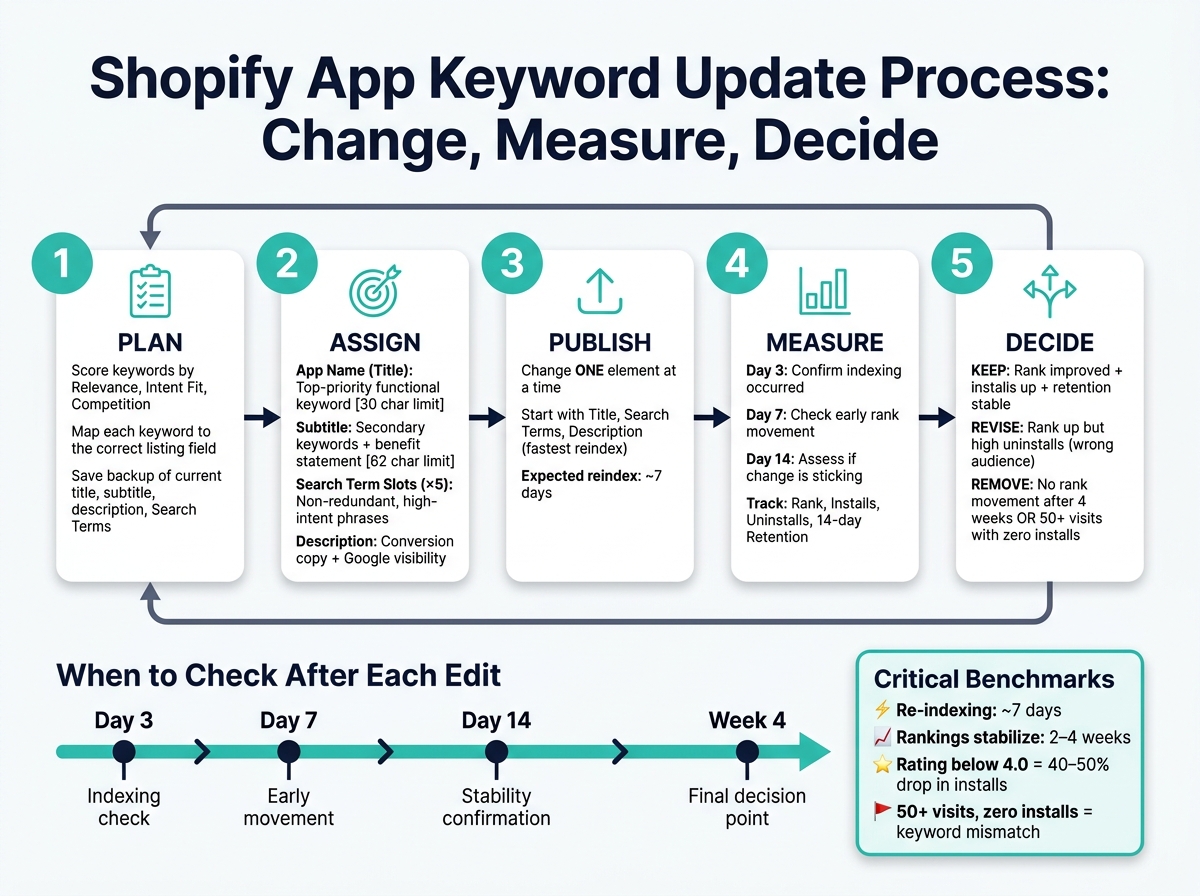
Shopify App Keyword Update Process: Change, Measure, Decide
Roll Out Changes in Small, Trackable Batches
Once you've mapped keywords to fields, don't change everything at once. Run tests in small, controlled batches instead.
Before you edit your listing, save a backup of your current title, subtitle, description, and all five Search Terms slots. Then record your baseline keyword rankings.
The main rule is simple: change one element at a time. If you update the title and Search Terms in the same edit, you won't know what caused the shift. Test one keyword in one field first. Then move to the next change after you have enough data to judge the result.
Start with the Title, Search Terms, and Description. Those tend to reindex the fastest.
Track analytics like rankings, installs, and retention After Each Update
Check performance on day 3, day 7, and day 14.
- Day 3 shows whether indexing happened
- Day 7 gives you early movement
- Day 14 shows whether the change is sticking
Rank movement by itself doesn't tell the whole story. You also need to watch merchant behavior. If a keyword helps your rank but leads to more uninstalls, that's not a win. Track installs, uninstalls, and 14-day retention to see whether the keyword brought in the right merchants.
Use this blank template to log each update and what happened after:
| Keyword | Change Date | Rank Before | Rank After | Install Change | Retention Change | Action Taken |
|---|---|---|---|---|---|---|
If rankings drop right after an edit, don't rush into another change. Wait at least 20 minutes and check whether the drop is limited to your target keyword or part of a broader rank swing.
Use AppJubilee to Connect Listing Edits to Ranking Movement
AppJubilee logs daily rankings and connects them to listing edits. That makes it easier to see which keyword changes moved positions and whether those moves affected traffic or installs.
Its Listing Changes & Impact Analysis feature shows ranking movement next to each edit date. Its GA4 and Shopify Partners integrations help you see whether a rank lift led to more traffic and installs, or just changed a number without changing merchant behavior.
Read 7-day and 30-day trends instead of judging results from a one-day spike.
Conclusion: Build a Repeatable Keyword Update Process
After each test, use the same loop: change, measure, decide. Keyword updates only matter when they improve relevance and post-click performance. Page-one apps get there by building those signals over time.
The practical takeaway is simple: change one thing, measure it, then move on. Drop keywords that show no rank movement after 4 weeks or bring clicks without installs after 50+ visits. Apps that keep iterating on keyword strategy tend to beat one-off edits.
Track installs and retention first. Ranking often follows. When you optimize for qualified installs instead of raw position, you keep the right signals in place and stay focused on what matters: keyword updates can improve visibility, but rank lasts when the right merchant finds your app and sticks with it.
That’s why tracking every edit matters. Use AppJubilee's Listing Changes & Impact Analysis, along with GA4 and Shopify Partners integrations, to tie edits back to ranking and install results.
FAQs
How long do keyword changes take to affect rankings?
Keyword changes in the Shopify App Store can affect indexing FAST, sometimes by the next day. New keywords may begin ranking within 24 hours to a few days.
If you remove a keyword, rankings can slip almost right away. In some cases, the bigger drops show up within 3 days. To see the full effect, track rankings for 1 to 2 weeks as things settle.
Which listing fields matter most for keywords?
The app title has the biggest impact on keyword ranking, and words near the beginning tend to matter more. Search terms also carry a lot of weight. The app description helps add context, but it’s not the place to cram in keywords.
Put simply: the title and search terms help decide what your app can rank for. But your full listing still needs clear, natural language that matches what people are looking for.
How can I tell if a keyword is attracting the wrong merchants?
Monitor your uninstall rate and your conversion metrics closely. A keyword might look good on the surface if it brings in lots of impressions. But if those impressions don’t turn into installs - or if people install and then remove the app soon after - that keyword is probably pulling in the wrong merchants.
It also helps to look past clicks and page views. Are product page views turning into actual installs? And after people install, do they stick around and keep using the app over time? Those are the numbers that tell you whether your listing is attracting the right fit.
AppJubilee can help you track listing changes and see how those updates affect performance.