
Shopify App Gaps: Study of 4 Rival Types
Sort Shopify app rivals into four types to spot feature, search, positioning, and roadmap gaps that affect installs.

Most Shopify app teams track the wrong rivals or compare Shopify app optimization tools incorrectly. If I only watch apps that look like mine, I miss the ones that beat me in search, steal clicks with bundles, or shift what merchants expect next.
Here’s the short version: this article says I should sort rivals into 4 types so I can tell whether my problem is features, keyword visibility, positioning, or roadmap timing. That matters in a store with 17,891 active apps, about 584 new apps each month, and more than 10,000 apps overall in the App Store ecosystem.
If I boil it down, the framework is this:
- Dominant full-stack apps set the baseline for broad features, trust signals, and top keywords.
- Narrow specialists show where my product is thin on one job merchants care about.
- Adjacent crossovers take installs by bundling nearby use cases into one tool.
- Emerging experimental apps hint at what merchants may expect next, often through new long-tail searches.
The article also gives a simple rule for action:
- Match baseline when a full-stack rival makes something feel standard
- Close depth gaps only when a specialist’s strength overlaps with my core use case
- Reposition before rebuilding when a crossover wins on convenience
- Monitor first, build later when an experimental app shows early traction
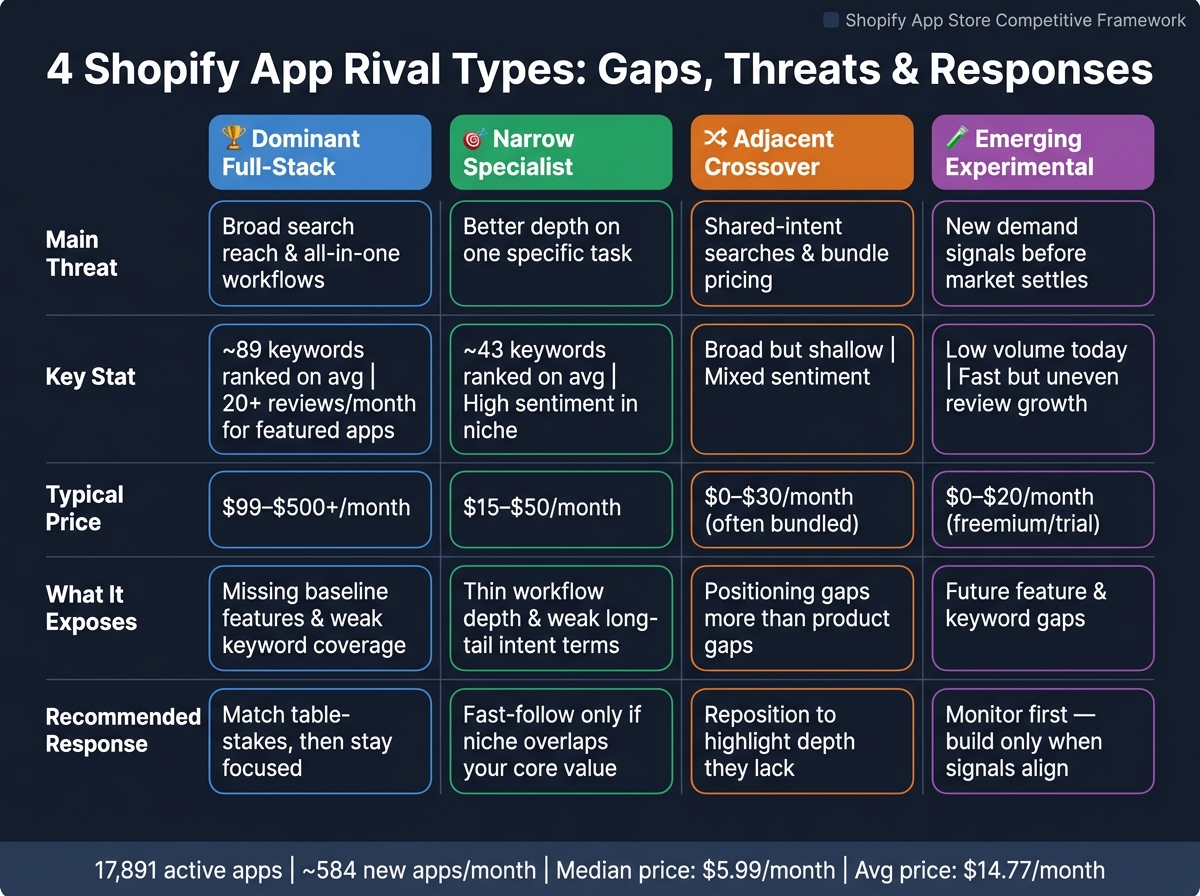
4 Shopify App Rival Types: Gaps, Threats & Responses
Quick Comparison
| Rival Type | Main Threat | What It Usually Exposes | What I Should Do |
|---|---|---|---|
| Dominant Full-Stack | Broad search reach and all-in-one workflows | Missing baseline features, weak broad keyword coverage, weaker trust signals | Match table-stakes, then stay focused |
| Narrow Specialist | Better depth on one task | Thin workflow coverage, weak long-tail intent terms | Copy only the parts tied to my core value |
| Adjacent Crossover | Shared-intent searches and bundle pricing | Positioning gaps more than product gaps | Stress depth and fix install objections |
| Emerging Experimental | New demand signals | Future feature and keyword gaps | Watch review growth, search terms, and customer pull |
A few stats shape the whole piece: dominant apps rank for about 89 keywords on average versus 43 for niche apps, featured apps often get 20+ new reviews per month, and apps on Page 2 often get almost no installs. That’s why the article treats rival tracking as a ranking and positioning job, not just a feature checklist.
In short, the best rival isn’t always the app that looks most like mine. It’s the one most likely to change my next install decision.
sbb-itb-ce93587
1. Dominant Full-Stack Apps
Dominant full-stack apps lead their category because they do a lot in one place. They combine several jobs into a single product and, over time, that stacks the deck in their favor. Klaviyo is a good example. It’s installed on 104,511 stores, or 20.55% of the Shopify stores reviewed in one market-share study. That kind of reach shows what this rival type looks like at its peak: broad product coverage, strong search presence, and trust signals that are hard to ignore.
For this rival type, the main issue usually isn’t one missing feature. It’s range. The bigger app does more, covers more steps, and shows up in more places. That puts pressure on your app from three angles at once: feature set, search visibility, and product direction.
Feature gap patterns
Start by mapping the rival’s full workflow from beginning to end. Then look at each step and note where your app drops off. Dominant apps usually handle capture, nurture, convert, and retain in one system. They also ship template libraries, prebuilt automation flows, and deep integrations that support analytics and personalization. (See analytics keyword trends for category benchmarks.)
That matters because smaller apps often ask merchants to piece things together on their own. And that’s where adoption can slip. If users have to build too much from scratch, many simply won’t bother. In practice, the steps your app doesn’t cover are the gaps that matter most.
Keyword visibility gaps
Dominant apps rank for roughly 89 keywords on average. A typical niche app ranks for about 43. That gap shows up fast in search. The bigger players tend to hold top spots for broad category terms as well as long-tail phrases with buying intent.
If a dominant rival already owns the broad keyword, don’t burn time trying to outmuscle it head-on. A better move is to go after narrower intent terms or phrases other apps have overlooked. Positions 8–15 deserve close attention because that’s often where your app is closest to breaking onto Page 1.
"Page 2 rankings generate almost no installs." - AppJubilee
Daily keyword tracking helps you see which terms the rival already controls and which near-page-one terms are still in play. And when search is locked down, the faster read often comes from reviews and pricing.
Review and pricing signals
Dominant apps usually sit in the 4.5 to 5.0-star range and have thousands of reviews. Featured apps on the Shopify App Store also average 20+ new reviews per month. That steady review flow sends a simple message: merchants trust these apps, and the store keeps reinforcing that trust.
Still, the weak spots are often easy to spot if you read complaints closely. Negative reviews on dominant apps tend to cluster around complexity, cost, and slow support. Those complaints aren’t random. They show where a lighter, easier alternative can make sense.
Pricing tells a similar story. The entry plan may look affordable at first glance, but key automation or analytics features often sit behind a paid upgrade. And there’s one more trust marker you can’t ignore: 98% of featured apps also have Built for Shopify certification. In crowded categories, that badge is less of a bonus and more of a basic expectation.
Roadmap pressure
The trap here is obvious: trying to copy the whole suite. That usually ends badly. A better approach is to close the gaps merchants see as non-negotiable, then stay lean where simplicity helps you win.
It helps to sort rival features into three buckets:
- Parity: features merchants now expect by default
- Selective investment: areas worth building because they fit your position
- Deliberate omission: features you skip on purpose to stay focused
Competitor alerts and listing change tracking can show when a dominant rival starts moving into nearby areas. That gives your team a chance to decide, with a clear head, whether to answer that move or let it pass. The goal isn’t to match everything. It’s to match what merchants now see as baseline - and leave the rest alone.
Narrow specialists create a different kind of gap, which makes the next rival type a cleaner benchmark.
2. Narrow Specialists
Narrow specialists do one thing well. Merchants looking for that one job can find them fast, and once they do, they often stick around. That creates a different kind of gap than you see with full-stack apps. The pressure isn’t about doing more things. It’s about doing the main thing better.
Feature gap patterns
With a narrow specialist, the gap usually isn’t volume. It’s depth.
A broad app might handle reviews as one feature out of twenty. A specialist review app, on the other hand, may offer tighter review-request timing controls, more detailed import tools, and stronger UGC display options. That’s where the difference shows up.
The practical test is simple: walk through the specialist’s main task flows and see whether your app handles each one just as cleanly. If merchants would slow down or leave because a feature is missing, that’s feature debt. If the difference comes down to wording, styling, or page layout, it’s cosmetic.
That same depth often sharpens the specialist’s keyword cluster too.
Keyword visibility gaps
Narrow specialists usually own a small, precise keyword cluster.
A full-stack rival may rank across broad terms like “email marketing.” A specialist is more likely to win high-intent, feature-level terms like “Shopify bundle discount app” or “post-purchase upsell automation.” Those searches often signal stronger intent because the merchant already knows what they want.
So the visibility gap isn’t volume. It’s relevance.
Specialists tend to line up their listing copy, category choice, and even review language around one use case. That tight match helps them rank for that cluster. Generalist apps often miss the shared high-intent terms that specialists already control.
Daily keyword tracking and competitor mapping make this easier to spot. You can see where a specialist is gaining relevance and where your app barely shows up.
Review and pricing signals
Reviews on narrow specialists often point to niche fit.
Look for phrases like "best for X" or "finally solved Y." Those comments tell you what job merchants think the app owns.
Pricing often starts low or scales with usage. That usually shows how the specialist makes money from depth rather than breadth.
Roadmap pressure
Roadmap pressure here should stay selective.
Match the specialist only on the core path that affects conversions, retention, or search visibility. Don’t rebuild every niche feature just because it looks polished. Use narrow specialists as precision benchmarks. They help you decide where to build, not what to copy.
That makes specialists a depth benchmark. The next rival type shows whether that same demand is starting to spill across categories.
3. Adjacent Category Crossovers
Specialists tend to win on depth. Crossovers win on the appeal of an all-in-one bundle.
Adjacent category crossovers sit outside your main category label, but they still compete for the same searches and installs. A reviews app that adds loyalty features, or an SMS app that moves into email capture, can show up in your search results and pull installs from merchants who want fewer tools in their stack.
That’s the big takeaway: crossovers create gaps in search and positioning, not just in features.
Feature gap patterns
The gap here is a broad bundle, shallow depth issue.
Crossover apps package features from two or more categories into one product. But each part is often weaker than what a specialist offers. For example, a crossover might include basic popup capture and email collection, yet miss things like advanced segmentation, A/B testing, or event-based triggers.
The practical question is simple: do merchants spot that gap before they install, or only after they start using the app? That same bundle dynamic also shows up in search.
Keyword visibility gaps
Crossovers often do well on broad, high-intent search terms that touch more than one merchant job.
A merchant searching for “product reviews,” “email popups,” or “bundles app” (or even niche terms like product personalizer) may see a crossover app if its listing casts a wide net, even if it’s not the deepest tool for that job. Shared core keywords are the terms that most apps in the category fight over. Crossovers can win those terms because one listing lines up with multiple intents.
That’s why it helps to track keyword movement across adjacent rivals, not just direct competitors. That’s the difference between reacting late and seeing the shift early. AppJubilee's competitor mapping and daily keyword tracking can help you spot when a crossover starts gaining ground on your shared search terms before it turns into a ranking problem.
Review and pricing signals
Reviews for crossover apps often praise convenience over capability. Watch for patterns like merchants saying the app replaced two tools or made their setup easier to manage. Those reviews point to lower purchase friction.
Pricing matters too. A flat bundle plan that covers multiple use cases can come in below the total cost of two separate specialist apps, even when each feature on its own is weaker. That’s a packaging edge, not a product edge, but it can still drive installs.
Roadmap pressure
When a crossover starts taking shared searches, the roadmap issue becomes one of positioning.
Crossovers don’t just create feature-by-feature pressure. They create pressure around how your app is framed in the market. For most specialist apps, the better move is to defend depth. But if a crossover keeps winning shared searches or starts showing up in merchant feedback, a well-placed bridge feature can help close the gap without watering down the product.
Add a bridge feature only when it helps you win core terms or removes a common install objection.
4. Emerging Experimental Apps
This rival group gives merchants a preview of what may come next, not just what they want right now.
If big apps win on breadth and niche tools win on depth, emerging experimental apps win by being early. They step into a new problem space before the market settles on a standard fix. These are early-stage apps with small user bases, fast update cycles, and feature sets that still have holes. Their edge isn't the category they sit in. It's that the solution itself feels new.
Think AI-driven product add-ons and upsell personalization.
That makes these apps useful for spotting future feature gaps, search gaps, and roadmap pressure. In plain English: they can hint at the next thing merchants will expect before it becomes common.
Feature gap patterns
Experimental apps often miss baseline features like multi-store support, reporting, and role permissions. But they may introduce one thing that no mature app offers yet. That's the part to watch.
Treat these apps like early signals. They can show which features may move from "nice idea" to "expected."
Here's the practical read: when merchants keep praising one specific capability in reviews, pay attention. That usually points to an unmet need, not just a shiny new trick.
Keyword visibility gaps
Experimental apps usually pick up long-tail innovation queries, not core terms. That includes phrases like "AI product bundles" or "shopper quiz funnels" that established apps haven't targeted yet.
These keyword clusters are easy to overlook if you're only watching direct rivals. That's the trap. Keyword tracking can show when an experimental app starts picking up visibility on search terms that overlap with your core category. Current search volume matters less than whether that query cluster is starting to grow.
Roadmap pressure
Once a new query begins to gain traction, timing becomes the main call.
Experimental apps create long-term pressure, not immediate pressure. They usually won't take your installs today. But they can change what merchants start to expect tomorrow. Review velocity can outrank static review totals. That kind of momentum can shift rankings.
A simple way to sort the pressure:
- Ignore if the idea is too niche or doesn't fit your core users
- Monitor if it lines up with a long-term trend but adoption is still low
- Test if you're seeing early demand signals from your own customers
- Build only when keyword visibility, review traction, and merchant feedback all point in the same direction
Gap Matrix by Comparison Criteria
The four rival types put pressure on your product in different ways. The matrix below gives you a fast way to compare feature gaps, search gaps, trust signals, and roadmap pressure.
Start with the table. Then use the notes below to decide what to build, what to ignore, and what to keep an eye on.
Here’s how they stack up across the criteria that matter most for prioritization. The price bands below are rough benchmarks, and they sit within a broader Shopify app market where the median price is $5.99/month and the average is $14.77/month.
| Rival Type | Core Feature Coverage | Advanced Depth | Long-Tail Keyword Coverage | High-Volume Keyword Coverage | Review Signal | Typical Monthly Price (USD) | Recommended Product Response |
|---|---|---|---|---|---|---|---|
| Dominant Full-Stack | High | Moderate | Moderate | High | Many reviews, fast growth | $99–$500+ | Match baseline; differentiate on UX |
| Narrow Specialist | Moderate | Very High | High | Low | High sentiment in specific areas | $15–$50 | Fast-follow only if the niche is central to your value prop |
| Adjacent Crossover | Broad, shallow | Low | Low to Moderate | Moderate | Mixed; often established but off-category | $0–$30 (often bundled) | Reposition to highlight depth they lack |
| Emerging Experimental | Low | Niche or AI-led | Low today; new clusters forming | Low | Low total count, fast but uneven growth | $0–$20 (freemium or trial) | Monitor; fast-follow only when demand signals align |
Feature gap patterns across the four rival types
The main split is baseline vs. depth.
Dominant full-stack apps set the table stakes. If you're missing something they treat as standard, that gap can hurt adoption. Narrow specialists are different. They tend to beat everyone on one narrow function, but that only becomes urgent if that function sits close to your core value prop.
Adjacent crossovers usually don’t call for feature matching. In most cases, the smarter move is repositioning. They may look broad on paper, but that breadth is often shallow. Experimental apps are another story. They point to where the market may head next, not what you need to ship right now.
Keyword visibility gaps across the four rival types
Narrow specialists often win the intent-heavy long-tail searches tied to a specific workflow. These are the searches broad apps often skip.
Adjacent crossovers can create a quieter kind of threat. Because they sit across two categories, they may rank for overlapping terms that don’t look dangerous at first glance. That can chip away at visibility before teams notice it.
Emerging experimental apps are weaker on volume right now, but they can show new keyword angles early. Sometimes that’s where a new search cluster starts.
A simple rule helps here:
- Cover high-volume category terms first
- Then cover the high-intent subproblems merchants are already searching for
AppJubilee's daily keyword tracking, competitor alerts, and ranking snapshots make it practical to watch which rival type is gaining or losing ground on specific terms over time.
Review and pricing signals as quick competitive reads
Review count, review sentiment, and monthly price can tell you a lot at a glance. Put those three together, and you get a decent read on maturity and merchant trust.
Dominant full-stack apps usually have high review counts and established pricing tiers. Narrow specialists may have fewer reviews, but the praise is often stronger within one narrow use case. Adjacent crossovers can show mixed sentiment when merchants expect one category and get something else instead. Emerging experimental apps usually show low review counts and more volatile pricing, which points to early validation rather than proven fit.
AppJubilee's review intelligence and listing change tracking can surface these sentiment shifts and new feedback patterns.
Roadmap pressure by rival type
Not every gap deserves engineering time. That’s the trap.
Dominant full-stack apps create the most immediate pressure. If they support a workflow you don’t, merchants will notice during evaluation. Narrow specialists create moderate pressure, but only when their specialized function overlaps with your core use case. If it doesn’t, chasing their depth can pull your roadmap off course. In that case, it’s often better to position around broader workflow value.
Adjacent crossovers rarely justify parity work. Their edge usually comes from a different mental model, not from a better product. Emerging experimental apps create long-term pressure, not immediate pressure. The better move is to watch them, track keyword traction, and fast-follow only when review velocity, search demand, and merchant feedback all point the same way.
Prioritize based on which rival type is most likely to affect your next install decision, not which one looks best in a feature table.
The next section shows when each rival type is a useful benchmark - and when it pushes teams into bad roadmap decisions.
When to Use Each Rival Type
Use this section to separate helpful benchmarks from roadmap traps. The matrix above maps the gaps across features, search, and roadmap choices. This part shows how those signals can get misread.
When each rival type works as a useful benchmark
Dominant full-stack apps: Use dominant apps to set the baseline for features, pricing, and high-volume keywords.
Narrow specialists: Use narrow specialists to find under-served intent and the exact workflow merchants want fixed.
Adjacent crossovers: Use crossovers to spot category overlap and changes in what merchants expect.
Emerging experimental apps: Use experimental apps to catch early signals worth testing, not demand you should copy.
When each rival type leads to bad roadmap decisions
Use the table below as a fast decision rule for each rival type.
| Rival Type | Pros for Your Strategy | Cons/Risks | Best Response |
|---|---|---|---|
| Dominant Full-Stack | Sets baseline feature expectations, pricing anchors, and core keyword benchmarks | Easy to overreact; chasing their breadth leads to feature bloat and unwinnable keyword battles | Match baseline; differentiate in 1–2 depth areas |
| Narrow Specialist | Reveals under-served search intent, long-tail keyword gaps, and focused review language | Copying their scope too literally caps revenue potential and limits expansion paths | Build specialist-level flows inside a broader value prop; use their keyword language without their narrow scope |
| Adjacent Crossover | Signals category convergence and emerging merchant expectations across workflows | Misreading exploratory features as full category pivots dilutes your core positioning | Monitor for sustained usage and review growth before adjusting your roadmap or listing |
| Emerging Experimental | Surfaces new UX patterns, pricing models, and early messaging angles worth testing | Most experiments fail; about 194 apps are removed from the Shopify App Store every 30 days | Wait for 30 days of sustained review growth and stable listings before fast-following |
That leaves one final question: which rival type changes your next install decision fastest?
Conclusion
The matrix leads to a simple rule: each rival type answers a different question.
Use full-stack apps to set the baseline. Use specialists to show where your depth is thin. Use crossovers to spot overlap. And use experimental apps to catch demand before it becomes obvious.
That split helps you separate basic expectations from actual opportunity.
As the category changes, the mix you track should change too. Early on, pay closer attention to specialists and experimental apps. Later, full-stack apps and crossovers tend to matter more.
The best roadmaps pull a different signal from each group:
- Full-stack apps for table-stakes parity
- Specialists for depth and keyword language
- Crossovers for bundling and category-shift warnings
- Experimental apps for early trend signals worth testing
A simple rule for recurring competitor tracking
Run a monthly scan across all four rival types, then do a quarterly deep dive. Compare features side by side, review the last 90 days of reviews for new merchant language, and update your gap matrix.
With over 17,891 active apps and roughly 584 new apps launching every month, recurring tracking matters.
AppJubilee automates daily keyword tracking, competitor alerts, ranking snapshots, and review intelligence, so small teams can keep the scan consistent. That helps keep keyword tracking, feature priority, and positioning in sync with how the Shopify App Store actually moves.
FAQs
How do I know which rival type matters most right now?
Focus on the rival type linked to the clearest gap in your current data.
- If you're losing rankings and installs, focus on search and ranking gaps caused by competitor listing changes.
- If you're still getting exposure but installs have stalled, focus on feature gaps shown by keyword intent mismatch.
- If you're missing category definitions, focus on core keyword gaps.
Use AJ Score and weekly opportunities to see which gap is biggest.
When should I fix positioning instead of building new features?
Fix positioning first when the problem is search visibility, not the product itself.
If competitors rank for core keywords and you don’t, close those gaps in your title and description. Then work on moving page-2 keywords onto page 1, especially terms sitting in positions 8–10. That’s often where a small lift can make a big difference.
You’ll also want to measure listing changes over 3, 7, and 14 days. Keep the changes that improve rankings. Drop keywords that get zero impressions after 4 weeks or lead to uninstall spikes within 7 days.
What signals show an experimental app is worth following?
An experimental app is worth watching when its Shopify App Store search signals show real momentum, not just raw volume.
Here’s what that looks like:
- ranking gains on priority keywords over 7–30 days
- fresh listing updates every 30–60 days
- faster review growth than peers
- visible install velocity growth
One of the best green flags is a clear cause-and-effect pattern. Specific listing changes line up with ranking gains, and keyword relevance stays steady without big swings.