
Why Competitor Updates Change Shopify App Rankings
How competitor metadata, reviews, installs, and releases can quickly shift Shopify App Store rankings and how to diagnose the cause.
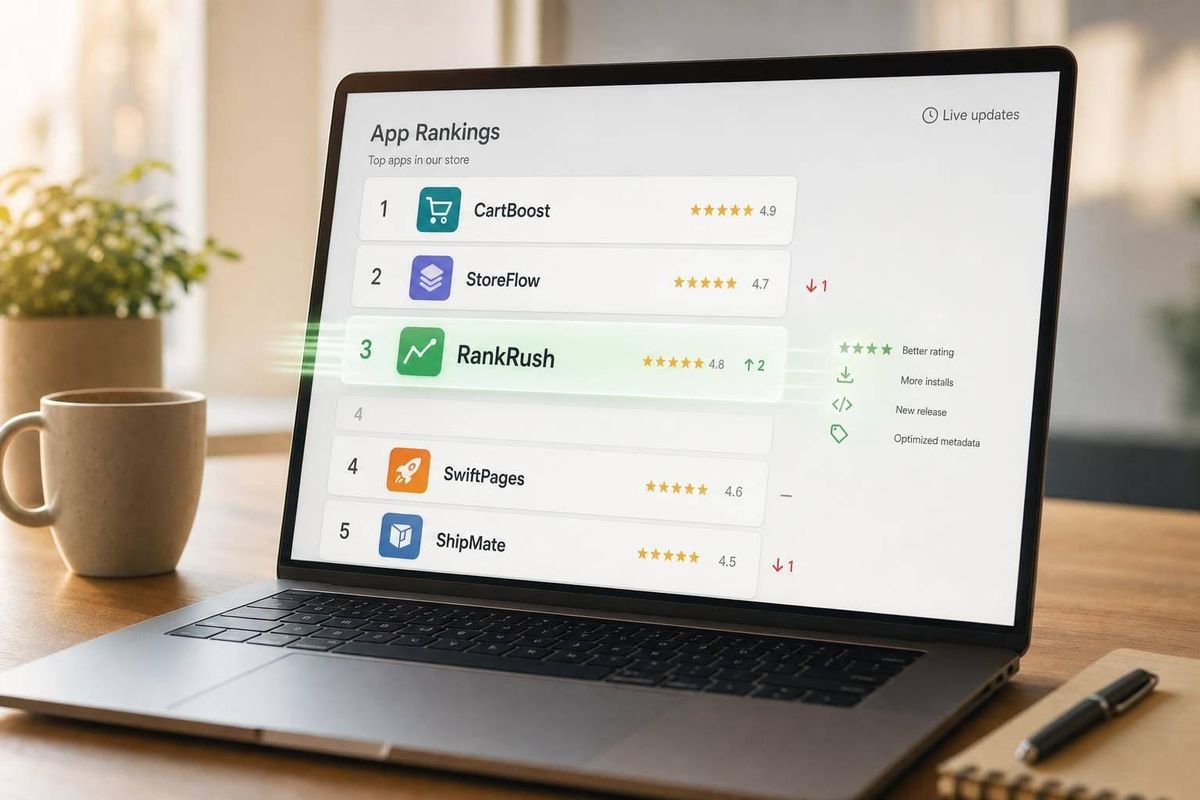
Your Shopify App Store rank can drop even when you changed nothing. That happens because rankings are relative: if a competitor improves their title, gets more installs, picks up new reviews, or boosts click-through rate, they can move up and push you down.
Here’s the short version:
- Rankings are comparative, not fixed
- Metadata edits can change keyword match fast
- New reviews and better ratings can shift positions in 24 to 72 hours
- Install momentum and conversion often matter as much as keyword fit
- A drop across one keyword often points to a competitor move
- A drop across many keywords may point to issues on your side
- The right response is to check timelines first using Shopify app optimization tools, then fix the listing or product based on the cause
If I were looking into a rank drop, I’d start with three checks:
- Scope: Did one keyword fall, or many? (You can track this using a Shopify app keyword research tool.)
- Timing: Did a competitor update right before the drop?
- My signals: Did conversion, reviews, retention, or support issues get worse?
| What changed | What it usually means | What I’d do next |
|---|---|---|
| One or two keywords dropped | Competitor likely improved relevance | Review their title, subtitle, screenshots, and category |
| Several related keywords dropped | Listing or conversion issue on my side | Check installs, listing edits, pricing, and screenshots |
| Rankings fell after a competitor review surge | Their quality signals improved | Work on review flow and listing CTR |
| Rankings fell after my release | Product or onboarding issue | Check bugs, support tickets, and uninstall rate |
The main point: I wouldn’t treat every rank drop like a penalty. In many cases, it’s just the market moving around me. The fix is simple: confirm the cause, then respond with focused changes instead of random edits.
How Shopify App Store Rankings React to Competitor Changes
Once you know Shopify rankings are relative, the next thing to figure out is simple: which competitor moves matter most?
Competitor updates matter because they can change both relevance and quality signals. Shopify likely ranks apps in two passes. First, it checks whether an app matches the search. Then it sorts those matching apps based on quality signals. Because the system is relative, a competitor can jump ahead of you just by improving their own signals, even if you haven’t changed a thing.
Relevance Signals: Title, Subtitle, Description, and Keyword Fit
Title appears to carry the most weight, with subtitle next, then description. So if a competitor changes a vague title into one that matches search terms more directly, they can gain ground fast.
For example, changing "ShopBoost" to "Smart Upsell & Cross-Sell" gives Shopify a much clearer read on what the app does and which searches it fits.
Quality Signals: Installs, Retention, Ratings, and Review Recency
After relevance, Shopify seems to weigh which apps merchants are most likely to install and keep. That likely includes recent install velocity, retention compared with uninstalls, average rating, review volume, and how recent those reviews are. If a competitor gets stronger install momentum, newer positive reviews, and better click-through, they can move past you even when your own numbers stay flat.
A good example is a competitor moving from 4.2 stars to 4.7 stars while also adding a steady flow of new positive product reviews. On paper, your app may look the same as yesterday. In the ranking system, though, that competitor now looks stronger.
Why Daily Refreshes Create Visible Rank Swings
Because Shopify refreshes rankings often, these changes can show up fast. Meaningful ranking movement often appears within 24 to 72 hours after a competitor updates their listing, ships a new version, or gets a burst of new reviews. That gives Shopify time to reindex the listing and refresh rankings.
Not every drop means trouble, though. A one-day dip is often just noise. But if you fall three to five positions and stay there for a week or more, that usually points to a real competitor change.
AppJubilee can line up daily ranking snapshots with competitor change logs, which makes it easier to tell the difference between a normal wobble and a real shift.
The next step is figuring out which competitor action caused the change.
sbb-itb-ce93587
4 Competitor Actions That Most Often Shift Rankings
Not every competitor move hits with the same force. Some changes lead to a clear drop in a matter of days. Others show up as a slow slide that’s easy to brush off until you’re a few spots behind. Start with these four signals. In most cases, they explain the fastest ranking drops.
Update Timing and Release Freshness
A new release can drive more clicks, installs, and review activity, often visible in analytics for the category. That short burst of engagement tells Shopify the app is picking up steam, which can move it up in search results. Timing matters too. Releases that land before major Shopify events can pull in more clicks and installs, which can make that bump even stronger.
Review Volume, Rating Shifts, and Recent Review Tone
If the update didn’t change metadata, check social proof next. Recent review pace often matters more than total lifetime count. A steady flow of new positive reviews can push an app ahead of a listing that hasn’t seen much activity. And when a competitor’s review momentum speeds up, their listing can look stronger even if your own rating stays flat.
Keyword Edits and Listing Tests That Improve Conversion
Competitors can move up fast when they tighten titles, subtitles, screenshots, and pricing labels around a search query. The closer the fit, the better the chance of more clicks and installs. And that tends to help rankings.
Category Moves and Positioning Changes
Some rank shifts happen because a competitor changes the playing field, not because they changed the listing itself. A narrower category can cut direct competition and help that app show up for more relevant searches. The result is simple: that competitor gets tougher to beat for a tighter group of queries, and your app can fall several spots even when nothing changed on your side.
How to Tell Whether a Competitor Caused Your Rank Drop
Before you touch your listing, figure out what caused the drop. That one move can save you from edits that make things worse. The goal here is simple: separate competitor-driven movement from problems on your side before you change anything.
Check the Scope of the Drop Before Changing Anything
Start with three layers:
- One specific keyword
- A group of related keywords
- Your overall category visibility
If only one keyword slipped while nearby terms stayed flat, a competitor is the likely cause. Maybe they changed a keyword, updated their title, or ran a listing test. If several related terms dropped at the same time, the issue is more likely tied to your own listing or conversion rate. If you’re losing ground across most tracked keywords and your category rank is down, you may be dealing with a major competitor move or a problem on your side.
Use a 30- to 60-day view when you check this. One-day swings are often just noise. If the drop looks broad, compare your timeline with competitor activity next.
Review Your Own App Signals Alongside Competitor Timelines
Before blaming a competitor, look at your own recent activity first. Check for app releases, crash reports, uninstall spikes, listing edits, pricing changes, and shifts in review sentiment or fake reviews. If your timeline shows a release, a listing edit, or a surge in support tickets right before the drop, that’s a stronger clue than competitor activity by itself.
If nothing on your side lines up with the timing, move to competitor timelines. Look at when they shipped an update and whether their title or subtitle changed. Timing is the clearest signal here: their change date matches your drop, and the keywords that fell overlap with their new positioning. That’s when competitor-driven movement becomes the most likely call. If your own timeline is clean, dated snapshots can help confirm whether the competitor update matches the drop.
Use Ranking Snapshots and Change Logs to Confirm the Pattern
Memory is shaky for this kind of diagnosis, especially when several things change in the same week. Dated ranking records, review history, and listing-change notes let you compare actual before-and-after positions instead of guessing.
Review velocity matters more than total lifetime reviews, so daily snapshots can show spikes that raw review totals miss. AppJubilee supports this with daily keyword tracking, competitor alerts, ranking snapshots, and listing-change impact tracking. The GA4 and Shopify Partners integrations connect ranking movement to product and traffic data, so you can check whether the drop lines up with actual install and traffic changes or stays limited to search rankings.
A Simple Framework to Tell Competitor Impact Apart From Your Own Issues
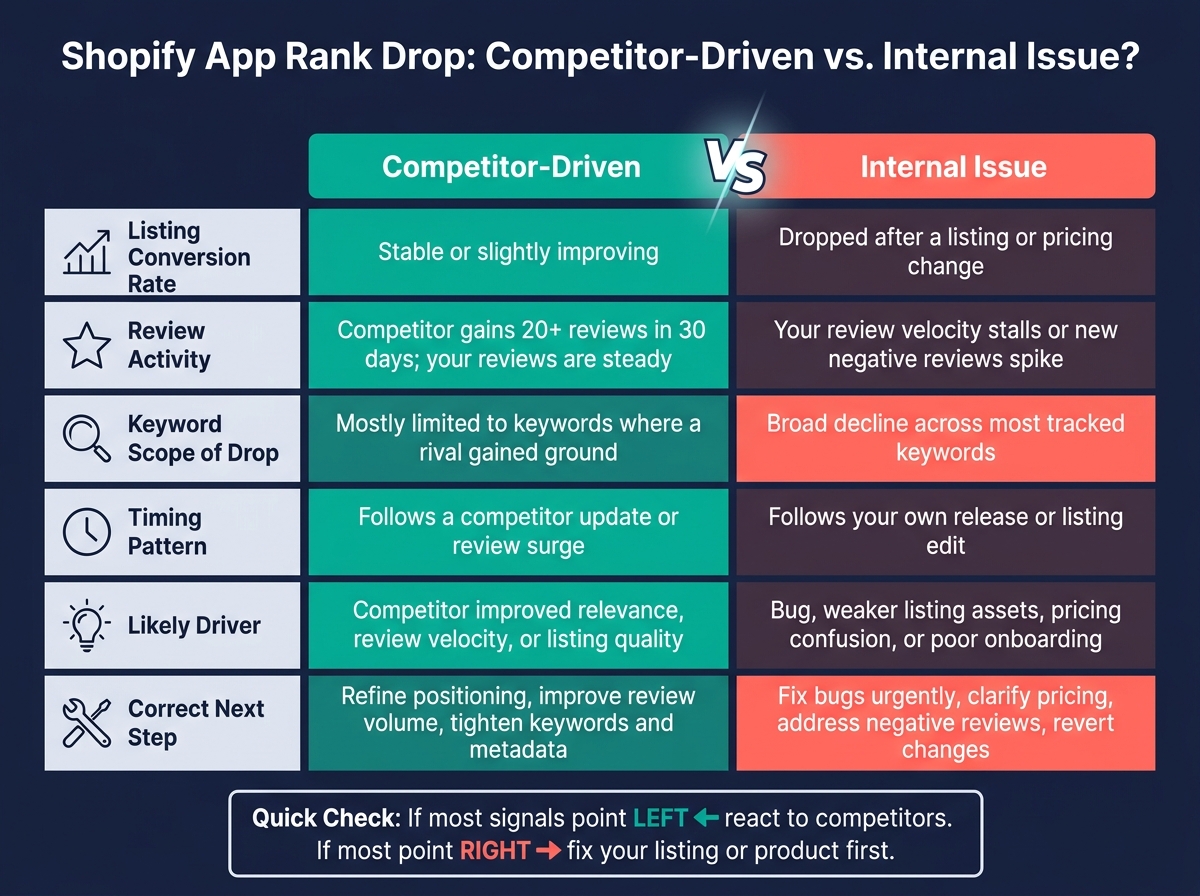
Competitor-Driven vs. Internal Shopify App Rank Drops: How to Tell the Difference
Once you have snapshots and change logs, classify the drop before you touch the listing. That’s the point of this step. You want to separate competitor movement from changes on your own side, so you don’t make the most common ASO mistake: fixing the wrong thing because the cause was misread.
Signs the Change Is Competitor-Driven
Start with a simple pattern: your metrics stay steady, while a competitor moves up.
If your listing conversion rate is flat or a bit higher, your average rating and review volume haven’t changed much, and you haven’t shipped a major release or updated the listing in the last two to four weeks, your own signals probably aren’t the issue.
Then check the competitors that gained ground on the keywords where you lost rank. Did one or two of them push an update, swap in new screenshots, or rewrite their title? If a competitor crossed a rating threshold that matters - say, moving from 4.3 to 4.7 stars or higher with a burst of positive reviews - that alone can push them ahead of you on shared keywords.
There’s another clue here. Your drop is usually concentrated on terms where those same competitors show up, while performance on lower-competition queries stays mostly the same. That’s a strong sign the drop came from competitor movement, not from damage on your side.
Signs the Issue Is on Your Side
The other pattern looks different: more than rankings are slipping.
Pay close attention to one- to three-star reviews, especially when the same complaints keep showing up. Setup confusion, broken integrations, surprise charges, and weak support are all warning signs. Install conversion is another big one. If listing views stay level but installs drop, something in the listing or onboarding may have gone sideways. A move from 20% to 12% conversion after a screenshot or pricing update is a clear red flag.
Releases are a common cause. A new version that adds bugs, lifts error rates, or breaks a core flow can lead to uninstall spikes and weaker retention. If rankings fall across most of your tracked keywords - not just the ones where rivals are active - and your timeline shows a recent release or listing edit, treat it as an internal issue first, even if competitors were active at the same time.
One nuance matters here: a recent listing edit is only a problem if it lines up with weaker conversion or retention. Timing alone isn’t enough.
Use these signals together, not one by itself.
Competitor Impact vs. Internal Issues: Comparison Table
| Signal | Competitor-Driven Change | Internal Issue |
|---|---|---|
| Listing conversion rate | Stable or slightly improving | Dropped after a listing or pricing change |
| Review activity | Competitor gains 20+ reviews in 30 days; your reviews are steady | Your review velocity stalls or new negative reviews spike |
| Keyword scope of drop | Mostly limited to keywords where a rival gained ground | Broad decline across most tracked keywords |
| Timing pattern | Follows a competitor update or review surge | Follows your own release or listing edit |
| Likely driver | Competitor improved relevance, review velocity, or listing quality | Bug, weaker listing assets, pricing confusion, or poor onboarding |
| Correct next step | Refine positioning, improve review volume, tighten keywords and metadata | Fix bugs urgently, clarify pricing, address negative reviews, revert changes |
Use the table as a weekly check. If most rows point left, react to competitors. If most point right, fix the listing or product first. Once the cause is clear, the next step is figuring out which changes are most likely to move rankings fast.
What to Do After Competitor Updates Change Your Rankings
Update Metadata, Address Reviews, and Improve Conversion
After you confirm the drop came from a competitor update, go straight to the listing and product signals most likely to help you recover rank.
Start with the title and subtitle. Then tighten the opening description. Your screenshots should show outcomes, not just UI. People need to see what the product helps them do, not only what it looks like.
On the review side, fix the issues dragging down your rating first. If the same complaints keep showing up in support tickets, deal with those before you ask for more reviews. After that, build a steady request cadence. 7 to 14 days after install is the best window for useful feedback. Try to time listing updates with actual product improvements. Fresh metadata tied to a better user experience tends to last longer than a cosmetic rewrite.
Set a Weekly Competitor Monitoring Routine
Once the listing is in better shape, monitor competitors every week so the same pattern doesn't blindside you again.
Track your priority keywords daily. Then do a full competitor review once a week. In that review, check for:
- Title edits
- Screenshot changes
- Review spikes
- Pricing shifts
- Category moves
Log what you find with dates. That way, when rankings move, you can trace the cause instead of guessing.
AppJubilee helps make this routine easier with daily keyword tracking, competitor alerts, ranking snapshots, and listing change impact analysis. That gives you a clearer link between rank shifts and what caused them.
Prioritize Changes by Likely Impact and Effort
Use the next update cycle to pick fixes by impact, not urgency alone.
Start with low-effort changes first: titles, subtitles, and screenshot copy. These can move visibility fast. Next, work on pricing, onboarding, and value clarity. Leave bigger product changes that improve retention and activation for later. They take more time, but they tend to produce the most durable ranking gains.
Key Takeaways
Competitor updates change rankings by improving relevance, review freshness, conversion, and install momentum. They don't penalize your app directly. In most cases, a rank drop is a market response, not an algorithmic punishment.
The best recovery plan isn't random optimization. It's a disciplined process: monitor often, confirm the cause before changing anything, and make targeted updates to the listing or product area most likely to restore visibility. That turns a reactive ranking problem into a repeatable ASO workflow you can run every week.
FAQs
How can I tell if a rank drop is just normal fluctuation?
Shopify App Store rankings can shift on their own based on location, time of day, and personalization. So if your app moves up or down by one or two spots, that’s normal. It usually doesn’t mean anything has changed in a meaningful way.
Don’t read too much into a one-day dip. That’s usually just noise.
Instead, watch the trend over 7 to 30 days. If the drop keeps showing up over that stretch, then it’s time to dig in. Common causes include competitor updates, changes to your listing, or slower install velocity.
Which Shopify App Store signals move rankings fastest?
Rankings tend to move fastest when review velocity changes. That usually means new reviews start coming in at a faster pace, or an app updates high-impact listing fields like the App Name or Search Terms. Those changes can index in 24 hours to 7 days, and install momentum can help too.
Listing freshness matters as well. Apps that refresh their listing every 30–60 days often rank higher. And because Shopify rankings are tracked daily, intraday swings are usually just noise. It’s better to watch the trend over 7–30 days instead of reacting to every small move.
What should I fix first after a ranking drop?
First, see if the drop lines up with changes to your listing - title, description, screenshots, or pricing - or with competitor shifts on the same keywords over the last 7 and 30 days.
If the drop matches a listing-change window, roll back that edit or tweak it. If not, look at review and install velocity, keyword relevance, and how well your title and description match search intent without stuffing keywords.