
Best Practices for Shopify App Keyword Research
Use merchant-language keywords, score by intent/competition, place top terms in name/subtitle, and test results every 2–4 weeks.
If merchants can’t find your app in search, they can’t install it. And with about 60% of Shopify app installs coming from search, I’d treat keyword research as a direct path to more qualified installs.
Here’s the short version: I’d build my keyword list around merchant language, not product jargon; score terms by intent, competition, and app stage; place top terms in the app name, subtitle, search fields, and opening description; then review results every 2–4 weeks. The goal is not more views. The goal is more installs from people who already want the job your app does.
What matters most:
- Use outcome-based phrases merchants would type
- Check demand with autocomplete, App Ads terms, competitor listings, reviews, and forums
- Prioritize high-intent keywords before broad category phrases
- Match targets to app maturity, from new app to growth stage
- Place keywords carefully without repeating them too much
- Track CTR, install rate, and uninstall signals
- Swap weak terms if they show no movement after about 4 weeks
A few numbers stand out:
- High-intent terms can convert around 5%–12%
- Broader terms often convert around 1%–4%
- A healthy search CTR is often 8%–15%
- If a keyword brings 50+ visits and 0 installs, I’d cut it
This article lays out a simple process I’d use: research what merchants say, sort terms by install intent, add them to the right listing fields, and keep testing based on ranking and install data.
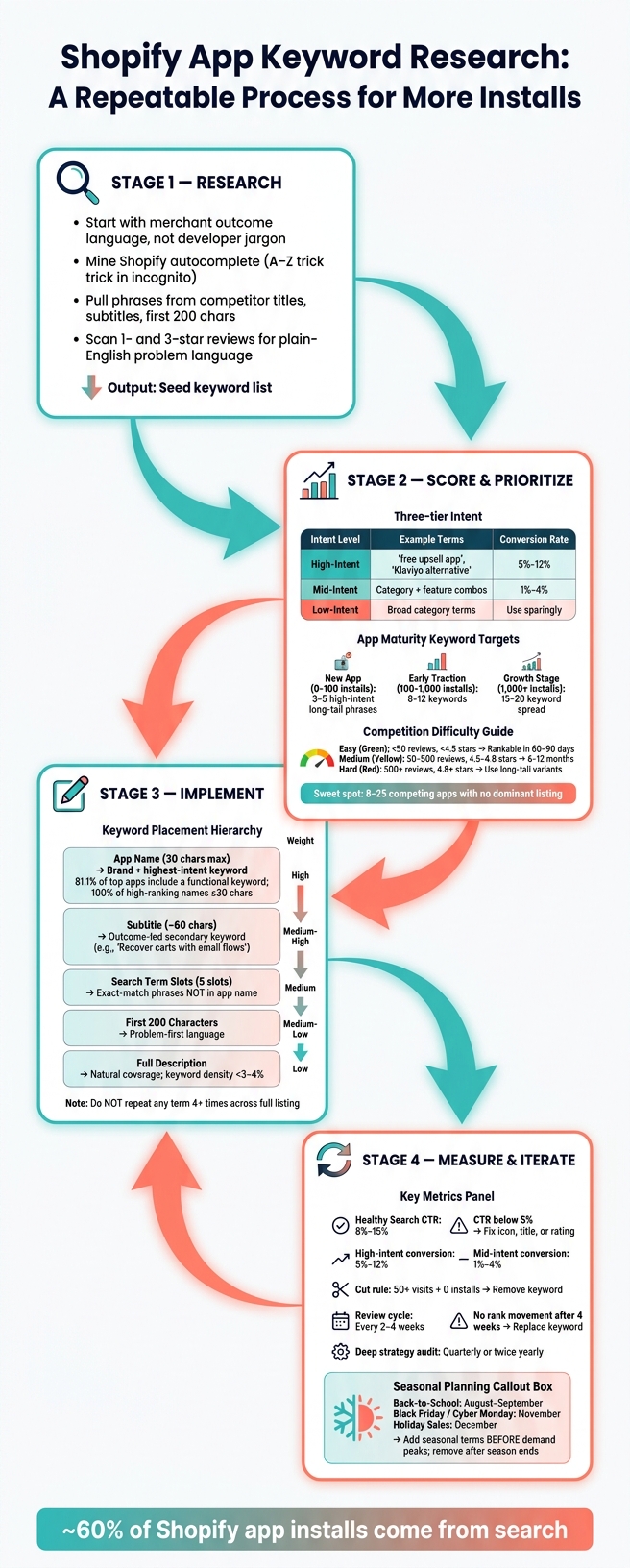
Shopify App Keyword Research Process: From Research to Installs
Build a High-Intent Shopify App Keyword List
Start with Merchant Jobs-to-Be-Done and Feature Outcomes
Start with what merchants want to get done, not the way your app works behind the scenes. The goal here is simple: make a short list of terms you can score later for intent and competition.
This shift matters. Merchants usually don’t search for product jargon. They search for the result they want.
| Developer Language (Mechanism) | Merchant Language (Outcome / Search Term) |
|---|---|
| Multi-channel attribution | track where my sales come from |
| Abandoned cart automation | send a reminder when people don't checkout |
| Inventory sync | stop overselling |
| Subscription billing | let people pay monthly |
| Wishlist functionality | let customers save items for later |
Use the merchant-language column as your seed list. Those terms are what you’ll score next for buyer intent and competition.
Mine the Shopify App Store, Reviews, and Autocomplete
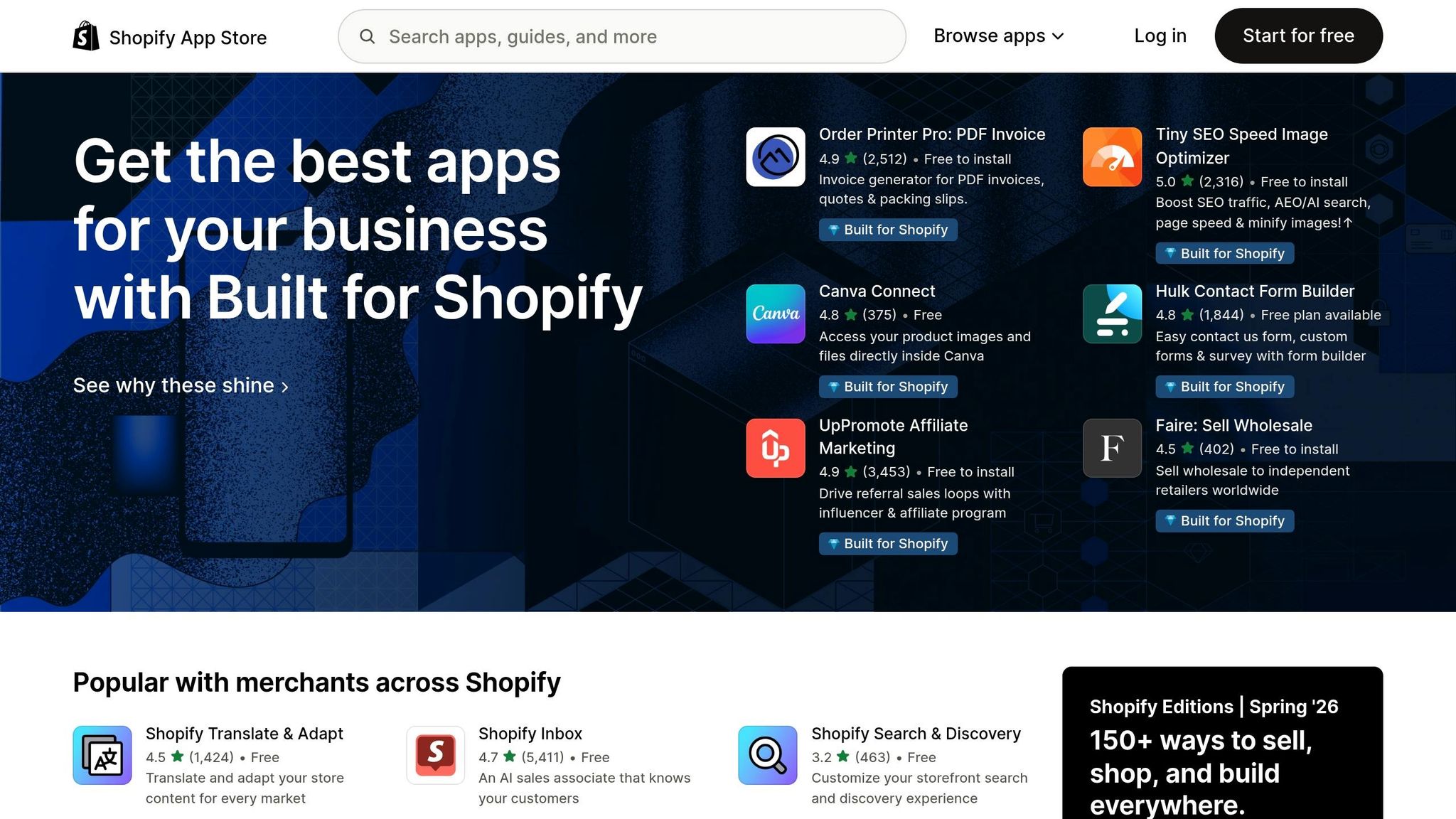
Now pressure-test each seed term against the language merchants already use in Shopify. Check each one with four sources: Shopify App Ads Recommended Keywords, search-bar autocomplete, competitor listings, and phrases pulled from reviews and forums.
In incognito mode, search apps.shopify.com with each seed term plus A–Z. The suggestions are ordered by search frequency for U.S. searches. If you sell to U.S. merchants, put extra focus on terms tied to the local retail calendar and tax issues, like Black Friday, Cyber Monday, and sales tax nexus.
When you review competitor listings, look closely at the titles, subtitles, and the first 200 characters of the descriptions for the top 5 to 10 apps in your category. Those fields often pack a lot of ranking weight into just a few terms.
Reviews can be even more useful. Scan 1- and 3-star reviews for repeated complaints and gaps. That’s often where you’ll find the plain-English wording merchants use when they describe the problem they want fixed .
Use that cleaned-up list as the input for keyword scoring in the next section.
Organize Your Keyword List for Action
Put everything into a working spreadsheet with these columns:
- Keyword
- Intent
- Feature
- Seasonality
- Priority
That setup makes sorting much easier when you’re planning seasonal pushes, feature releases, or launch timing.
You’ll also want normalization rules for wording variants. For example, abandoned cart and cart recovery point to the same core need. Pick one main term, then log the other versions separately so your team stays consistent.
One more filter helps a lot: the bid test. Ask yourself, would you spend money to bid on this keyword? If the answer is no, the term may have weaker conversion value downstream, and it probably doesn’t deserve space in your top listing fields.
AppJubilee can track daily rankings, keyword movement, and competitor shifts while you refine the list.
That setup makes it easier to sort and prioritize keywords by intent and competition.
sbb-itb-ce93587
The Secret to Shopify App Store Success: Cracking the Pop-Up Keyword
Score and Prioritize Keywords by Intent, Competition, and App Maturity
After you build your keyword list, the next job is simple: figure out which terms deserve attention first. The best way to do that is to score each keyword based on intent, competition, and how well it fits your app right now.
Group Keywords by Intent Level
Once your seed list is cleaned up, sort each term by how close it is to an install. Some keywords hint at a merchant who is ready to act. Others just show general curiosity.
A simple way to think about it is in three tiers.
High-intent terms sit closest to a purchase decision. Phrases like "free upsell app" or "Klaviyo alternative" usually mean the merchant already knows the problem they want to solve and is comparing options. These terms tend to convert best. Mid-intent terms are less direct, and low-intent terms are usually too broad.
That means your priorities should look like this:
- Keep high-intent terms in play at every stage
- Add mid-intent terms after you get early traction
- Use low-intent terms only when they are highly relevant
Assess Competition Inside the Shopify App Store
Before you commit to a keyword, search it in the Shopify App Store and study the top 10 apps. Pay close attention to the median review count and median rating across those results.
| Difficulty | Top-10 Review Median | Top-10 Rating Median | Ranking Verdict |
|---|---|---|---|
| Easy | < 50 reviews | < 4.5 stars | Rankable within 60–90 days |
| Medium | 50–500 reviews | 4.5–4.8 stars | 6–12 months with steady velocity |
| Hard | 500+ reviews | 4.8+ stars | Use long-tail variants; avoid direct competition |
Here’s the catch: a keyword with very few apps is not always a gift. Very low app counts can point to weak demand, not an easy opening.
A better target is often a keyword with 8–25 competing apps and no single listing that dominates the results. That setup usually gives you room to stand out.
This step helps you toss out keywords that look good on paper but are too crowded for where your app is today.
Match Keyword Targets to Your App's Growth Stage
Your keyword mix should change as your app grows. A new app should not chase the same terms as an app with a long install history and steady review flow.
For new apps (0–100 installs), the smart move is to focus on 3–5 high-intent, long-tail phrases. Going after broad category terms right out of the gate is usually a losing bet.
At early traction (100–1,000 installs), you can expand to 8–12 keywords and add the top two mid-intent terms in your category. By the growth stage (1,000+ installs), a 15–20 keyword spread starts to make sense, including some broader category terms.
Using Shopify App Store Optimization tools for daily keyword tracking can help you spot terms that are already starting to move before you branch into broader targets.
Once you know which terms fit your stage, you can map them to your listing fields in the next step.
Place Keywords in Your Shopify App Listing Without Stuffing
Now it’s time to map your priority keywords to the listing fields that matter most.
Start with the highest-weight fields, then repeat those terms in supporting assets. That way, your listing stays focused without sounding forced.
Place Primary and Secondary Keywords in the Right Listing Fields
Your app name carries the most indexing weight. Put your single highest-intent keyword there, then follow a brand + function pattern. Think "Rivo: Loyalty & Rewards" or "PageFly Landing Page Builder." In one 2026 study, 81.1% of top-performing app names included at least one functional keyword, and 100% of high-ranking names were 30 characters or fewer.
Your subtitle - about 60 characters - is the next most useful field. Use it for a secondary keyword with outcome-led wording. For example, "Recover carts with email flows" says a lot more than "email marketing app" because it speaks to the merchant’s immediate concern: what will this do for me?
Use the five search term slots for exact-match phrases that do not already appear in your app name.
| Keyword Tier | Listing Field | Strategy |
|---|---|---|
| Core (Primary) | App Name (30 chars) | Brand name + highest-intent keyword |
| Secondary | Subtitle / Tagline (~60 chars) | Outcome-led wording + secondary keyword |
| Experimental | Search Term Slots (5 slots) | Distinct long-tail phrases not used in the app name |
| Supporting | First 200 Characters | Problem-first language; name the merchant's pain point immediately |
| Contextual | Full Description | Natural coverage of use cases; keep keyword density under 3–4% |
In the first 200 characters, lead with the merchant’s problem. Then use plain, natural wording to cover use cases and keyword variations.
After the text fields, reinforce the same terms through visuals.
Align Screenshots, Captions, and Review Language with Target Terms
Screenshots should back up the same keyword theme, not just show the interface. The first screenshot should feature a bold benefit statement tied to your primary keyword, placed over a product image. The next screenshots can show the UI, integrations, or social proof.
If your core term is "subscriptions," your first screenshot caption should make that outcome clear at a glance. Don’t just label a feature. Show the result.
Review language matters too. Reviews that mention the problem solved or the result achieved are more useful than generic praise. You can encourage that kind of feedback by asking for reviews 7–14 days after install, right after the merchant hits a clear win - like their first sale tied to the app.
Once the listing is updated, test one change at a time.
Track Listing Edits and Their Ranking Impact
Treat every listing edit like a test. Indexing usually updates within 7 days, but you should wait 2–4 weeks before judging ranking impact.
The most common mistake is changing too many fields at once. If you update the title and description in the same week, you won’t know which edit moved the needle. Make one targeted edit at a time, then watch the result.
AppJubilee can connect listing edits with daily ranking snapshots and before-and-after ranking data.
Measure Results and Build a Repeatable Keyword Research Process
Once your keywords are live, the job isn't done. Now you need performance data to figure out which terms deserve to stay and which ones should be cut.
Track the Metrics That Show Keyword Quality
Focus on search CTR, listing-to-install rate, and uninstall signals. A healthy CTR usually falls between 8% and 15%. If it drops below 5%, the problem is usually your icon, title, or rating, not the keyword itself. High-intent terms should convert in the 5%–12% range, while mid-intent terms tend to land between 1% and 4%. And if a keyword brings in 50+ visits with zero installs, cut it.
It also helps to read CTR and install rate through the same high-, mid-, and low-intent tiers you used during research. That keeps your analysis grounded. Since Shopify doesn't give you a Search Console-style view for organic queries, connect rank movement with review velocity and GA4 traffic data to spot which terms are driving installs and revenue. In dashboards and notes, report revenue in USD and use MM-DD-YYYY dates. Also, pay close attention to install velocity, not just rank, because install movement often shows up first.
AppJubilee ties together daily keyword rankings, listing changes, GA4, and Shopify Partners data, which makes it much easier to connect edits to installs.
Set a Testing Schedule for Seasonal and Underperforming Terms
Review your keyword set every 2–4 weeks so the algorithm has time to settle before you make a call. If a keyword shows no rank movement after 4 weeks, replace it. On top of that regular review cycle, run a deeper strategy check quarterly or twice a year to catch new competitor entries and category shifts.
Once your core terms are stable, set aside part of your list for seasonal targets. In the U.S., that usually means planning around:
- Back-to-School (August–September)
- Black Friday and Cyber Monday (November)
- holiday sales (December)
Add those temporary terms before demand peaks, then remove them once the season passes.
Conclusion: Core Practices That Improve Shopify App Store Visibility
Apps that rank well over time usually don't win because they stumbled onto one smart keyword. They win because they built a process they can run again and again.
Use merchant language pulled from real reviews and the Shopify App Store autocomplete bar. Validate each term inside the Shopify App Store before you commit to it. Score keywords by intent and competition based on your app's current growth stage. Then place them with purpose across your listing fields: title first, then subtitle, then the first 200 characters of the description. Don't repeat any term four or more times across the full listing.
From there, watch what moves, cut what doesn't, and rotate in new targets as the market changes.
That cycle - research, prioritize, implement, measure, iterate - is what turns keyword research from a one-time launch task into a steady growth practice.
FAQs
How do I find merchant-language keywords?
Look past developer jargon and zero in on the words merchants use when they talk about the problems your app fixes.
A good place to look:
- Reddit and Shopify Community threads
- merchant reviews
- Shopify App Store autocomplete
- Shopify App Ads keywords
- user interviews and surveys
This matters because merchants often describe pain points in plain language, not product language. If your listing mirrors the way they speak, it has a better shot at matching the terms they search for.
AppJubilee can help here by tracking keywords each day and showing which terms line up with visibility and rankings.
Which keywords should a new Shopify app target first?
Prioritize high-intent, long-tail keywords that spell out what your app actually does. These terms are often easier to rank for than broad, short-tail keywords, which gives newer apps with fewer reviews a better shot at showing up.
Start with your main app category and the exact problem you solve. Then narrow your focus:
- Use two primary keywords in your app name and card
- Add three long-tail keywords to your listing description
If you need help finding and tracking those terms, AppJubilee can help.
How long should I wait before changing keywords?
Keyword performance needs regular attention. It’s not a set-it-and-forget-it task.
Check it on a steady schedule, like monthly or quarterly, so you can spot changes in rankings and traffic over time.
If a keyword keeps slipping or traffic and rankings continue to drop, that’s usually a sign that your approach needs a tweak. AppJubilee can help by tracking keywords daily and showing how listing changes affect performance.