
Shopify app review analysis: guide for SEO teams
How to extract keywords, themes, and competitor gaps from Shopify app reviews—30‑day loop to update listings and track ranking impact.

Reviews can change both rankings and installs. If I work on Shopify app SEO, I should treat reviews as a source of keywords, pain points, and competitor gaps - not just support feedback.
Here’s the short version:
- I look at recent review volume, not just lifetime totals
- I track 30-day rating trends to spot drops after releases
- I group reviews into themes like onboarding, billing, bugs, support, and outcomes
- I pull repeated phrases from positive and negative reviews for titles, descriptions, screenshots, and FAQs
- I compare my review language with competitor review complaints to find missed terms
- I measure changes against a 30-day baseline before and after listing edits
A few numbers stand out. One 2026 report says apps with stronger review velocity can outrank apps with more total reviews. The article also notes that featured apps average 20+ new reviews per month, and new apps need at least 10 reviews in the first 30 days to build visibility. That tells me one thing: recent feedback matters more than old praise.
This article shows a simple loop I can run every 30 days: collect reviews, clean the data, group themes, pull keywords, compare Shopify app optimization tools, update the listing, and measure results. If I want better app store SEO, that’s the process that matters.
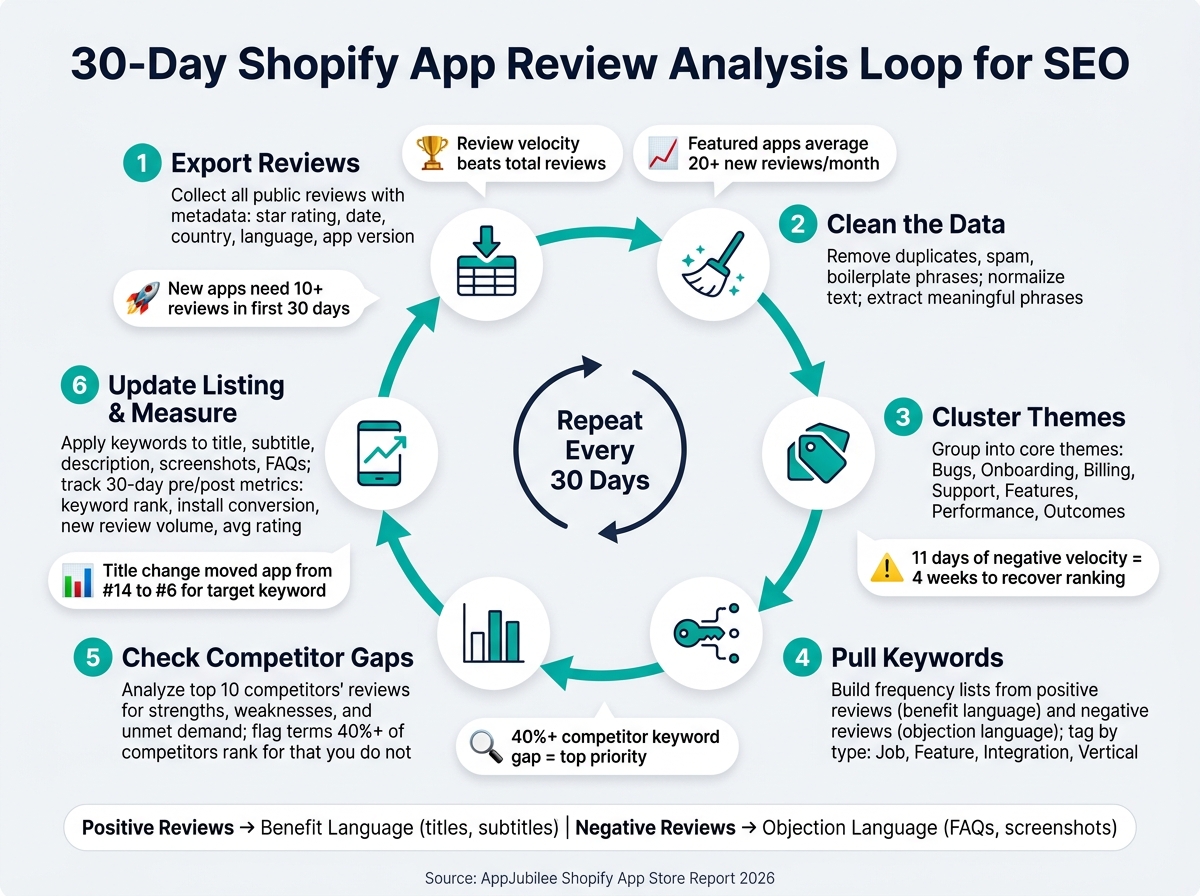
30-Day Shopify App Review Analysis Loop for SEO
1. Build a review data pipeline for Shopify App Store analysis
A review pipeline doesn't need to be complicated. It just needs to run the same way every time. The goal is to keep one dataset you can search by date, rating, keyword, and release period, without rebuilding the whole thing whenever a new question comes up.
Collect reviews and metadata into one dataset
Start by pulling in every public review for your app, along with the fields that make the data useful: review text, star rating, review date in MM/DD/YYYY format, reviewer country, language, time using the app, developer reply status, and app version.
If your SEO work is aimed at the U.S., mark reviews from U.S. merchants on their own. That way, your keyword extraction reflects how domestic merchants talk, instead of blending that language into a global mix.
Then add internal tags where you can, such as:
- feature area like "onboarding", "billing", or "analytics"
- plan type
- helpfulness signals like upvotes
These fields turn a plain review export into a dataset you can filter by topic. Save exports as daily or weekly snapshots too. That makes it much easier to compare "before vs. after" for a listing edit or product release without losing past context.
Clean review text for accurate trend and keyword analysis
Raw review text gets messy fast. Before you run keyword extraction or sentiment analysis, clean it up first. The big issues are usually duplicate and near-duplicate reviews, spam, boilerplate phrases, and non-English text.
Each one throws off the data in its own way. Duplicates can make one complaint look bigger than it is. Spam can distort rating patterns. Boilerplate phrases like "great app" or "highly recommend" take up space while hiding the wording that matters for SEO.
After that, normalize the text. Lowercase everything, standardize punctuation, remove HTML artifacts, and decide what to do with emojis. You can map them to sentiment labels - like 👍 for positive and 😡 for negative - or remove them if your tools don't read them well.
Also remove stop words and other low-signal phrases. That helps terms like "easy setup for non-developers" or "works with Shopify Plus" stand out instead of getting buried under formatting noise. Once the text is cleaned, keyword frequency analysis gives you a much clearer read on what merchants are saying.
Organize reviews by time window, rating bucket, and release period
Once the data is clean, set it up for analysis. Group reviews into daily, weekly, and rolling 30-day windows. That lets you spot short-term spikes, like a burst of bug complaints after a release, while also tracking medium-term patterns, such as better sentiment after a UX fix.
You can also layer those windows against keyword ranking curves to check whether shifts in sentiment line up with visibility changes for target terms.
Next, split reviews into two rating buckets:
- 1–3 stars for negative and mixed feedback
- 4–5 stars for positive feedback
These buckets do different jobs for SEO. Negative reviews point to pain points you may want to fix in FAQs and app descriptions. Positive reviews show outcomes and phrases worth repeating in titles, screenshots, and copy.
Finally, tag each review with a release period or app version, such as "v3.2 – GA4 integration launch." That makes it easy to run questions like did negative reviews about reporting drop after v3.2? and connect the answer to a listing update decision.
A simple field-to-use map also helps keep everyone on the same page. review_date powers time-series charts. rating_bucket shows which pain points to fix and which strengths to highlight. release_tag links product changes to shifts in sentiment. country and language keep en-US analysis centered on U.S. merchants. feature_area helps you decide which parts of the description need work. And extracted_phrases can feed straight into keyword ideas for titles and listing copy.
When that mapping lives in an internal playbook, anyone on the team - developer, marketer, or agency analyst - can trace a listing decision back to a specific field in the data.
sbb-itb-ce93587
2. Group review trends and sentiment into clear themes
After you clean the dataset, start grouping repeated complaints and value statements by week or month. A single review usually isn't enough to justify an SEO change. Repeated patterns are what matter. Those patterns then become your source material for keyword extraction and competitor gap analysis.
Track review velocity, rolling ratings, and inflection points
Review velocity - the number of new reviews per week or month - often says more about current momentum than a lifetime average.
According to the AppJubilee Shopify App Store Report 2026:
"Review velocity beats total reviews. An app gaining 50 reviews in 30 days will outrank an app with 500 static reviews." - AppJubilee Shopify App Store Report 2026
Featured apps average 20+ new reviews per month, and new apps need at least 10 reviews in their first 30 days to build visibility.
Instead of staring at your all-time average, track a 30-day average rating. That means the average score from reviews posted in the last 30 days. It moves faster than a lifetime average, so it's more useful after product changes.
If rolling ratings drop after a release, treat that moment as a likely inflection point. In plain English, it's a turning point tied to a release issue or support problem. One review-velocity analysis found that 11 days of sustained negative review velocity can lead to a measurable drop in install conversion and a category ranking decline that takes 4 weeks to recover. Use 7-day and 30-day windows to separate steady trends from short spikes.
When velocity changes at the same time ratings fall, that's the first place to inspect before you touch your listing copy.
Cluster reviews into topics such as bugs, onboarding, billing, and outcomes
Start with a small set of core themes:
- Bugs
- Onboarding
- Billing
- Pricing
- Support
- Features
- Performance
- Integrations
- Outcomes
Within each theme, split reviews into praise and friction. For example, "easy setup" and "confusing installation steps" both belong to onboarding, but they tell two very different stories about your listing and product.
Tag each review with one primary theme and one secondary signal, such as positive, negative, or time saved. That keeps the process manageable and makes it easier to count how often each theme shows up. Negative themes can point to messaging gaps or product issues that may be slowing installs. Positive themes often contain the exact language you want to keep for keyword extraction.
Once those themes stop shifting around, use the repeated phrases inside them to pull keyword ideas.
Filter out noise before making SEO changes
Not every pattern deserves a listing update. Some review swings are just noise.
Before you act, use a few simple filters. Set a minimum review threshold first. If a theme appears in only a few reviews during one week, it's usually too weak to drive a copy change. Next, check whether the pattern appears across rating buckets. A complaint that shows up on one bad day in a batch of low-rated reviews is weak. A theme that keeps appearing across 2–3 star reviews over several weeks carries more weight. Then check what happens after a fix. If the pattern fades right after a product update, it probably shouldn't shape your listing.
Only themes that stick around across time and rating buckets should feed listing updates.
The table below shows how to match each trend type with the right SEO response.
| Trend Type | Signal Strength | Recommended Action |
|---|---|---|
| Single 1-star review | Low (noise) | Monitor for 7 days; hold on listing changes |
| Same complaint across multiple weeks of reviews | High (signal) | Address in FAQ, description, or onboarding copy |
| Repeated outcome phrase in positive reviews | High (opportunity) | Reinforce language in title, screenshots, or feature callouts |
| Review surge overlapping a listing change | Ambiguous (confounded) | Isolate variables; wait for a clean 7-day window before measuring impact |
| Short-lived spike after a bug fix | Low (resolved) | No copy change; keep monitoring |
Use the themes that make it through these filters as inputs for keyword extraction and competitor gap mapping.
3. Extract keywords from reviews and map competitor review gaps
Once you've filtered out the noisy themes, the next step is simple: turn the language that's left into keyword ideas, then check where competitors already rank for those terms. From there, compare your app's language with competitor reviews before you change your listing copy.
Find high-intent keywords in your own reviews
Not every review gives you a useful ASO keyword. Phrases like "great app" or "nice support" sound good, but they don't show much search intent. The phrases worth pulling out are the ones tied to merchant goals, outcomes, integrations, and use cases. That's the language merchants use when they're trying to find a tool.
Create two frequency lists from your cleaned review set:
- One for positive reviews
- One for negative reviews
Positive reviews tend to surface benefit language, like "saved us hours a week", "increased average order value", or "easy to sync inventory." Negative reviews tend to show objection language, like "confusing setup", "missing Shopify Flow integration", or "slow sync."
Use benefit phrases in your app name, subtitle, and the first 100–200 words of your description. Use objection phrases in your FAQ copy, screenshot captions, and short clarifying lines that deal with common hesitation head-on.
Tag each phrase by type so your team knows where it fits:
- Job keyword: verb + outcome noun, such as "recover abandoned cart"
- Feature keyword: such as "bulk editor"
- Integration keyword: such as "Google Analytics 4"
- Vertical keyword: such as "fashion", "beauty", or "electronics"
This makes it much easier to decide which metadata field should carry each term. Keep the keyword set small and focus on intent plus ranking difficulty.
Then look at which of those terms competitors are already protecting, and where merchant demand still isn't being served.
Map competitor review themes to strengths, weaknesses, and unmet demand
Pull reviews from your top 10 competitors and run the same sentiment and topic clustering process you used on your own reviews. You want to find three things: what merchants keep praising, what they keep complaining about, and what they say they wish existed.
Competitor strengths show what they're already defending well. Terms like "fast customer support" or "works flawlessly with Shopify POS" tell you where you'll need to match them or frame your app differently.
Complaints point to positioning gaps. If several competitors get hit with phrases like "no native Klaviyo sync" or "confusing billing in USD", and your app handles those workflows, that's a direct keyword angle you can go after.
Unmet demand is where things get interesting. When merchants mention features competitors don't offer, such as "wish it had GA4 event tracking" or "missing multi-location inventory support", those phrases can turn into keyword openings that no one is using in listing copy.
The table below shows one clean way to organize this comparison.
| Keyword / Phrase | Source | Sentiment | Frequency | Theme | Suggested Metadata Field | Opportunity Type |
|---|---|---|---|---|---|---|
| "average order value" | Own app | Positive | High | Outcomes | Subtitle, Description | Protect existing rankings |
| "confusing onboarding" | Competitor A | Negative | Medium | Onboarding | Screenshot caption, FAQ | Differentiate |
| "GA4 event tracking" | Competitor B | Negative (request) | Medium | Integrations | Subtitle, Description | Add new terms |
| "bulk editor" | Own app | Positive | High | Features | App name, Subtitle | Protect existing rankings |
| "multi-location inventory" | Competitor C | Negative (request) | Medium | Features | Description, Screenshots | Add new terms |
Watch core keyword gaps closely, especially terms that 40% or more of your competitor set ranks for while your app does not. Those should move to the top of the list for your next listing update.
Use AppJubilee to connect review language with rankings and competitor movement
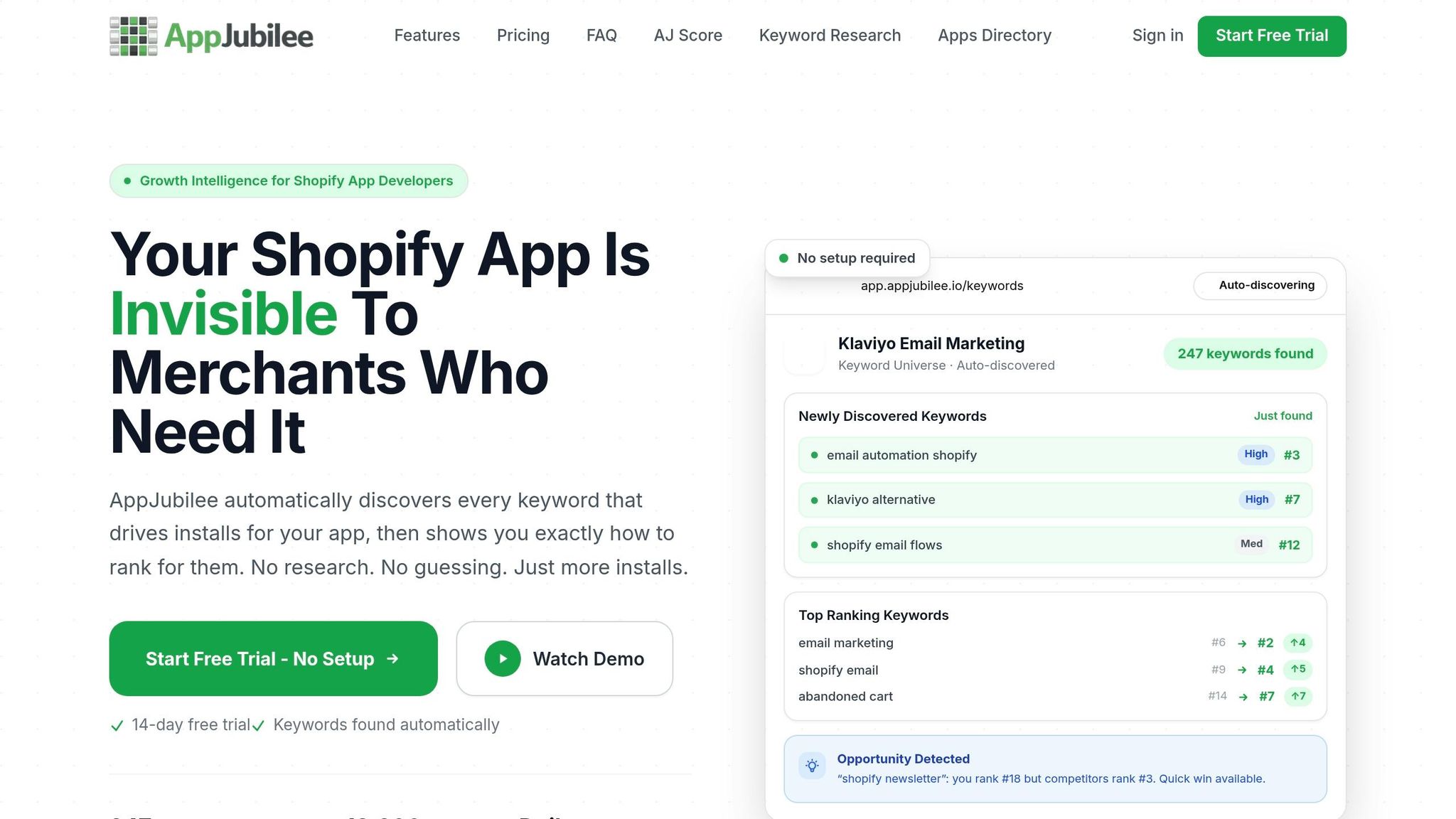
Tracking data helps you separate phrases that look good on paper from phrases that actually move rankings.
AppJubilee is a Shopify App ASO platform built for this exact workflow. It pulls frequent phrases and sentiment from your reviews, tracks daily keyword ranking shifts after listing updates, maps competitor positions, sends competitor alerts, and stores ranking snapshots so you can measure the impact of listing changes without manual spot checks.
In a 60-day period ending April 2026, a title change moved one app from #14 to #6 for "shopify email", and a description rewrite moved it from #18 to #7 for "newsletter".
Use AppJubilee to track keyword movement, competitor alerts, and listing-change impact in one view.
4. Turn review insights into listing updates and measure ranking impact
Update titles, descriptions, and screenshots based on review themes
Once you've mapped the strongest review phrases, put them to work in your listing. Start with the title, then the subtitle, then the first 1–2 lines of the description. In the Shopify App Store, the title carries the most weight for search.
Use positive outcome phrases in the title, subtitle, and opening copy. Then use recurring negative themes to clear up confusion around pricing, setup, or support. That matters for a simple reason: when merchants know what to expect, they're less likely to leave negative reviews based on a mismatch between the listing and the product. That can help ranking performance too.
After you make the edit, check whether those same phrases move in search and whether install quality gets better. Screenshot captions should sound like the way merchants talk. For example:
- "See upsell revenue by campaign"
- "Add targeted product offers in under 5 minutes"
Measure pre- and post-change impact with a baseline framework
Set a 30-day baseline before you change anything. Use the same review window and release tag structure from your analysis pipeline when you build that baseline. Also note any outside factors - active advertising campaigns, product launches, or seasonal spikes - that might affect the numbers.
Track daily rankings, conversion, new reviews, and average rating for 30 days before the update and 30–60 days after it. If GA4 or Shopify Partners data is available, pull downstream metrics too: activation rate, revenue per install, and churn. That helps you see whether the listing update is bringing in better-fit installs, not just more installs.
The table below makes the before-and-after read easier:
| Metric | Pre-Change (30-Day Baseline) | Post-Change (30–60 Days) |
|---|---|---|
| Primary keyword rank | Avg. position over 30 days | Avg. position over 30–60 days |
| Install conversion rate | Listing views → installs % | Listing views → installs % |
| New review volume | Count of reviews in window | Count in matching post window |
| Avg. rating (new reviews only) | Avg. stars for new reviews | Avg. stars for new reviews |
| Downstream performance | GA4 / Shopify Partners baseline | GA4 / Shopify Partners post-update |
If you want to separate the effect of a listing edit from all the usual noise - seasonality, a product release, or competitor movement - keep a tight change log. Write down what changed, when it changed, and which review theme led to the edit. Then compare the keywords you pushed harder against the ones you left alone. If the reinforced terms move more, the listing update is probably the reason.
Conclusion: a repeatable review analysis loop for Shopify App Store SEO
The win comes from repetition, not from one listing tweak. AppJubilee brings review signals, listing edits, and ranking data into one place so you can see whether ranking gains stick and tie listing changes back to install velocity and downstream revenue.
Repeat the cycle every 30 days:
- Export reviews
- Cluster themes
- Pull keywords
- Check competitor gaps
- Update the listing
- Measure the result against your baseline
FAQs
How many reviews are enough to spot real SEO patterns?
Don’t get hung up on hitting some minimum review count. Review velocity - the pace at which new reviews come in - often matters more than the total number of reviews on the profile.
What you want to watch is the pattern over time, not one-off comments. Look for clusters, streaks, and shifts in momentum. If you see a burst of new reviews or a run of negative ones, check whether rankings move over the next seven days.
At the same time, be careful not to blame reviews for every change. Sometimes rankings shift because of listing edits, not review activity, so it helps to separate those signals before you draw a conclusion.
Which review themes should I prioritize for listing updates?
Use AppJubilee to spot patterns instead of reacting to one-off reviews. Focus on clusters of reviews where the same sentiment lines up with shifts in keyword rankings.
Put recurring merchant pain points first, especially the ones most likely to affect visibility. It also helps to check for confounding factors, like listing edits made at the same time, so your updates reflect actual review feedback instead of unrelated changes.
How long should I wait to measure ranking impact after edits?
After updating your Shopify app listing, check performance after 3, 7, and 14 days.
Fields with a big effect - like your title and search terms - often get indexed within about a week. But shifts in rankings and installs usually take 2–4 weeks to show up in a way that means something.
Don’t judge the update based on a single day. Day-to-day numbers can bounce around for all kinds of reasons. Instead, track results daily and compare the trend over 7 or 30 days to see if your changes actually made a difference.